
1. Киришүү
This manual provides essential instructions for the safe and efficient use of your LIVALL PikaBoost 2 E-Bike Conversion Kit. Please read this manual thoroughly before installation and operation to ensure proper function and longevity of your device. The PikaBoost 2 is designed to transform a standard bicycle into an electric bike, offering assistance and extended range for various cycling needs.
2. Коопсуздук боюнча маанилүү маалымат
- Always use a 65W USB-C charger for the battery. Using an incompatible charger may damage the battery or pose a safety risk.
- The PikaBoost 2 is compatible only with bicycles featuring round seatposts with a diameter between 25-35mm (0.98-1.38 inches). Ensure your bike meets these specifications before installation.
- This product is not suitable for children's bicycles, tricycles, wheelchairs, D-shaped seat tubes, carbon fiber seat posts, or bikes with rear suspension.
- The motor is equipped with a gyroscope that automatically shuts off power if the unit tilts over 30°. An SOS alert will be triggered if the tilt exceeds 60°, enhancing safety on challenging terrains.
- Regularly inspect the V-shape tire for wear. The tire is designed for durability, lasting 3,000 to 5,000 km, but replacement may be necessary based on usage conditions.
- Ар бир жүрүүнүн алдында бардык компоненттердин бекем бекитилишин текшериңиз.
- Adhere to local traffic laws and regulations when operating an e-bike.
3. Пакеттин мазмуну
Таңгактан чыгаргандан кийин бардык буюмдар бар экенин жана жакшы абалда экендигин текшериңиз.
- LIVALL PikaBoost 2 Main Unit
- Rechargeable Battery (158Wh or 220Wh, depending on model)
- Зымсыз алыстан башкаруу
- USB-C заряддоо кабели
- Монтаждык кашаа жана жабдуу
- Tool Kit
- Quick колдонмо

Image: Contents of the LIVALL PikaBoost 2 E-Bike Conversion Kit package.
4. Продукт бүтүп калдыview
The LIVALL PikaBoost 2 is a compact and versatile e-bike conversion kit designed for easy attachment to the rear wheel of compatible bicycles. It features a powerful motor, a long-lasting battery, and smart connectivity for an enhanced riding experience.
Негизги компоненттер:
- Негизги блок: Houses the motor, battery, and control electronics. Attaches to the seatpost.
- Drive Wheel: The small wheel that makes contact with the bicycle's rear tire, providing propulsion.
- Арткы жарык: Integrated LED light for visibility and safety.
- Зымсыз алыстан башкаруу: Allows for mode switching and speed adjustments during rides.
- Батарея: Available in 158Wh or 220Wh capacities, providing power for the motor. Features a multi-layered Battery Management System (BMS) for safety.

Image: The LIVALL PikaBoost 2 E-Bike Conversion Kit main unit and remote control.
5. Орнотуу жана орнотуу
5.1 Шайкештикти текшерүү
Before installation, ensure your bicycle meets the following criteria:
- Bike Models: Most common hardtail bikes (mountain bikes, road bikes, hybrid bikes, folding bikes).
- Дөңгөлөктүн көлөмү: 35.6–73.7 cm (14–29 inches).
- Seat Tube Type: Round tube.
- Seat Tube Length: Over 50 mm (1.97 inches).
- Seat Tube Diameter: 25–35 mm (0.98–1.38 inches).
- Tire Width:
- V-shaped Tire: 25–65 mm (1.0–2.6 inches)
- Road Tire: 23–32 mm (0.9–1.3 inches)
- Mountain Tire: 45–65 mm (1.8–2.6 inches)
Note: Not suitable for tricycles, wheelchairs, D-shaped seat tubes, carbon fiber seat posts, or rear-suspension bikes.
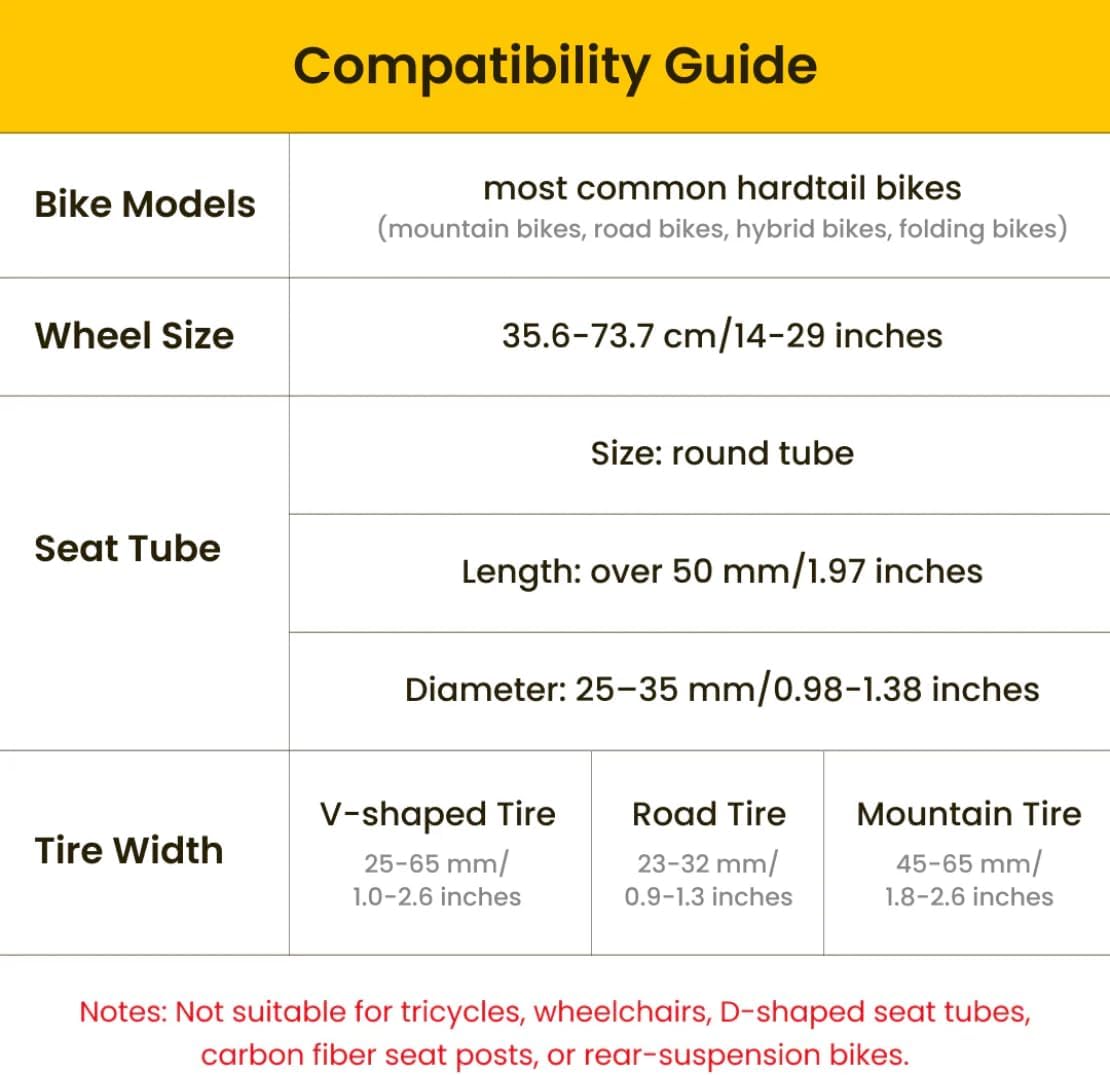
Image: Detailed compatibility guide for the PikaBoost 2.
5.2 Mounting the PikaBoost 2 Unit
- Attach the mounting bracket to your bicycle's seatpost. Ensure it is securely tightened according to the quick guide instructions.
- Slide the PikaBoost 2 main unit onto the mounting bracket until it clicks into place. Verify that the drive wheel makes proper contact with the rear bicycle tire.
- Adjust the unit's position to ensure optimal contact and alignment with the tire.

Image: PikaBoost 2 unit installed on a bicycle.
Video: Demonstration of installing the PikaBoost 2 unit onto a bicycle seatpost.
5.3 Батареяны алгачкы заряддоо
Before first use, fully charge the PikaBoost 2 battery.
- Connect the USB-C charging cable to the charging port on the PikaBoost 2 unit.
- Connect the other end of the cable to a 65W USB-C power adapter (not included).
- The charging indicator lights will illuminate. Charge until all lights are solid, indicating a full charge.
Video: Illustrates the process of charging the PikaBoost 2 battery.
5.4 App Connection and Calibration
Download the official LIVALL app from your smartphone's app store. The app allows for automatic installation, calibration, and advanced control features.
- Смартфонуңузда Bluetooth иштетилгенин текшериңиз.
- Open the LIVALL app and follow the on-screen instructions to pair with your PikaBoost 2 unit.
- The app will guide you through initial calibration for optimal performance.
Video: Demonstrates connecting the PikaBoost 2 to the LIVALL app and initial setup.
6. Иштөө нускамалары
6.1 Күйгүзүү/өчүрүү
Press and hold the power button on the PikaBoost 2 unit to turn it on or off. The indicator lights will confirm the status.
6.2 Айдоо режимдери
The PikaBoost 2 offers four distinct riding modes, selectable via the remote control or the LIVALL app:
- Күтүү абалы: Motor is inactive.
- Assist Mode: Provides motor assistance based on your pedaling effort.
- Круиз режими: Maintains a set speed without continuous pedaling.
- Машыгуу режими: Offers resistance for a more intense cycling workout.

Image: PikaBoost 2 modes for diverse riding styles.
6.3 Алыстан башкаруу функциялары
The wireless remote control provides convenient access to key functions:
- Борбордук баскыч: Pause assistance or switch between modes.
- Өйдө/ылдый баскычтары: Adjust speed in Cruise Mode.
- Сол/оң баскычтары: Sync with turn signals (if available and paired).
- Brake Lever Sensors: Intelligent E-Brake automatically cuts motor power when braking.
Видео: Бүттүview of the remote control functions for the PikaBoost 2.
6.4 Колдонмону башкаруу
The LIVALL app offers advanced control and monitoring features:
- Switch between the 4 riding modes.
- Monitor battery level and ride statistics.
- Create groups with friends for shared rides.
- Access remote troubleshooting functions.
7. Техникалык тейлөө
- Тазалоо: Wipe the PikaBoost 2 unit with a damp cloth. Avoid using harsh chemicals or abrasive cleaners. Do not submerge the unit in water.
- Батареяга кам көрүү: For optimal battery life, avoid fully discharging the battery frequently. Store the unit in a cool, dry place when not in use, and charge it periodically if stored for extended periods. The battery is designed to retain 80% capacity after 1,000 cycles.
- Шиналарды текшерүү: Regularly check the PikaBoost 2's V-shape drive tire for wear and tear. Replace if significant wear is observed to maintain optimal traction and performance.
- Программалык камсыздоонун жаңыртуулары: Check the LIVALL app periodically for firmware updates to ensure your PikaBoost 2 has the latest features and performance enhancements.
8. Кыйынчылыктарды
| Көйгөй | Мүмкүн себеп | Чечим |
|---|---|---|
| Түзмөк күйбөйт. | Батарея түгөнүп калган же туура эмес салынган. | Charge the battery fully. Ensure the battery is correctly seated in the unit. |
| Мотор жардам көрсөтпөйт. | Incorrect riding mode selected, unit not properly calibrated, or poor contact with bike tire. | Switch to Assist or Cruise Mode. Re-calibrate via the app. Adjust unit position to ensure firm contact with the tire. |
| Алыстан башкаруу пульту жооп бербей жатат. | Пульттун батареясы аз же жупташтырылган эмес. | Replace remote battery. Re-pair the remote with the PikaBoost 2 unit according to the quick guide. |
| Колдонмого туташуу маселелери. | Bluetooth off, app outdated, or unit not discoverable. | Ensure Bluetooth is on. Update the LIVALL app. Restart the PikaBoost 2 unit and try connecting again. |
9. Техникалык шарттар
| Өзгөчөлүк | Деталь |
|---|---|
| Бренд | LIVALL |
| Модель аты | PikaBoost 2 (Essential Edition) |
| Батарея сыйымдуулугу | 158Wh or 220Wh |
| Estimated Range (158Wh) | Up to 50 km (31 miles) under ideal conditions |
| Estimated Range (220Wh) | Up to 70 km (43 miles) under ideal conditions |
| Мотор күчү | 500W Peak Power, 250W Rated Power |
| Максималдуу ылдамдык (жардамчы) | 25 км/саатка чейин (15 миль/саат) |
| Compatibility (Seatpost Diameter) | Round seatposts, 25-35mm (0.98-1.38 inches) |
| Compatibility (Wheel Size) | 14-29 дюйм (35.6-73.7 см) |
| Материал | Алюминий (рамка) |
| Өзгөчө өзгөчөлүк | Portable, Fall Detection (Gyroscope), Regenerative Power System |
| Battery Compliance Standards | UL227, UL2580 (US) |
| Элементтин пакетинин өлчөмдөрү | 17.24 x 7.6 x 5.2 дюйм |
| Пакет Салмагы | 8.8 фунт |
| UPC | 199284744318 |

Сүрөт: Ички view of the PikaBoost 2 motor and regenerative power system.
10. Кепилдик жана колдоо
10.1 Кепилдик маалыматы
The LIVALL PikaBoost 2 E-Bike Conversion Kit comes with a 1-Year Warranty Protection сатып алынган күндөн тартып. Бул кепилдик нормалдуу колдонуудагы өндүрүш кемчиликтерин камтыйт. Кепилдик дооматтары үчүн сатып алганыңыздын далилин сактап коюңуз.
For detailed warranty terms and conditions, please refer to the official LIVALL webсайтка же кардарларды колдоо менен байланышыңыз.
10.2 Кардарларды колдоо
If you encounter any issues or have questions regarding your PikaBoost 2, please contact LIVALL customer support through the following channels:
- Расмий колдонуучу колдонмо (PDF): PDF колдонмосун жүктөп алыңыз
- LIVALL Official Webсайт: зыярат кылыңыз LIVALL Store on Amazon продукт маалымат жана колдоо булактары үчүн.
- Колдонмодогу колдоо: Utilize the remote troubleshooting functions available within the LIVALL app.