
Introduction
Welcome to your Reflex Active SeaVenture Smartwatch. This device is designed to enhance your active lifestyle with advanced features including 50m water resistance for swimming, built-in GPS for precise activity tracking, and an ultra-high-definition AMOLED display. This manual provides essential information for setting up, operating, maintaining, and troubleshooting your smartwatch to ensure optimal performance.
1. Орнотуу
1.1 кутудан чыгаруу
Бардык компоненттерди таңгактан кылдаттык менен алып салыңыз. Куту төмөнкүлөрдү камтышы керек:
- Reflex Active SeaVenture Smartwatch with Watch Band
- Заряддоо кабели
- Instruction Manual

Image: The smartwatch packaging, an instruction manual, and the charging cable. This illustrates the contents typically found in the product box.
1.2 Акылдуу саатты кубаттоо
Before first use, fully charge your smartwatch. Connect the magnetic charging cable to the charging points on the back of the watch and plug the USB end into a compatible power adapter (not included) or computer USB port. The watch display will indicate charging status.

Image: A close-up of the smartwatch display showing a green battery icon with a lightning bolt, indicating that the device is charging.
1.3 Колдонмону орнотуу
Акылдуу саатыңыздын толук мүмкүнчүлүктөрүн ачуу үчүн, жүктөп алыңыз Reflex Active App on your smartphone. The app is compatible with iOS 12.0+ and Android 9.0+ devices.
- Издөө "Reflex Active" in the Apple App Store or Google Play Store.
- Alternatively, scan the QR code provided in the packaging or on the support webсайт.
For more information and support, visit the official Reflex Active webсайт: Reflex Active AMOLED маалыматы
1.4 Смартфонуңуз менен жупташуу
After installing the app, open it and follow the on-screen instructions to pair your smartwatch via Bluetooth. Ensure Bluetooth is enabled on your smartphone and the watch is sufficiently charged.
2. Акылдуу саатты иштетүү
2.1 Негизги навигация
The SeaVenture smartwatch features a 1.43-inch AMOLED touchscreen and physical buttons for navigation. Swipe across the screen to access different functions and menus. Use the side buttons for quick access to specific features or to return to the home screen.
2.2 Дисплейдин өзгөчөлүктөрү
The ultra-high-definition AMOLED display offers vibrant colors and clear visibility. The Ар дайым күйгүзүлгөн дисплей feature ensures that the time and essential information are visible without needing to activate the screen.

Image: A collage showing the smartwatch's AMOLED display, a screen indicating GPS positioning success, and the watch on a wrist underwater with altimeter, barometer, and compass readings.
2.3 Байланыш өзгөчөлүктөрү
- Чалууларды жасоо жана кабыл алуу: Connect your smartwatch to your phone to make and receive calls directly from your wrist.
- Эскертмелер: Receive alerts for messages, social media, and other app notifications.
Image: A collage showing a person wearing the smartwatch, the watch displaying an incoming call, and a screen showing various app notifications.
2.4 Fitness and Health Tracking
The SeaVenture smartwatch offers comprehensive tracking for your fitness and health:
- Камтылган GPS: Tracks your training routine and routes precisely using satellite navigation.
- Спорт режимдери: Over 100 sports modes available via the Reflex Active App, including running, hiking, cycling, and treadmills.
- Жүрөктүн кагышын көзөмөлдөөчү: Үзгүлтүксүз жүрөктүн кагышын көзөмөлдөйт.
- Кадамдарды эсептөө: Күнүмдүк кадамдарыңызды көзөмөлдөйт.
- Уйкунун анализи: Уйкуңуздун үлгүсүн жана сапатын көзөмөлдөйт.
- Калорияга көз салуу: Estimates calories burned during activities.
- Суюктук жөнүндө эскертүүлөр: Prompts you to drink water.
- Дем алуу көнүгүүлөрү: Guides you through relaxation exercises.
- Отуруучу эскертүүлөр: Кыймылсыздык мезгилинен кийин көчүп кетүү тууралуу эскертет.
- Аялдардын ден соолугу: Provides tracking features relevant to women's health.
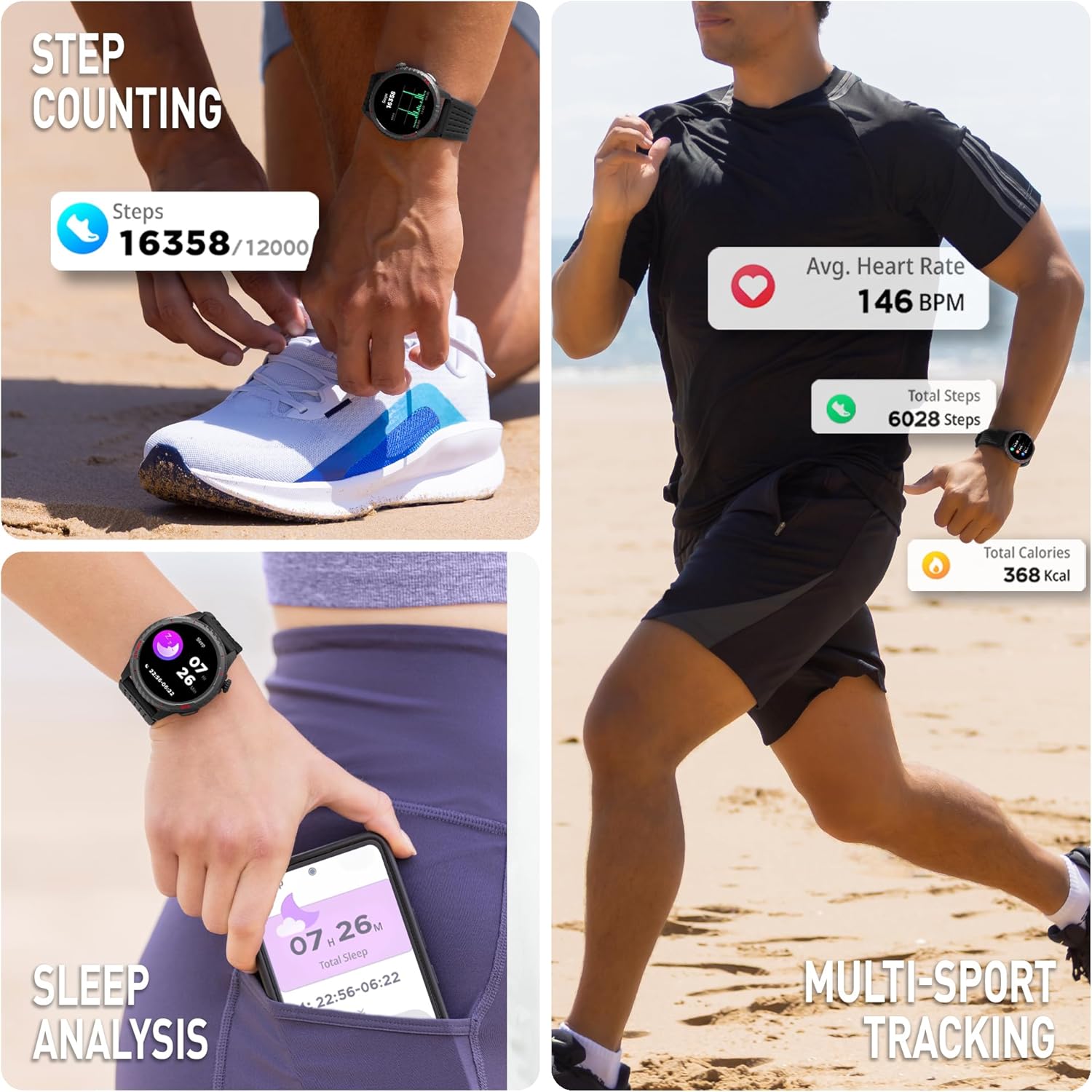
Image: A collage illustrating the smartwatch's fitness tracking capabilities, including step counting, average heart rate display, and sleep analysis.
2.5 Environmental Sensors
The smartwatch includes an altimeter, barometer, and compass for environmental data, useful for outdoor activities.
2.6 Кошумча функциялар
- Эки убакыт алкагы: Shows time at home and away, ideal for travelers.
- Бетти көрүү: Customize your watch face from the extensive Reflex Active Dialing Library via the app, or create your own with personal photos.
- Музыкалык башкаруу: Смартфонуңузда музыканы ойнотууну көзөмөлдөңүз.
- Аба ырайы жаңыртуулары: Access current weather information.
- Үн жардамчысы: Телефонуңуздун үн жардамчысын түздөн-түз сааттан колдонуңуз.
- Камераны башкаруу: Смартфонуңуздун камерасын алыстан башкарыңыз.
- Сааттын жайгашкан жерин аныктоочу: Helps locate your watch if misplaced.
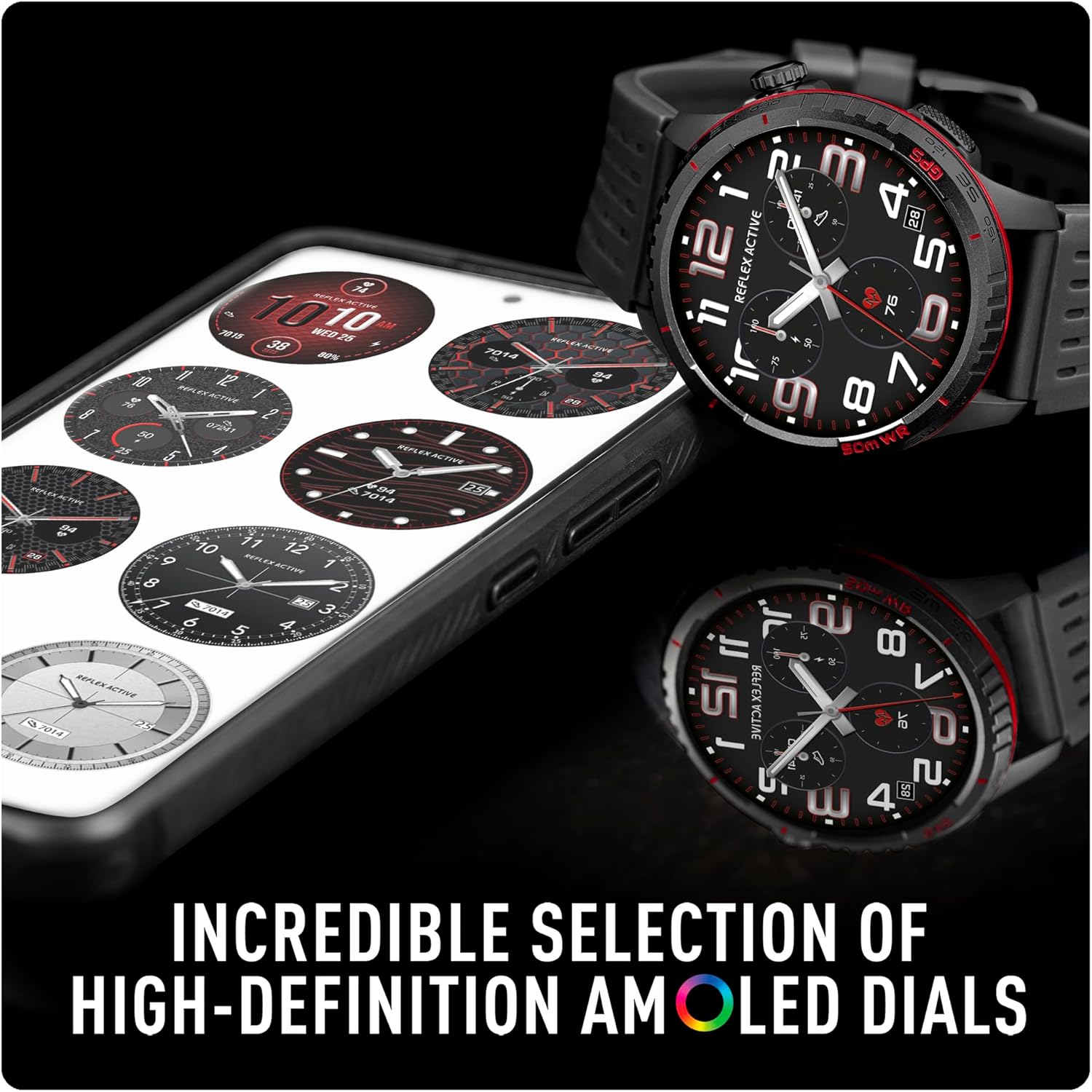
Image: A smartphone screen displaying a selection of high-definition AMOLED watch faces available for the Reflex Active SeaVenture smartwatch, alongside the watch itself showing a customized dial.

Image: An infographic displaying a comprehensive list of SeaVenture features, each represented by a small icon, including 5ATM water resistance, built-in GPS, dual time zones, always-on dial, call functions, altimeter, barometer, compass, messages, sports modes, calorie tracking, step counter, heart rate, sleep tracking, breathing exercises, hydration reminders, camera control, voice assistant, weather updates, music control, watch locator, sedentary reminders, and women's health.
3. Техникалык тейлөө
3.1 Сууга туруктуулук
The Reflex Active SeaVenture smartwatch is 50 м сууга чыдамдуу, making it suitable for pool and sea swimming. Ensure the watch is clean and dry after exposure to saltwater to prevent corrosion.

Image: A person swimming freestyle in the ocean, wearing the Reflex Active SeaVenture smartwatch on their left wrist. The image highlights the 50m water resistance feature.
3.2 Тазалоо
To clean your smartwatch, gently wipe the screen and body with a soft, damp, lint-free cloth. Avoid using harsh chemicals or abrasive materials. Ensure the charging contacts are clean and dry before charging.
3.3 Боону багуу
The silicone strap is designed for durability and comfort. Clean it regularly with mild soap and water. The straps are interchangeable, allowing for customization.
4. Кыйынчылыктарды
If you encounter issues with your Reflex Active SeaVenture smartwatch, try the following steps:
- Күйгүзүлбөйт: Ensure the watch is fully charged. Connect it to the charging cable and allow it to charge for at least 30 minutes.
- Туташуу маселелери: Check that Bluetooth is enabled on your smartphone and the watch is within range. Try restarting both your watch and smartphone.
- Колдонмону синхрондоштуруу көйгөйлөрү: Ensure the Reflex Active App is updated to the latest version. Close and reopen the app, or restart your phone.
- Туура эмес окуулар: For heart rate or step tracking, ensure the watch is worn snugly on your wrist, not too tight or too loose. For GPS, ensure you have a clear view асмандын.
- Экран жооп бербейт: Try restarting the watch by pressing and holding the power button (if applicable) or performing a soft reset through the app settings.
For further assistance, please refer to the support section of the Reflex Active webсайт.
5. Техникалык шарттар
| Өзгөчөлүк | Спецификация |
|---|---|
| Модель аты | Reflex Active SeaVenture 50m Swim-Safe AMOLED GPS Smart Watch |
| Модель номери | RA-VE-400R-5ATM-03 |
| Screen Size | 1.43 дюйм |
| Дисплей түрү | AMOLED |
| Резолюция | 454 x 454 |
| Сууга туруктуулук деңгээли | 50 метр (5ATM) |
| GPS | Камтылган GPS |
| Байланыш технологиясы | Bluetooth |
| Батарея клеткасынын курамы | Литий полимери |
| Шайкеш түзмөктөр | Смартфон |
| Шайкеш телефон моделдери | iOS 12.0+ and Android 9.0+ devices |
| Адам интерфейсинин киргизүү | Баскычтар, сенсордук экран |
| Элемент Салмагы | 42 грамм |
| Band Материал түрү | Силикон |
| Иштин материалдык түрү | Пластик |
| Metrics Measured | Heart Rate Monitor, Distance, Step Count |
| Өзгөчөлүктөр | Barometric Altimeter, Compass, Always-On Display, Dual Time Zones, Call Functionality |
6. Кепилдик жана колдоо
For detailed warranty information, product support, and frequently asked questions, please visit the official Reflex Active support webсайт:
You can also find additional resources and contact customer service through the website for any technical issues or inquiries.