
1. Киришүү
This manual provides detailed instructions for the installation, configuration, and operation of the VOTOL EM85 Programmable Sine Wave Controller. Designed for electric scooters and motors ranging from 1000W to 2000W, this controller offers advanced features for efficient power management. Please read this manual thoroughly before installation and use to ensure proper function and safety.
2. Продукт бүтүп калдыview
The VOTOL EM85 is a high-performance sine wave motor controller compatible with 48V, 60V, and 72V systems. It features a maximum release current of 85A and a phase line current of 300A, suitable for motors between 400W and 2000W. Its design incorporates weak magnetic technology to enhance power and speed.
Key Features and Components:
- Hall Plug connection
- Тескери функция
- Low Brake (0V) and High Brake (12V) inputs
- Throttle (0-5V) input
- Тутанууну башкаруу
- One-line/Hall Meter Wire support
- Dedicated Program Port for configuration
- Three-Speed modes
- Спорт модели
- Parking function
- Anti-Theft system
- Regen Charge (regenerative braking)
- Flux Weaken Current capability

2.1-сүрөт: The VOTOL EM85 controller shown with its complete set of wiring harnesses and the USB programming cable for computer connection.

2.2-сүрөт: Жогортон ылдый view of the EM85 controller, highlighting the various connection ports and safety labels.

2.3-сүрөт: The underside of the EM85 controller, displaying the integrated heat sink fins designed for efficient thermal dissipation.
3. Техникалык шарттар
| Спецификация | Нарк |
|---|---|
| Модель аты | EM85 (85A72300S) |
| Тtage Шайкештик | 48V to 72V (Universal) |
| Maximum Release Current | 85A |
| Phase Line Current | 300A |
| Adaptive Motor Power | 400W - 2000W |
| Камтылган компоненттер | EM85 controller, matching wiring harness, USB debugging data cable |
| Пакеттин өлчөмдөрү | 7.87 x 4.72 x 3.94 дюйм |
4. Орнотуу жана орнотуу
Proper installation is crucial for the safe and efficient operation of your VOTOL EM85 controller. Ensure all connections are secure and correctly matched according to the provided wiring diagram (not included in this manual, refer to manufacturer's specific wiring guide).
Жалпы орнотуу кадамдары:
- Монтаждоо: Securely mount the controller in a location that allows for adequate airflow and protection from environmental elements (water, dust).
- Кубат туташуулары: Connect the main battery positive and negative terminals to the corresponding B+ and B- terminals on the controller.
- Мотор байланыштары: Connect the motor phase wires (U, V, W) and Hall sensor wires to the controller. Ensure correct color matching.
- Газ туташтыруу: Connect the throttle input (0-5V) to the controller.
- Brake Connections: Connect the low brake (0V) and high brake (12V) wires as required by your system.
- От алдыруу: Connect the ignition wire to the vehicle's ignition switch.
- Жардамчы функциялары: Connect any additional functions such as reverse, three-speed, sport mode, parking, anti-theft, and regenerative charging according to your system's requirements.
- Программалоо порту: The USB debugging data cable connects to this port for computer-based configuration.
Абайлаңыз: Incorrect wiring can damage the controller, motor, or battery. If you are unsure about any connection, consult a qualified technician or the manufacturer's detailed wiring diagram.
5. Иштөө нускамалары
The VOTOL EM85 controller is programmable via a dedicated software interface, allowing for fine-tuning of various parameters to match your motor and riding preferences. The controller supports multiple voltage inputs and offers advanced features like flux weakening for increased performance.
Programming Software Overview:
The controller comes with a USB debugging data cable for connection to a computer. The programming software (LD-EM-V3, as shown in the images) allows users to adjust settings such as battery voltage, current limits, throttle response, motor parameters, and various auxiliary functions.

5.1-сүрөт: The 'Basic Settings' page of the LD-EM-V3 programming software, showing options for battery voltage, current limits, and throttle settings.

5.2-сүрөт: The 'Sport mode setup' and 'Flux-Weakening compensation' page within the programming software, allowing for advanced performance adjustments.
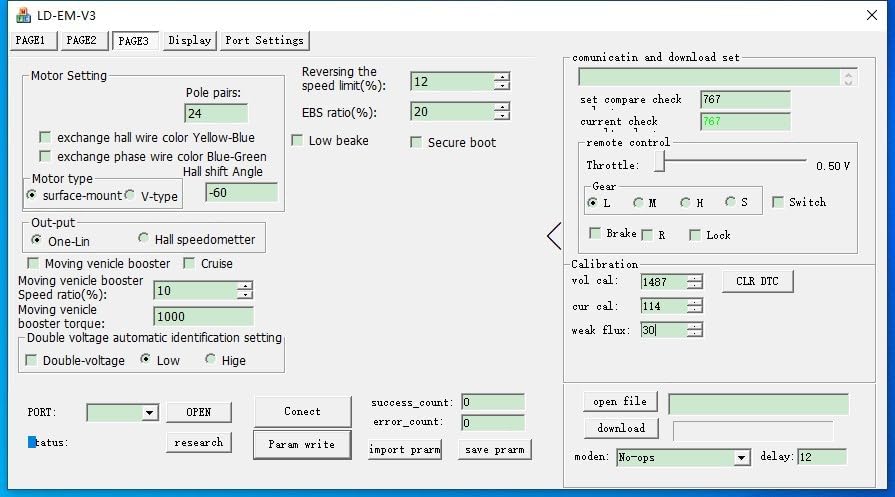
5.3-сүрөт: The 'Motor Setting' page of the programming software, where parameters like pole pairs, motor type, and Hall shift angle can be configured.
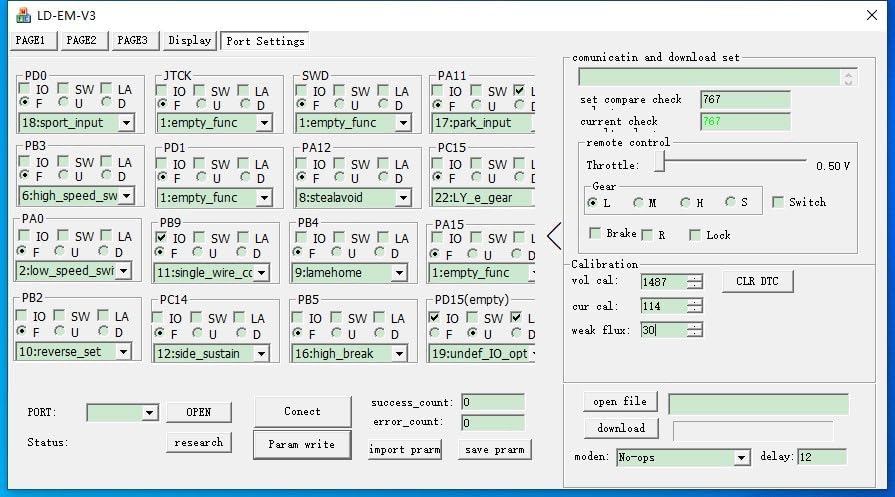
5.4-сүрөт: The 'Port Settings' page, illustrating the various input/output pin assignments and their configurable functions.
Негизги операция:
- Күйгүзүү: Turn on the vehicle's ignition. The controller will perform a self-check.
- дроссель башкаруу: Gently apply the throttle to initiate motor movement. The response will depend on your configured settings.
- Тормоздоо: Apply brakes as needed. The controller supports both low and high brake inputs, and regenerative braking if enabled.
- Режим тандоо: Utilize the three-speed or sport mode functions if configured, to adjust performance characteristics.
6. Техникалык тейлөө
The VOTOL EM85 controller is designed for durability, but regular checks can extend its lifespan and ensure optimal performance.
- Тазалык: Keep the controller free from dust, dirt, and moisture. Periodically wipe the exterior with a dry, soft cloth.
- Байланыштары: Regularly inspect all wiring connections for tightness and signs of corrosion or damage. Loose connections can lead to intermittent operation or component failure.
- Жылуулук таркатылышы: Ensure the controller's heat sink fins are not obstructed, allowing for proper heat dissipation. Avoid operating the controller in excessively hot environments without adequate cooling.
- Программалык камсыздоонун жаңыртуулары: Өндүрүүчүнү текшериңиз website periodically for any available firmware updates that may improve performance or address issues.
7. Кыйынчылыктарды
This section addresses common issues you might encounter with your VOTOL EM85 controller. For more complex problems, contact technical support.
- Кубат жок:
- Батареянын туташууларын текшерип, батареянын заряддалганын текшериңиз.
- Verify the ignition wire is correctly connected and receiving power.
- Inspect main power fuses if applicable.
- Мотор дроссельге жооп бербейт:
- Ensure the throttle is correctly connected and functioning (check 0-5V output).
- Verify motor Hall sensor connections.
- Check for any active brake signals that might be overriding the throttle.
- Confirm motor phase wire connections are secure.
- Үзгүлтүксүз иштөө:
- Бардык зымдарды бош туташуулар же бузулган изоляция үчүн текшериңиз.
- Check for signs of overheating on the controller.
- Controller Not Connecting to Software:
- Ensure the USB debugging cable is securely connected to both the controller and the computer.
- Verify that the correct USB driver is installed on your computer.
- Компьютериңиздеги башка USB портун колдонуп көрүңүз.
8. Кепилдик жана колдоо
For warranty information, please refer to the terms and conditions provided at the point of purchase or contact your vendor. The manufacturer, Zhejiang Qima Co., Ltd., provides technical support for product-related inquiries.
For assistance with installation, programming, or troubleshooting beyond the scope of this manual, please contact customer support through your retailer or the official VOTOL support channels.