
1. Киришүү
This manual provides essential information for the safe and efficient operation of your VOTOL EM100SP 72350 Brushless DC Motor Controller. This intelligent programmable controller is designed for electric motorcycles and mobility scooters, supporting motors from 2000W to 3000W and operating within a voltag48V 72V диапазону.
Please read this manual thoroughly before installation and use to ensure proper functionality and to prevent damage to the controller or connected components.
2. Коопсуздук маалыматы
- Always disconnect power before performing any installation, maintenance, or wiring tasks.
- Ensure all connections are secure and correctly polarized to prevent short circuits or damage.
- Do not expose the controller to water, excessive moisture, or extreme temperatures beyond its operating limits (up to 60°C).
- Эгерде сиз кандайдыр бир кадамдарга ишене албасаңыз, орнотууну квалификациялуу кызматкерлер аткарышы керек.
- Verify that the controller's voltage and current ratings match your motor and battery specifications.
3. Пакеттин мазмуну
Пакетти ачканда, бардык компоненттер бар экенин текшериңиз:
- VOTOL EM100SP 72350 Controller
- Matching Wiring Harness
- USB Debugging Data Cable

Image 3.1: The VOTOL EM100SP 72350 controller shown with its accompanying wiring harness.
4. Техникалык шарттар
| Модель аты | EM100SP 72350 |
| Тtage Диапазон | 48V to 72V (Universal) |
| Maximum Release Current | 150A |
| Phase Line Current | 350A |
| Adaptive Motor Power | 2000W - 3000W |
| Материал | Металл, пластик |
| Иштөө температурасы | 60°Сге чейин |
| Өлчөмдөр | 7.87 x 4.72 x 3.94 дюйм (Пакеттин өлчөмдөрү) |
The controller features weak magnetic technology, which contributes to increased power and speed.
5. Орнотуу жана орнотуу
Proper installation is crucial for the performance and longevity of your controller. Refer to the following steps and diagrams for guidance.
5.1 Controller Overview

Сүрөт 5.1: Жогорку view of the EM100SP 72350 controller. Note the main power terminals (B+, U, V, W, B-) and various signal connectors.

Сүрөт 5.2: Детальдуу view of the main power terminals (B+, U, V, W, B-) on the controller. Ensure correct wiring for battery positive (B+), motor phases (U, V, W), and battery negative (B-).

Сүрөт 5.3: View of the main power terminals with the protective cover removed, showing the screw terminals for secure connections.
5.2 Зымдарды туташтыруу
Connect the controller to your electric vehicle's battery, motor, and other components using the provided wiring harness. Pay close attention to the color coding and pin assignments.
- Батарея туташуу: Connect the main battery positive (B+) and negative (B-) terminals to the corresponding ports on the controller.
- Мотор фазасынын зымдары: Connect the U, V, W phase wires from your motor to the respective U, V, W terminals on the controller.
- Холл сенсорунун зымдары: Connect the motor's Hall sensor wires to the Hall Plug on the controller.
- Муунткуч: Connect the throttle (0-5V) signal wire.
- Brake Signals: Connect Low Brake (0V) and High Brake (12V) wires as per your vehicle's braking system.
- От алдыруу: От алдыруу зымын туташтырыңыз.
- Meter Wire: Connect the One-line/Hall Meter Wire for display feedback.
- Программалоо порту: Use the USB Debugging Data Cable to connect to a computer for programming.
Always double-check all connections before applying power. Incorrect wiring can lead to severe damage.
6. Иштөө нускамалары
The VOTOL EM100SP 72350 controller offers a range of programmable functions to optimize your vehicle's performance. The default functions include:
- Hall Plug
- Кайтарым функциясы
- Low Brake 0V
- Throttle (0-5V)
- High Brake 12V
- От алдыруу
- One-line/Hall Meter Wire
- Программа порту
- Three Speed Modes
- Спорт модели
- Parking Function
- Уурулукка каршы
- Regen Charge (Regenerative Braking)
- Flux Weaken Current
6.1 Программалык камсыздоону программалоо
The controller is intelligent and programmable via a dedicated software interface. Use the USB Debugging Data Cable to connect the controller to a computer. The software allows for fine-tuning of various parameters.

Image 6.1: Software interface - Basic Settings. Here you can adjust parameters such as Battery Voltage, Undervoltage, Overvoltage, Busbar Current, Phase Current, and Throttle settings.

Image 6.2: Software interface - Sport Mode and Flux-Weakening. This section allows configuration of current limiting, flux weakening values, three-speed modes (Low, Mid, High), and downhill electric brake assist (HHC/HDC).
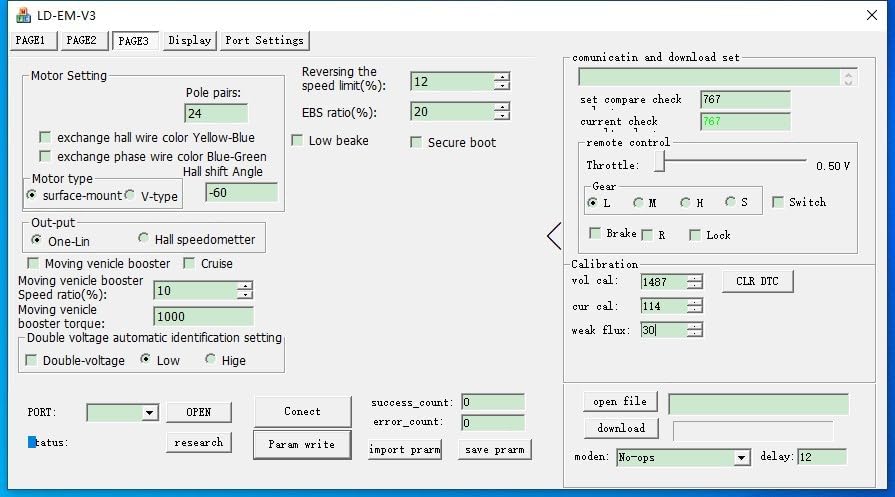
Image 6.3: Software interface - Motor Setting. Configure motor-specific parameters like pole pairs, EBS ratio, Hall shift angle, and output type (One-Lin, Hall speedometer).
Refer to the software's built-in help or specific programming guides for detailed explanations of each parameter. Incorrect settings can affect performance or damage components.
6.2 Видео көрсөтүү
Видео 6.1: Бүттүview of the VOTOL EM50SP controller, demonstrating its features and potential applications in electric vehicles. While the video shows an EM50SP, the general principles and connectivity are similar to the EM100SP.
7. Техникалык тейлөө
- Keep the controller clean and free from dust and debris.
- Regularly inspect all wiring connections for tightness and signs of wear or corrosion.
- Ensure adequate airflow around the controller to prevent overheating, especially during high-power operation.
- Avoid exposing the controller to harsh chemicals or solvents.
8. Кыйынчылыктарды
| Көйгөй | Мүмкүн себеп | Чечим |
|---|---|---|
| Контроллер күйбөй жатат | No power from battery; incorrect wiring; blown fuse (if applicable) | Батареянын көлөмүн текшериңизtage; verify all power connections; inspect fuses. |
| Motor not responding to throttle | Throttle not connected; faulty throttle; Hall sensor issue; motor wiring incorrect | Check throttle connection and function; inspect Hall sensor wiring; verify motor phase connections. |
| Туруксуз кыймыл-аракет | Incorrect motor parameters in software; loose connections; Hall sensor interference | Review software settings (Image 6.3); check all wiring; ensure Hall sensors are properly seated. |
| Ашыкча ысып кетүү | Insufficient cooling; excessive load; incorrect current settings | Ensure proper ventilation; reduce load; check current limits in software (Image 6.2). |
Бул жерде көрсөтүлбөгөн көйгөйлөр боюнча же мүчүлүштүктөрдү оңдоо кадамдары көйгөйдү чечпесе, кардарларды колдоо кызматына кайрылыңыз.
9. Кепилдик жана колдоо
This product is covered by a standard manufacturer's warranty. Please refer to your purchase documentation for specific warranty terms and conditions. For technical support, replacement parts, or warranty claims, please contact the retailer or manufacturer directly.
When contacting support, please have your product model number (EM100SP 72350) and purchase date available.