
Introduction
This manual provides comprehensive instructions for the TREKURE TK40 Jump Starter with integrated OBD2 Diagnostic functions. Please read this manual thoroughly before operating the device to ensure safe and efficient use. Keep this manual for future reference.
Эмне камтылган
The TREKURE TK40 package contains the following items:
- 1x TREKURE TK40 Jump Starter with OBD2 Scanner: The main unit for jump starting and vehicle diagnostics.
- 1x Heavy-Duty Jumper Cables: For connecting the jump starter to a vehicle battery.
- 1x USB-C Charging Cable: For recharging the jump starter and powering other devices.
- 1x 16-Pin OBD Cable: For connecting to the vehicle's OBD2 port.
- 1x User Manual: Бул нускама.
- 1x EVA Storage Bag: A protective case for storing the device and accessories.

Figure 1: Package Contents of the TREKURE TK40.
Продукт өзгөчөлүктөрү
7000A Emergency Jump Starter
The TREKURE TK40 is equipped with a powerful 7000A peak current, capable of jump starting all 12V gasoline vehicles and diesel vehicles up to 10L engine displacement. It functions reliably even in low temperatures down to -20°C. The device features a forced start technology, allowing it to start a vehicle instantly even if the car battery is completely dead. The process is designed for simplicity, making it accessible for all users.

Figure 2: TREKURE TK40 connected to a vehicle battery.

Figure 3: Vehicle compatibility for jump starting.
Integrated Battery Tester
The device includes a car battery tester that displays the battery voltage value and voltage curve in real-time. This feature provides high reading speed and accuracy, assisting in evaluating the battery's health status. By making the battery status visible, users can plan replacements in advance and avoid sudden failures caused by battery aging.
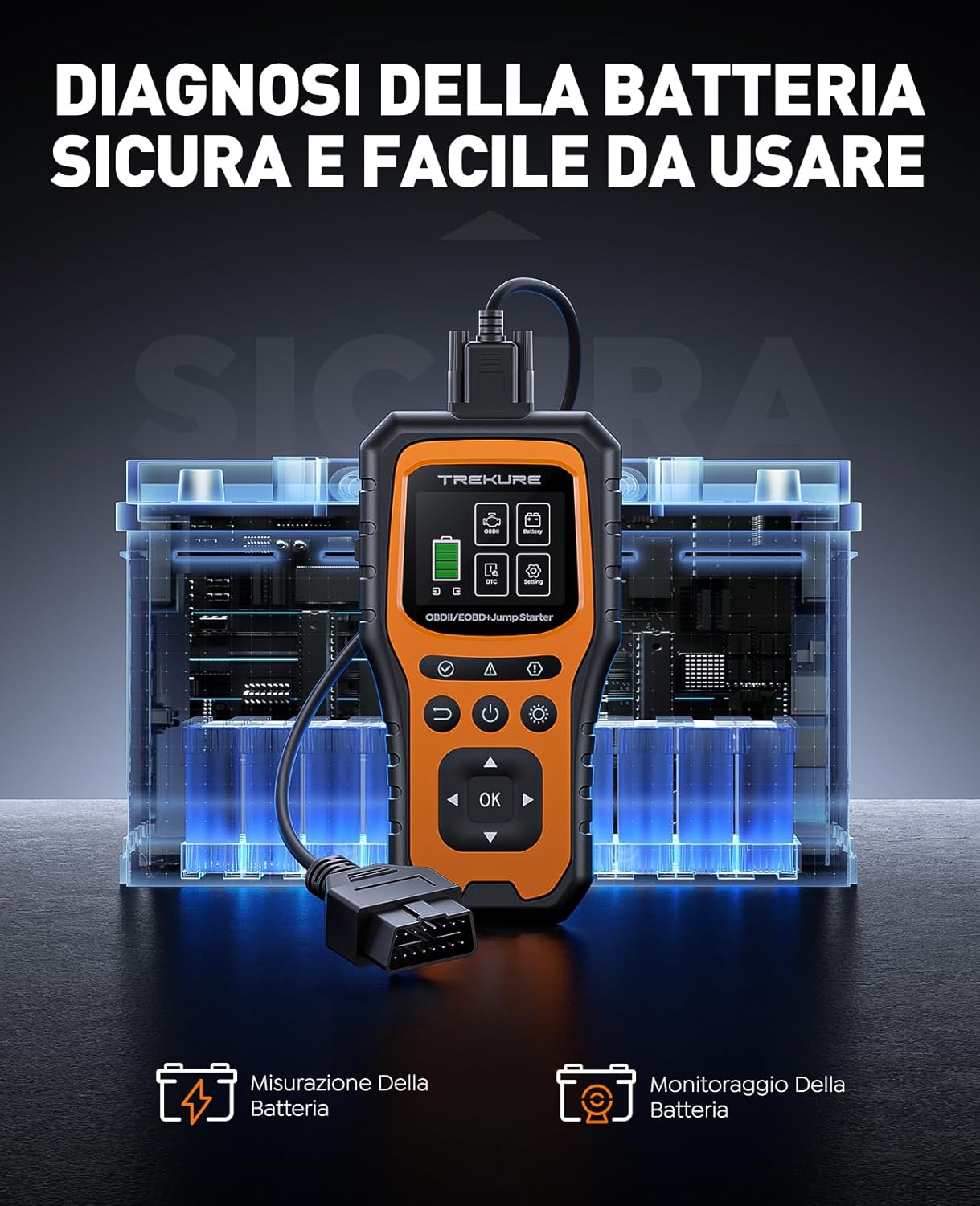
Figure 4: Battery diagnosis interface.
Professional OBDII Diagnostic Tool
The TREKURE TK40 integrates an 83,100+ DTC code library and supports nine protocols, making it compatible with 99.99% of vehicles manufactured in the United States after 1996, and in Europe and Asia after 2000. This professional diagnostic tool allows for quick reading and clearing of diagnostic trouble codes (DTCs), such as the malfunction indicator light (MIL). It can also read real-time vehicle data, display freeze frame data, perform DTC error code lookup, query oxygen sensor data, and check I/M readiness status. All functions are powered by the internal battery, making it a plug-and-play device that eliminates the need for multiple tools.

Figure 5: OBDII diagnostic functions overview.

Figure 6: Wide vehicle compatibility for OBDII diagnostics.
Көп функционалдуу Power Bank
The TREKURE TK40 can serve as a power bank to charge mobile phones, tablets, and other electronic devices. This ensures your devices remain charged during outdoor activities or emergencies. It features fast charging capabilities for convenience.

Figure 7: Using the TREKURE TK40 as a portable power bank.
3-in-1 LED Lighting
The portable jump starter also functions as a flashlight, supporting multiple lighting modes: always on, strobe, and SOS. This feature is useful for night-time illumination during roadside assistance, camping, or other outdoor situations.

Figure 8: TREKURE TK40's integrated LED flashlight.
Көптөгөн коопсуздукту коргоо
Constructed from V0 class flame-retardant material, the TREKURE TK40 is resistant to high and low temperatures, ensuring safe storage in your vehicle. It integrates multiple protection mechanisms for safe and hazard-free operation, including protection against overcharge, overvoltage, overcurrent, reverse connection, short circuit, low voltage, overheating, overload, extreme temperatures, and anti-spark technology. The device is shock-resistant, durable, and easy to store.

Figure 9: ашыкview of 10 intelligent safety protections.
Орнотуу жана заряддоо
- Баштапкы төлөм: Before first use, fully charge the TREKURE TK40 using the provided USB-C charging cable and a compatible USB power adapter (not included). The device's display will indicate the charging status.
- Connecting Jumper Cables: When preparing for jump starting, connect the heavy-duty jumper cables to the quick-start port on the device. Ensure a secure connection.
- Connecting OBD Cable: For diagnostic functions, connect the 16-pin OBD cable to the device's OBD2 port.
Иштөө нускамалары
Унааны секирип баштоо
- Connect Jumper Cables to Device: Insert the blue plug of the jumper cables into the 12V jump start output port on the TREKURE TK40. Ensure it is fully inserted.
- Connect ClampБатареяга: Кызыл позитивдүү (+) клды туташтырыңызamp to the positive (+) terminal of the vehicle's battery. Connect the black negative (-) clamp to the negative (-) terminal of the vehicle's battery. Ensure good contact.
- Унаа баштоо: Бир жолу clamps are securely connected, start your vehicle. The TREKURE TK40 will provide the necessary power.
- Clamps: After the vehicle starts, remove the jumper cables from the vehicle battery first, then disconnect the blue plug from the jump starter.

Figure 10: Three simple steps to jump start your vehicle.
Using the OBD2 Diagnostic Functions
- Унаага туташуу: Locate your vehicle's 16-pin OBD2 port, usually found under the dashboard on the driver's side. Connect the provided 16-pin OBD cable to this port and then to the TREKURE TK40.
- От алдырууну күйгүзүңүз: Turn your vehicle's ignition to the ON position (engine off) or start the engine if required for specific tests. The device will automatically link to the vehicle's computer.
- Менюга өтүү: Use the navigation buttons on the TREKURE TK40 to select desired diagnostic functions.
- Окуу коддору: Displays current, pending, and permanent diagnostic trouble codes (DTCs).
- Коддорду тазалоо: Clears DTCs and turns off the Malfunction Indicator Light (MIL) after repairs are made.
- View Фреймди тоңдуруу: Shows a snapshot of vehicle operating conditions at the time a DTC was set.
- I/M даярдыгы: Checks the readiness of emission-related monitoring systems.
- Унаа жөнүндө маалымат: Retrieves Vehicle Identification Number (VIN), calibration IDs, and calibration verification numbers.
- Live PCM Data: Displays real-time data stream from the engine control module (PCM).
- Realtime Curve: Visualizes live data in a graphical format for easier analysis of trends.
- O2 сенсор тести: O2 сенсоруна мониторинг жүргүзүү тестинин жыйынтыктарын чыгарат.
- Дүйшөмбү күнү бортто сыноо: Accesses results of on-board diagnostic monitoring tests for specific components.
- Компоненттик тест: Allows testing of specific components, such as the EVAP system, for leaks or proper function.
- Exit Diagnostic Mode: To exit the OBD2 diagnostic mode, press the "Back" button on the device. Confirm exit if prompted.

Figure 11: Connecting the OBD2 cable to the vehicle.

Figure 12: Reading and clearing engine codes.
Power Bank катары колдонуу
To charge external devices, connect your device's USB charging cable to one of the USB output ports on the TREKURE TK40. The device will automatically begin charging. Disconnect when charging is complete.
Жарык диоддук чыракты колдонуу
Press the flashlight button on the device to cycle through the lighting modes: constant on, strobe, and SOS. Press again to turn off the flashlight.
Техникалык тейлөө
- Толуктоо: For optimal battery life, recharge the TREKURE TK40 at least once every three months, even if not in use.
- Сактагыч: Store the device and its accessories in the provided EVA storage bag in a cool, dry place away from direct sunlight and extreme temperatures.
- Тазалоо: Түзмөктү тазалоо үчүн жумшак, кургак чүпүрөктү колдонуңуз. Катуу химиялык заттарды же абразивдүү материалдарды колдонбоңуз.
- Кабельге кам көрүү: Inspect jumper cables and OBD cables regularly for any signs of damage. Replace if frayed or damaged.
Проблемаларды чечүү
If you encounter issues with your TREKURE TK40, refer to the following common troubleshooting steps:
- Түзмөк күйбөй жатат: Түзмөктүн толук заряддалганын текшериңиз. Эгерде батарея толугу менен түгөнгөн болсо, түзмөк жооп бергенге чейин бир нече мүнөт заряддоо талап кылынышы мүмкүн.
- Унаа от албай жатат:
- Verify that the jumper cables are correctly and securely connected to both the jump starter and the vehicle battery terminals (red to positive, black to negative).
- Check the jump starter's battery level. If below 50%, recharge it before attempting to jump start.
- Ensure the vehicle's ignition is off before connecting, and then turned to the ON position or engine started as per instructions.
- If the vehicle still does not start after several attempts, there may be a deeper mechanical or electrical issue with the vehicle that requires professional inspection.
- OBD2 Connection Issues:
- Confirm the 16-pin OBD cable is firmly connected to both the device and the vehicle's OBD2 port.
- Унаанын от алдыруу системасы "ON" абалында экенин текшериңиз.
- If the device fails to link, try restarting the vehicle and the TREKURE TK40.
- Check for any damage to the OBD cable.
- Inaccurate Battery Readings: Ensure the battery terminals are clean and free of corrosion for accurate measurements.
Техникалык шарттар
| Өзгөчөлүк | Деталь |
|---|---|
| Бренд | TREKURE |
| Модель номери | TK40 |
| Жогорку ток | 7000A |
| Кыймылдаткычтын шайкештиги (Газ) | All 12V Gasoline Vehicles |
| Кыймылдаткычтын шайкештиги (Дизель) | Up to 10L Diesel Vehicles |
| Батарея клеткасынын курамы | Литий полимери |
| Тtage | 12 вольт |
| Продукциянын өлчөмдөрү (L x W x Y) | 19.8 x 10.1 x 3.4 см |
| OBD2 Compatibility | 99.99% of US vehicles (after 1996), Europe/Asia (after 2000) |
| DTC Code Library | 83,100+ codes |
| Кошумча функциялар | Battery Tester, Power Bank, 3-in-1 LED Flashlight (Constant, Strobe, SOS) |
Кепилдик жана колдоо
TREKURE is committed to ensuring your safety and satisfaction. The TREKURE TK40 comes with a 2 жылдык өндүрүүчүнүн кепилдиги. If you encounter any issues during use, please contact TREKURE customer service. Our professional team is available to assist you as soon as possible.
For further assistance or to report issues, please refer to the contact information provided in your product packaging or visit the official TREKURE webсайт.