
Introduction
This manual provides detailed instructions for the UGREEN Revodok Max 13-in-1 Thunderbolt 4 Docking Station. Please read this guide thoroughly to ensure proper setup, operation, and maintenance of your device. This docking station is designed to expand the connectivity of your laptop or computer, offering multiple ports for peripherals, displays, and network access, along with power delivery.
Пакеттин мазмуну
Орнотууну улантуудан мурун, төмөндө тизмеленген нерселердин баары пакетиңизге камтылганын текшериңиз:
- UGREEN Revodok Max Thunderbolt 4 Docking Station
- 180W Power адаптер
- Power Cord (US, EU, UK Plugs)
- Thunderbolt 4 Cable (2.6ft)

Image: All components included in the UGREEN Revodok Max package.
Продукт бүттүview жана порттор
The UGREEN Revodok Max offers 13 diverse ports for comprehensive connectivity. Familiarize yourself with the port layout for optimal use.

Сүрөт: деталдуу view of the UGREEN Revodok Max docking station with all ports labeled.
Алдыңкы порттор:
- Кубат баскычы: Док-станцияны күйгүзүү/өчүрүү үчүн.
- TF 3.0 (MicroSD) Card Reader: Supports data transfer up to 200MB/s.
- USB-C PD (20W 10Gbps): For charging devices up to 20W and data transfer. Does not support display output.
- USB-C (10Gbps): For data transfer. Does not support display output.
- SD 3.0 картаны окугуч: Supports data transfer up to 200MB/s.
- USB-A (5Gbps): For connecting USB-A peripherals.
- Audio (3.5mm Combo Jack): For headphones or microphones.
Арткы порттор:
- Thunderbolt 4 Upstream: Connects to your host laptop for data, video, and power delivery (up to 96W).
- DC-IN: 180 Вт кубаттуулуктагы адаптерге туташат.
- Ethernet (1Gbps): Туруктуу зымдуу тармак байланышын камсыз кылат.
- USB-A (5Gbps) x2: For connecting additional USB-A peripherals.
- DisplayPort 1.4 (8K@30Hz): For connecting an external display. Note: The DP port does not support DP++. To connect an HDMI monitor, use an active DP-to-HDMI adapter or cable; passive adapters will not work.
- Thunderbolt 4 Downstream x2: For connecting Thunderbolt peripherals or additional displays.
Орнотуу колдонмосу
Follow these steps to set up your UGREEN Revodok Max docking station:
- Туташуу кубаты: Connect the provided 180W power adapter to the DC-IN port on the rear of the docking station, then plug the power cord into a wall outlet.
- Хост түзмөккө туташуу: Use the included Thunderbolt 4 cable to connect the Thunderbolt 4 Upstream port on the docking station to a Thunderbolt 4, Thunderbolt 3, USB4, or fully-featured USB-C port on your laptop or computer.
- Перифериялык түзүлүштөрдү туташтыруу: Connect your external monitors, USB devices (keyboard, mouse, external drives), Ethernet cable, and audio devices to the corresponding ports on the docking station.
- Күйгүзүү: Press the power button on the front of the docking station. The indicator light will illuminate.
Your computer should automatically detect the docking station and connected peripherals. No drivers are typically required for most operating systems.
Иштөө нускамалары
Жалпы колдонуу:
- Ensure all cables are securely connected before powering on the docking station or your host device.
- The docking station provides power delivery to your laptop via the Thunderbolt 4 upstream connection.
- For optimal performance, especially with multiple high-resolution displays or high-speed data transfers, ensure your host device supports Thunderbolt 4 or USB4.
Маалыматтарды өткөрүү:
The Thunderbolt 4 ports deliver a bandwidth of 40Gbps, enabling rapid file transfers. The SD/TF 3.0 card readers support speeds up to 200MB/s.

Image: Comparison of data transfer times for a 10GB file using Thunderbolt 4 (7 seconds) versus USB 3.0 (30 seconds).
Дисплей конфигурациясы
Док-станция ар кандай дисплей конфигурацияларын колдойт:
- Dual 4K@60Hz: Connect two 4K monitors at 60Hz via the DisplayPort 1.4 and one of the Thunderbolt 4 downstream ports.
- Single 8K@30Hz: Connect one 8K monitor at 30Hz via the DisplayPort 1.4 or a Thunderbolt 4 downstream port.

Сүрөт: Мисample setup showing dual 4K@60Hz display configuration with the docking station.
Important Display Notes:
- DP++ Compatibility: The DisplayPort does not support DP++. For HDMI monitor connections, an active DisplayPort to HDMI adapter or cable is required. Passive adapters will not function.
- High-Resolution & Refresh Rate: To achieve resolutions higher than 4K 60Hz, both your PC graphics card and monitor must support DSC 1.2 and DP 1.4 HBR3 standards. Certain high refresh rate modes may require adjusting color bit depth. Use reliable Thunderbolt 4 or DisplayPort 1.4 cables for stable video output.
- Mac шайкештиги: For Apple M1/M2/M3 base model Macs (e.g., MacBook Air), only one external display is supported via this docking station. M1 Pro/Max/Ultra, M2 Pro/Max/Ultra, M3 Pro/Max, and M4 (base, Pro & Max) chips support multiple displays.

Image: Display Resolution and Refresh Rate compatibility chart for different devices.

Image: Multi-display modes for Windows and macOS. Note that the dock only supports single display for laptops with full-function USB-C ports and Apple original M1/M2/M3 chips.
Кубат жана кубаттоо
The docking station is powered by a 180W adapter and provides efficient charging capabilities:
- Ноутбук заряддоо: Delivers up to 96W Power Delivery (PD) to your connected laptop via the Thunderbolt 4 upstream port.
- Аппаратты заряддоо: The front USB-C PD port provides up to 20W charging for smartphones and other compatible devices.
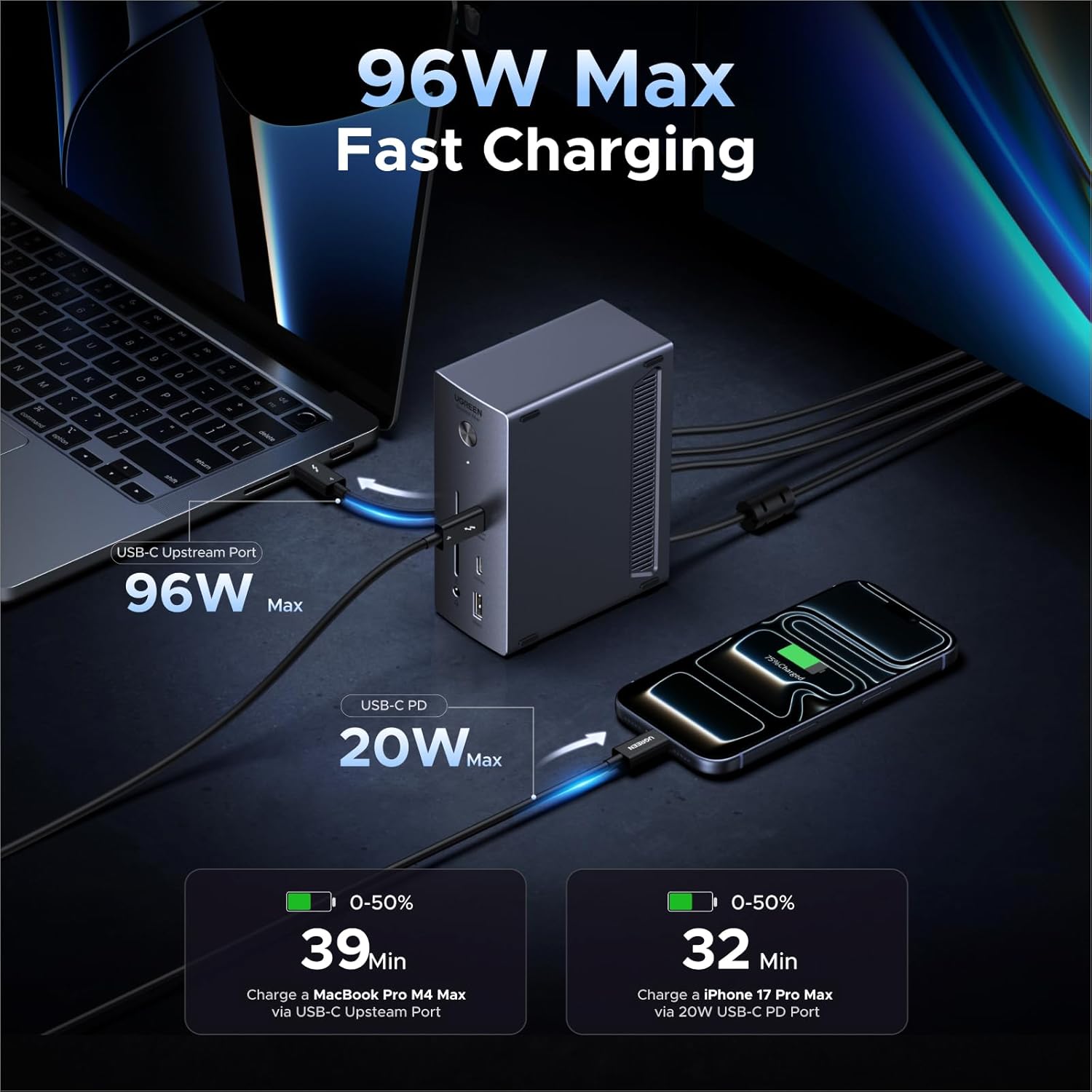
Image: Illustration of 96W laptop charging and 20W device charging.

Image: Ultra-Fast Charging details, showing 96W output to a laptop and charging times.
Шайкештик
The UGREEN Revodok Max is designed for broad compatibility:
- Шайкеш түзмөктөр: Apple M4/M3/M2/M1 Macs, Intel Thunderbolt 3 Macs, and Thunderbolt 4/3, USB4, or USB-C Windows laptops/PCs.
- Операциялык системалар: macOS 11.4 and above, Windows 10 and above.

Image: Universal Compatibility chart for devices and operating systems.
Шайкештик жөнүндө эскертүүлөр:
- It is not recommended to connect the docking station to iPads or any mobile phone devices.
- Incompatible devices include DELL Precision 7760.
- The USB-C port on some Windows computers may not support video output or charging functions.
Техникалык тейлөө
Док-станцияңыздын узак мөөнөттүү иштешин жана оптималдуу иштешин камсыз кылуу үчүн:
- Муздатуу: The docking station features a fanless passive cooling design with an aluminum front to ensure quiet operation and efficient heat dissipation.
- Вентиляция: Always place the docking station in a well-ventilated area to prevent overheating. Avoid covering ventilation holes.
- Тазалоо: Түзмөктүн сыртын тазалоо үчүн жумшак, кургак чүпүрөктү колдонуңуз. Суюк тазалоочу каражаттарды же эриткичтерди колдонбоңуз.
- Жайгашкан жери: The anti-slip pads allow for stable vertical or horizontal placement. Ensure it is on a flat, stable surface.

Сүрөт: Ички view highlighting the fanless silent design and ventilation for heat management.
Проблемаларды чечүү
Эгерде сиз док-станцияңыз менен көйгөйлөргө туш болсоңуз, төмөнкү кеңири таралган көйгөйлөрдү жана чечимдерди караңыз:
Q1: Is it normal for the docking station to get warm during operation?
A: Yes, it is normal. Under full load, the surface temperature of the docking station may reach approximately 50°C. Its all-metal casing helps with heat dissipation. Please ensure the usage environment is well-ventilated.
Q2: Why must the original power adapter and cables be used?
A: To ensure stability and device safety, please be sure to use the power adapter and Thunderbolt 4 cable included in the package. Using non-standard or underpowered power supplies may easily cause the following issues: unstable performance, random disconnection of peripherals, device unrecognition, and even hardware damage.
Q3: What should I do if the external monitor shows abnormal colors after connecting to the docking station?
A: This docking station supports HDR to enhance image quality. If your monitor does not support HDR, color distortion may occur. You can manually disable the HDR function in the display settings of your laptop's operating system.

Image: Common questions and answers regarding usage and support.
Техникалык шарттар
| Өзгөчөлүк | Деталь |
|---|---|
| Бренд | UGREEN |
| Модель номери | U707 (75237F) |
| Аппараттык интерфейс | 3.5mm Audio, MicroSD, USB 3.2 Gen 2, USB Type C, DisplayPort 1.4, Thunderbolt 4 |
| Жалпы USB порттору | 5 (3x USB-A 5Gbps, 2x USB-C 10Gbps) |
| Порттардын саны | 13 |
| Thunderbolt 4 Speed | 40Gbps |
| Display Output | Dual 4K@60Hz or Single 8K@30Hz |
| Power Delivery (Laptop) | 96 Вт чейин |
| Total Power Adapter Wattage | 180 Вт |
| Ethernet | Гигабит (1000Мбит/сек) |
| Card Reader | SD/TF 3.0 (200MB/s) |
| Продукциянын өлчөмдөрү | 3.7"L x 1.96"W x 5.78"H |
Кепилдик жана колдоо
UGREEN provides a 1 жылдык кепилдик for this product from the date of purchase. This warranty covers manufacturing defects and ensures the product functions as described under normal use.
For technical support, troubleshooting assistance, or warranty claims, please contact UGREEN customer service through their official website or the retailer where the product was purchased. Please have your product model number (U707) and proof of purchase ready when contacting support.