
1. Продукт бүтүп калдыview
The STUDIOFINIX In-Wall Audio Control Amplifier Receiver Wall Plate is designed to integrate seamlessly into your home or office audio system. This 4-channel amplifier provides versatile audio input options and Bluetooth wireless streaming, allowing for flexible control of your sound environment.
Негизги өзгөчөлүктөрү:
- 4-канал чыгаруу: Supports up to two pairs of speakers.
- Bluetooth 5.0 туташуусу: Wireless audio streaming from compatible devices with a range of up to 30 feet (10 meters).
- Бир нече аудио киргизүүлөр: Includes front 3.5mm AUX jack, rear line-level pigtail leads, USB port for flash drives, and a 1/4" microphone input.
- Интегралдык башкаруу каражаттары: Master volume knob with power ON/OFF function, and input selection switch.
- Компакт дизайн: All-in-one unit designed for in-wall installation.
2. Коопсуздук маалыматы
Please read and understand all safety instructions before installing and operating this device. Retain this manual for future reference.
- Электр коопсуздугу: Ensure power is disconnected before installation or servicing. All wiring should be performed by a qualified professional if you are unsure.
- Вентиляция: Вентиляция тешиктерин жаап албаңыз. Агрегаттын айланасында адекваттуу аба агымын камсыз кылыңыз.
- Нымдуулук: Агрегатты сууга же ашыкча нымдуулукка дуушар кылбаңыз.
- Температура: Ашыкча температурадан алыс болуңуз. Түзмөктү сунушталган айлана-чөйрө шарттарында иштетиңиз.
- Динамик туташуу: Always match positive (+) and negative (-) terminals correctly to prevent damage to the ampкөтөргүч жана спикерлер.
3. Эмнелер камтылган
Пакетте бардык компоненттер бар экенин текшериңиз:
- 1 x In-Wall Audio Control Amplifier Receiver Wall Plate
- 1 х AC кубат адаптери
- 2 x Монтаждоо бурамалар
- 1 x Колдонуучунун колдонмосу
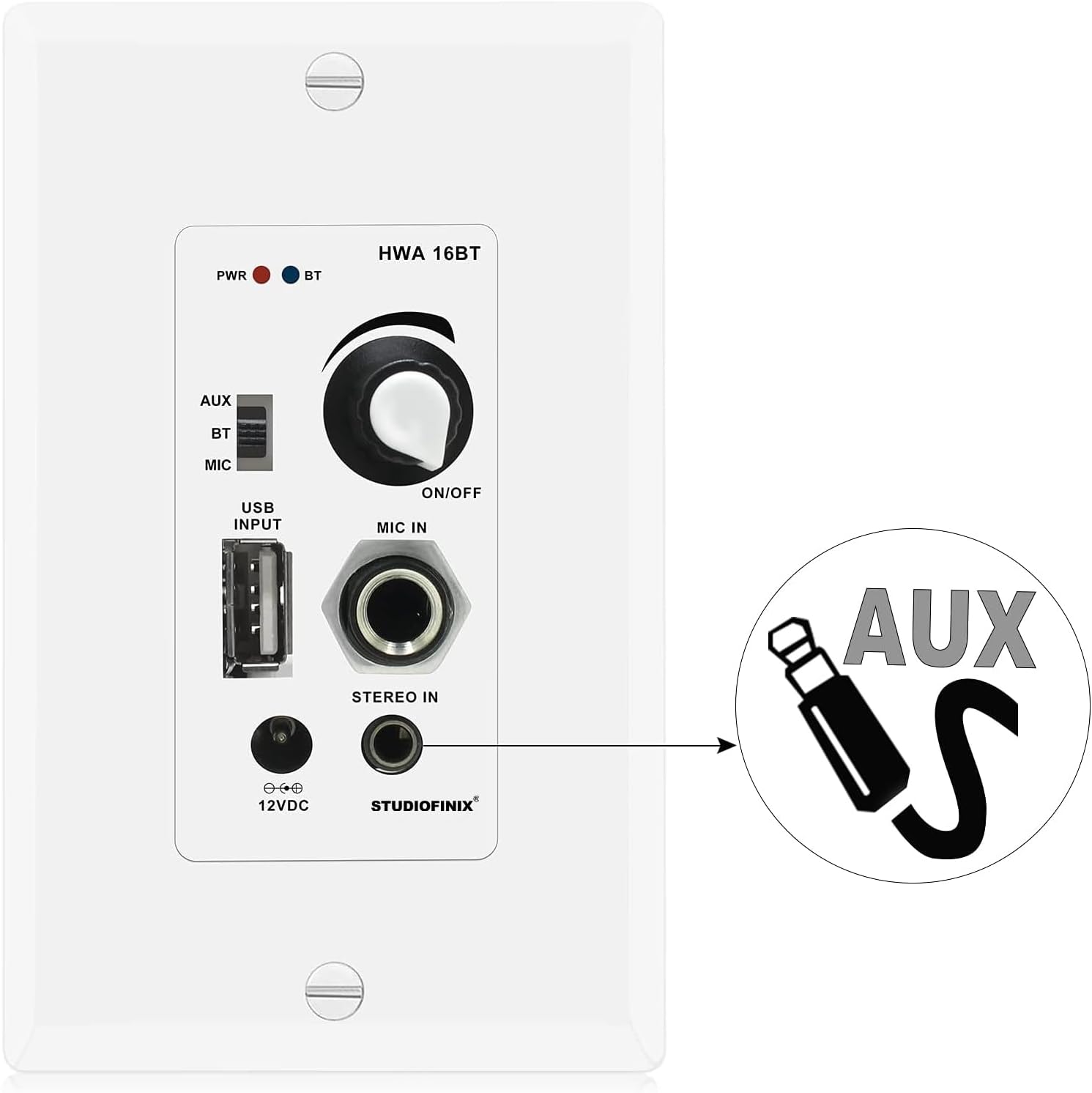
Image: Package contents showing the in-wall amplifier, power supply, screws, and user manual.
4. Орнотуу жана орнотуу
This section outlines the steps for installing and connecting your in-wall ampөмүрлүү.
4.1 Динамиктин туташуусу
The amplifier supports up to two pairs of speakers (4 channels). Ensure correct polarity when connecting speaker wires.
- Динамиктериңиздеги оң (+) жана терс (-) терминалдарды аныктаңыз.
- Connect the speaker wires from your speakers to the corresponding terminals on the amplifier's rear terminal block. Match positive to positive (red) and negative to negative (black).
- Кыска туташуулардын алдын алуу үчүн бардык туташуулардын коопсуз экенин текшериңиз.

Image: Speaker wiring diagram for the 4-channel in-wall amplifier, showing connections for four speakers.
4.2 Кубат туташтыруу
Connect the included AC power adapter to the DC 12V input on the amplifier. The power adapter can be connected via the front access port or the rear board pigtail leads.
4.3 In-Wall Mounting
The amplifier is designed to fit into a standard single-gang wall box. Secure the unit using the provided mounting screws.
5. Иштөө нускамалары
Familiarize yourself with the controls and functions of your STUDIOFINIX in-wall ampөмүрлүү.

Image: Front panel layout of the 4-channel in-wall amplifier, detailing each control and port.
5.1 Power ON/OFF and Master Volume
The large knob on the front panel controls both power and master volume. Rotate clockwise to turn the unit ON and increase volume. Rotate counter-clockwise to decrease volume and turn the unit OFF.
5.2 Киргизүүнү тандоо
Use the slide switch located on the left side of the front panel to select your desired audio source:
- AUX: For connecting external devices via the 3.5mm AUX input.
- BT: For Bluetooth wireless audio streaming.
- MIC: Микрофон киргизүү үчүн.
5.3 Bluetooth жупташтыруу
- Set the input selection switch to BT. The Bluetooth Signal LED will blink, indicating pairing mode.
- Мобилдик түзмөгүңүздө (смартфон, планшет ж.б.) Bluetooth иштетип, жеткиликтүү түзмөктөрдү издеңиз.
- Select "STUDIOFINIX" from the list of devices.
- Once paired, the Bluetooth Signal LED will illuminate steadily. You can now stream audio wirelessly.
5.4 USB ойнотуу
MP3 аудиосу бар USB флэш-дискти салыңыз files into the USB port. The unit will automatically detect and play audio from the drive. The USB port also provides 5V/1A for charging devices.

Image: USB port on the amplifier, used for MP3 flash drive playback or device charging.
5.5 AUX киргизүү
Connect an external audio source (e.g., smartphone, media player) to the 3.5mm AUX input jack using a standard audio cable. Set the input selection switch to AUX.

Image: 3.5mm AUX input jack for connecting external audio devices.
5.6 Микрофон киргизүү
Connect a dynamic microphone to the 1/4" MIC IN jack. Set the input selection switch to MIC for microphone use.
6. Техникалык тейлөө
To ensure the longevity and optimal performance of your STUDIOFINIX in-wall amplifier, бул тейлөө көрсөтмөлөрүн аткарыңыз:
- Тазалоо: Use a soft, dry cloth to clean the surface of the unit. Do not use liquid cleaners or abrasive chemicals.
- Вентиляция: Мезгил-мезгили менен желдетүү тешиктери чаңдан жана таштандыдан таза экенин текшерип туруңуз.
- Байланыштары: Ensure all cable connections remain secure. Loose connections can affect audio quality.
7. Кыйынчылыктарды
If you encounter issues with your in-wall amplifier, төмөнкү жалпы көйгөйлөрдү жана чечимдерди карагыла:
- Кубат жок:
- Ensure the AC power adapter is securely connected to both the ampкөтөргүч жана жумушчу розетка.
- Verify the master volume knob is turned ON.
- Үн жок:
- Check speaker wire connections for correct polarity and secure contact.
- Confirm the correct input source (AUX, BT, MIC) is selected via the slide switch.
- Башкы үнүн тууралаңыз.
- Bluetooth колдонуп жатсаңыз, аппарат жупташып, аудио ойнотулуп жатканын текшериңиз.
- If using AUX, ensure the cable is fully inserted and the external device's volume is up.
- Bluetooth ажыратуу/жупташтыруу мүмкүн эмес:
- камсыз кылуу amplifier's input is set to BT.
- Bluetooth түзмөгүңүздү жакыныраак жылдырыңыз amplifier (within 30 feet/10 meters).
- Түзмөгүңүздөгү Bluetooth'ту өчүрүп, күйгүзүңүз, андан кийин кайра жупташтырып көрүңүз.
- Эгер мурда жупташтырылган болсо, телефонуңуздагы аппаратты унутуп, кайра жупташып көрүңүз.
- Бурмаланган аудио:
- Экөөнүн тең үнүн азайтыңыз ampкүчөткүч жана аудио булагы.
- Check speaker impedance compatibility (minimum 4 Ohm).
- Ensure speaker wires are not frayed or touching each other.
8. Техникалык шарттар
Technical specifications for the STUDIOFINIX In-Wall Audio Control Amplifier Receiver Wall Plate:
| Модель номери | ST-HWA16BT-4CH-CA |
| Power Output | 100 Watt Peak, 40 Watt RMS x 4 Ch. @ 4 Ohm |
| Bluetooth версиясы | 5.0 |
| Зымсыз диапазон | 30 фут (10 метр) |
| Микрофон киргизүү түрү | Динамикалык |
| Күч Ampжашоочу түрү | Стерео класс-D |
| Минималдуу жүк каршылык | 4 Ом |
| Жалпы гармоникалык бурмалоо (THD) | 0.03% (8 Ohm, 1KHz) |
| Power Draw | 12V 3Amps |
| Электр камсыздоо | DC 100-240V, 50/60Hz (12V DC Adapter) |
| Материал | Пластик |
| Түс | Ак |
| Элемент Салмагы | 9.6 унция |
| Орнотуу түрү | Screw-In |

Image: Technical specifications of the in-wall Bluetooth ampөмүрлүү.
9. Кепилдик жана колдоо
For warranty information or technical support, please contact STUDIOFINIX directly through their official webпродукт сатылып алынган сайт же сатуучу. Сатып алганыңыздын далили катары сатып алуу дүмүрчөгүңүздү сактаңыз.