
idoooz X2
idoooz X2 Mini MP3 музыка ойноткуч колдонуучусунун колдонмосу
Model: X2 | Brand: idoooz
1. Киришүү
Thank you for choosing the idoooz X2 Mini MP3 Music Player. This compact and lightweight device is designed for portability and ease of use, perfect for sports, gym, jogging, and other activities. It features a clip-on design, LED indicators, and 8GB of built-in storage for your music.
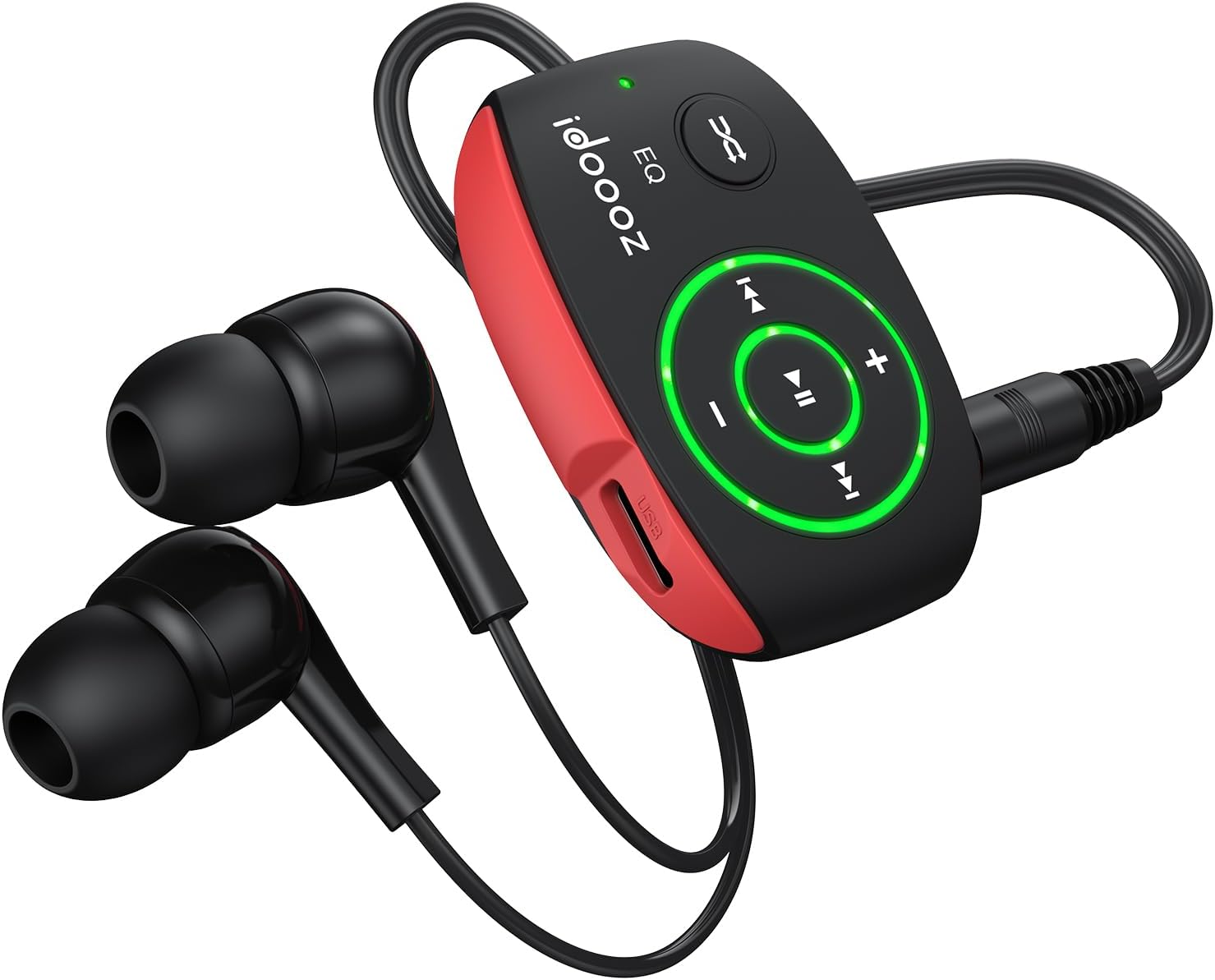
Image 1.1: The idoooz X2 Mini MP3 Player with wired earphones.
2. Кутуда эмне бар
Сураныч, пакеттин мазмунун текшерип, бардык буюмдар бар экенин текшериңиз:
- idoooz X2 Mini MP3 Player
- High-quality Earphones
- USB-C заряддоо кабели
- Колдонуучунун Колдонмосу (бул документ)

Image 2.1: Package contents of the idoooz X2 Mini MP3 Player.
3. Продукт бүтүп калдыview жана компоненттер
Familiarize yourself with the various parts and controls of your idoooz X2 MP3 Player.

Image 3.1: Labeled diagram of the idoooz X2 MP3 Player components.
- USB-C Charging Port / Data Transfer: Used for charging the device and transferring music files.
- LED Charging Indicator Light: Заряддоо абалын көрсөтөт.
- LED Playback Status Light: Indicates device status (play/pause/power).
- Volume - / +: Ойнотуу үнүн тууралайт.
- Previous Track / Fast Backward: Navigates to the previous track or fast backward.
- Next Track / Fast Forward: Navigates to the next track or fast forward.
- EQ / Shuffle / Standard Playback: Toggles between equalizer modes, shuffle, and standard playback.
- On / Off / Play / Pause: Түзмөктү күйгүзөт/өчүрөт жана музыка ойнотууну башкарат.
- 3.5 mm Earphone Jack: Connects your wired earphones.
- КАЛТЫРУУ: Small button for resetting the device if needed.
- Клип: Ойноткучту кийимге же аксессуарларга бекитүү үчүн орнотулган клипса.
4. Орнотуу
4.1 Аппаратты заряддоо
Before first use, fully charge your MP3 player. The built-in 110mAh rechargeable battery provides approximately 15 hours of continuous music playback at medium volume and takes about 2.5 hours to fully charge.
- Connect the provided USB-C cable to the charging port on the MP3 player.
- USB-C кабелинин экинчи учун USB кубат адаптерине (кошумча эмес) же компьютердин USB портуна туташтырыңыз.
- The LED Charging Indicator Light will illuminate during charging. It will change or turn off once charging is complete.
4.2 Музыканы өткөрүп берүү Files
The idoooz X2 has 8GB of built-in flash memory, capable of storing over 2,000 songs. It supports MP3, WMA, APE, and FLAC formats with lossless audio quality.
- Connect the MP3 player to your computer using the provided USB-C cable.
- The computer will recognize the MP3 player as a removable disk drive.
- Open the drive folder. You can drag and drop your music files (MP3, WMA, APE, FLAC) directly into this folder.
- Баары бир жолу files are transferred, safely eject the MP3 player from your computer before disconnecting the cable.

Image 4.1: Transferring music files from a computer to the MP3 player.
OTG Function (Optional): You can also transfer music from your smartphone to the MP3 player using an OTG adapter (not included) and a compatible cable. Connect the OTG adapter to your phone, then connect the MP3 player via its USB-C cable to the adapter.

Image 4.2: Using the OTG function to transfer music from a smartphone.
5. Иштөө нускамалары
5.1 Power On/Off and Playback
- Күйгүзүү: басып, кармап туруңуз Күйгүзүү/өчүрүү/ойнотуу/тындыруу button until the LED Playback Status Light illuminates.
- Ойнотуу/тындыруу: баскычын кыскача басыңыз Күйгүзүү/өчүрүү/ойнотуу/тындыруу button to play or pause the current track. The LED light will flash to indicate playback status.
- Өчүрүү: басып, кармап туруңуз Күйгүзүү/өчүрүү/ойнотуу/тындыруу button until the LED Playback Status Light turns off.
5.2 Үндү тууралоо
- басыңыз Көлөм + үнүн жогорулатуу үчүн баскыч.
- басыңыз Көлөмү - үнүн азайтуу үчүн баскыч.
5.3 Track Navigation
- Кийинки трек: баскычын кыскача басыңыз Кийинки трек / Тез алдыга баскычы.
- Мурунку трек: баскычын кыскача басыңыз Previous Track / Fast Backward баскычы.
- Тез алдыга: басып, кармап туруңуз Кийинки трек / Тез алдыга баскычы.
- Тез артка: басып, кармап туруңуз Previous Track / Fast Backward баскычы.
5.4 EQ / Shuffle / Standard Playback
басыңыз EQ / Shuffle / Standard Playback button to cycle through different playback modes, including equalizer settings and shuffle mode.

Image 5.1: The idoooz X2 MP3 Player in use during exercise.
6. Техникалык тейлөө
- Аппаратты кургак кармаңыз. ным же суюктуктардын таасиринен алыс болуңуз.
- Аппаратты жумшак, кургак чүпүрөк менен тазалаңыз. Катуу химиялык заттарды же абразивдүү тазалагычтарды колдонбоңуз.
- Avoid extreme temperatures. Do not store in very hot or cold environments.
- Protect the USB-C port and earphone jack from dust and debris.
- If the device becomes unresponsive, use a thin object (like a paperclip) to press the RESET баскычы.
7. Кыйынчылыктарды
| Көйгөй | Мүмкүн чечим |
|---|---|
| Түзмөк күйбөйт. | Ensure the device is fully charged. Press and hold the Power button for a few seconds. If unresponsive, try the RESET button. |
| Которуу мүмкүн эмес fileс аппаратка. | Ensure the USB-C cable is securely connected to both the player and the computer. Try a different USB port or cable. Ensure the device is powered on when connected. |
| Наушниктен үн чыкпайт. | Check if earphones are properly plugged into the 3.5mm jack. Ensure volume is not set to minimum. Test with different earphones if available. |
| LED көрсөткүч иштебейт. | Refer to the "Product Overview and Components" section for expected LED behavior. If the device functions otherwise, this may not indicate a critical issue. |
| Түзмөк катып калат же жооп бербей калат. | Press the RESET button using a thin, pointed object. This will restart the device without deleting data. |
8. Техникалык шарттар
| Өзгөчөлүк | Деталь |
|---|---|
| Модель аты | X2 |
| Бренд | idoooz |
| Эстутум сактоо сыйымдуулугу | 8 ГБ |
| Продукциянын өлчөмдөрү | 1.81 x 1.18 x 0.7 дюйм |
| Элемент Салмагы | 0.52 унция |
| Байланыш технологиясы | USB-C |
| Колдоого алынган аудио форматтары | MP3, WMA, APE, FLAC |
| Батареянын иштөө мөөнөтү | Болжол менен 15 саат (орточо көлөмдө) |
| Заряддоо убактысы | Болжол менен 2.5 саат |
| Өзгөчөлүктөр | Built-In Clip, Equalizer, LED light |
9. Кепилдик жана колдоо
The idoooz X2 Mini MP3 Music Player comes with a 365-day warranty. If you encounter any problems or have questions regarding your device, please contact idoooz customer service directly for assistance.
For support, please refer to the contact information provided with your purchase or visit the official idoooz webсайт.
Ask a question about this manual
Ask about setup, troubleshooting, compatibility, parts, safety, or missing instructions. Manuals+ will review the question and use this page’s manual context to help answer it.