
Introduction
Thank you for choosing the SuperRC M23 Mini RC Drone. This manual provides essential information for the safe operation, setup, maintenance, and troubleshooting of your drone. Please read this manual thoroughly before operating the drone to ensure proper function and to avoid damage or injury. This drone is designed for adult beginners and features a lightweight, portable design with an HD camera and intelligent flight functions.
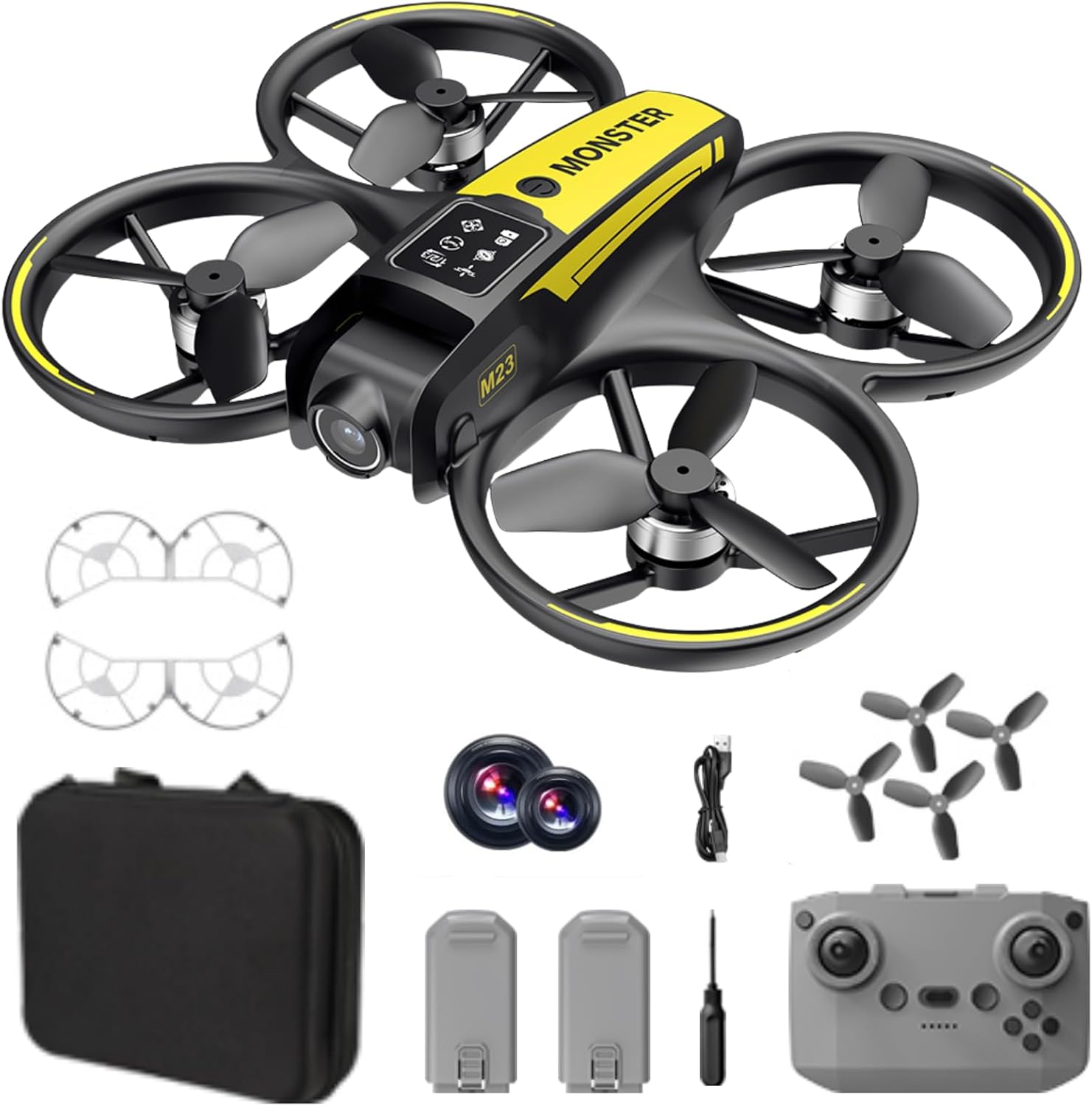
Кутуда эмне бар
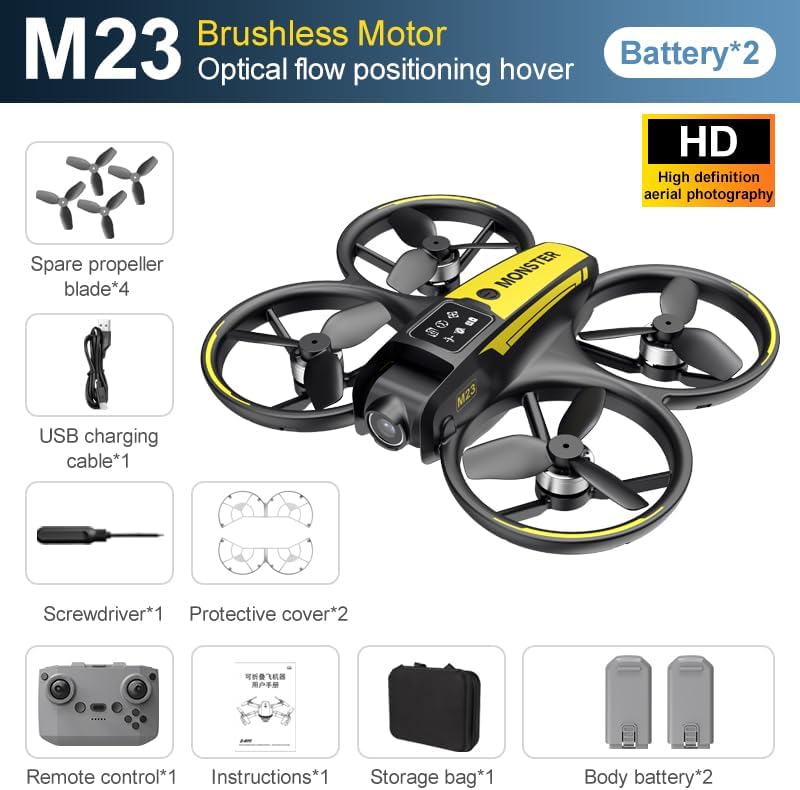
The SuperRC M23 drone package includes the following components:
- M23 Drone
- Remote Controller
- 2 x 3.7V 1050mAh Rechargeable Batteries
- 4 х запастык пропеллер
- 2 х пропеллер сакчылары
- Эстутум картасы
- Card Reader
- Screwdriver
- USB заряддоо кабели
- Сактоочу баштык
- Колдонуучунун Колдонмосу (бул документ)

Продукт бүттүview
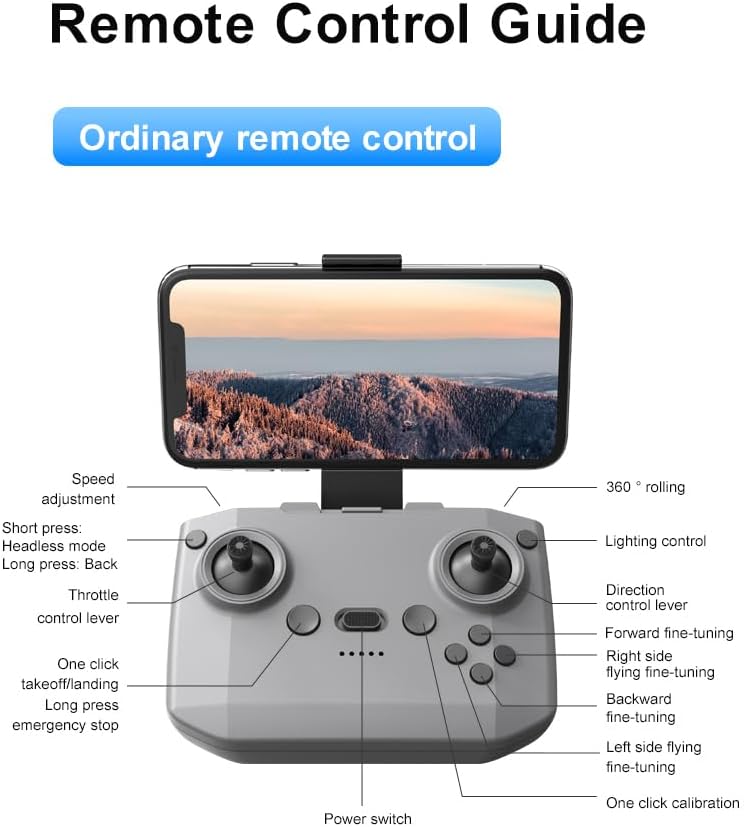
Remote Control Layout
Familiarize yourself with the remote control buttons and their functions before flight.
Жайгашуу
1. Батареяны орнотуу
- Дрон жана пульт өчүрүлгөндүгүн текшериңиз.
- Дрондогу батарея бөлүкчөсүн табыңыз.
- Insert a charged 3.7V 1050mAh battery into the compartment until it clicks securely into place.
- For the remote control, open the battery cover and insert the required batteries (not specified in product data, assume standard AA/AAA, user should refer to physical manual for exact type).
2. Пропеллерди орнотуу
Дрон алдын ала орнотулган пропеллер менен келет. Эгерде алмаштыруу керек болсо:
- Identify the 'A' and 'B' markings on the propellers and the corresponding motor arms.
- Attach 'A' propellers to 'A' motor shafts and 'B' propellers to 'B' motor shafts. Ensure they are firmly secured.
3. Пропеллердин коргоочусун орнотуу
For added safety, attach the propeller guards:
- Align each propeller guard with the designated slots on the drone's motor arms.
- Gently push until they snap into place.
4. Заряддоо
Charge the drone batteries using the provided USB charging cable.
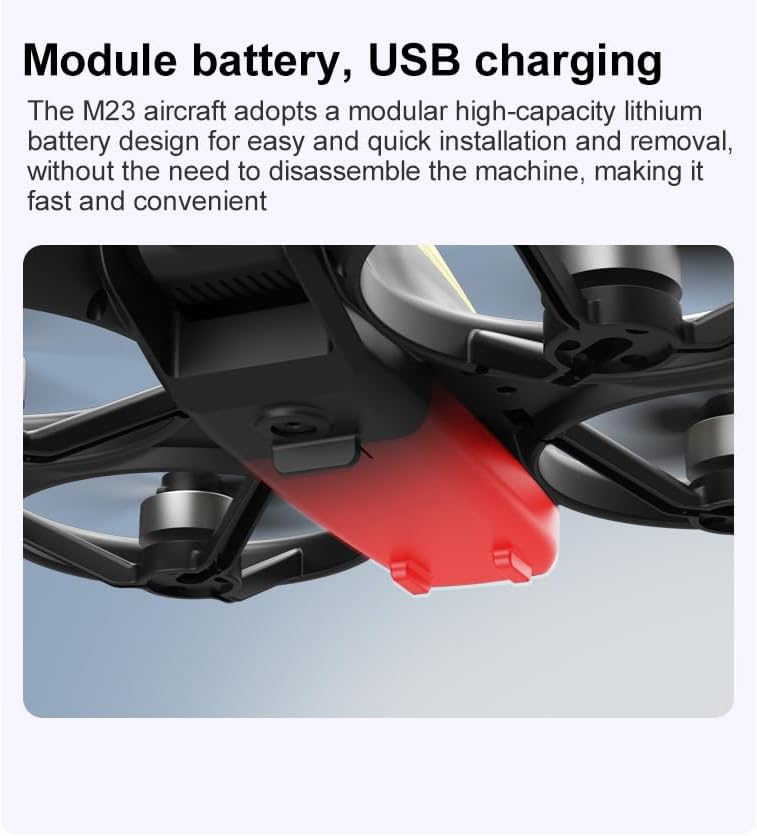
- USB кубаттоочу кабелди дрондун батареясына туташтырыңыз.
- Plug the other end into a USB power source (e.g., computer, USB wall adapter).
- The indicator light on the cable will show charging status (refer to physical manual for specific light indications).
- Charging time is approximately 60-90 minutes for a full charge.
Иштөө нускамалары
Учуу алдындагы текшерүү тизмеси
- Дрондун жана алыстан башкаруунун батареялары толук заряддалганын текшериңиз.
- Пропеллерлер туура орнотулган жана коопсуз.
- Propeller guards are attached (recommended for beginners).
- Тоскоолдуктарсыз, адамдарсыз жана жаныбарларсыз ачык, таза аймакты тандаңыз.
- Учаардан мурун жергиликтүү дрон эрежелерин текшериңиз.
Негизги учуу операциялары
The following video demonstrates key flight features including one-key takeoff, optical flow positioning, 360-degree roll, and speed switching.
One-Key Takeoff and Landing
- Учуп чыгуу: Place the drone on a flat surface. Press the One-Key Takeoff button on the remote control. The drone will automatically ascend and hover at a stable altitude.
- Конуу: Press the One-Key Landing button. The drone will slowly descend and land automatically.
Flight Modes and Features
- Башсыз режим: Press the Headless Mode button. In this mode, the drone's orientation is relative to the pilot, making it easier to control without worrying about the drone's front direction.
- Ылдамдыкты жөндөө: Use the speed adjustment button (or switch) on the remote control to cycle through low, medium, and high speeds. This allows for adaptable flight control based on skill level and environment.
- 360° Roll: Press the 360° Roll button and then move the right joystick in any direction to perform an aerial flip. Ensure sufficient altitude before attempting.
- Оптикалык агымдын жайгашуусу: The drone utilizes a bottom camera for optical flow positioning, which helps maintain stable hovering, especially indoors or in areas with good ground texture. This feature assists in precise altitude hold.
- Учуу траекториясы: Through the mobile application, you can draw a desired flight path on your screen. The drone will then follow this trajectory automatically.

Камеранын иштеши
The M23 drone is equipped with an HD camera with a 90-degree adjustable lens for capturing photos and videos.

- Сүрөт/Видео жаздыруу: Use the dedicated buttons on the remote control or the mobile app to start/stop video recording or take photos.
- Сүрөттөрдү реалдуу убакытта өткөрүү: Connect your smartphone to the drone's Wi-Fi network to view реалдуу убакыт footage from the drone's camera on your device.
Техникалык тейлөө
Тазалоо
- Regularly clean the drone body with a soft, dry cloth.
- Ensure propellers are free from dust, dirt, or debris.
- Clean the camera lens gently with a microfiber cloth to maintain image quality.
Сактагыч
- Store the drone and its components in the provided storage bag to protect them from dust and physical damage.
- Keep the drone in a cool, dry place, away from direct sunlight and extreme temperatures.
Батареяга кам көрүү
- Батареяларды ашыкча заряддабаңыз же ашыкча зарядсыздандырбаңыз.
- Эгер батарейкаларды узак убакытка сактасаңыз, анда алардын кубаттуулугун болжол менен 50-60% чейин кубаттаңыз.
- Avoid exposing batteries to high temperatures or direct sunlight.
Проблемаларды чечүү
If you encounter issues with your SuperRC M23 drone, refer to the following common problems and solutions:
| Көйгөй | Мүмкүн себеп | Чечим |
|---|---|---|
| Дрон пультка жооп бербейт | Low battery on drone or remote; Not paired correctly; Interference | Charge batteries; Re-pair drone and remote (refer to physical manual for pairing steps); Move to an area with less interference |
| Учуу учурунда учкучсуз учат | Not calibrated; Wind interference; Damaged propeller | Perform calibration (refer to physical manual); Fly in calm conditions; Replace damaged propellers |
| Камерадагы сүрөттүн сапаты начар | Dirty lens; Low light conditions; Wi-Fi interference | Clean camera lens; Fly in well-lit areas; Ensure strong Wi-Fi connection |
| Кыска учуу убактысы | Батарея толук заряддалган эмес; Эски батарея; Агрессивдүү учуу | Ensure battery is fully charged; Consider replacing old batteries; Practice smoother flight maneuvers |
Техникалык шарттар
Key technical specifications for the SuperRC M23 Mini RC Drone:
| Өзгөчөлүк | Деталь |
|---|---|
| Модель аты | M23-Drone |
| Бренд | SuperRC |
| Элемент Салмагы | 0.2 Kilograms (Under 250g) |
| Элементтин өлчөмдөрү (L x W x Y) | 7"L x 6"W x 2"H (болжол менен 18 x 15 x 5 см) |
| Материал | Пластик |
| Skill Level | Beginner |
| Жаш аралыгы (сүрөттөө) | бойго жеткен |
| Камера | HD Camera with 90° Adjustable Lens |
| Видео тартуунун резолюциясы | 720p |
| Video Output токтому | 720 пиксел |
| Видео тартуу форматы | MP4 |
| Колдоого алынган сүрөт форматы | JPEG |
| Оптикалык сенсор технологиясы | CMOS |
| Байланыш технологиясы | Wi-Fi, радиожыштык |
| Башкаруу түрү | Алыстан башкаруу |
| Батарея сыйымдуулугу | 1050mAh (per battery) |
| Батарея клеткасынын курамы | Литий ион |
| Өзгөчөлүктөр | Adjustable, One Button Return, One Key Rotation, Rechargeable, Speed Adjustment, Headless Mode, Optical Flow Positioning |
Кепилдик жана колдоо
SuperRC provides a standard warranty for the M23 Mini RC Drone against manufacturing defects. Please retain your proof of purchase for warranty claims.
Кепилдик маалымат
- The warranty period typically covers defects in materials and workmanship under normal use.
- Damage resulting from misuse, accidents, unauthorized modifications, or improper maintenance is not covered.
- For specific warranty terms and conditions, please refer to the warranty card included in your product packaging or contact SuperRC customer service.
Кардарларды колдоо
If you require further assistance, have questions, or need to report an issue, please contact SuperRC customer support through the following channels:
- Онлайн колдоо: Visit the official SuperRC webКөп берилүүчү суроолор, колдоо булактары жана байланыш формалары үчүн сайт.
- Электрондук почта колдоо: Refer to your product packaging or the SuperRC webкардарларды тейлөө электрондук почта дареги үчүн сайт.
- Чекене колдоо: If purchased from a retailer, you may also contact their customer service for assistance.
When contacting support, please provide your product model (M23) and a detailed description of the issue.