1. Коопсуздук боюнча маанилүү маалымат
Түзмөктү колдонуудан мурун бардык көрсөтмөлөрдү кунт коюп окуп чыгыңыз. Бул колдонмону келечекте колдонуу үчүн сактап коюңуз.
- Do not use if you have a pacemaker, artificial joints, or electronic medical devices.
- Consult a physician before use if you have any pre-existing medical conditions, skin sensitivities, or are pregnant.
- Do not use on open wounds, swollen areas, or areas with skin irritation.
- Балдар жетпеген жерде сактаңыз.
- Аппаратты сууга салбаңыз же өтө нымдуу чөйрөдө колдонбоңуз.
- Берилген заряддоо кабелин жана кубат адаптерин гана колдонуңуз.
- Эгер кандайдыр бир ыңгайсыздык же оору сезилсе, дароо колдонууну токтотуңуз.
2. Продукт бүтүп калдыview
The HX-601/603 Wireless Knee Massager is designed to provide therapeutic massage and integrated heating for your knees. Its ergonomic and portable design allows for comfortable use at home, in the office, or during travel.
2.1 Компоненттер
- Main Massager Unit with Control Panel
- Жөнгө салынуучу кайыштар
- Magnetic Battery Compartment
- USB заряддоо кабели
2.2 Өзгөчөлүктөрү
- Зымсыз иштөө: Enjoy massage without tangled cords.
- Integrated Heating: Therapeutic heat to improve circulation and relax muscles.
- 3 интенсивдүүлүк деңгээли: Customize your massage experience.
- 15 мүнөттүк таймер: Automatic shut-off for safety and optimal session duration.
- Санарип башкаруу панели: Easy adjustment of settings with LED display.
- Эргономикалык дизайн: Conforms to the knee for maximum comfort and effectiveness.
- Ыңгайлуу кездемелер: Made with breathable materials for extended use.

The image displays the wireless knee massager worn on a knee, illustrating the integrated heating function with red arrows indicating heat flow.
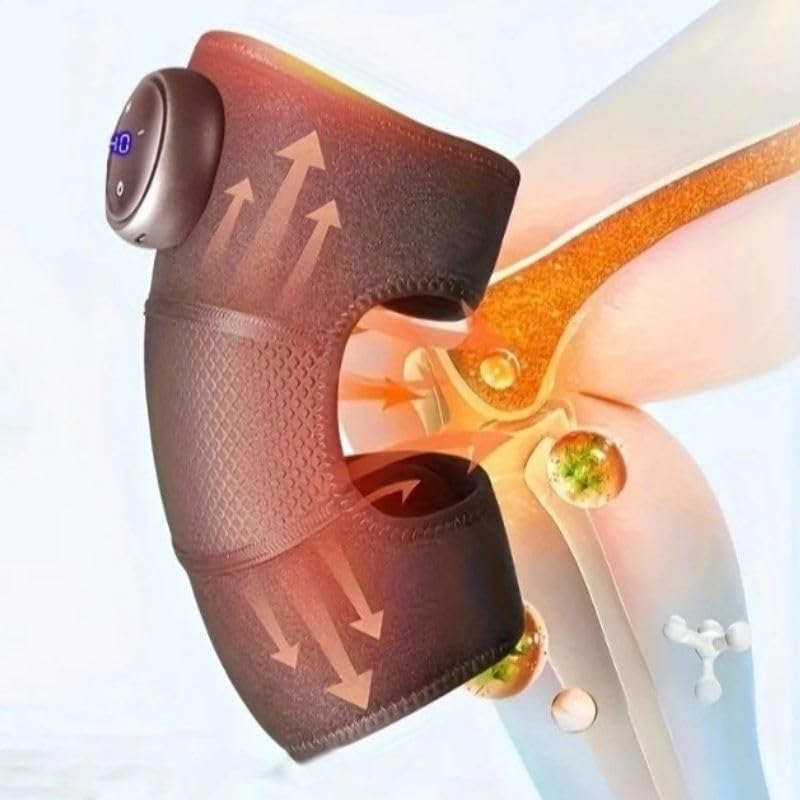
This image highlights the device's control panel with a digital display and buttons, along with the magnetic battery compartment for wireless operation.

А деталдуу view of the massager's fabric, emphasizing its comfortable, breathable, and non-stuffy texture.
3. Орнотуу
3.1 Аппаратты заряддоо
- Locate the charging port on the massager unit.
- Connect the USB charging cable to the device and to a compatible USB power adapter (not included) or computer USB port.
- The LED indicator on the control panel will show charging status. A full charge typically takes several hours.
- Батареянын иштөө мөөнөтүн оптималдаштыруу үчүн, түзмөктү биринчи жолу колдонуудан мурун толук заряддалганын текшериңиз.
3.2 Attaching to the Knee
- Unfold the knee massager.
- Position the main unit over your knee, ensuring the massage elements are centered.
- Secure the massager using the adjustable straps, ensuring a snug but comfortable fit. Do not overtighten.
4. Иштөө нускамалары
4.1 Күйгүзүү/өчүрүү
- To turn on: Press and hold the Power button (usually marked with a circle or power symbol) on the control panel for 2-3 seconds. The LED display will illuminate.
- To turn off: Press and hold the Power button again for 2-3 seconds. The display will turn off.
4.2 Adjusting Massage Intensity
- Once powered on, press the Intensity button (usually marked with '+' or '-') to cycle through the 3 available intensity levels.
- The current intensity level will be indicated on the LED display.
4.3 Activating Heating Function
- Press the Heat button (usually marked with a wave or heat symbol) to activate or deactivate the integrated heating function.
- The heating indicator on the display will light up when active.
4.4 Automatic Timer
The device is equipped with an automatic 15-minute timer. After 15 minutes of continuous operation, the massager will automatically shut off. You can restart the device for another session if desired, but it is recommended to take breaks between sessions.
5. Техникалык тейлөө
5.1 Тазалоо
- Тазалоодон мурун аппараттын өчүрүлгөнүн жана розеткадан ажыратылганын текшериңиз.
- Массажердин бетин жумшак, г менен сүртүңүзamp кездеме.
- Абразивдүү тазалагычтарды, эриткичтерди же катуу химиялык заттарды колдонбоңуз.
- Аппаратты сууга салбаңыз.
5.2 Сактоо
- Аппаратты салкын, кургак жерде, тике күн нурунан жана экстремалдык температурадан алыс сактаңыз.
- Keep it away from sharp objects that could damage the fabric or internal components.
6. Кыйынчылыктарды
| Көйгөй | Мүмкүн себеп | Чечим |
|---|---|---|
| Түзмөк күйбөй жатат. | Батарея аз же түзмөк кубатталган эмес. | Аппаратты толук заряддаңыз. Кубат баскычы басылып, 2-3 секунд кармап турушун текшериңиз. |
| Жылуулук жок же алсыз жылуулук жок. | Heating function not activated or low battery. | Ensure the heat button is pressed. Charge the device. |
| Массаждын интенсивдүүлүгү өтө алсыз/күчтүү. | Туура эмес интенсивдүүлүк жөндөлгөн. | Adjust the intensity using the '+' or '-' buttons. |
| Түзмөк күтүлбөгөн жерден токтойт. | Automatic 15-minute timer activated or low battery. | This is normal operation due to the timer. Recharge the device if the battery is low. |
7. Техникалык шарттар
| Модель номери | HX-601/603 |
| Бренд | Жалпы |
| Power Source | Батарея менен иштейт |
| Тtage | 5V |
| Күч | 7W |
| Продукциянын өлчөмдөрү | 25 x 14 x 8 см |
| Продукт Салмагы | 100 грамм |
| Материал | Electronic Components, Plastic, Fabric |
| Таймер | 15 minutes (automatic shut-off) |
| Интенсивдүүлүк деңгээли | 3 |
| Келип чыккан өлкө | Бразилия |
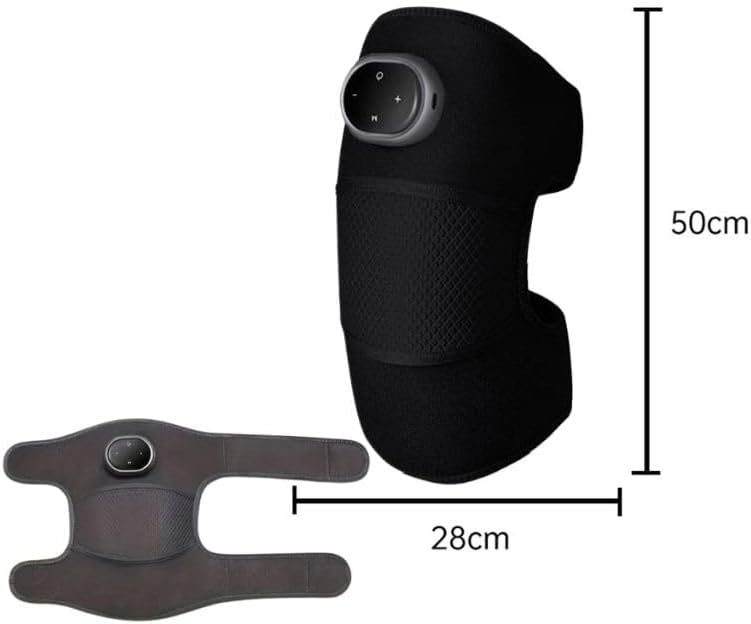
This image provides the physical dimensions of the knee massager, indicating a length of 50cm and a width of 28cm when laid flat.
8. Кепилдик жана колдоо
This product is manufactured by Knee. For warranty information or technical support, please contact your retailer or the manufacturer directly. Please retain your proof of purchase.
Эскертүү: Кепилдиктин конкреттүү шарттары аймакка жана сатуучуга жараша өзгөрүшү мүмкүн.


