
Introduction
This manual provides instructions for the setup, operation, maintenance, and troubleshooting of your ATTACK SHARK V5 Wireless Gaming Mouse. Please read this manual carefully before using the product to ensure optimal performance and longevity.

Image: The ATTACK SHARK V5 Wireless Gaming Mouse, highlighting its 8000Hz wireless polling rate capability.
Жайгашуу
Пакеттин мазмуну
- ATTACK SHARK V5 Wireless Gaming Mouse
- USB кабыл алгыч (2.4 ГГц)
- USB-C заряддоо/дата кабели
- User Manual
Байланыш режимдери
The ATTACK SHARK V5 mouse supports three connectivity modes: Wired, 2.4GHz Wireless, and Bluetooth.
- 2.4 ГГц зымсыз режими: Insert the USB receiver into an available USB port on your computer. The mouse will automatically connect. The transparent LED lighting on the receiver indicates connection status.
- Bluetooth режими: Switch the mouse to Bluetooth mode. On your computer or device, search for Bluetooth devices and select "ATTACK SHARK V5" to pair.
- Зымдуу режим: Connect the mouse to your computer using the provided USB-C cable. This mode also charges the mouse.

Image: The ATTACK SHARK V5 mouse connected via its USB-C cable and showing the 2.4GHz wireless receiver, illustrating its triple-mode connectivity.
Драйверди орнотуу
The mouse supports cloud-driven technology, which automatically identifies devices upon connection. For advanced customization, independent driver software is available for download from the official ATTACK SHARK website. This software allows for optimization of response speed, accuracy, and programmable features.
Иштөө нускамалары
DPI тууралоо
The PixArt 3950MAX sensor offers a DPI range of up to 42,000. DPI settings can be adjusted in precise 50 DPI increments using the dedicated driver software. The mouse typically has a DPI button for on-the-fly adjustments through preset levels.
Добуш берүү көрсөткүчү
The mouse features an 8000Hz polling rate in wireless mode and a 1000Hz polling rate in wired mode. This high polling rate ensures rapid and responsive cursor movement.
Programmable Buttons and Macros
The ATTACK SHARK V5 has 6 buttons. Utilize the downloadable software to customize button functions, create macros, and adjust other settings such as DPI speed and lighting effects. This software provides a comprehensive interface for personalizing your mouse experience.
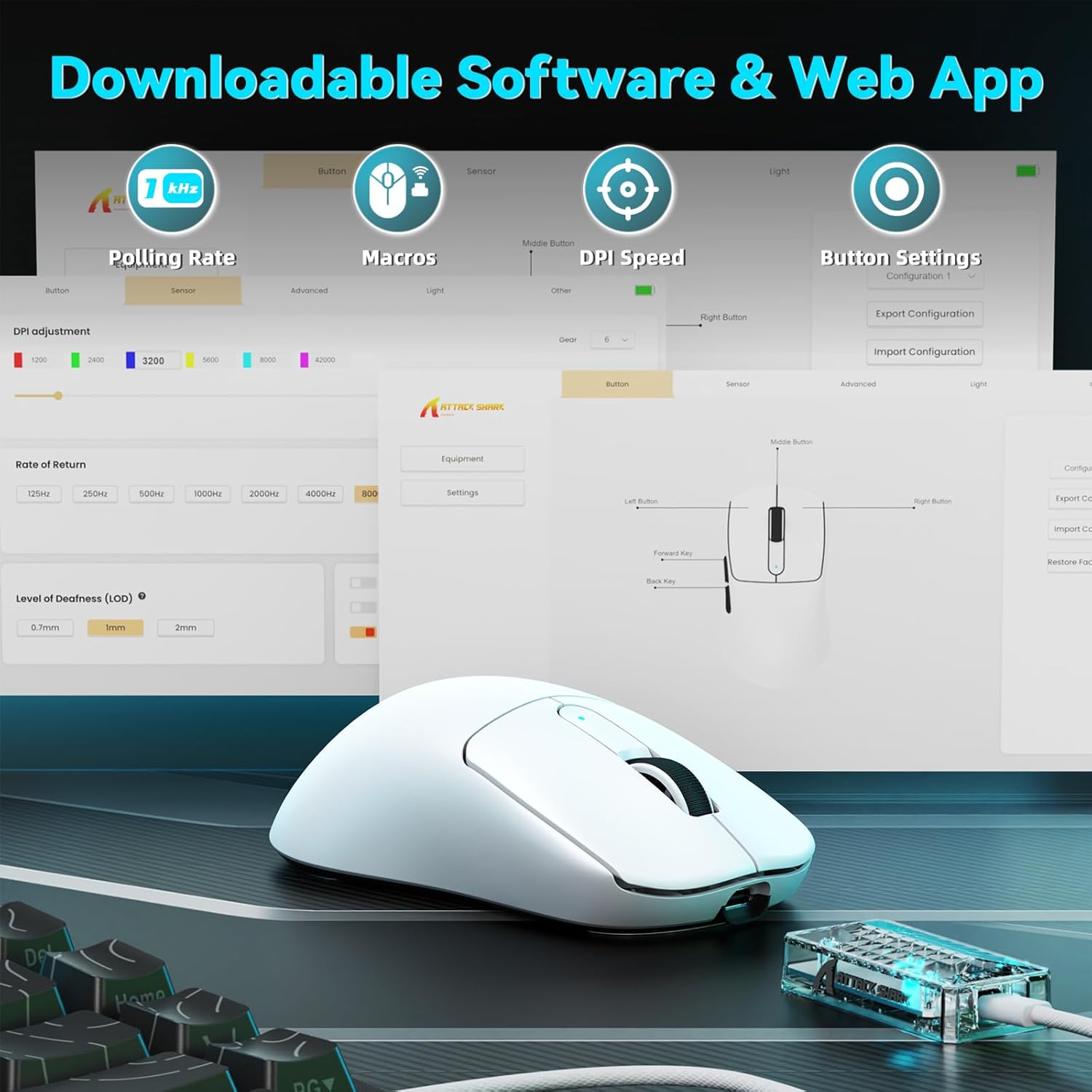
Image: A visual representation of the downloadable software interface, showing options for polling rate, macros, DPI speed, and button settings.
Батарея башкаруу
The mouse is equipped with a 500mAh battery, providing extended usage. To charge, connect the mouse using the USB-C cable. The LED indicator on the mouse will show charging status.

Сүрөт: ички view of the ATTACK SHARK V5 mouse, highlighting its high-capacity 500mAh battery.
Техникалык тейлөө
Тазалоо
Оптималдуу иштөөсүн жана көрүнүшүн сактоо үчүн, чычканды үзгүлтүксүз тазалап туруңуз. Бетин жумшак, кургак чүпүрөк менен сүртүңүз. Өжөр кир үчүн, бир азamp чүпүрөк колдонсо болот, ички компоненттерге ным кирбесин. Катуу химиялык заттардан же абразивдүү материалдардан алыс болуңуз.
Nano Ice-Sense Coating
The mouse features a nano ice-sense coating designed to prevent slippage and ensure a firm grip, even during extended use or with sweaty hands. This coating requires no special maintenance beyond regular cleaning.
Проблемаларды чечүү
Чычкан жооп бербейт
- Байланыштуулугун текшерүү: Ensure the USB receiver is properly inserted for 2.4GHz mode, or that the USB-C cable is securely connected for wired mode. For Bluetooth, verify the mouse is paired and selected in your device's Bluetooth settings.
- Батарея деңгээли: If in wireless mode, check the mouse's battery level. Connect the USB-C cable to charge if the battery is low.
- Кайра баштоо: Компьютериңизди же түзмөгүңүздү өчүрүп-күйгүзүп көрүңүз.
- Айдоочу: Ensure the necessary drivers are installed and up to date.
Inconsistent Tracking or Lag
- Бети: Чычканды таза, бирдей бетте колдонуңуз. Өтө жарык чагылдыруучу же тунук беттерден алыс болуңуз.
- Интерференция: For wireless modes, ensure there are no strong sources of wireless interference nearby (e.g., other 2.4GHz devices, Wi-Fi routers).
- DPI жөндөөлөрү: Adjust DPI settings via the software to find a comfortable and stable tracking speed.
Техникалык шарттар
| Өзгөчөлүк | Деталь |
|---|---|
| Бренд | ATTACK SHARK |
| Модел | V5 |
| Түс | Ак |
| Байланыш | Зымдуу (USB-C), 2.4 ГГц зымсыз, Bluetooth |
| Сенсор | PixArt 3950MAX |
| DPI диапазону | Up to 42,000 (50 DPI adjustable) |
| Зымсыз добуш берүү ылдамдыгы | 8000Hz |
| Зымдуу добуш берүү көрсөткүчү | 1000Hz |
| Салмагы | Болжол менен 55 грамм |
| Которгучтар | Optical, 100 million click lifespan |
| Ылдамдатуу | 60G |
| Кодер | Richwell's 200W |
| Батарея сыйымдуулугу | 500mAh |
| баскычтардын саны | 6 |
| Колдун багыты | Туура |
| Шайкеш операциялык системалар | Windows, macOS, Linux (e.g., Mac OS 14 Sonoma, Ubuntu 22.04 Jammy Jellyfish, Windows 11) |
| Зымсыз диапазон | 10 метр |
| Материал | Пластик |
| UPC | 752010843312 |
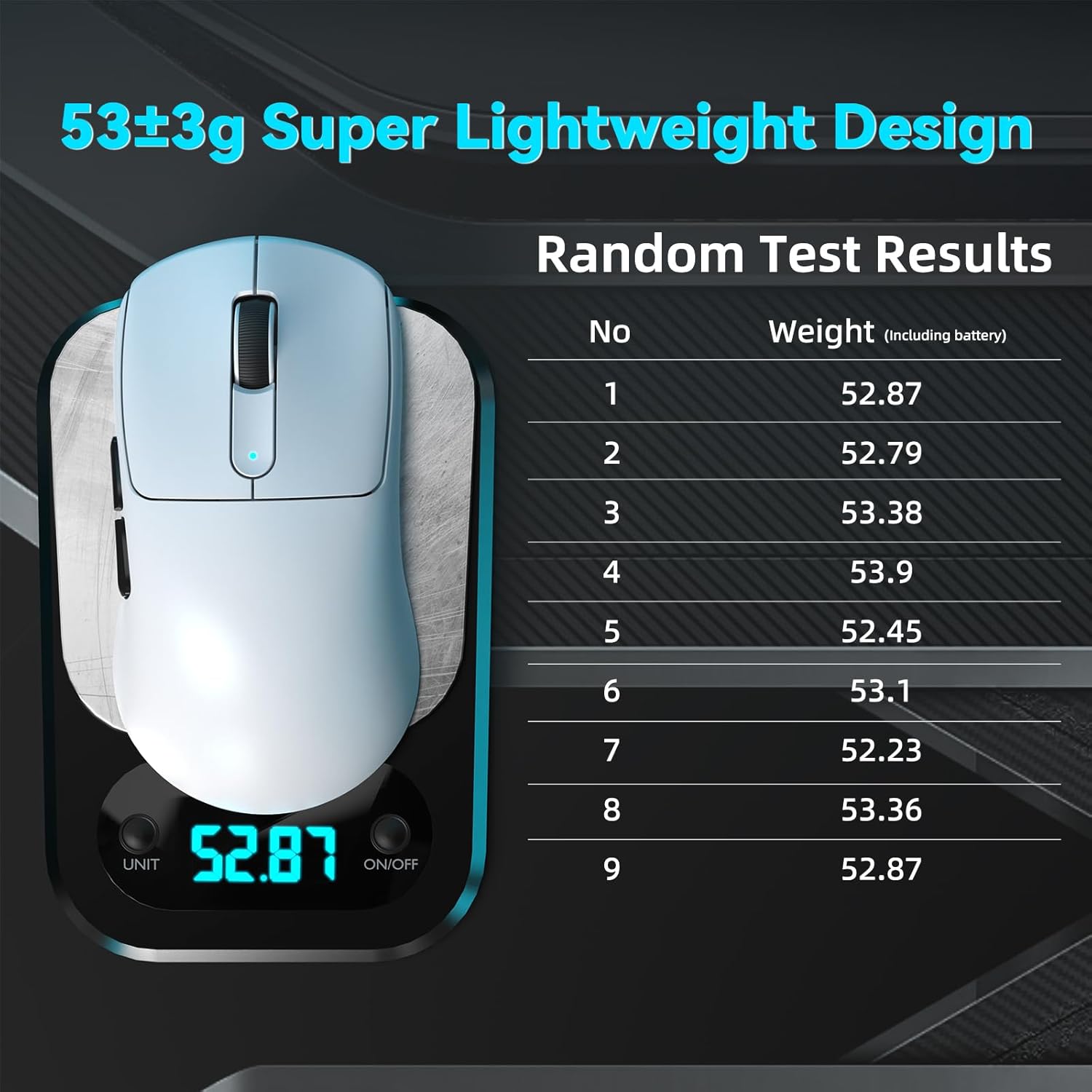
Image: The ATTACK SHARK V5 mouse on a digital scale, demonstrating its ultra-lightweight design at approximately 53 grams.

Сүрөт: деталдуу view of the Omron Optical Microswitch used in the ATTACK SHARK V5 mouse, known for its durability and precise clicks.
Кепилдик жана колдоо
Кепилдик маалымат
The ATTACK SHARK V5 Wireless Gaming Mouse comes with a 1 жылдык Өндүрүүчүнүн Кепилдиги. Бул кепилдик нормалдуу колдонуудагы материалдардагы жана жасалгадагы кемчиликтерди камтыйт. Кепилдик дооматтары үчүн сатып алганыңыздын далилин сактап коюңуз.
Кардарларды колдоо
For technical assistance, troubleshooting, or warranty inquiries, please visit the official ATTACK SHARK website or contact their customer support directly. Refer to the product packaging or the official webакыркы байланыш маалыматы үчүн сайт.