
1. Киришүү
This manual provides detailed instructions for the installation, operation, and maintenance of your UNITOPSCI 8 Core 4G+64G Android 15 Car Stereo. Please read this manual thoroughly before using the product to ensure proper function and safety. Keep this manual for future reference.
2. Коопсуздук маалыматы
- Кесиптик орнотуу сунушталат: Installation of this car stereo requires technical knowledge and experience. It is highly recommended to have it installed by a qualified professional.
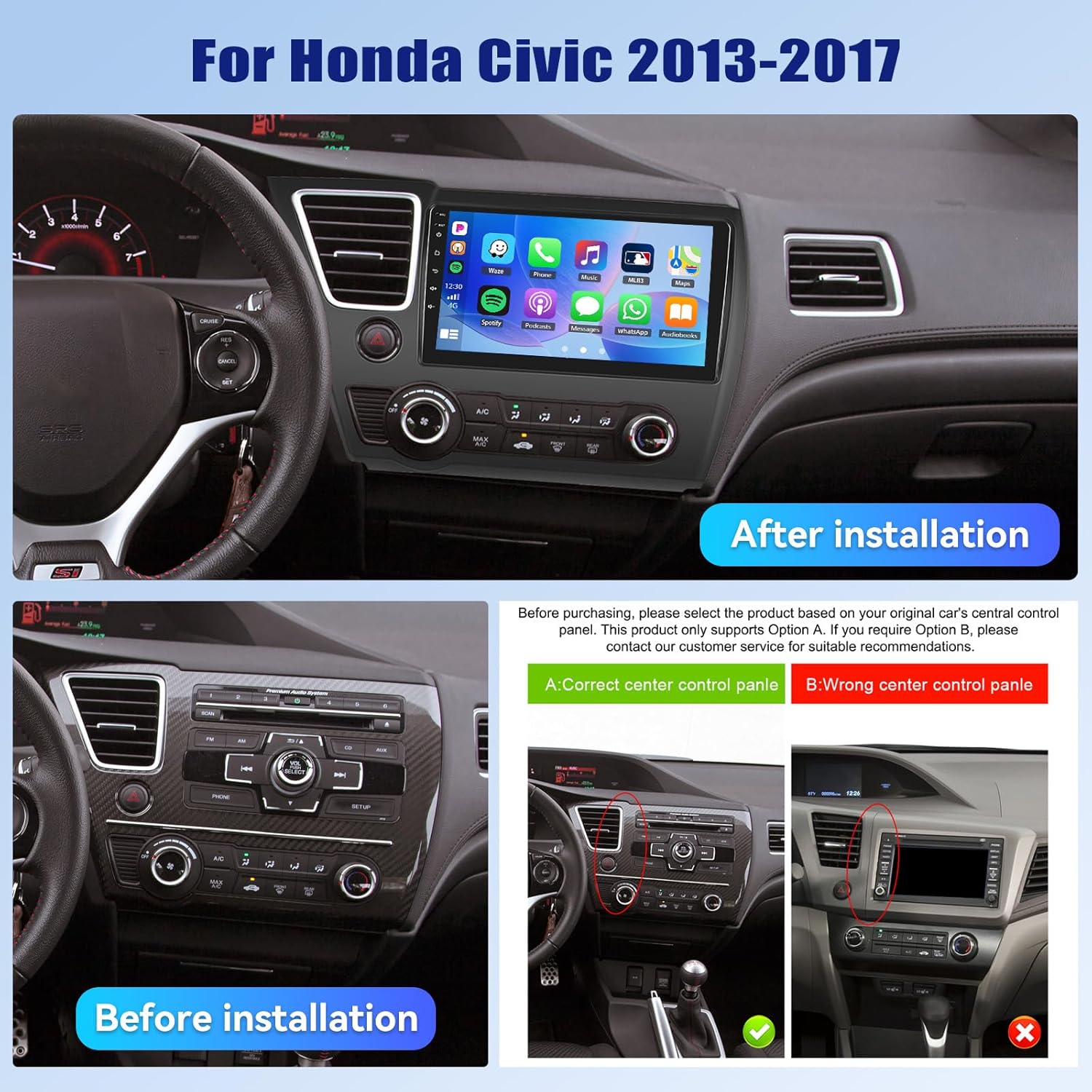
- Унаа шайкештиги: This unit is designed specifically for Honda Civic models from 2013 to 2017. Verify compatibility with your vehicle's center console before installation.
- Электр камсыздоо: Ensure the vehicle's power supply is disconnected before beginning installation to prevent electrical shock or damage.
- Зымдар: Follow the provided wiring diagram carefully. Incorrect wiring can cause damage to the unit or vehicle.
- Operation While Driving: Агрегатты айдоодон алаксыта тургандай иштетпеңиз. Ар дайым жол коопсуздугун биринчи орунга коюу.
- Температура: Аппаратты экстремалдык температурага же түз күн нуруна узак убакытка калтыруудан сактаңыз.
3. Пакеттин мазмуну
Пакетте бардык буюмдар бар экенин текшериңиз:
- 1 x Унаа радиосу
- 1 x Кубат кабели
- 1 x Арткы унаа View Камера
- 1 x Орнотуу куралдарынын топтому
- 1 x GPS антеннасы
- 1 x Арткы камеранын киргизүү кабели
- 1 x RCA кабели
- 2 x USB кабели
- 1 x User Manual
- 1 x Микрофон
- 1 x Original Car USB & Radio Adapter Cable
- 1 x Canbus декодери

4. Продукт бүтүп калдыview
4.1 Негизги өзгөчөлүктөрү
- Операция системасы: Android 15
- Процессор: Qualcomm 8-Core Chip
- Эстутум: 4 ГБ RAM + 64 ГБ ROM
- Дисплей: 9-inch 1280x720P IPS Capacitive Touchscreen
- Байланыш: Bluetooth 5.1, Dual-Band WiFi (2.4GHz & 5GHz)
- Смартфон интеграциясы: Wireless/Wired Apple CarPlay, Wireless/Wired Android Auto, Mirror Link
- Аудио: Built-in DSP (Digital Sound Processor)
- Навигация: GPS Navigation (supports online and offline maps)
- Радио: FM/RDS радиосу
- Камераны колдоо: AHD Backup Camera (included)
- Кошумча өзгөчөлүктөр: Steering Wheel Control (SWC), Built-in Cooling Fan, Picture-in-Picture, Customizable UI.


5. Орнотуу боюнча колдонмо
5.1 Орнотууга чейинки текшерүү
Before proceeding with installation, ensure your Honda Civic's center console matches the compatible design. Refer to the image below for guidance.
5.2 Электр өткөргүч схемасы
A detailed wiring diagram is typically included with your product. Connect the power cable, speaker wires, GPS antenna, USB cables, rear camera input, and other accessories according to the diagram. Ensure all connections are secure to prevent malfunctions.
5.3 Физикалык орнотуу
- Этияттык менен баштапкы унаа стерео жана кыркуучу панелдерди алып салуу.
- Connect the new car stereo's wiring harness to the vehicle's existing harness, matching colors and connectors.
- GPS антеннасын ачык жерге орнотуңуз view асмандын.
- Route the rear camera cable and install the camera (if applicable).
- Жаңы унаа стереосун аспаптар тактасынын тешигине бекем орнотуңуз.
- Бардык трим панелдерин кайра орнотуңуз.
- Reconnect the vehicle's power supply.
6. Баштапкы орнотуу
Upon first power-on, the system may guide you through an initial setup process. This typically includes:
- Тил тандоо: Өзүңүзгө жаккан тилди тандаңыз.
- Убакыт жана дата: Set the correct time zone, date, and time.
- WiFi туташуусу: Connect to a stable Wi-Fi network to enable online features and app downloads.
- GPS калибрлөө: Allow the GPS system to acquire satellite signals for accurate positioning.
7. Иштөө нускамалары
7.1 Колдонуучу интерфейсин ыңгайлаштыруу
The car stereo offers various customization options for its user interface.
- Shaderlab Topics: Adjust the UI color and font color to your preference.
- Терезе дизайны: Select from different themes (Card, SplitView, Wallpaper) and layouts for easy operation.
- 3D Car Dynamic Effects: Customize the displayed 3D car model, including its color and type (Car, MPV, SUV).


7.2 Bluetooth 5.1
Connect your smartphone via Bluetooth for hands-free calling, music playback, and access to your phone's contacts and call history. Bluetooth 5.1 offers improved range and stability.

7.3 FM/RDS радиосу
Tune into your favorite radio stations. The RDS (Radio Data System) feature provides additional information such as station name, song title, and traffic updates where available.

7.4 Wireless CarPlay & Android Auto
Connect your iPhone or Android smartphone wirelessly or via USB to access CarPlay or Android Auto. This allows for hands-free calls, navigation, music streaming, and voice commands (Siri or Google Assistant).

Video 7.1: Wireless CarPlay Radio Operation Guide with Qualcomm Chips. This video demonstrates the setup and usage of the Wireless CarPlay feature on the UNITOPSCI car stereo, highlighting its responsiveness and ease of use.
7.5 Mirror Link
Mirror Link allows you to display your smartphone screen directly onto the car stereo. Android users can also control their phone applications directly from the car's touchscreen.
7.6 GPS навигациясы
The unit supports both online and offline navigation. Connect to Wi-Fi for real-time traffic updates and precise route guidance. Pre-installed maps or downloadable map applications can be used.

7.7 DSP аудио иштетүү
The built-in Digital Sound Processor (DSP) allows for advanced audio tuning. Adjust equalization, sound field modes, and speaker settings to achieve strong bass, soft midrange, and clear treble for a personalized audio experience.

7.8 Cooling Fan Settings
The integrated cooling fan system helps maintain optimal operating temperature for the radio. You can monitor the temperature and adjust fan settings (e.g., Auto/On) to ensure stable performance.
7.9 Сүрөт ичиндеги сүрөт (PIP)
"Сүрөт ичиндеги сүрөт" функциясы сизге төмөнкүлөрдү мүмкүндүк берет view video content simultaneously while performing other operations, such as navigation or music playback.
7.10 AHD камдык камера
The included AHD wide-angle backup camera provides clear night vision and is waterproof. It assists with parking by displaying a real-time view of the area behind your vehicle with parking guidelines. Note: Does not support original car camera.

7.11 Рулду башкаруу (SWC)
Utilize your vehicle's existing steering wheel buttons to control various functions of the car stereo, such as adjusting volume, changing tracks, and answering calls. This enhances convenience and safety while driving.

7.12 Бөлүнгөн экран
The split-screen function allows for simultaneous display of two applications, such as navigation and music, for convenient multitasking.
8. Кыйынчылыктарды
| Көйгөй | Мүмкүн себеп | Чечим |
|---|---|---|
| Түзмөк күйбөйт | туура эмес зымдар; күйгөн сактагыч; Электр энергиясы жетишсиз. | Check power connections and fuses. Ensure proper voltage. Consult a professional if unsure. |
| Үн жок | Динамиктин зымдары ажыратылган; Үнү өтө төмөн; Үнсүз режим иштетилген. | Verify speaker connections. Increase volume. Deactivate mute. Check DSP settings. |
| Bluetooth туташпай жатат | Bluetooth off on phone/unit; Device not in pairing mode; Interference. | Ensure Bluetooth is enabled on both devices. Put unit in pairing mode. Try pairing in a different location. |
| GPS сигналы жоголду/так эмес | GPS antenna obstructed; Antenna faulty; Software issue. | Relocate GPS antenna to a clear area. Check antenna connection. Update navigation software. |
| Сенсордук экран жооп бербейт | System frozen; Screen calibration needed. | Бирдикти кайра иштетиңиз. Эгер маселе чечилбесе, баштапкы абалга келтириңиз (жөндөөлөр менюсун караңыз). |
| Арткы камера көрүнбөйт | Camera cable disconnected; Camera faulty; Incorrect settings. | Check camera input cable connection. Verify camera power. Ensure reverse gear signal is connected. |
9. Техникалык шарттар
- Элемент Салмагы: 4.36 фунт
- Пакеттин өлчөмдөрү: 15.35 x 9.65 x 3.35 дюйм
- Дисплей өлчөмү: 9 дюйм
- Экрандын өлчөмү: 9 дюйм
- Операция системасы: Android
- Эстутум сактоо сыйымдуулугу: 64 ГБ
- Screen Түрү тийип: Capacitive
- Байланыш технологиясы: Bluetooth, WiFi
- Карта түрү: Түндүк Америка, дүйнө жүзү боюнча
- Аудио чыгаруу режими: Стерео
10. Кепилдик жана колдоо
UNITOPSCI offers the following support for this product:
- Кепилдик: 1-Year Manufacturer's Warranty.
- Акчаны кайтарып берүү кепилдиги: 30-day money-back service.
- Алмаштыруу кызматы: 12 айлык алмаштыруу кызматы.
- Сатуудан кийинки колдоо: Dedicated 24/7 professional after-sales team available to assist with installation or usage inquiries.
For online support, please contact: UNITOPSCI@126.com