Introduction
Thank you for choosing the EUQQ YYK-Q10 AI Translator Earbuds. These earbuds are designed to provide seamless real-time language translation, high-quality audio, and effective noise cancellation, making them ideal for communication across language barriers, business meetings, and everyday use. This manual will guide you through the setup, operation, and maintenance of your new device to ensure optimal performance and user experience. Please read this manual thoroughly before using the product.
Пакеттин мазмуну
Сураныч, пакетте төмөнкү нерселерди текшериңиз:
- EUQQ YYK-Q10 AI Translator Earbuds (L/R)
- Заряддоо кутусу
- USB заряддоо кабели
- Кулак учтарынын бир нече өлчөмү
- User Manual
Эгерде кандайдыр бир нерселер жок болсо же бузулса, кардарларды колдоо менен байланышыңыз.
Продукт бүттүview
The EUQQ YYK-Q10 features a compact design with intuitive controls and a smart charging case. Familiarize yourself with the components below.
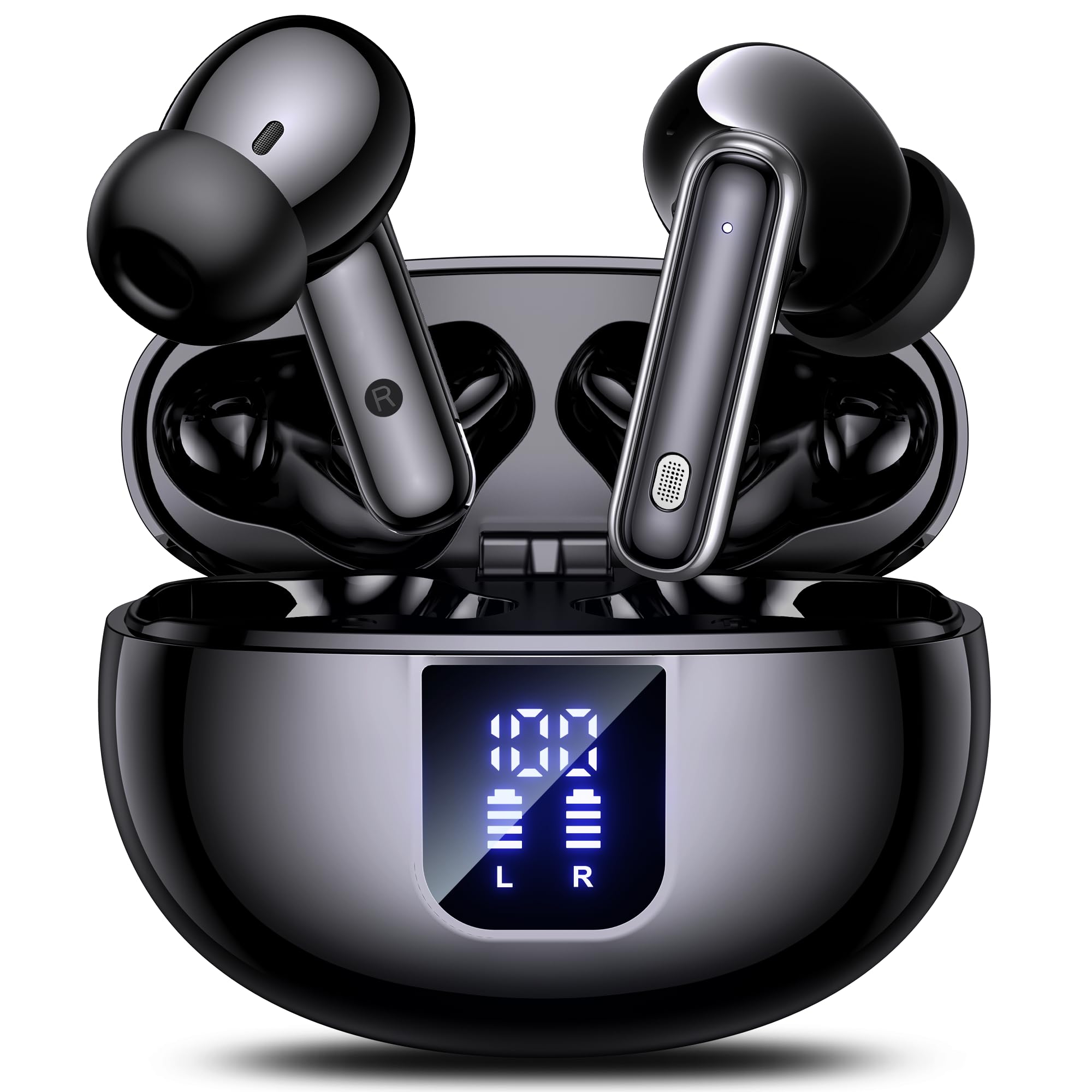
Image: The EUQQ YYK-Q10 AI Translator Earbuds are shown inside their open charging case. The case is black and features a digital display on the front, indicating battery levels for both the case and individual earbuds (L and R). The earbuds themselves are black with silver accents.
Негизги компоненттер:
- Кулакчындар: Left (L) and Right (R) earbuds with touch control areas and microphones.
- Заряддоо кутусу: Stores and charges the earbuds. Features a digital display for battery status.
- Заряддоо порту: USB-C port on the charging case for power input.
- LED көрсөткүчтөрү: On earbuds and case to show charging status and connection.
Жайгашуу
1. Баштапкы заряддоо
- Кулакчындардын экөөнү тең зарядкага салыңыз.
- USB кубаттоо кабелин корпустагы кубаттоо портуна жана кубат булагына туташтырыңыз.
- The digital display on the case will show the charging status. Ensure both earbuds and the case are fully charged before first use (approximately 1-2 hours).
2. Bluetooth Жупташтыруу
- Кубаттоочу кутучаны ачыңыз. Кулакчындар автоматтык түрдө жупташтыруу режимине өтөт, бул күйүп-өчкөн LED жарыктары менен көрсөтүлөт.
- Смартфонуңузда же түзмөгүңүздө Bluetooth иштетиңиз жана жеткиликтүү түзмөктөрдү издеңиз.
- Select "EUQQ YYK-Q10" from the list of devices.
- Once connected, the earbud LEDs will stop flashing, and a voice prompt will confirm the connection.
3. App Installation (for Translation Features)
To utilize the real-time translation features, download the dedicated EUQQ translation app from your device's app store (iOS App Store or Google Play Store). Follow the in-app instructions to connect your earbuds and configure language settings.
Иштөө нускамалары
Күйгүзүү/өчүрүү
- Күйгүзүү: Заряддоо кутучасын ачыңыз же кулакчындарды кутудан чыгарып алыңыз. Алар автоматтык түрдө күйөт.
- Өчүрүү: Кулакчындарды кайра заряддоо кутусуна салып, капкагын жабыңыз. Алар автоматтык түрдө өчүрүлөт.
Music Playback Controls (Touch Controls)
- Ойнотуу/тындыруу: Кулакчындарды бир жолу таптаңыз.
- Кийинки трек: Оң кулакчынды эки жолу таптаңыз.
- Мурунку трек: Сол кулакчынды эки жолу таптаңыз.
- Көлөмү: Оң кулакчынды үч жолу таптаңыз.
- Үнүн азайтуу: Сол кулакчынды үч жолу таптаңыз.
Чалууларды башкаруу (сенсордук башкаруу)
- Чалууга жооп берүү/аяктоо: Кулакчындарды бир жолу таптаңыз.
- Чакырууну четке кагуу: Кулакчындардын бирин 2 секунд басып туруңуз.
Translation Mode
Activate translation mode through the dedicated EUQQ app. The app will guide you through selecting source and target languages. Depending on the app's features, you may use different modes:
- Сүйлөшүү режими: Speak into your earbud's microphone, and the translation will be played through the other person's earbud or your phone's speaker.
- Котормочу режими: One person wears an earbud, the other speaks into the phone.
- Touch-to-Speak Mode: Tap an earbud to speak, release to translate.
Refer to the EUQQ app's help section for detailed instructions on specific translation modes and features.
Noise Cancellation
The earbuds feature dual-mic noise cancelling. This feature is typically active by default or can be toggled via the companion app. It helps reduce ambient noise during calls and translation sessions for clearer communication.
Техникалык тейлөө
- Тазалоо: Кулакчындарды жана заряддоо кутусун жумшак, кургак, түксүз чүпүрөк менен дайыма тазалап туруңуз. Катуу химиялык заттарды же абразивдүү материалдарды колдонбоңуз.
- Кулак кеңештери: Кулактардын учун мезгил-мезгили менен суу жана жумшак самын менен алып салып, тазалап туруңуз. Кайрадан орнотуудан мурун алардын толугу менен кургаганын текшериңиз.
- Заряддоо байланыштары: Туура заряддоону камсыз кылуу үчүн кулакчындардагы жана кутудагы заряддоо контакттарын кургак кебез тампон менен акырын тазалаңыз.
- Сактагыч: Колдонулбай турган учурда, кулакчындарды коргоо жана кубаттоо үчүн кубаттоочу кутучасында сактаңыз. Ашыкча температурадан жана нымдуулуктан алыс болуңуз.
Проблемаларды чечүү
| Көйгөй | Чечим |
|---|---|
| Кулакчындар жупташкан жок |
|
| Үн жок же үнү төмөн |
|
| Заряддоо маселелери |
|
| Котормо иштебейт |
|
Техникалык шарттар
| Өзгөчөлүк | Деталь |
|---|---|
| Бренд | EUQQ |
| Модель аты | YYK-Q10 |
| Байланыш технологиясы | Зымсыз |
| Наушник форма фактору | In-Ear |
| Түс | Кара |
| Камтылган компоненттер | Instruction Manual (and other standard accessories like earbuds, case, cable, ear tips) |
| Элементтердин саны | 1 (product unit) |
| Батареялар талап кылынат | No (built-in rechargeable) |
| Өндүрүүчү моделдин номери | YYK-Q10 |
| Пакеттин өлчөмдөрү | 0.1 x 0.1 x 0.1 см; 45.36 г |
| ASIN | B0FN3WC8LW |
Кепилдик маалымат
The EUQQ YYK-Q10 AI Translator Earbuds come with a standard manufacturer's warranty. For detailed information regarding warranty coverage, terms, and conditions, please refer to the warranty card included in your package or visit the official EUQQ webсайт. Кепилдик дооматтары үчүн сатып алганыңыздын далилин сактап коюңуз.
Кардарларды колдоо
If you encounter any issues or have questions regarding your EUQQ YYK-Q10 AI Translator Earbuds, please do not hesitate to contact our customer support team. You can find contact information on the official EUQQ website or through the support section of the EUQQ translation app.
Онлайн ресурстар:
- Official EUQQ Webсайт: Visit EUQQ Store on Amazon
- EUQQ Translation App (for in-app support)