
Introduction
This manual provides essential information for the setup, operation, and maintenance of your WalkerFit M6 GPS Smart Watch. Designed for active users, this smartwatch features multi-satellite positioning, a durable full-metal body, long battery life, 5ATM water resistance, Bluetooth calling, and a vibrant 1.43-inch AMOLED screen. Please read this manual thoroughly to ensure proper usage and to maximize your device's capabilities.
Пакеттин мазмуну
Төмөндө тизмеленген нерселердин баары сиздин продукт кутучада бар экенин текшериңиз:
- 1x WalkerFit M6 GPS Smart Watch
- 1x Magnetic Base Charger
- 1x Колдонуучунун колдонмосу
- 1x Black Silicone Band
- 1x Camouflage Band

Image: Contents of the WalkerFit M6 GPS Smart Watch package, showing the watch, magnetic charger, user manual, and two interchangeable bands.
Жайгашуу
Баштапкы заряддоо
Before first use, fully charge your WalkerFit M6 GPS Smart Watch. Connect the magnetic charging cable to the charging points on the back of the watch and plug the USB end into a compatible power source. A full charge typically takes approximately 2.5 hours.
Күйгүзүү/өчүрүү
- Күйгүзүү үчүн: Press and hold the power button (typically the top right button) until the screen illuminates.
- Өчүрүү үчүн: Press and hold the power button, then select the 'Power Off' option on the screen.
Video: Instructions on how to power on the WalkerFit M6 GPS Smart Watch.
Колдонмону жүктөп алуу жана жупташтыруу
To unlock the full functionality of your smartwatch, download the companion app. The app is compatible with both Android and iPhone devices.
- Scan the QR code provided in the user manual or on the watch screen to download the 'FitCloudPro' app from your device's app store.
- "FitCloudPro" колдонмосун ачып, аккаунт түзүү же кирүү үчүн экрандагы көрсөтмөлөрдү аткарыңыз.
- Смартфонуңузда Bluetooth'ду иштетиңиз.
- Within the app, navigate to the 'Device' section and select 'Add Device' or 'Scan for Device'.
- Select 'M6 GPS' from the list of available devices to initiate pairing. Confirm the pairing request on both your smartphone and the smartwatch.
Иштөө нускамалары
Навигация жана дисплей
- Сенсордук экран: Swipe left, right, up, or down to navigate through menus and features. Tap to select options.
- Физикалык баскычтар: The watch features multiple physical buttons for quick access to functions like Sport mode, Menu, and Back.
- Ыңгайлаштырылган саат жүздөрү: Change your watch face directly from the device settings or through the companion app to personalize your display.

Image: The 1.43-inch AMOLED display of the WalkerFit M6 GPS Smart Watch, showcasing different customizable watch faces and the Always-On Display feature.
Multi-Satellite GPS and Outdoor Features
The WalkerFit M6 GPS Smart Watch is equipped with advanced multi-system positioning (GPS, GLONASS, Galileo, BeiDou) for accurate outdoor tracking. It also includes a built-in compass, altimeter, and barometer.
- Route Recording: Activate a sports mode (e.g., hiking, trail running, cycling) to automatically record your route, distance, and other metrics using GPS.
- Экологиялык маалымдуулук: Utilize the compass for real-time directional guidance, the altimeter to track elevation changes, and the barometer to monitor air-pressure trends.

Image: A user wearing the WalkerFit M6 GPS Smart Watch while hiking, demonstrating its multi-satellite GPS tracking capabilities, compass, altimeter, and barometer features.
Sports Modes and Health Tracking
Access over 170 indoor and outdoor sports modes directly from your watch. The device continuously monitors various health metrics.
- Спорт режимдери: Select your desired activity (e.g., running, cycling, swimming, strength training) to track performance data such as heart rate, calories burned, and duration.
- Daily Wellness: The watch provides all-day tracking for heart rate, SpO₂, sleep patterns, stress levels, and activity trends. Review detailed insights in the companion app.

Image: A user engaging in water sports while wearing the WalkerFit M6 GPS Smart Watch, highlighting its 5ATM waterproof rating and the availability of over 170 sports modes.
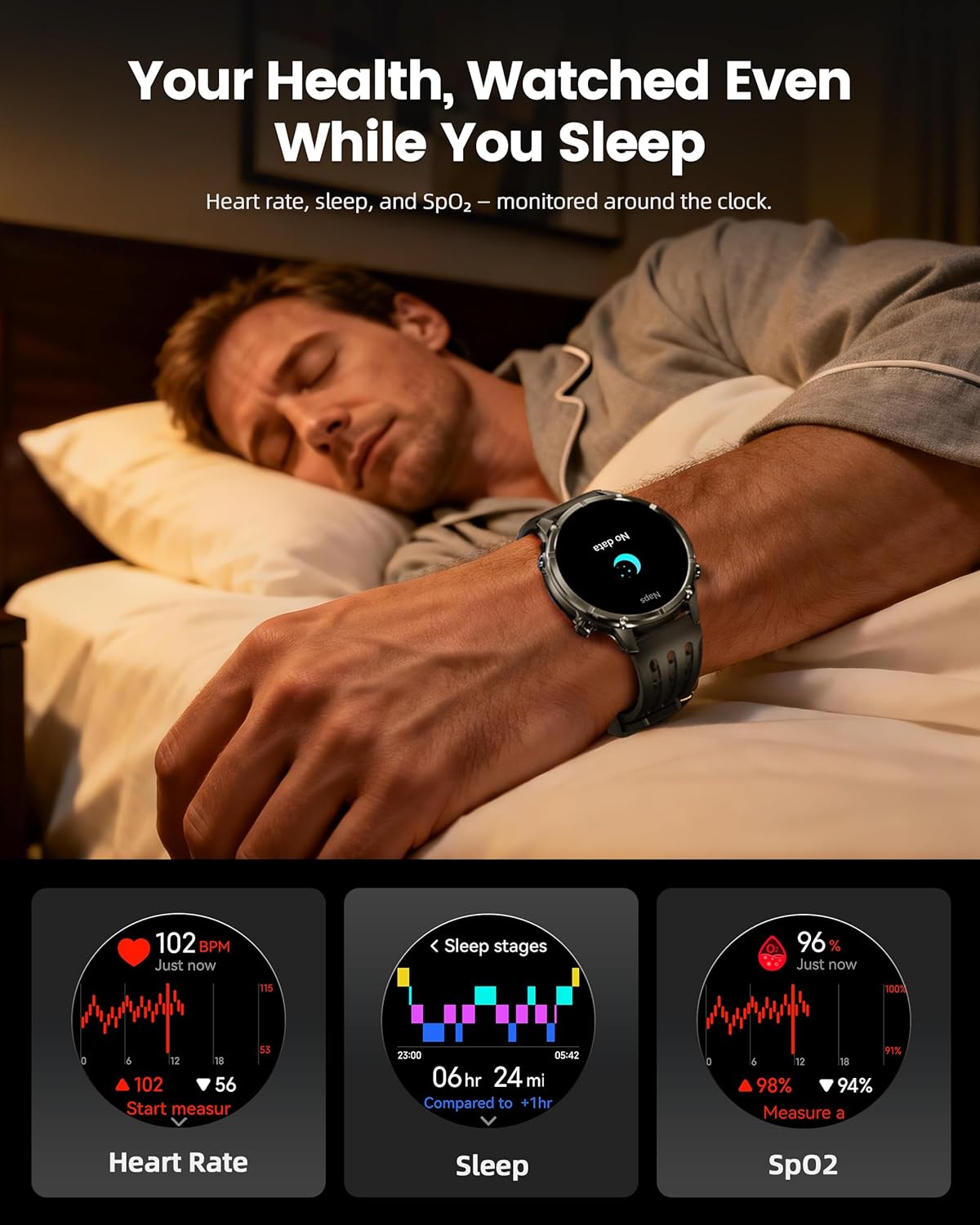
Image: The WalkerFit M6 GPS Smart Watch monitoring health metrics such as heart rate, sleep stages, and SpO₂ levels, even during sleep.
Bluetooth чалуулары жана акылдуу эскертмелер
Stay connected with Bluetooth calling and smart notifications directly on your wrist.
- Bluetooth чалуулары: Answer or place calls directly from your smartwatch when connected to your smartphone.
- Эскертмелер: Receive alerts for SMS, email, and app notifications (e.g., WhatsApp, Facebook, Instagкочкор).
- Кошумча куралдар: Access music control, weather updates, world clock, timer, alarm, calculator, flashlight, find-phone, and camera control.
Video: Demonstration of the smartwatch's communication functions, including Bluetooth calls and smart notifications.

Image: The WalkerFit M6 GPS Smart Watch showing smart notifications from various apps and its AI assistant capabilities for calls and messages.
Негизги өзгөчөлүктөрү бүттүview
Rugged Design and Display
The WalkerFit M6 GPS Smart Watch is built with a durable full-metal zinc-alloy body and features a 1.43-inch AMOLED display with Always-On Display (AOD) functionality. The screen is designed for clear visibility even under strong sunlight and is protected with 8H hardness.
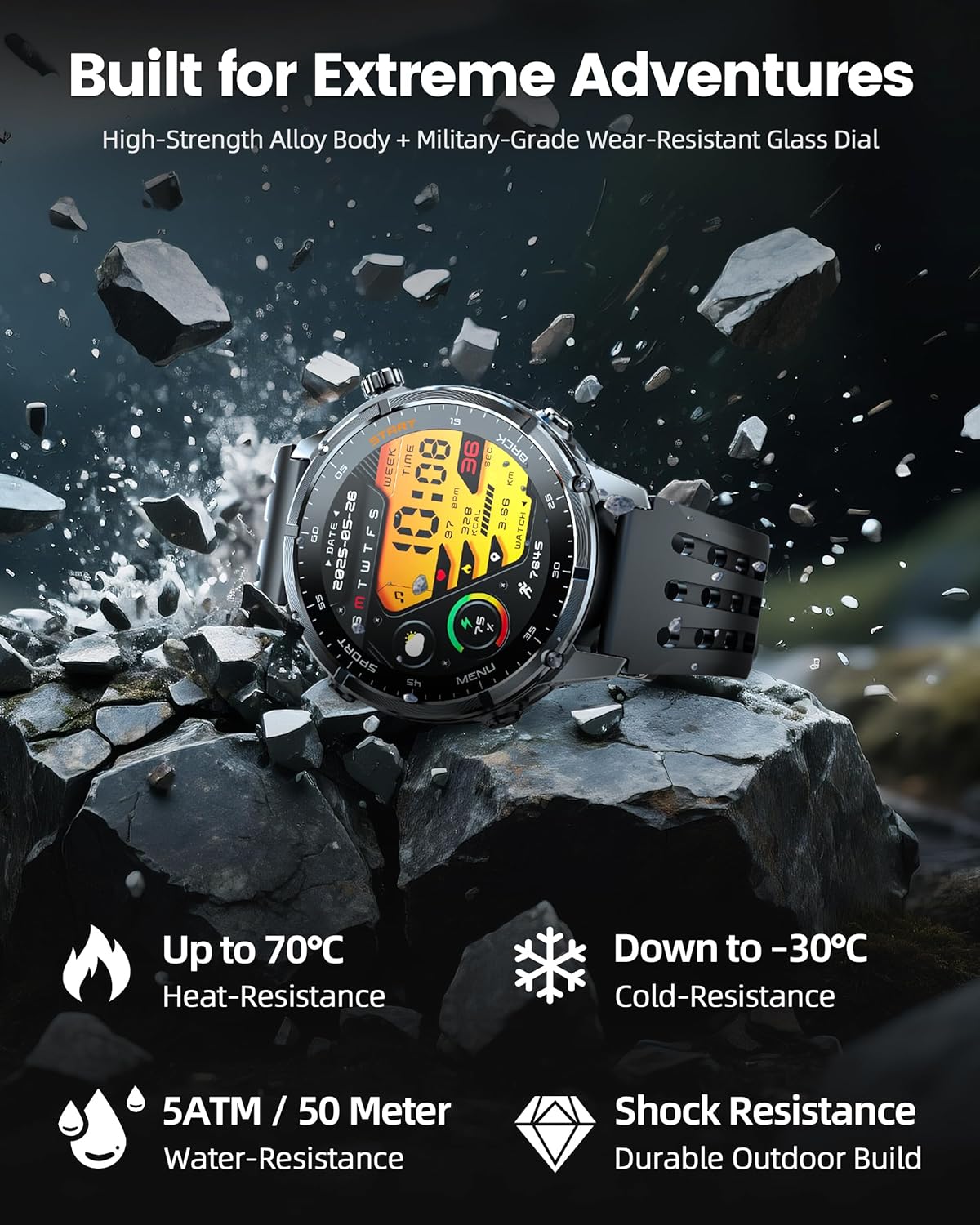
Image: The WalkerFit M6 GPS Smart Watch in a rugged outdoor setting, illustrating its high-strength alloy body, military-grade wear-resistant glass, and resistance to heat, cold, water, and shock.
Узак мөөнөттүү батарея
Equipped with a 520mAh battery, the smartwatch offers extended usage times:
- Up to 14 days for daily use.
- 7+ days during active outdoor training.
- Күтүү режиминде 60 күнгө чейин.
Recharging to full capacity takes approximately 2.5 hours.

Image: The WalkerFit M6 GPS Smart Watch on its magnetic charger, emphasizing its 520mAh battery capacity and multi-day usage capabilities.
Техникалык тейлөө
Тазалоо жана кам көрүү
- Regularly clean the watch and bands with a soft, damp кездеме.
- Avoid using harsh chemicals or abrasive materials that could damage the watch's finish or sensors.
- Коррозияны болтурбоо үчүн заряддоодон мурун заряддоо контакттары таза жана кургак экенин текшериңиз.
Суу каршылык
The WalkerFit M6 GPS Smart Watch is rated 5ATM, making it suitable for swimming in pools, use in rainy weather, splashes, and sweat during workouts. It is not recommended for diving or high-pressure water activities.
Проблемаларды чечүү
- Көрүү күйгүзүлбөйт: Ensure the watch is fully charged. If the issue persists, try connecting it to the charger for a few minutes before attempting to power on again.
- Жупташтыруу маселелери: Confirm Bluetooth is enabled on your smartphone and the watch is within range. Restart both devices and try pairing again through the 'FitCloudPro' app.
- Inaccurate Heart Rate/SpO₂ Readings: Саат өтө тар же өтө бош эмес, билегиңизге бекем тагылганын текшериңиз. Сааттын артындагы сенсорду тазалаңыз.
- GPS сигналын жоготуу: Move to an open area away from tall buildings or dense foliage for better signal reception.
- Кыска батареянын иштөө мөөнөтү: Adjust display brightness, reduce the display duration, or disable features like Always-On Display if not needed to extend battery life.
Техникалык шарттар
| Өзгөчөлүк | Деталь |
|---|---|
| Модель номери | GPS M6 |
| Дисплей | 1.43 дюймдук AMOLED, 466 * 466 чечилиште |
| Батарея сыйымдуулугу | 520 миллионamp Hours (520mAh) |
| Байланыш | Bluetooth |
| GPS | Built-in GPS (Multi-Satellite Positioning) |
| Суу каршылык | 5ATM |
| Операция системасы | Wear OS 1.1 |
| Элемент Салмагы | 4.8 унция |
| Материал | Full Metal Zinc-Alloy Body |
Кепилдик жана колдоо
For warranty information, technical support, or service inquiries, please refer to the contact details provided on the product packaging or visit the official WalkerFit webсайт. Сатып алуу квитанциясын кепилдик дооматтары үчүн сатып алуунун далили катары сактаңыз.