
Introduction
This manual provides comprehensive instructions for the installation, operation, and maintenance of your UNITOPSCI 4+64G Android 15 Car Stereo. Designed specifically for Kia Soul models from 2014 to 2017, this unit enhances your driving experience with advanced features such as wireless Carplay/Android Auto, GPS navigation, Bluetooth 5.0, and a high-resolution IPS touchscreen.
Please read this manual thoroughly before installation and use to ensure proper functionality and to maximize the benefits of your new car stereo system.
Пакеттин мазмуну
Орнотууну баштоодон мурун, пакетте бардык компоненттер бар экенин текшериңиз:
- 1 x Унаа радиосу
- 1 x Кубат кабели
- 1 x GPS антеннасы
- 1 x Арткы камеранын киргизүү кабели
- 1 x RCA кабели
- 2 x USB кабели
- 1 х Колдонуучунун колдонмосу (бул документ)
- 1 x Микрофон
- 1 x Арткы унаа View Камера
- 1 x Орнотуу куралы

1-сүрөт: Бүттүview of the UNITOPSCI car stereo unit and all included accessories, including cables, antennas, microphone, rear camera, and installation tools.
Орнотуу жана орнотуу
Professional installation is recommended for this car stereo system. Ensure the vehicle's battery is disconnected before starting any electrical work.
1. Унаа шайкештиги
This unit is designed for Kia Soul models manufactured between 2014 and 2017. Verify your vehicle's dashboard configuration matches the compatible design.

2-сүрөт: The UNITOPSCI car stereo seamlessly integrated into a Kia Soul dashboard, demonstrating the 'After' installation appearance.
3-сүрөт: Visual guide indicating which Kia Soul dashboard configurations are compatible ('Fit') and incompatible ('Not Fit') with this specific car stereo model.
2. Зымдарды туташтыруу
Белгилүү бир туташуулар үчүн берилген зым схемасын караңыз. Негизги туташуулар төмөнкүлөрдү камтыйт:
- Кубат кабели: Connect to the vehicle's power supply (constant 12V, accessory, and ground).
- GPS антеннасы: Тунук жерге орнотуңуз view оптималдуу сигнал кабыл алуу үчүн асман.
- Арткы камеранын кириш кабели: Connect to the provided AHD rear view камера.
- USB кабелдери: Маалыматтарды өткөрүү жана кубаттоо үчүн.
- Микрофон: Үнсүз чалуу жана үн буйруктары үчүн.
- RCA кабелдери: Тышкы аудио/видео киргизүү/чыгаруу үчүн.
3. Баштапкы күйгүзүү
After all connections are secure, reconnect the vehicle's battery. Turn on the ignition. The unit should power on automatically. Follow any on-screen prompts for initial setup, such as language selection and time zone.
Иштөө нускамалары
Wireless Carplay & Android Auto
Connect your iPhone or Android smartphone wirelessly to access navigation, music, calls, and messages directly on the stereo's display. This feature integrates smart voice control via Siri or Google Assistant.
- Смартфонуңузда Bluetooth жана Wi-Fi иштетилгенин текшериңиз.
- Унаа стереосунда Carplay же Android Auto тиркемесине өтүңүз.
- Select your phone from the available devices to pair.
- Жупташтыруу кодун эки түзмөктө тең ырастаңыз.

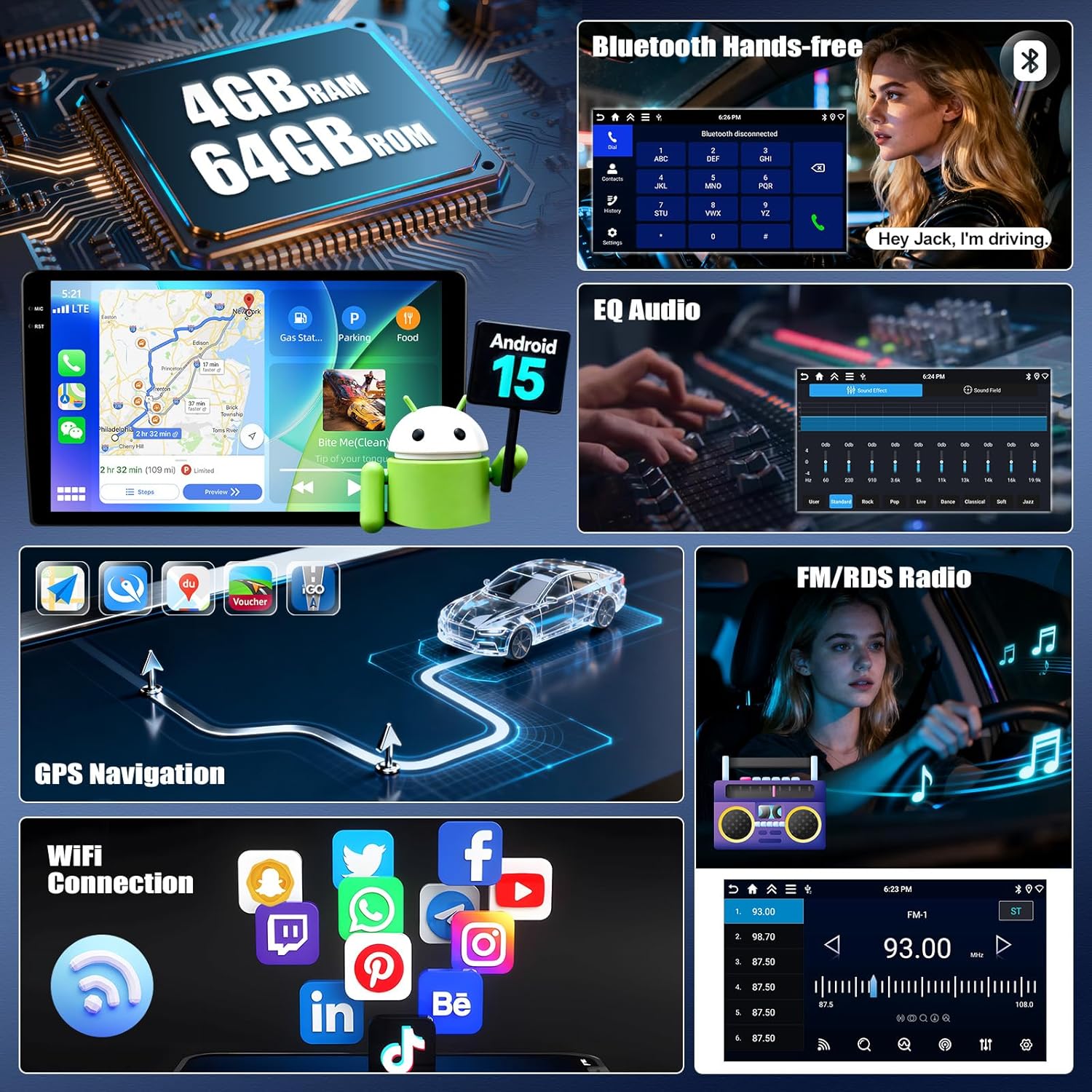
4-сүрөт: The car stereo display showing the user interface for Wireless Carplay and Android Auto, with various app icons visible.
Mirror Link Functionality
Mirror Link allows you to display your smartphone's screen on the car stereo. Android users can also control their phone directly from the stereo's touchscreen.
- For iOS devices: Connect via Wi-Fi or USB.
- For Android devices: Connect via Wi-Fi or USB for mirroring, and control via USB.
Bluetooth 5.0
The integrated Bluetooth 5.0 module enables hands-free calling and wireless audio streaming.
- Access the Bluetooth menu on the stereo.
- Телефонуңузда Bluetooth'ду иштетип, жеткиликтүү түзмөктөрдү издеңиз.
- Select "UNITOPSCI" (or similar device name) from the list and pair.
- Жупташтырылгандан кийин, сиз чалууларды жасап/кабыл алып, зымсыз музыка ойной аласыз.

5-сүрөт: The car stereo displaying the Bluetooth interface for hands-free calling and music playback, with a phone dial pad and music controls.
FM/RDS радиосу
Tune into your favorite radio stations with enhanced signal reception. RDS (Radio Data System) provides additional information like station name and song title where available.
- Select the FM/RDS application from the main menu.
- Use the scan function to automatically find and save stations, or manually tune to a frequency.

6-сүрөт: The car stereo displaying the FM radio interface, showing frequency selection and potential RDS information.
GPS багыттоо & WiFi туташуу
The unit features dual navigation capabilities, supporting both offline and online maps. Connect to Wi-Fi to access online maps, download apps, and browse the internet.
- GPS навигациясы: Access the navigation app. Ensure the GPS antenna is properly installed for accurate positioning.
- WiFi туташуусу: Go to Settings > Network & Internet > Wi-Fi. Select your desired network and enter the password.

7-сүрөт: The car stereo displaying GPS navigation with options for online and offline maps, alongside various app icons indicating WiFi connectivity.
Рулду башкаруу (SWC)
Program your steering wheel buttons to control audio functions (volume, track skip) and answer calls, enhancing driving safety.
- Navigate to the SWC settings in the stereo's menu.
- Follow the on-screen instructions to "learn" each button's function by pressing the button on your steering wheel and then selecting the corresponding function on the stereo's screen.

8-сүрөт: The car stereo displaying the interface for programming Steering Wheel Controls, showing options to assign functions to physical buttons.
AHD Арткы View Камера
камтылган AHD камдык камерасы ачык-айкын камсыз кылат view of the area behind your vehicle. It automatically activates when shifting into reverse, displaying real-time views with parking assist lines.

9-сүрөт: Арткы жагын көрсөткөн унаанын стереосу view from the AHD camera, complete with dynamic parking assist lines for safe maneuvering.
Multiple UI Themes & Split Screen
Customize your stereo's appearance with various UI themes. The split-screen function allows you to run two applications simultaneously, such as navigation and music playback.
- UI темалары: Access the theme settings to select your preferred visual style.
- Бөлүнгөн экран: Drag an app to one side of the screen or use the dedicated split-screen button (if available) to activate.

10-сүрөт: The car stereo demonstrating various user interface themes and the split-screen feature, allowing two applications to run concurrently.
Техникалык тейлөө
To ensure the longevity and optimal performance of your UNITOPSCI car stereo, follow these maintenance guidelines:
- Тазалоо: Сенсордук экранды жана блоктун сыртын тазалоо үчүн жумшак, кургак чүпүрөктү колдонуңуз. Абразивдүү тазалагычтардан же эриткичтерден качыңыз.
- Программалык камсыздоо жаңыртуулары: Periodically check for software updates via the system settings to ensure you have the latest features and bug fixes. A stable Wi-Fi connection is required for updates.
- Температура: Түзмөктү узак убакыт бою өтө жогорку температурага дуушар кылбаңыз.
- Байланыштары: Бардык кабелдер бекем туташтырылган жана бузулбаганын текшериңиз.
Проблемаларды чечүү
Эгерде сиз унааңыздын стереосу менен көйгөйлөргө туш болсоңуз, төмөнкү жалпы көйгөйлөрдү чечүү кадамдарын караңыз:
Күч жок
- Бардык электр кабелдеринин туташууларынын бекем экенин текшериңиз.
- Унаанын стерео системага тиешелүү сактагычы күйүп кетпегенин текшериңиз.
- Унаанын от алдыруу күйгүзүлгөнүн текшериңиз.
Үн жок
- Check the volume level and ensure it is not muted.
- Динамик зымдарынын туура жана коопсуз экенин текшериңиз.
- Check audio settings (EQ, balance, fader) to ensure they are not set to extreme values.
GPS Signal Loss or Inaccuracy
- Ensure the GPS antenna is mounted in a location with an unobstructed view асмандын.
- GPS антеннасынын түзмөккө туташуусун текшериңиз.
- Эгер мүмкүн болсо, картанын маалыматтарын жаңыртыңыз.
Bluetooth туташуу маселелери
- Bluetooth стерео системаңызда да, смартфонуңузда да иштетилгенин текшериңиз.
- Эки түзмөктөн мурунку жупташтырууларды өчүрүп, кайра жупташтырууга аракет кылыңыз.
- Стереону да, смартфонуңузду да өчүрүп-күйгүзүңүз.
Carplay/Android Auto туташпай жатат
- Verify Wi-Fi and Bluetooth are active on your phone.
- Телефонуңуздун операциялык системасы жаңыртылганын текшериңиз.
- Check for any specific app permissions required by Carplay/Android Auto on your phone.
If problems persist after attempting these steps, please contact UNITOPSCI customer support for further assistance.
Техникалык шарттар
| Өзгөчөлүк | Деталь |
|---|---|
| Операция системасы | Android 15 |
| RAM | 4 ГБ |
| ROM | 64 ГБ |
| Дисплей өлчөмү | 9 дюйм |
| Display Resolution | 1280 x 720P IPS Touchscreen |
| Bluetooth версиясы | 5.0 |
| Байланыш | Bluetooth, Wi-Fi, USB |
| Өзгөчөлүктөр | Wireless CarPlay, Android Auto, Mirror Link, GPS Navigation, FM/RDS, EQ, DSP, Steering Wheel Control, AHD Backup Camera |
| Шайкеш түзмөктөр | Смартфон (Android/iOS) |
| Аудио чыгаруу режими | Стерео |
| Башкаруу ыкмасы | Тийүү, Үн |
| Элемент Салмагы | 1.92 килограмм (4.22 фунт) |
| Пакеттин өлчөмдөрү | 14.17 x 11.02 x 3.74 дюйм |
Кепилдик жана колдоо
Кепилдик маалымат
Your UNITOPSCI car stereo comes with a 1 жылдык кепилдик from the date of purchase. This warranty covers manufacturing defects and malfunctions under normal use. Additionally, a 30-day money-back guarantee and a 12-month replacement service are offered.
Optional extended protection plans are available for purchase:
- 2 жылдык коргоо планы
- 3 жылдык коргоо планы
Кепилдик дооматтары үчүн сатып алганыңыздын далилин сактап коюңуз.
Кардарларды колдоо
For any inquiries, technical assistance, or support during installation or usage, please contact our dedicated customer service team. We offer lifetime after-sales consultation and technical support.
Электрондук почта: UNITOPSCI@126.com
Our professional after-sales team is available 24/7 to assist you.

11-сүрөт: Visual representation of UNITOPSCI's customer support, highlighting replacement, quick response, lifetime support, and return policies.