
1. Продукт бүтүп калдыview
The jeeber 816pro is a 1080P WiFi Baby Monitor designed to provide continuous monitoring of your baby. It features a camera with pan-tilt-zoom capabilities, a 4-inch IPS display, HD night vision, and various detection functions including motion and cry detection. The system supports dual control via the dedicated monitor unit and a mobile application, offering flexibility for monitoring both at home and remotely.

Image 1.1: The jeeber 816pro Baby Monitor system, showing the camera unit, the 4-inch IPS display monitor, and a smartphone screen displaying the app interface.
1.1 Негизги өзгөчөлүктөрү
- Кош башкаруу: Monitor via the 4-inch IPS display or a smartphone application simultaneously.
- Кеңири камтуу: 340° pan and 70° tilt with 3x zoom for a 360° view питомниктин.
- HD түнкү көрүнүш: 5M Auto-IR night vision for clear visibility in low light conditions.
- реалдуу убакыт эскертүүлөр: VOX cry detection and motion detection send instant notifications.
- Эки тараптуу сүйлөшүү: Built-in microphone and speaker for remote communication with your baby.
- Бесик ырлары: Pre-set lullabies can be played remotely to soothe your baby.
- Температура сенсору: Monitors nursery temperature to ensure a comfortable environment.
- Батареянын узак иштөө мөөнөтү: Up to 14 hours of continuous screen use on the monitor unit.
- Коопсуз берүү: AES encrypted signal and FHSS technology for privacy and stable connection.
1.2 Пакеттин мазмуну
- Baby Camera Unit
- Baby Monitor Unit (with 4-inch IPS Screen)
- Charging Cable (for both units)
- Колдонуучунун Колдонмосу (бул документ)
2. Коопсуздук маалыматы
Please read and understand all safety instructions before using the jeeber 816pro Baby Monitor. Failure to follow these instructions may result in injury or damage to the product.
- муунтуу коркунучу: Keep all cables and cords out of reach of children (at least 3 feet / 1 meter away). Never place the camera or cords within the crib or playpen.
- Мункунуп калуу коркунучу: Бул продукт майда бөлүктөрдөн турат. Бардык компоненттерди жана таңгактоочу материалдарды балдардан алыс кармаңыз.
- Ашыкча ысып кетүү: Мониторду же камераны кийим, жууркан же башка материалдар менен жаппаңыз. Тийиштүү желдетүүнү камсыз кылыңыз.
- Суу жана ным: Продукцияны сууга же нымдуулукка тийгизбеңиз. Ванналардын, раковиналардын, кир жуучу жайлардын, бассейндердин же нымдуу жертөлөлөрдүн жанында колдонбоңуз.
- Кубат булактары: Use only the provided charging cables and power adapters. Using unauthorized chargers may damage the product and void the warranty.
- Жайгашкан жери: Place the camera on a stable, flat surface or securely mount it to a wall. Ensure it is positioned to provide a clear view of the baby without being directly above the crib.
- Интерференция: Keep the monitor and camera away from other electronic devices that may cause interference, such as microwaves or Wi-Fi routers.
- Температура: Operate the device within the recommended temperature range (typically 0°C to 40°C / 32°F to 104°F).
- Чоңдордун көзөмөлү: This product is intended to assist in monitoring your baby and should not replace proper adult supervision.
3. Орнотуу колдонмосу
3.1 Charging the Monitor Unit
Before first use, fully charge the monitor unit. Connect the provided charging cable to the monitor unit and a power adapter (not always included, but typically a standard USB power adapter). The battery indicator on the screen will show charging status. A full charge provides up to 14 hours of continuous use.
3.2 Positioning the Camera
Place the camera unit on a flat, stable surface in the nursery, ensuring it has a clear, unobstructed view of your baby's crib or play area. Keep the camera and its power cord at least 3 feet (1 meter) away from the crib to prevent strangulation hazards. The camera can also be wall-mounted (mounting hardware not included).

Image 3.1: Proper placement of the camera unit on a surface near the crib, ensuring a clear view.
3.3 Камераны жана мониторду жупташтыруу
The camera and monitor units are typically pre-paired at the factory. Simply power on both units, and they should automatically connect. If they do not connect, or if you are adding an additional camera (sold separately), follow these steps:
- Turn on the monitor unit.
- Access the monitor's menu and navigate to the "Camera" or "Pairing" option.
- Select "Add Camera" or "Pair".
- Within 10 seconds, press and hold the pairing button on the back of the camera unit until the monitor indicates successful pairing.
3.4 Connecting to Mobile App (Optional)
Алыскы үчүн viewing and additional features, you can connect the camera to your home 2.4GHz Wi-Fi network and use the companion mobile application.
- Download the "FeelBaby" app (or specified app name) from your smartphone's app store.
- Каттоо эсебин түзүп, кириңиз.
- Follow the in-app instructions to add a new device. This typically involves scanning a QR code on the camera or monitor, or manually entering device details.
- Орнотуу процессинде смартфонуңуз 2.4 ГГц Wi-Fi тармагына туташып турганын текшериңиз.
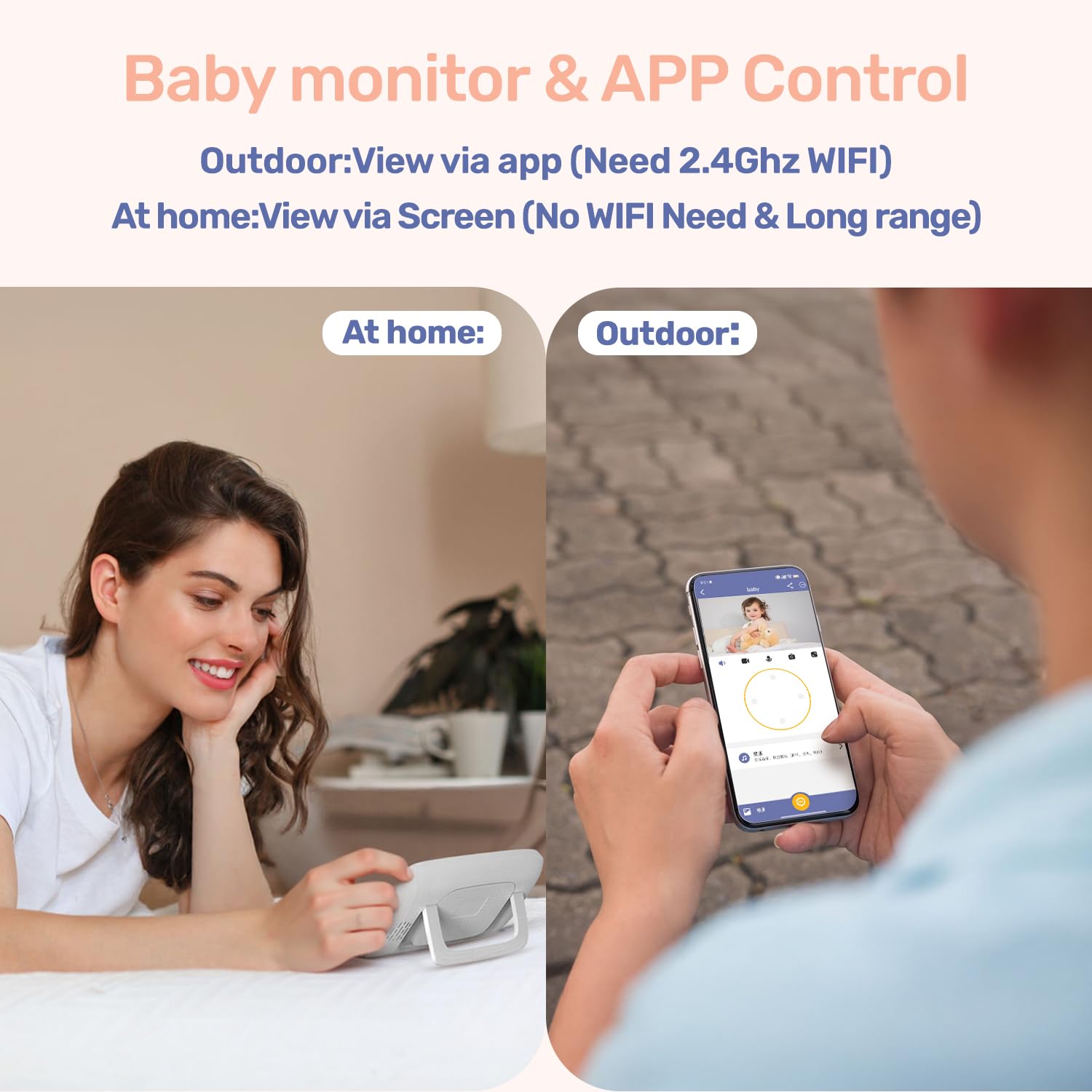
Image 3.2: Illustration of dual control, allowing monitoring via the dedicated screen at home or the mobile app when outdoors (requires 2.4GHz WiFi for app viewing).
4. Иштөө нускамалары
4.1 Monitor Unit Controls
The monitor unit features a 4-inch IPS screen and several buttons for control:
- Кубат баскычы: Press and hold to turn on/off. Short press to turn screen on/off.
- Меню баскычы: Орнотуулар үчүн негизги менюга кириңиз.
- Чабыттоо баскычтары (өйдө/төмөн/сол/оң): Navigate through menus and control camera pan/tilt.
- OK баскычы: Тандоолорду ырастаңыз.
- Чоңойтуу баскычы: Magnify the video feed (up to 3x).
- Үн баскычтары: Аудионун үнүн тууралаңыз.
- Сүйлөшүү баскычы: Press and hold to activate two-way talk.
- Бешик ырынын баскычы: Play pre-set lullabies.
4.2 Camera Controls (Pan/Tilt/Zoom)
From the monitor unit, use the navigation buttons to remotely adjust the camera's viewing angle. Press the Up/Down buttons to tilt the camera (70° range) and Left/Right buttons to pan (340° range). Use the Zoom button to digitally zoom in on the image (up to 3x).

Image 4.1: The camera unit demonstrating its 340° pan and 70° tilt capabilities for comprehensive room coverage.
4.3 Түнкү көрүнүш
The camera is equipped with 5M Auto-IR night vision. This feature automatically activates in low-light conditions, providing a clear black-and-white image of your baby without disturbing them with visible light. The invisible 940nm infrared light ensures eye-safe operation.

Image 4.2: The camera unit with invisible infrared light, enabling clear night vision for monitoring a sleeping baby.
4.4 Эки тараптуу сүйлөшүү
To speak to your baby, press and hold the "Talk" button on the monitor unit. Release the button to listen. This feature allows you to comfort your baby remotely.
4.5 Бешик ырлары
The monitor unit has a dedicated button to play pre-set lullabies through the camera's speaker. Press the "Lullaby" button to cycle through available melodies or turn them off. Adjust the volume of the lullabies via the monitor's menu.
4.6 Температуранын мониторинги
The camera unit includes a temperature sensor that displays the nursery's ambient temperature on the monitor screen. You can set temperature alerts in the monitor's menu to be notified if the room temperature goes above or below a comfortable range.
4.7 VOX (Voice Operated Exchange) Mode
VOX mode conserves battery life by turning off the monitor screen when no sound is detected from the baby's room. The screen will automatically activate when the camera detects sound (e.g., crying). You can adjust the VOX sensitivity level in the monitor's settings.

Image 4.3: The monitor unit displaying its auto-wake feature via VOX sound detection, activating the screen when the baby needs attention.
4.8 Motion and Cry Detection
The monitor can detect both motion and crying sounds. When enabled, these features will trigger alerts on the monitor unit and, if connected, send notifications to your mobile application. Sensitivity levels for both detections can be adjusted in the settings.

Image 4.4: A smartphone screen displaying an instant alert notification for baby motion detection from the FeelBaby app.
4.9 Азыктандыруу жөнүндө эскертүү
Set up feeding reminders through the monitor's menu. This feature allows you to program alerts at specific intervals to help maintain a feeding schedule.
5. Техникалык тейлөө
Proper maintenance ensures the longevity and optimal performance of your jeeber 816pro Baby Monitor.
- Тазалоо: Wipe the camera and monitor units with a soft, dry, lint-free cloth. Do not use cleaning agents, solvents, or abrasive materials.
- Сактагыч: If storing the device for an extended period, ensure both units are fully charged, then power them off. Store in a cool, dry place away from direct sunlight.
- Батареяга кам көрүү: To maximize battery life, avoid fully discharging the monitor unit frequently. Charge it regularly. Do not expose the battery to extreme temperatures.
- Линзага кам көрүү: Gently clean the camera lens with a lens cleaning cloth if smudges affect image clarity.
6. Кыйынчылыктарды
Жалпы маселелер жана аларды чечүү үчүн төмөнкү таблицага кайрылыңыз.
| Көйгөй | Мүмкүн себеп | Чечим |
|---|---|---|
| No image on monitor screen | Camera or monitor is off; out of range; low battery. | Ensure both units are powered on and charged. Move monitor closer to camera. Re-pair units if necessary. |
| Үн жок же үн сапаты начар | Volume too low; interference; microphone blocked. | Increase monitor volume. Move units away from other electronics. Ensure camera microphone is clear. |
| Monitor loses connection frequently | Out of range; interference; weak Wi-Fi signal (for app). | Reduce distance between camera and monitor. Avoid obstacles. Ensure strong 2.4GHz Wi-Fi for app connection. |
| Түнкү көрүү так эмес | Camera lens dirty; insufficient ambient light for IR activation. | Clean the camera lens gently. Ensure the room is dark enough for automatic IR activation. |
| Колдонмого туташуу маселелери | Incorrect Wi-Fi password; 5GHz Wi-Fi network; app not updated. | Verify Wi-Fi password. Ensure connection to a 2.4GHz Wi-Fi network. Update the mobile app to the latest version. |
7. Техникалык шарттар
| Өзгөчөлүк | Деталь |
|---|---|
| Модель аты | VB816 PRO |
| Видео тартуунун резолюциясы | 1080p (supports 720P feed, up to 1080P display) |
| Монитор экранынын өлчөмү | 4 дюймдук IPS |
| Пан бурчу | 340° |
| Тит бурч | 70° |
| Чоңойтуу | 3x Digital Zoom |
| Түнкү көрүнүш | 5M Auto-IR (940nm Invisible Light) |
| Байланыш технологиясы | Wireless (FHSS for monitor, Wi-Fi for app) |
| Wi-Fi жыштыгы | 2.4GHz (for app connection) |
| Battery Life (Monitor) | Up to 14 hours (continuous screen use) |
| Өзгөчөлүктөр | 2-Way Audio, Cry Detection, Motion Detection, Temperature Sensor, Lullabies, Feeding Reminder |
| Материал | Акрилонитрил бутадиен стирол (ABS) |
| Элементтин өлчөмдөрү (LxWxH) | 14 x 10.9 x 6.9 сантиметр |
| Элемент Салмагы | 621 г |
| Келип чыккан өлкө | Кытай |
8. Кепилдик жана колдоо
The jeeber 816pro Baby Monitor comes with a manufacturer's warranty. Please refer to the warranty card included in your package or visit the official jeeber website for detailed warranty terms and conditions. Registering your product may extend your warranty period.
For technical support, troubleshooting assistance, or any inquiries regarding your product, please contact jeeber customer service. Contact information can typically be found on the product packaging, the official webсайтында же мобилдик тиркемеде.
When contacting support, please have your product model number (VB816PRO) and purchase details readily available.