
PRSCFUM S3
PRSCFUM S3 IPX7 Waterproof Portable Bluetooth Speaker User Manual
Модели: S3
1. Киришүү
Thank you for choosing the PRSCFUM S3 IPX7 Waterproof Portable Bluetooth Speaker. This manual provides essential information for the safe and efficient use of your speaker. Please read it thoroughly before operation and retain it for future reference.

Image 1.1: PRSCFUM S3 Portable Bluetooth Speaker.
2. Кутуда эмне бар
Бардык буюмдар кутудан чыгарылганда бар экенин текшериңиз:
- 1 x S3 Bluetooth Speaker
- 1 x User Manual
- 1 x Type-C заряддоо кабели
- 1 x соргуч

Image 2.1: Package contents of the PRSCFUM S3 Bluetooth Speaker.
3. Орнотуу
3.1 Динамикти заряддоо
Before first use, fully charge the speaker using the provided Type-C charging cable. Connect the cable to the speaker's charging port and a compatible USB power source. The LED indicator will show charging status.
3.2 Күйгүзүү/өчүрүү
Press and hold the power button (usually marked with a power symbol) for a few seconds to turn the speaker on or off.
3.3 Bluetooth жупташтыруу
- Динамик күйгүзүлгөнүн жана жупташтыруу режиминде экенин текшериңиз (жаркылдаган LED менен көрсөтүлгөн).
- Түзмөгүңүздө (смартфон, планшет, ноутбук) Bluetooth иштетиңиз жана жеткиликтүү түзмөктөрдү издеңиз.
- Select "PRSCFUM S3" from the list. Once connected, the LED indicator will stop flashing.
The speaker features Bluetooth 5.3 for a stable and fast connection.

Image 3.1: Internal components highlighting Bluetooth 5.3 technology.
3.4 Соргуч чөйчөктү бекитүү
The included suction cup allows for easy attachment to smooth surfaces like glass or tiles. Ensure the surface is clean and dry for optimal adhesion. Press the suction cup firmly against the desired surface.

Image 3.2: Speaker attached to a shower wall using the suction cup.
3.5 Setting the Time Display (Android Devices)
When connecting to an Android phone, the speaker may request SMS permission to accurately update its time display. You can grant or deny this permission. Denying it will not affect other speaker functions, but the time display may not be accurate.
4. Иштөө нускамалары
4.1 Негизги башкаруу каражаттары
The speaker features intuitive buttons for control:
- Кубат баскычы: Күйгүзүү/өчүрүү үчүн басып туруңуз.
- Ойнотуу/тындыруу баскычы: Музыканы ойнотуу же тындыруу үчүн басыңыз.
- Үнүн жогорулатуу (+): Үнүн көбөйтүү үчүн басыңыз.
- Үнүн төмөндөтүү (-): Үндү азайтуу үчүн басыңыз.
- Кийинки трек: Press and hold Volume Up (+) to skip to the next track.
- Мурунку трек: Press and hold Volume Down (-) to go to the previous track.
- Режим баскычы (M): Press to switch between Bluetooth, FM Radio (if available), or other modes.
- Жарык баскычы: Press to cycle through LED light modes.
4.2 Чыныгы зымсыз стерео (TWS) жупташтыруу
To achieve true wireless stereo sound, you can pair two S3 speakers together:
- Ensure both S3 speakers are powered off.
- Turn on both speakers. They will automatically enter pairing mode.
- On one speaker, double-press the Mode (M) button. The speakers will attempt to connect to each other.
- Once successfully paired, one speaker will act as the master and the other as the slave. Connect your device to the master speaker via Bluetooth.

Image 4.1: Two S3 speakers connected for True Wireless Stereo.
4.3 LED жарык режимдери
The speaker features various LED light modes, including music rhythm lights and color breathing lights. Press the Light button to cycle through the available options and select your preferred visual effect.

Сүрөт 4.2: Мисamples of the speaker's LED light modes.
4.4 Hands-Free чалуу
When connected to your smartphone, the speaker can be used for hands-free calls. Press the Play/Pause button to answer or end a call.
4.5 Суу өткөрбөйт пайдалануу (IPX7)
The S3 speaker is IPX7 waterproof, meaning it can withstand immersion in up to 1 meter of water for 30 minutes. This makes it suitable for use in showers, by the pool, or at the beach. Ensure the charging port cover is securely closed before exposing the speaker to water.

Image 4.3: Speaker demonstrating IPX7 waterproof capability in a pool.

Image 4.4: Speaker in a bathroom setting, highlighting its waterproof design.
4.6 Көчүрүү
The speaker features a compact design and a hanging hole, making it easy to carry for outdoor activities like cycling, campже сейилдөө.

Image 4.5: Speaker attached to a bicycle, showcasing анын көчмө жөндөмдүүлүгү.

Image 4.6: Speaker hanging from a backpack, illustrating its rugged design for travel.
5. Техникалык тейлөө
5.1 Тазалоо
Динамикти тазалоо үчүн аны жумшак, гamp cloth. Do not use harsh chemicals or abrasive cleaners. Ensure the charging port cover is sealed if cleaning with water.
5.2 Батареяга кам көрүү
Батареянын иштөө мөөнөтүн узартуу үчүн, динамикти тез-тез толук зарядсыздандырбаңыз. Динамикти көпкө чейин колдонбосоңуз да, аны үзгүлтүксүз кубаттап туруңуз. Салкын, кургак жерде сактаңыз.

Image 5.1: Battery life and capacity information.
6. Кыйынчылыктарды
- Speaker will not turn on: Ensure the battery is charged. Connect the speaker to a power source using the Type-C cable and try again.
- Bluetooth аркылуу жупташтыруу мүмкүн эмес: Make sure the speaker is in pairing mode (flashing LED). Ensure Bluetooth is enabled on your device and it is within the 15-meter range. Try restarting both the speaker and your device.
- Үн жок же үнү төмөн: Динамиктин жана туташкан түзмөгүңүздүн үн деңгээлин текшериңиз. Динамиктин үнү өчүрүлбөгөнүн текшериңиз.
- Buttons are difficult to read: The buttons are designed for tactile use. Familiarize yourself with their positions and functions.
- Time display is inaccurate: If using an Android device, ensure SMS permission was granted for time synchronization. Otherwise, the time display may not be accurate.
- Suction cup not holding: Ensure the surface is clean, dry, and smooth. Press firmly to remove air bubbles.
7. Техникалык шарттар
| Өзгөчөлүк | Спецификация |
|---|---|
| Бренд | PRSCFUM |
| Модель номери | S3 |
| Байланыш технологиясы | Bluetooth 5.3 |
| Сууга туруктуулук деңгээли | IPX7 (Суу өткөрбөйт) |
| Динамиктин максималдуу чыгаруу күчү | 6 Ватт |
| Аудио чыгаруу режими | Стерео |
| Батарея сыйымдуулугу | 1100 мАч |
| Батареянын орточо иштөө мөөнөтү | 8-10 саат |
| Максималдуу диапазон | 15 метр |
| Башкаруу ыкмасы | Push Button |
| Материал | Металл, пластик |
| Элементтин өлчөмдөрү (D x W x Y) | 5"D x 5"W x 5"H |
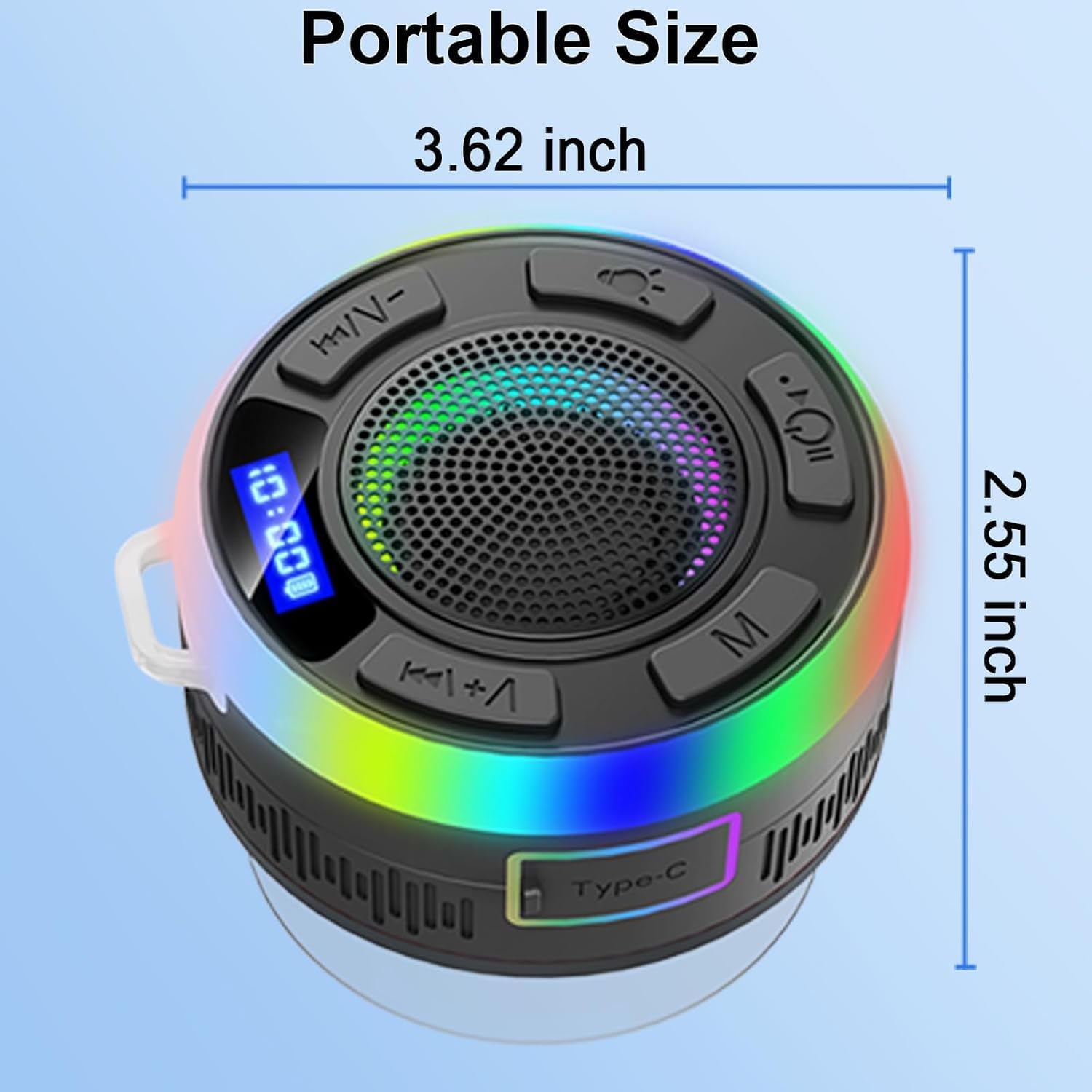
Image 7.1: Speaker dimensions.
8. Кепилдик жана колдоо
8.1 Кепилдик маалыматы
The PRSCFUM S3 speaker comes with a reasonless return and exchange service within 30 days of purchase. Additionally, 24-hour after-sales service is provided within 180 days.
8.2 Кардарларды колдоо
For any questions, concerns, or support needs, please refer to the contact information provided with your purchase or visit the official PRSCFUM webсайт.