
Introduction
Сатып алганыңыз үчүн рахматasing the Anker Soundcore P31i True Wireless Earbuds. This manual provides detailed instructions on how to set up, operate, and maintain your earbuds to ensure optimal performance and longevity. Please read this manual carefully before use and retain it for future reference.
Эмне камтылган
Your Soundcore P31i package includes the following items:
- Soundcore P31i Earbuds (Left and Right)
- Заряддоо кутусу
- Ear Tips (XS, S, M, L - M size pre-installed)
- USB-Cден USB-Aга чейин кубаттоочу кабель
- Quick Start Guide
- Коопсуздук колдонмосу
Продукт бүттүview
The Soundcore P31i earbuds are designed for comfort and high-quality audio. Each earbud features a touch control area and an indicator light. The charging case protects the earbuds and provides additional battery life.
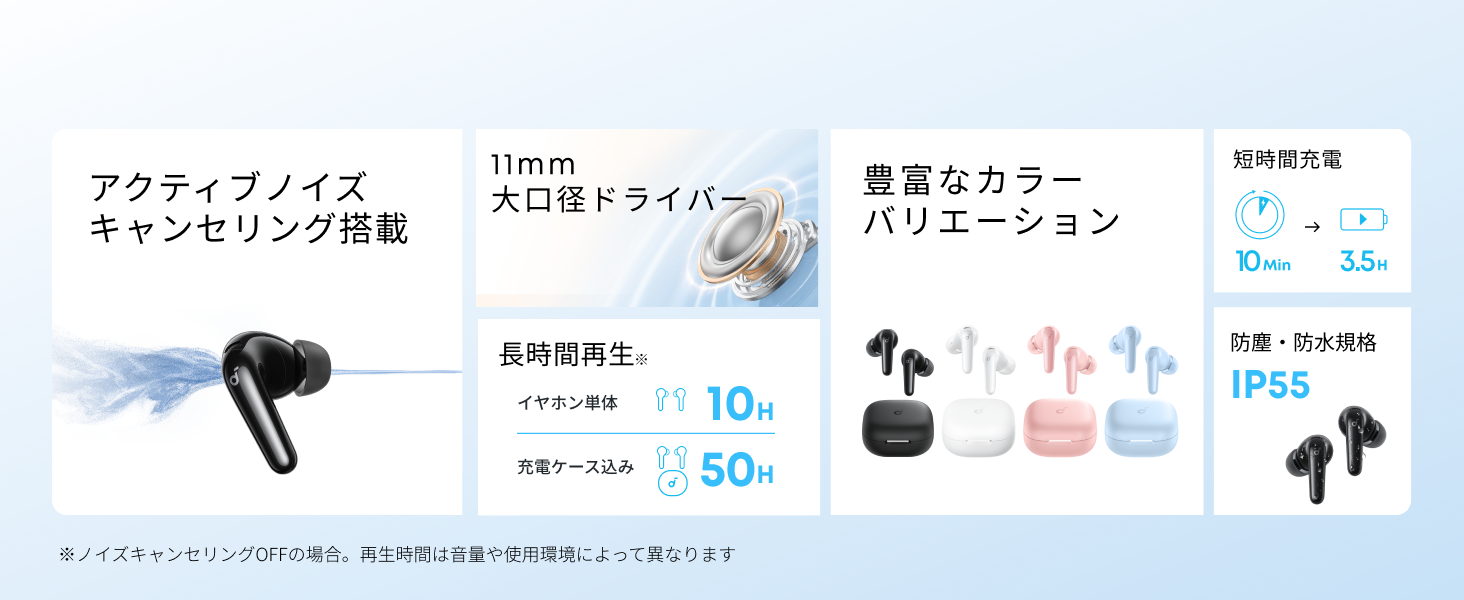
Diagram showing the Soundcore P31i earbuds and charging case with key components labeled.
Кулакчындар: Each earbud is equipped with an 11mm dynamic driver for powerful bass and clear sound. They feature active noise cancellation and AI noise reduction for calls. The ergonomic design ensures a secure and comfortable fit.
Заряддоо кутусу: The compact charging case not only stores and protects your earbuds but also recharges them on the go. It has a USB-C charging port and a strap hole for portability.
Кулакчындарыңызды жана кутучаңызды кубаттоо
Биринчи колдонуудан мурун, кулакчындарды да, кубаттоочу кутучаны да толук заряддаңыз.
- Кулакчындарды заряддоо: Place the earbuds into the charging case. The indicator lights on the earbuds will show charging status.
- Ишти заряддоо: Connect the charging case to a power source using the provided USB-C to USB-A cable. A full charge for the case and earbuds takes approximately 3 hours.
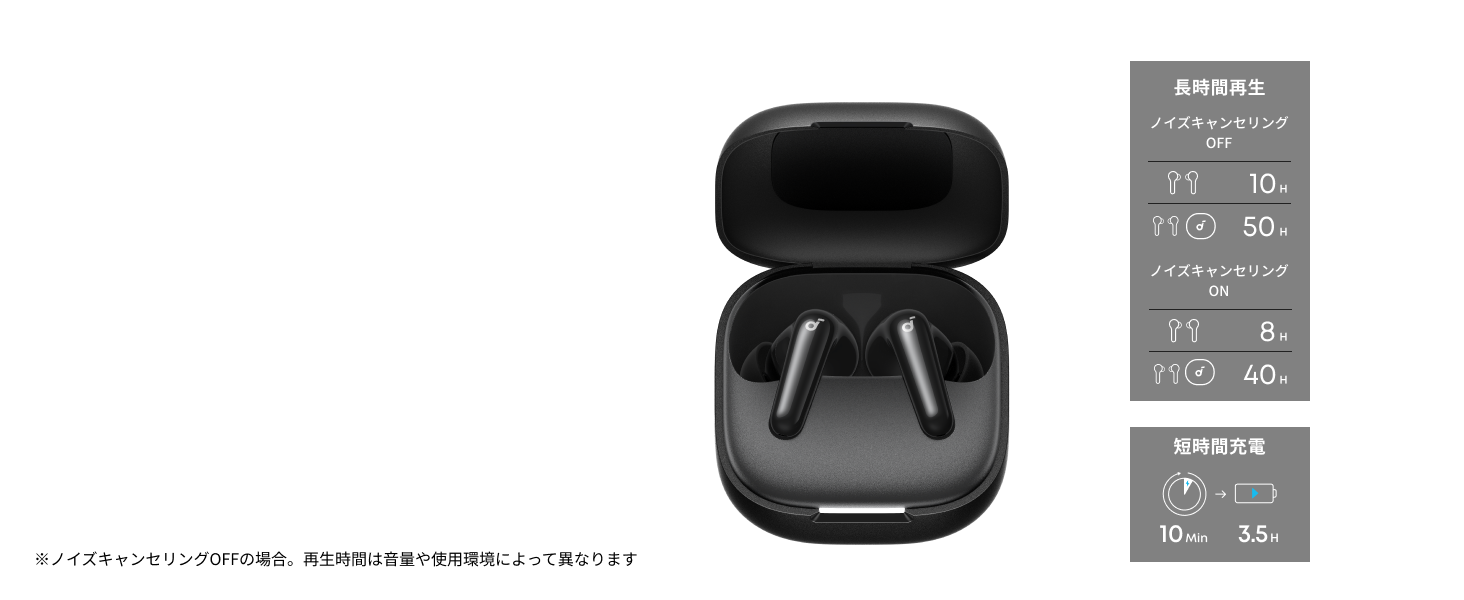
Diagram illustrating charging times and playback duration for Soundcore P31i earbuds.
Батареянын иштөө мөөнөтү:
- Up to 10 hours of playback on a single charge (earbuds only).
- Заряддоо кутучасы менен жалпы ойнотуу 50 саатка чейин.
- A quick 10-minute charge provides up to 3.5 hours of listening time.
Note: Playback time varies depending on volume level and audio content.
Кулакчындарды тагынуу
For optimal sound quality and comfort, it is important to wear your earbuds correctly.
- Туура кулак кеңештерин тандаңыз: Select the ear tips that provide the best seal and comfort for your ears. Experiment with different sizes (XS, S, M, L) to find the perfect fit.
- Кулакчындарды салыңыз: Кулакчындарды кулак каналдарыңызга акырын киргизиңиз.
- Коопсуздук үчүн буруңуз: Twist the earbuds slightly until they fit snugly and securely in your ears.

Image showing a person wearing the Soundcore P31i earbuds correctly.
Bluetooth Жупташтыруу
Follow these steps to pair your Soundcore P31i earbuds with your device:
- Биринчи жолу жупташтыруу:
- Open the charging case. The earbuds will automatically enter Bluetooth pairing mode. The indicator lights on the earbuds will flash white.
- Түзмөгүңүздө (смартфон, планшет ж.б.) Bluetooth жөндөөлөрүнө өтүңүз.
- Select "Soundcore P31i" from the list of available devices.
- Once connected, the indicator lights on the earbuds will turn solid white for 1 second and then turn off.
- Башка түзмөк менен жупташуу:
- Кулакчындарды кубаттоочу кутуга салып, капкагын ачык калтырыңыз.
- Press and hold the button on the charging case for 3 seconds until the earbud indicator lights flash white rapidly.
- Repeat steps 2 and 3 from "First-Time Pairing" on your new device.
Controls
The Soundcore P31i earbuds feature touch controls for managing playback, calls, and other functions. Specific control configurations can often be customized via the Soundcore app.
General Touch Controls (Default):
- Ойнотуу/тындыруу: Кулакчындын бирин басыңыз.
- Кийинки трек: Оң кулакчынды эки жолу таптаңыз.
- Мурунку трек: Сол кулакчынга эки жолу басыңыз.
- Чалууга жооп берүү/аяктоо: Кулакчындын бирин басыңыз.
- Чакырууну четке кагуу: Кулакчындардын бирин 2 секунд басып туруңуз.
- Үн Жардамчысын жандыруу: Triple-tap either earbud (may vary).
- ANC/Тунук режимин которуу: Press and hold the right earbud for 2 seconds (may vary).
For detailed and customizable controls, please refer to the Soundcore app or the included Quick Start Guide.
Активдүү ызы-чууну жокко чыгаруу (ANC)
The Soundcore P31i earbuds feature Active Noise Cancelling technology to minimize ambient noise, allowing for an immersive listening experience.

Illustration demonstrating the active noise cancelling feature of the Soundcore P31i earbuds.
ANC detects and reduces various types of noise, such as engine hum on trains or buses, and chatter in cafes. This allows you to enjoy your music or podcasts with greater clarity and fewer distractions.
To switch between ANC, Normal, and Transparency modes, use the touch controls on the earbuds or adjust settings within the Soundcore app.
Үн сапаты
The Soundcore P31i earbuds are engineered to deliver a rich audio experience.

Diagram illustrating the 11mm dynamic driver responsible for the audio output.
- 11 мм динамикалык драйверлер: Equipped with large 11mm drivers, these earbuds produce a wide frequency range and detailed sound.
- BassUp™ технологиясы: Anker's proprietary BassUp™ technology enhances low frequencies, delivering powerful and impactful bass.
You can further customize the sound profile using the equalizer settings within the Soundcore app.
Чалуу сапаты
The Soundcore P31i earbuds ensure clear voice calls and web конференциялар.

Illustration depicting AI noise reduction technology for clear voice calls.
AI ызы-чуусун азайтуу: Integrated AI noise reduction technology effectively filters out background noise, ensuring your voice is transmitted clearly to the person on the other end of the call, even in noisy environments.
Көп чекиттүү туташуу
The Soundcore P31i supports multi-point connection, allowing you to connect to two Bluetooth devices simultaneously.

Illustration showing the Soundcore P31i connected to multiple devices simultaneously.
This feature enables seamless switching between devices. For example, you can listen to music on your laptop and instantly switch to answer a call on your phone without manually re-pairing.
To enable multi-point connection, ensure both devices are paired with your earbuds. The earbuds will automatically connect to the last two paired devices when powered on.
Soundcore колдонмосу
Download the Soundcore app to enhance your experience with the P31i earbuds. The app offers various features and customization options.

Screenshots of the Soundcore app interface, highlighting customization features.
App Features include:
- Ыңгайлаштырылган башкаруу элементтери: Personalize touch controls for playback, calls, and voice assistant.
- Эквалайзер орнотуулары: Аудиону тууралооfiles to your preference or choose from preset EQs.
- ANC/Transparency Mode Switching: Easily toggle between noise cancelling and transparency modes.
- Программалык камсыздоонун жаңыртуулары: Кулакчындарыңызды акыркы функциялар жана жакшыртуулар менен кабардар кылып туруңуз.
- AI Translation Function: (Available from Spring 2026, requires Soundcore app ver 4.0.0 or higher).
The Soundcore app is available for download on both iOS and Android devices.
Продукт бүттүview Video
Расмий продукт видео showcasing the key features and design of the Soundcore P31i True Wireless Earbuds, including active noise cancellation, powerful bass, long battery life, and multi-point connectivity.
Техникалык тейлөө жана кам көрүү
Proper maintenance ensures the longevity and performance of your Soundcore P31i earbuds.
- Тазалоо: Кулакчындарды жана заряддоо кутусун жумшак, кургак, түксүз чүпүрөк менен дайыма тазалап туруңуз. Катуу химиялык заттарды же абразивдүү материалдарды колдонбоңуз.
- Кулак кеңештери: Remove the ear tips and clean them with water and mild soap if necessary. Ensure they are completely dry before reattaching.
- Заряддоо байланыштары: Туура кубаттоо үчүн кулакчындардын жана кутучанын заряддоо контакттарын таза жана кургак кармаңыз.
- Сактагыч: Колдонулбаганда, кулакчындарды чаңдан жана бузулуудан коргоо үчүн кубаттоочу кутуга салып сактаңыз.
- Суу каршылык: The earbuds are rated IP55 for dust and water resistance. This means they can withstand sweat and light rain, but are not designed for submersion in water. Ensure the earbuds are dry before placing them back in the charging case.

Image showing Soundcore P31i earbuds with water droplets, highlighting their IP55 water resistance.
Проблемаларды чечүү
If you encounter any issues with your Soundcore P31i earbuds, refer to the following common solutions:
- Кулакчындар жупташкан жок:
- Эки кулакчындын тең кубатталганын текшериңиз.
- Place earbuds in the case, close the lid, then open it again to re-enter pairing mode.
- Forget "Soundcore P31i" from your device's Bluetooth list and try pairing again.
- Reset the earbuds (refer to the Quick Start Guide for specific reset instructions).
- Only One Earbud Playing Audio:
- Place both earbuds back into the charging case and close the lid for 5 seconds, then open it again.
- Эки кулакчындын тең батареясы жетиштүү экенин текшериңиз.
- Кулакчындарды баштапкы абалга келтириңиз.
- Үн сапаты начар:
- Кулак учтары кулак каналыңызда жакшы мөөр менен камсыз болушун камсыз кылыңыз. Ар кандай өлчөмдөрдү байкап көрүңүз.
- Кулакчын түтүктөрүндөгү калдыктарды тазалаңыз.
- Кедерги болбош үчүн туташкан түзмөгүңүзгө жакындаңыз.
- кубаттоо маселелери:
- Заряддоо кабелин жана адаптердин бузулганын текшериңиз.
- Кулакчындардын жана кутучанын кубаттоочу контакттарынын таза экенин текшериңиз.
- Башка заряддоо кабелин же кубат булагын колдонуп көрүңүз.
Техникалык шарттар
| Өзгөчөлүк | Деталь |
|---|---|
| Бренд | Саундкор |
| Модель аты | P31i |
| Модель номери | D1202 |
| Түс | Кара (бул өзгөчө вариант) |
| Форма фактору | In-Ear |
| Байланыш технологиясы | Зымсыз (Bluetooth 6.1) |
| Noise Control | Активдүү ызы-чууну жокко чыгаруу |
| Айдоочунун өлчөмү | 11мм динамикалык айдоочулар |
| Ойнотуу убактысы (наушник) | 10 саатка чейин |
| Жалпы ойнотуу убактысы (кеп менен) | 50 саатка чейин |
| Тез заряддоо | 3.5 саат ойнотуу үчүн 10 мүнөт заряддаңыз |
| Charging Time (Full) | Болжол менен 3 саат |
| Суу каршылык | IP55 |
| Көп чекиттүү туташуу | Колдоого алынган |
| UPC | 194644251543 |
| Келип чыккан өлкө | Кытай |
Кепилдик жана Кардарларды колдоо
Soundcore provides a comprehensive warranty for your P31i earbuds.

Image detailing the warranty period and extension for Soundcore P31i.
- Стандарттык кепилдик: An 18-month warranty is provided for products purchased from authorized retailer AnkerDirect.
- Кепилдик узартылган: Anker members can extend their warranty up to a maximum of 24 months.
- Маанилүү эскертүү: Purchases from unauthorized sellers may not be covered under warranty.
For product inquiries, delivery questions, or technical support, please contact Soundcore customer support. Contact details can typically be found on the official Soundcore webсайтында же Ыкчам баштоо колдонмоңузда.
Коопсуздук маалыматы
Түзмөгүңүзгө зыян келтирбөө же өзүңүзгө жаракат келтирбөө үчүн төмөнкү коопсуздук көрсөтмөлөрүн окуп чыгып, аткарыңыз:
- Кулакчындарды же заряддоо кутучасын ажыратпаңыз же өзгөртпөңүз.
- Аппаратты экстремалдык температурадан, түз күндүн нурунан жана ачык оттон алыс кармаңыз.
- Avoid exposing the device to excessive moisture or liquids, beyond its IP55 rating.
- Do not use the device at high volume levels for extended periods to prevent hearing damage.
- Балдар жана үй жаныбарлары жетпеген жерде сактаңыз.
- Продукцияны жергиликтүү эрежелерге ылайык таштаңыз.