
Introduction
Сатып алганыңыз үчүн рахматasing the ROCAM Digital Radio Alarm Clock. This manual provides detailed instructions for setting up, operating, and maintaining your device. Please read this manual thoroughly before use to ensure proper function and longevity of the product.
Коопсуздук маалыматы
- Ensure the device is connected to a power source with the correct voltage.
- Аппаратты сууга же ашыкча нымдуулукка дуушар кылбаңыз.
- Аппаратты жылуулук булактарынын жанына же тике күн нуруна коюудан алыс болуңуз.
- Аппаратты өз алдынча бөлүүгө же оңдоого аракет кылбаңыз. Квалификациялуу тейлөө кызматкерлерине кайрылыңыз.
- Балдар жетпеген жерде сактаңыз.
Продукт бүттүview
The ROCAM Digital Radio Alarm Clock features a clear display, intuitive controls, and multiple functions including FM radio, Bluetooth speaker, night light, and charging ports.

Фронт view of the ROCAM Digital Radio Alarm Clock, showing the large digital display and speaker grille.
Негизги өзгөчөлүктөрү:
- FM Radio (87.5 MHz - 108.0 MHz) with 20 presets.
- Bluetooth 5.0 speaker with 10m wireless range.
- Adjustable night light.
- USB жана Type-C кубаттоо порттору.
- Large, dimmable LED display (5 brightness levels).
- Dual alarm modes with classic beep or radio sound.
- 12/24 hour format and DST function.
- Battery backup for time and settings during power outages.
Жайгашуу
1. Кубат туташуу:
Connect the provided power adapter to the DC input port on the back of the alarm clock and plug it into a wall outlet. The clock requires plug power to operate. The internal battery serves as a backup for settings during power interruptions.
2. Баштапкы күйгүзүү:
Once connected, the display will light up. You may need to set the time manually if it's the first use or after a prolonged power disconnection without battery backup.
Иштөө нускамалары
Убакытты жана датаны коюу:
- басып, кармап туруңуз Убакыт коюу button (or similar button, usually indicated by a clock icon). The hour digits will start flashing.
- айлантыңыз Time/Volume knob саатты тууралоо үчүн.
- басыңыз Убакыт коюу саатты ырастоо жана мүнөткө өтүү үчүн кайра баскычын басыңыз.
- айлантыңыз Time/Volume knob мүнөтүн тууралоо үчүн.
- басыңыз Убакыт коюу убакытты үнөмдөө үчүн баскычын дагы бир жолу басыңыз.
- 12 сааттык жана 24 сааттык форматтын ортосунда которулуу үчүн, басыңыз 12/24H баскычы.
Ойготкучтарды орнотуу:
Саат эки көз карандысыз ойготкучту колдойт.
- басып, кармап туруңуз Ойготкуч 1 or Ойготкуч 2 баскычы. Ойготкуч сааттарынын сандары өчүп калат.
- айлантыңыз Time/Volume knob каалаган ойготкуч саатын коюуга.
- Тийиштүү баскычты басыңыз Ойготкуч саатты ырастоо жана мүнөткө өтүү үчүн кайра баскычын басыңыз.
- айлантыңыз Time/Volume knob каалаган ойготкуч мүнөттөрүн коюу үчүн.
- басыңыз Ойготкуч button again to select the alarm sound: classic beep or FM radio.
- басыңыз Ойготкуч button one last time to save the alarm setting.
- Ойготкучту иштетүү/өчүрүү үчүн, тиешелүү баскычты кыска басыңыз Ойготкуч баскычы. Дисплейде ойготкучтун сөлөкөтү пайда болот/жок болот.
The alarm clock display showing the time and an active alarm icon, indicating the alarm function is set.
Чырым Function:
Ойготкуч чыкканда, басыңыз Тындыруу/Жарык button to temporarily silence the alarm for a few minutes (default snooze time). The alarm will sound again after the snooze period.
FM радиосу:
- басыңыз Mode FM радио режимине өтүү үчүн баскыч.
- To perform an automatic scan for stations, press and hold the Скандоо button. The radio will search for and save up to 20 available stations (87.5 MHz to 108.0 MHz).
- To manually tune, short press the Мурунку/Кийинки жыштыкты жөндөө үчүн баскычтар.
- айлантыңыз Time/Volume knob to adjust the radio volume (16 levels).

The alarm clock display showing an FM radio frequency, indicating it is in radio mode.
Bluetooth жупташууда:
- басыңыз Mode button to switch to Bluetooth mode. The display will show a Bluetooth icon, usually flashing to indicate pairing mode.
- On your mobile device or computer, enable Bluetooth and search for "ROCAM Alarm Clock" (or similar device name).
- Select the device to pair. Once connected, the Bluetooth icon on the clock's display will stop flashing.
- You can now stream audio from your device to the alarm clock.
- айлантыңыз Time/Volume knob to adjust the playback volume.

Ички view of the ROCAM alarm clock highlighting its Bluetooth 5.0 capabilities and speaker components, demonstrating its audio features.
Түнкү жарык функциясы:
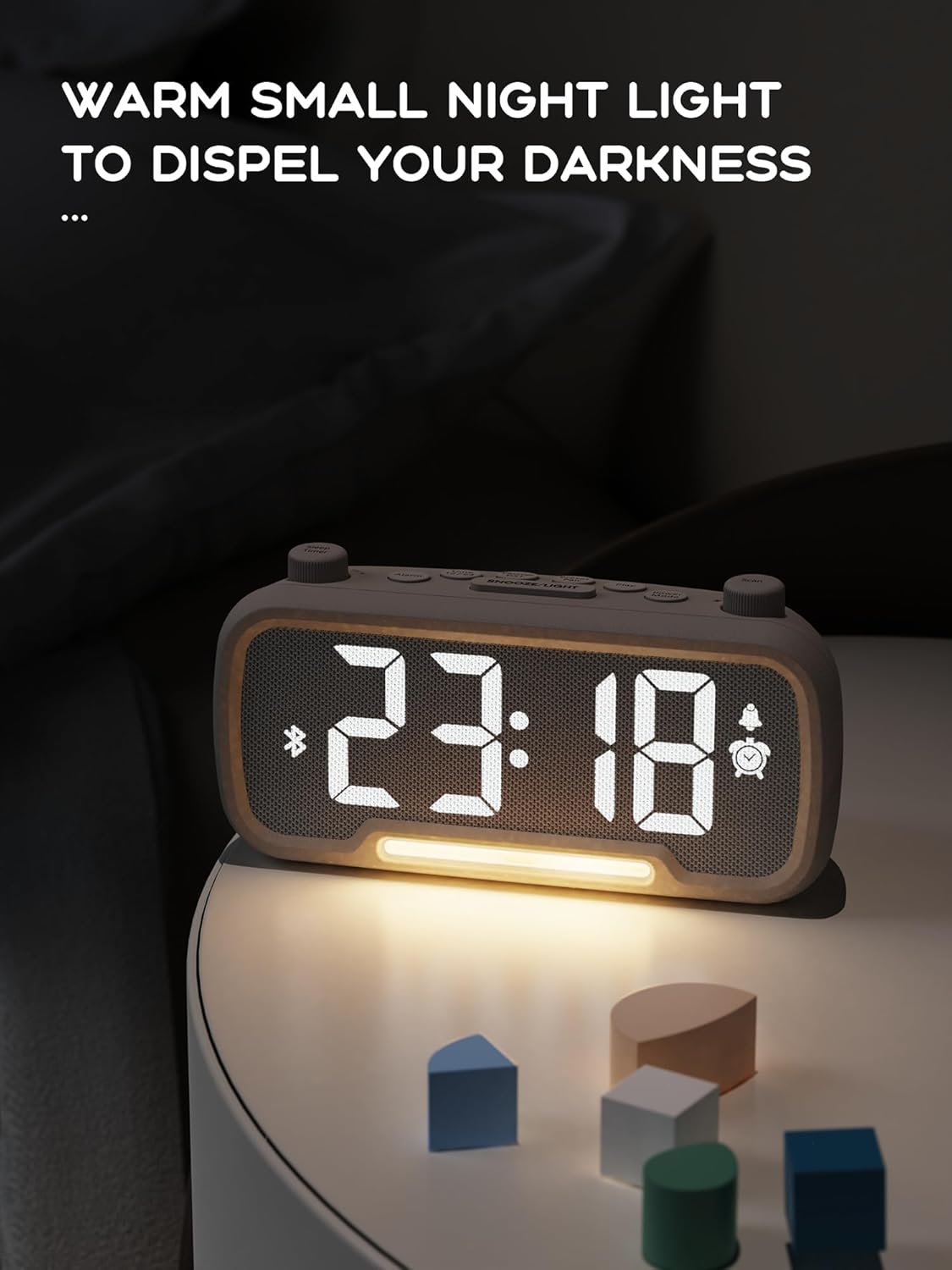
The alarm clock features an integrated night light.
- баскычын кыска басыңыз Тындыруу/Жарык Түнкү жарыкты күйгүзүү же өчүрүү үчүн баскычты басыңыз.
- The night light has adjustable brightness levels. Press and hold the Тындыруу/Жарык button to cycle through the brightness options.

The ROCAM alarm clock on a bedside table, with its warm night light illuminated, providing ambient lighting.
Дисплейдин жарыктыгын жөндөө:
The main display has 5 adjustable brightness levels.
- басыңыз Жарыктык button (or similar, often combined with Snooze/Light) to cycle through the display brightness levels.
- Айлана-чөйрөңүзгө эң ыңгайлуу болгон деңгээлди тандаңыз.
Жайкы убакыт (DST) функциясы:
Жайкы убакытка өтүү үчүн:
- баскычын кыска басыңыз DST button (or similar, often indicated by a sun icon). The time will automatically adjust forward or backward by one hour.
- Press it again to revert the change.
USB жана Type-C кубаттоо порттору:
The alarm clock includes USB and Type-C ports for charging external devices.
- Connect your device's charging cable to the appropriate USB or Type-C port on the back of the alarm clock.
- Кубаттоо порттору иштеши үчүн ойготкуч сааттын күйгүзүлгөнүн текшериңиз.
Техникалык тейлөө
- Clean the device with a soft, dry cloth. Do not use liquid cleaners or abrasive materials.
- Туура желдетүүнү камсыз кылуу үчүн аппаратты чаңдан жана таштандыдан алыс кармаңыз.
- Эгерде түзмөк көпкө чейин колдонулбаса, аны розеткадан сууруп коюңуз.
Проблемаларды чечүү
| Көйгөй | Мүмкүн себеп | Чечим |
|---|---|---|
| Сааттын дисплейи өчүк. | Кубат жок, күчtage, or device is off. | Check power connection. Ensure the power adapter is securely plugged in. If there was a power outage, the battery backup should maintain settings, but the display requires main power. |
| Ойготкуч угулбайт. | Alarm is not activated, volume is too low, or incorrect time set. | Ensure the alarm icon is visible on the display. Increase alarm volume. Verify alarm time is set correctly. |
| FM радиосун кабыл алуу начар. | Сигнал начар, антенна узартылган эмес же тоскоолдук. | Adjust the position of the device. Extend the FM antenna fully. Try auto-scanning for stations again. Avoid placing near other electronic devices. |
| Bluetooth түзмөгү жупташа албайт. | Clock not in Bluetooth mode, device too far, or already paired with another device. | Ensure the clock is in Bluetooth mode (flashing icon). Move your device closer to the clock. Disconnect from other Bluetooth devices. |
| USB/Type-C charging not working. | Clock not powered, cable faulty, or device not compatible. | Ensure the alarm clock is plugged into a wall outlet. Try a different charging cable. Verify your device is compatible with standard USB charging. |
Техникалык шарттар
| Өзгөчөлүк | Деталь |
|---|---|
| Бренд | ROCAM |
| Модел | B0FNWB172Z |
| Түс | Боз |
| Өлчөмдөр | 16.8 x 3.81 x 8.4 см (6.6 x 1.5 x 3.3 дюйм) |
| Салмагы | 350 г (0.77 фунт) |
| Power Source | Электр зымдары |
| Батарея | 1 Lithium-metal battery (included, for backup) |
| FM жыштык диапазону | 87.5 МГц - 108.0 МГц |
| Bluetooth версиясы | 5.0 |
| Дисплей жарыктыгы | 5 деңгээли жөнгө салынат |
| Үн деңгээли | 16 деңгээли жөнгө салынат |
Кепилдик жана колдоо
Кепилдик жөнүндө маалымат же техникалык колдоо алуу үчүн, сатып алууңуз менен берилген байланыш маалыматтарын караңыз же расмий ROCAM сайтына кириңиз webсайт. Кепилдик дооматтар үчүн сатып алганыңыздын далилин сактаңыз.