
1. Продукт бүтүп калдыview
The Verbatim Pocket SSD is a compact and portable external solid-state drive designed for high-speed data transfer and storage. Its lightweight design and robust features make it suitable for various applications, including high-resolution video editing, large data management, and enhancing gaming performance.
Негизги өзгөчөлүктөрү:
- Компакт жана көчмө: Ultra-lightweight at 58g and small dimensions (96.1 x 45.1 x 10mm) for easy transport.
- Жогорку ылдамдыктагы аткаруу: USB 3.2 Gen 2 interface provides data transfer speeds up to 10Gbps.
- Туруктуу дизайн: Includes two colorful rubber protective sleeves for enhanced shock resistance.
- Кеңири шайкештик: Connects to Windows PCs, Mac, TV, smartphones, and iPads via USB-C.
- Камтылган аксессуарлар: USB-C to USB-C cable with a convenient cable holder, two rubber cases (white and light blue), and a fabric bag.
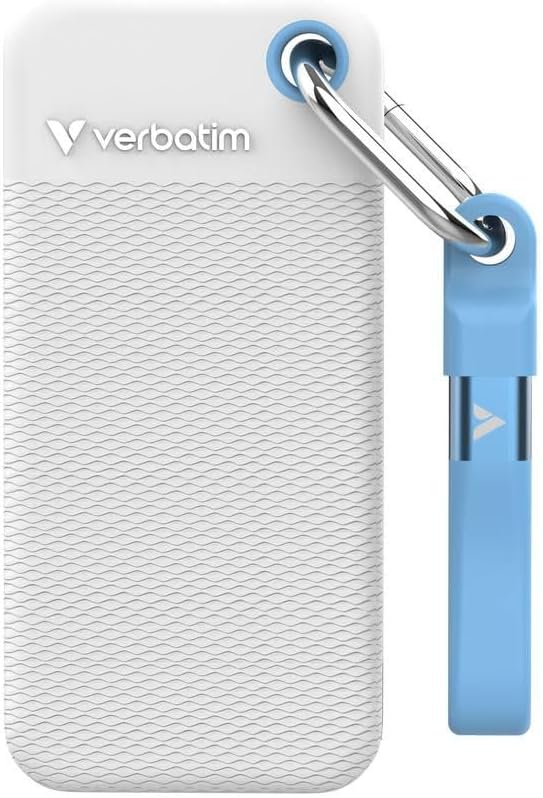
Image 1.1: Verbatim Pocket SSD with its white protective rubber sleeve. This image showcases the compact size and the included protective accessory.
2. Кутуда эмне бар
Пакетти ачкандан кийин, төмөнкү нерселердин бардыгы бар экенин текшериңиз:
- 1 x Verbatim Pocket SSD (1TB Capacity)
- 1 x USB-C - USB-C кабели
- 2 x Rubber Protective Cases (1 x White, 1 x Light Blue)
- 1 x Fabric Bag
3. Орнотуу нускамалары
3.1 SSD туташтыруу
- Attach Rubber Sleeve (Optional): For added protection, slide one of the provided rubber cases onto the SSD.
- Кабелди туташтыруу: Insert one end of the included USB-C to USB-C cable into the USB-C port on the Verbatim Pocket SSD.
- Түзмөккө туташуу: Insert the other end of the USB-C cable into an available USB-C port on your computer, laptop, smartphone, tablet, or gaming console.
- Күйгүзүү: The SSD is bus-powered and does not require an external power supply. It will power on automatically upon connection.

Image 3.1: Verbatim Pocket SSD shown with the light blue protective rubber sleeve. The USB-C port is visible for connection.
3.2 Initial Use and Formatting
The Verbatim Pocket SSD is typically pre-formatted for broad compatibility. However, depending on your operating system (Windows, macOS, Linux) and intended use, you may need to reformat the drive for optimal performance or specific file системалык талаптар.
- Windows: Use Disk Management to initialize and format the drive if it doesn't appear automatically. Common file systems include NTFS or exFAT.
- MacOS: Use Disk Utility to erase and format the drive. Common file systems include APFS or HFS+ (Mac OS Extended). For cross-platform compatibility, exFAT is recommended.
- Башка түзмөктөр: For use with gaming consoles, smart TVs, or other devices, refer to their respective manuals for specific formatting requirements.
Эскертүү: Formatting a drive will erase all data on it. Ensure any important data is backed up before proceeding with formatting.
4. SSDди иштетүү
4.1 Маалыматтарды өткөрүү
Once connected and recognized by your device, the Verbatim Pocket SSD will appear as an external storage device. You can transfer files to and from the SSD using standard operating system functions:
- Сүйрөп таштоо: Чыкылдатып сүйрөңүз files or folders from your computer to the SSD icon, or vice versa.
- Көчүрүү жана чаптоо: Оң чыкылдатыңыз files/folders, select "Copy," then navigate to the desired destination on the SSD, right-click, and select "Paste."
The USB 3.2 Gen 2 interface allows for rapid data transfer, making it efficient for large files and high-volume data operations.
4.2 Коопсуз алып салуу
To prevent data corruption or loss, always safely eject the SSD before disconnecting it from your device.
- Windows: Click the "Safely Remove Hardware and Eject Media" icon in the system tray, then select the Verbatim Pocket SSD.
- MacOS: Drag the SSD icon from your desktop to the Trash, or right-click the SSD icon and select "Eject."
5. Техникалык тейлөө жана кам көрүү
- Физикалык коргоо: Always use the provided rubber protective sleeves to guard against accidental drops and impacts. When not in use, store the SSD in the fabric bag to prevent scratches and dust accumulation.
- Тазалоо: Use a soft, dry, lint-free cloth to clean the exterior of the SSD. Avoid using liquid cleaners or solvents.
- Температура: Operate and store the SSD within recommended temperature ranges (typically 0°C to 70°C operating, -40°C to 85°C storage). Avoid extreme heat or cold.
- Маалыматтын камдык көчүрмөсү: Regularly back up important data stored on the SSD to another storage device. While SSDs are reliable, no storage device is immune to failure.
- Программалык камсыздоонун жаңыртуулары: Мезгил-мезгили менен сөзмө-сөз текшерүү website for any available firmware updates for your SSD model. Firmware updates can improve performance and stability.
6. Кыйынчылыктарды
6.1 SSD Not Recognized
- Байланыштарды текшерүү: Ensure the USB-C cable is securely connected to both the SSD and your device. Try a different USB-C port on your device.
- Try Another Cable: If available, test with a different USB-C to USB-C cable to rule out a faulty cable.
- Түзмөктү кайра иштетүү: Кээде компьютериңизди же түзмөгүңүздү жөнөкөй өчүрүп-күйгүзүү таануу көйгөйлөрүн чече алат.
- Дискти башкарууну (Windows) / Диск утилитасын (macOS) текшериңиз: Verify if the drive appears in your operating system's disk management tools. It might need to be initialized or formatted (see Section 3.2).
- Айдоочу маселелери: Операциялык системаңызда эң акыркы USB драйверлери орнотулганын текшериңиз.
6.2 Жай өткөрүү ылдамдыгы
- USB порт түрү: Ensure you are connecting the SSD to a USB 3.2 Gen 2 (or compatible USB 3.1 Gen 2) port on your device. Older USB 2.0 or 3.0 ports will result in significantly slower speeds.
- Кабелдин сапаты: Use the included high-quality USB-C cable. Lower quality or longer cables can impact performance.
- File Түрү: Көптөгөн майда которуулар files is generally slower than transferring a single large file бирдей жалпы өлчөмү.
- Түзмөктүн иштеши: The speed of your computer's internal drive and CPU can also affect transfer rates.
6.3 Маалыматтын бузулушу
- Коопсуз чыгаруу: Always safely eject the SSD before disconnecting it (see Section 4.2). Abrupt removal can lead to data corruption.
- Кубаттын өзгөрүшү: Avoid disconnecting the SSD during power outages or system crashes.
- Кадимки камдык көчүрмөлөр: Maintain regular backups of critical data to mitigate the impact of any data corruption.
7. Продукттун спецификациялары
| Модель номери | 32320 |
| Санариптик сактоо сыйымдуулугу | 1 ТБ |
| Катуу диск интерфейси | USB 3.2 Gen 2 |
| Байланыш технологиясы | USB |
| Өзгөчөлүктөр | Көчмө, соккуга туруктуу |
| Катуу диск форма фактору | 2.5 дюйм |
| Hard Disk Description | Solid State Drive |
| Шайкеш түзмөктөр | Computer, Gaming Console, Laptop, Smartphone, Tablet |
| Орнотуу түрү | Тышкы катуу диск |
| Түс | White (main variant) |
| Окуу ылдамдыгы | 1000 МБ/сек чейин |
| Маалыматтарды өткөрүү ылдамдыгы | Up to 1000 MB/s (10 Gbps) |
| Элемент Салмагы | 58 грамм |
| Өлчөмдөрү (У x Туурасы x Калыңдыгы) | 3.78"L x 0.39"W x 1.78"Th (approx. 96.1 x 10 x 45.1 mm) |
| Коргоочу материал | Пластмасса, резина |
| Өндүрүүчү | Сөзмө-сөз |
8. Кепилдик жана колдоо
8.1 Продукциянын кепилдиги
Verbatim products are covered by a limited warranty. For specific warranty terms and conditions applicable to your region and product, please refer to the official Verbatim webсайтына же сатып алууңузга тиркелген кепилдик картасына кайрылыңыз. Кепилдик талаптары үчүн сатып алганыңызды тастыктаган документти сактап коюңуз.
8.2 Маалыматтарды калыбына келтирүү пландары
Optional data recovery plans may be available for purchase separately to protect against data loss. These plans typically offer services to recover data from damaged or failed drives. For more information, please check with your retailer or the Verbatim webсайт.
- 2 жылдык маалыматтарды калыбына келтирүү планы: Available for extended data protection.
- 3 жылдык маалыматтарды калыбына келтирүү планы: Available for extended data protection.
8.3 Техникалык колдоо
For technical assistance, troubleshooting, or further inquiries, please visit the official Verbatim support website or contact their customer service. You can usually find contact information and FAQs on the Verbatim webсайт.
Сөзмө-сөз расмий Webсайт: www.verbatim.com