
1. Киришүү
Thank you for choosing the Twotrees TS5 7W Laser Engraver. This advanced machine is designed for precise and versatile engraving on a wide range of materials, featuring an innovative 4-in-1 rotary system. This manual provides essential information for safe operation, setup, usage, and maintenance of your device. Please read it thoroughly before operating the engraver.
2. Коопсуздук нускамалары
WARNING: Laser radiation can cause eye damage and skin burns. Always follow safety precautions.
- Көздү коргоо: The Twotrees TS5 features an integrated closed structure with special filtering materials to block harmful blue light. However, never look directly at the laser beam. Always ensure the protective enclosure is properly closed during operation.
- Терини коргоо: Теринин лазер нурунун түздөн-түз таасиринен алыс болуңуз.
- Вентиляция: The integrated smoke and dust ejection system helps maintain a clean working environment. Ensure proper ventilation in your workspace.
- Күйүүчү материалдар: Do not engrave highly flammable materials without proper precautions. Keep a fire extinguisher nearby.
- Балдар жана үй жаныбарлары: Keep the engraver out of reach of children and pets.
- Электр камсыздоо: Use only the provided power adapter. Ensure the power supply matches the specified voltage (100-240 V ~ 50/60 Hz).
- Шашылыш токтотуу: Familiarize yourself with the location of the emergency stop button.
3. Продукт бүтүп калдыview
The Twotrees TS5 7W Laser Engraver is a versatile and efficient tool for custom engraving. Its key features include:
- 4-in-1 Rotary System: The first enclosed 4-in-1 rotary laser engraver, including roller, chuck, sphere, and ring kits for engraving various shapes and objects.
- High Pre-assembly: 95% pre-assembled for quick and easy setup.
- Коопсуздук корпусу: Integrated closed structure with light filtering materials and a smoke/dust ejection system for a safe and clean workspace.
- Magnetic Closure Design: Allows for easy access and efficient batch processing.
- Precise Focusing: Ensures accurate engraving positioning.
- Кеңири шайкештик: Supports popular engraving software like LaserGRBL (Windows) and LightBurn (macOS/Windows/Linux), and GRBL control systems.
- Versatile Materials: Capable of engraving on aluminum jewelry, leather, glass, wood, stainless steel, cups, wine glasses, and rings.

Figure 3.1: The Twotrees TS5 Laser Engraver shown with its various 4-in-1 rotary attachments for diverse engraving tasks.

Figure 3.2: Breakdown of the innovative 4-in-1 rotary system, illustrating the Roller, Chuck, Sphere, and Ring rotary attachments.

Figure 3.3: The individual components of the Twotrees TS5 rotary system, ready for assembly and interchangeability.
4. Орнотуу
The Twotrees TS5 is 95% pre-assembled, making setup quick and straightforward.
- Пакеттен чыгаруу: Бардык компоненттерди таңгактан кылдаттык менен алып салыңыз. Таңгактоо тизмесинде көрсөтүлгөн бардык бөлүктөрдүн бар экендигин текшериңиз.
- Жайгашкан жери: Гравёрду тез күйүүчү материалдардан алыс, жакшы желдетилген жердеги туруктуу, тегиз бетке коюңуз.
- Кубат туташуу: Connect the power adapter to the engraver and then to a suitable power outlet.
- Программалык камсыздоону орнотуу: Install your preferred engraving software (LaserGRBL for Windows or LightBurn for macOS/Windows/Linux) on your computer. Links to download these can typically be found on the Twotrees official website or the software developers' sites.
- USB туташуу: Connect the engraver to your computer using a USB cable.
- Rotary Attachment (if needed): If using a rotary attachment, select the appropriate kit (roller, chuck, sphere, or ring) and install it according to the specific instructions for that module.
5. Иштөө нускамалары
Operating the Twotrees TS5 involves preparing your design, setting up the material, and initiating the engraving process.
5.1 Материалды даярдоо
- Flat Materials: Place flat materials directly on the engraving bed.
- Cylindrical/Irregular Objects: For items like cups, wine glasses, spheres, or rings, install the appropriate rotary attachment.
- Securing Material: Ensure the material is securely fastened to prevent movement during engraving. The chuck and roller systems offer multiple clamping styles.

Figure 5.1: The engraver demonstrating multiple clamping styles for different objects, such as a wine glass on the roller and a mug on the chuck.
5.2 Лазерди фокустоо
Precise focusing is crucial for optimal engraving results.
- Кол менен Фокус: Adjust the laser module height until the laser spot is at its smallest and sharpest point on the material surface.
- Assisted Focus: The TS5 features an effortless focus mechanism. Refer to the specific instructions for your model's focusing method.
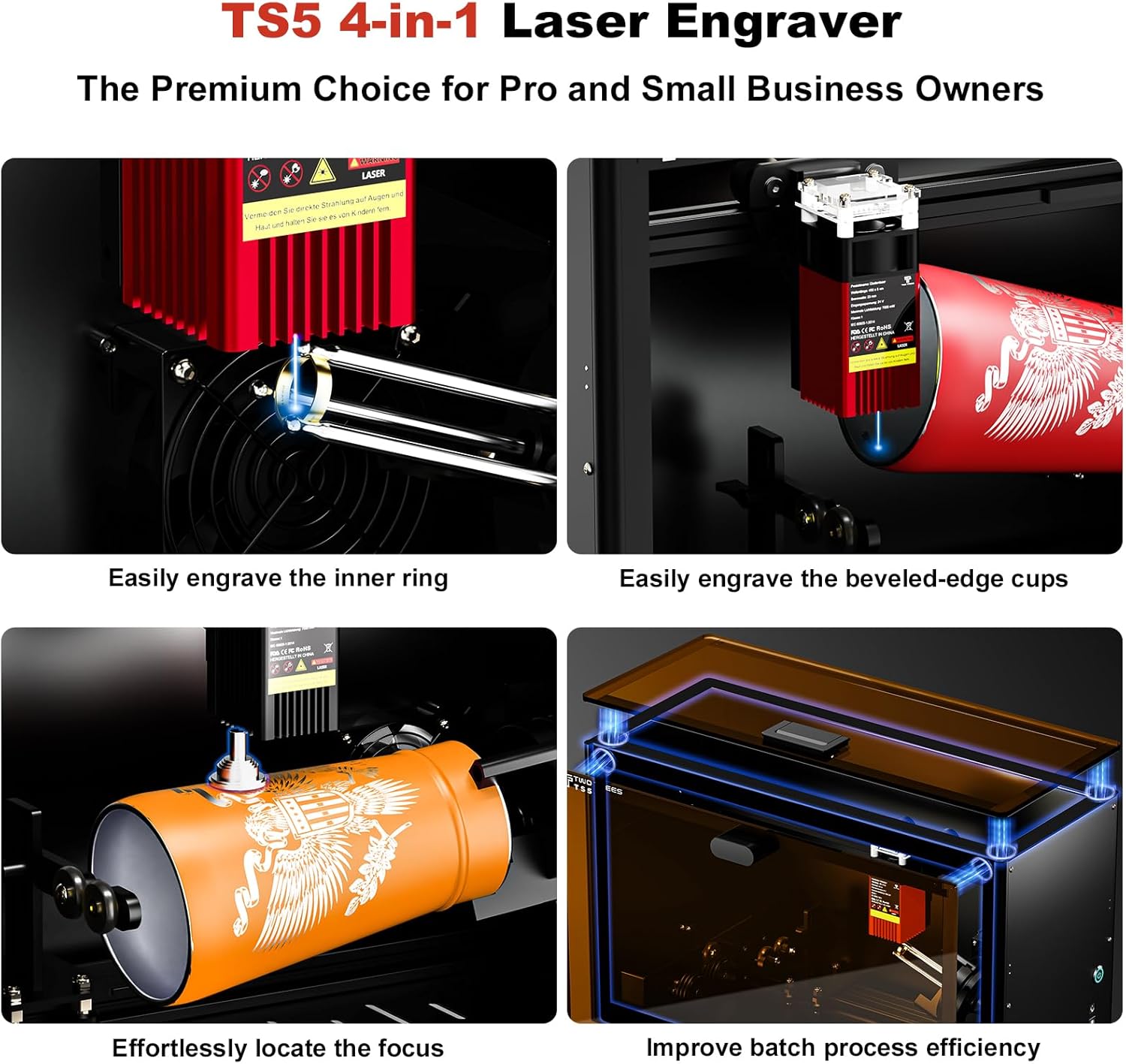
Figure 5.2: Visual guide demonstrating key operational aspects: engraving inner rings, handling beveled cups, effortless focus adjustment, and improving batch processing efficiency.
5.3 Software Operation (LightBurn/LaserGRBL)
- Импорттук дизайн: Дизайныңызды жүктөңүз file (LBRN, BMP, JPG, PNG, GCODE) into the software.
- Орнотууларды тууралоо: Set engraving parameters such as laser power (adjustable), speed, and number of passes based on the material.
- Preview: Программалык камсыздоонун алдын ала версиясын колдонуңузview function to ensure the design is correctly positioned.
- Гравюра баштоо: Close the protective enclosure, ensure all safety measures are in place, and initiate the engraving process from the software.

5.3-сүрөт: Мисamples of diverse engraving applications on materials such as aluminum jewelry, leather, glass, and wood.

Figure 5.4: The Twotrees TS5 actively engraving intricate patterns onto a wine glass using the roller rotary attachment.
6. Техникалык тейлөө
Regular maintenance ensures the longevity and optimal performance of your Twotrees TS5 Laser Engraver.
- Линзаны тазалоо: Лазердин күчүн жана тактыгын сактоо үчүн лазердик линзаны мезгил-мезгили менен жумшак, түксүз чүпүрөк жана линза тазалоочу эритме менен тазалап туруңуз.
- Корпусун тазалоо: Wipe down the interior and exterior of the enclosure to remove dust and debris.
- Майлоо: Lightly lubricate moving parts (rails, screws) as recommended by the manufacturer to ensure smooth operation.
- Программалык камсыздоонун жаңыртуулары: Check the Twotrees official webТүзмөгүңүз үчүн жеткиликтүү болгон программалык камсыздоонун жаңыртуулары үчүн сайт.
7. Кыйынчылыктарды
Бул жерде кээ бир жалпы маселелер жана алардын мүмкүн болуучу чечимдери:
| Көйгөй | Мүмкүн себеп | Чечим |
|---|---|---|
| Лазер иштебейт же алсыз | Incorrect focus, dirty lens, low power setting, loose connection. | Adjust focus, clean lens, increase laser power in software, check all cable connections. |
| Engraving is distorted or misaligned | Material not secured, loose belts/components, incorrect software settings. | Secure material, check and tighten belts/components, verify software settings (e.g., origin, work area). |
| Software not connecting to engraver | USB cable issue, driver not installed, incorrect COM port selected. | Try a different USB cable/port, install necessary drivers, select the correct COM port in software. |
| Ашыкча түтүн/буун | Insufficient ventilation, material type. | Ensure the integrated fume extraction system is clear and operating, improve room ventilation. |
8. Техникалык шарттар
| Өзгөчөлүк | Деталь |
|---|---|
| Модел | TS5 7W |
| Лазердик күч | 7 Вт |
| Жалпы күч | 60 Вт |
| Толкун узундугу | 450 ± 5 нм |
| Spot Size | 0.035 × 0.1 мм |
| Жумушчу аймак | 249 × 123 × 123 мм |
| Chuck Outer Clampдиапазону | Ø26 - Ø140 mm |
| Chuck Inner Clampдиапазону | Ø15 - Ø110 mm |
| Chuck Tilt Adjustment Angle | -8°тан +8°ка чейин |
| Продукциянын өлчөмдөрү | 480 × 200 × 298 мм |
| Таза Салмак | 9.13 кг |
| Киргизүү көлөмүtage | 100-240 В ~ 50/60 Гц |
| Output Voltage | 24 V |
| X/Y Axis Positioning Accuracy | 0.1 мм |
| Максималдуу ылдамдык | 10,000 мм/мин |
| Колдоого алынган программалык камсыздоо | LaserGRBL (Windows), LightBurn (Common) |
| Колдоого алынган OS | macOS / Windows / Linux |
| Колдоого алынган File Форматтар | LBRN, BMP, JPG, PNG, GCODE |
9. Кепилдик жана колдоо
For warranty information and technical support, please refer to the documentation included with your purchase or visit the official Twotrees website. You may also contact your seller for assistance.
Өндүрүүчү: Twotrees
Model Number (Article Reference): CTNTS5
ASIN: B0FP14B4CR
10. Кошумча маалымат
The Twotrees TS5 is designed to meet over 95% of mug customization needs and is ideal for custom engraving of irregular mugs and various other objects.

Figure 10.1: The Twotrees TS5 demonstrating its capability to engrave a wide variety of customized mugs and other items.

Figure 10.2: A comparison table illustrating the superior features of the Twotrees TS5 Laser Engraver, such as its 4-in-1 system and high pre-assembly, compared to other models.