
1. Продукт бүтүп калдыview
The PGST WiFi Home Alarm System Qek-a107s-b is a comprehensive wireless security solution designed for homes and offices. It supports dual network connectivity (WiFi and GSM) and offers various alarm states for enhanced protection. The system is expandable, allowing for the addition of up to 100 wireless sensors and 3 wired sensors.

Figure 1.1: PGST WiFi Home Alarm System Qek-a107s-b main unit and included accessories.
Негизги өзгөчөлүктөрү:
- Кош тармактык колдоо: Operates via WiFi (2.4G only) and GSM for reliable communication.
- Кеңейтүүчү система: 100гө чейин зымсыз сенсорлорду жана 3 зымдуу сенсорлорду колдойт.
- Бир нече куралдандыруу режимдери: Remote arming, home arming, delayed arming, and timely arming.
- Камдык батарея: Ensures continuous operation during power outages.
- Ийкемдүү башкаруу: Arm/disarm via remote control, mobile app, RFID card, or phone call.
- Long-Range Signal: Integrated antenna for wide coverage, up to 2,500 square feet.
- Жазылуу акысы жок: Free app control without hidden costs or contracts.
2. Пакеттин мазмуну
Upon unpacking, verify that all the following items are included in your PGST WiFi Home Alarm System Qek-a107s-b package:
- 1 x Сигнализация хосту (Башкы башкаруу панели)
- 3 x Кыймыл детекторлору
- 2 x Алыстан башкаруу
- 6 х эшик/терезе сенсорлору
- 2 x RFID карталары
- 1 x Зымдуу сирена
- All necessary batteries for included components.
3. Продукциянын компоненттери
3.1 Alarm Host (Main Control Panel)
The alarm host features a 4.3-inch TFT display and capacitive touch interface for easy navigation and control. It includes an SOS button and an RFID card sensing area for quick arming/disarming.

Сүрөт 3.1: Алдыңкы view of the alarm host, highlighting the 4.3 TFT display screen.
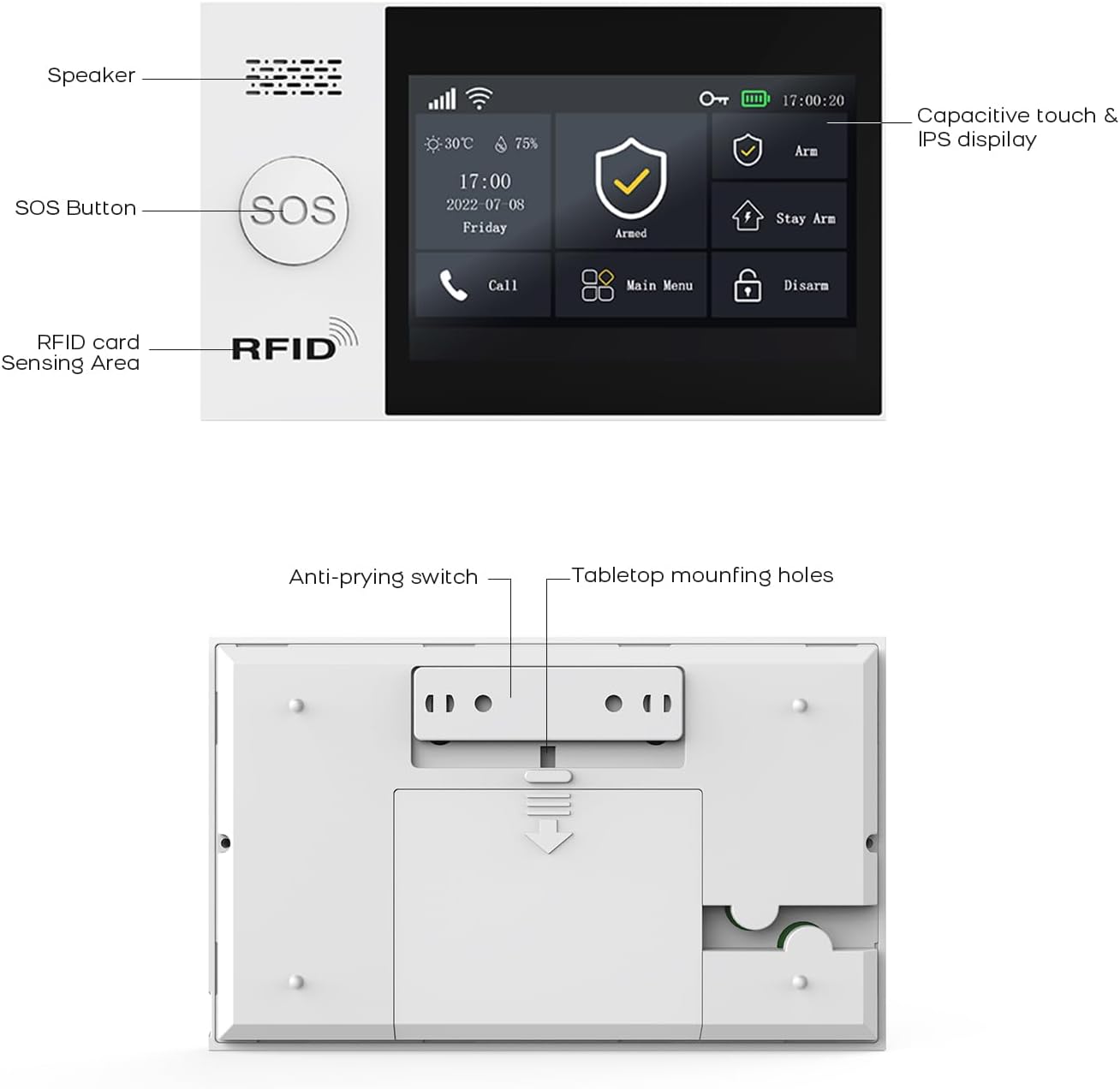
3.2-сүрөт: Детальдуу view of the alarm host's front panel (speaker, SOS button, RFID area) and rear panel (anti-prying switch, tabletop mounting holes).
3.2 Сенсорлор жана аксессуарлар
The system includes various sensors and accessories to detect intrusions and provide comprehensive security. These include motion detectors, door/window sensors, remote controls, RFID cards, and a wired siren.
4. Орнотуу жана орнотуу
The PGST alarm system is designed for easy DIY installation. Follow these steps to set up your system.
4.1 Баштапкы кубаттуулук
- Connect the alarm host to a power outlet using the provided adapter.
- Ensure the backup battery is properly installed. The system will automatically switch to battery power during an outage.
4.2 Network Connection (WiFi & GSM)
- WiFi туташуусу:
- Access the network settings on the alarm host's display.
- Select your 2.4GHz WiFi network (5GHz networks are not supported).
- Enter your WiFi password to connect.
- GSM Connection:
- Insert a valid SIM card into the designated slot on the alarm host.
- The system will automatically detect and connect to the GSM network.
4.3 Сенсорду орнотуу
Strategically place motion detectors and door/window sensors in key areas of your home or office. Ensure sensors are within range of the alarm host.
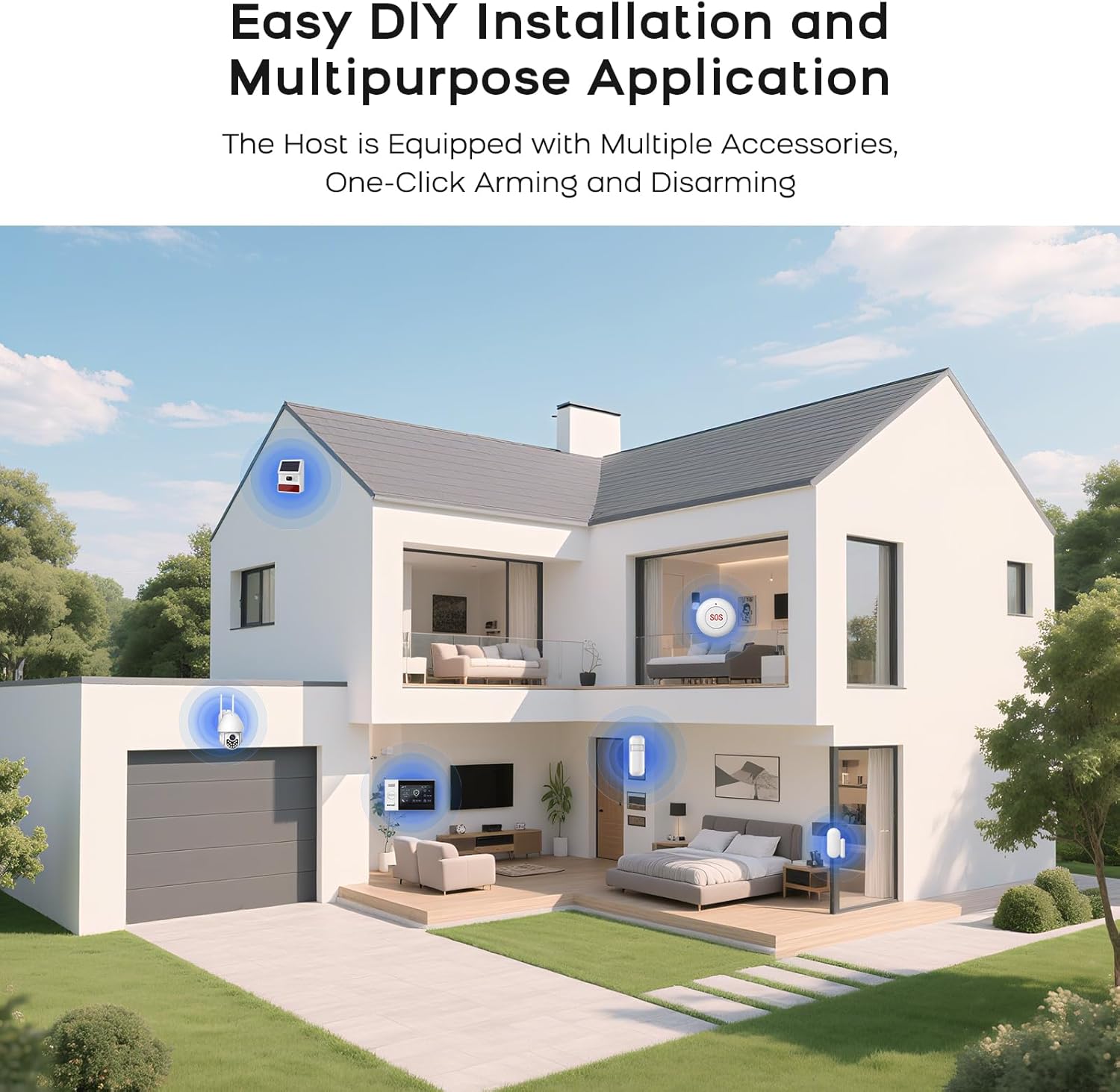
4.1-сүрөт: Мисample of a typical alarm system installation layout in a home, showing placement of various sensors and the main unit.
- Эшик/терезе сенсорлору: Mount the two parts of the sensor on the door/window frame and the door/window itself, ensuring they are aligned and close to each other when closed.
- Кыймыл детекторлору: Install in corners or areas with high traffic, ensuring a clear line of sight. Avoid placing near heat sources or direct sunlight.
- Жупташтырган сенсорлор: Refer to the alarm host's menu for instructions on pairing new sensors with the system.
5. Иштөө нускамалары
5.1 Системаны куралдандыруу жана куралсыздандыруу
Системаны бир нече ыкмалар менен куралдандырса же куралсыздандырса болот:
- Алыстан башкаруу: Press the arm or disarm button on the remote.
- Мобилдик колдонмо: Use the dedicated mobile application (SMART LIFE, TUYA) to arm or disarm remotely.
- RFID картасы: Tap an authorized RFID card on the sensing area of the alarm host.
- Сигнализация хосту панели: Use the touch screen interface to select arming or disarming modes.
- Телефон чалуу: Arm or disarm the system by calling the alarm host's GSM number and following voice prompts.
5.2 Smart App Remote Control
The mobile application allows for remote control and scheduling of arming/disarming times.

Figure 5.1: The mobile application interface for programming timed arming and disarming schedules.
5.3 Үн менен башкаруунун интеграциясы
The system supports voice control via compatible smart assistants like Amazon Alexa and Google Assistant.

Figure 5.2: Demonstrating voice control integration with Amazon Alexa to arm the system.
5.4 Two-Way Voice Intercom Function
The alarm host features a two-way voice intercom function, allowing you to make and receive calls, and send voice messages through the system.

Figure 5.3: The two-way voice intercom function enables communication through the alarm system.
6. Техникалык тейлөө
6.1 Батареяны башкаруу
The alarm host and wireless sensors are battery-powered. Regular monitoring of battery levels is crucial for uninterrupted operation.
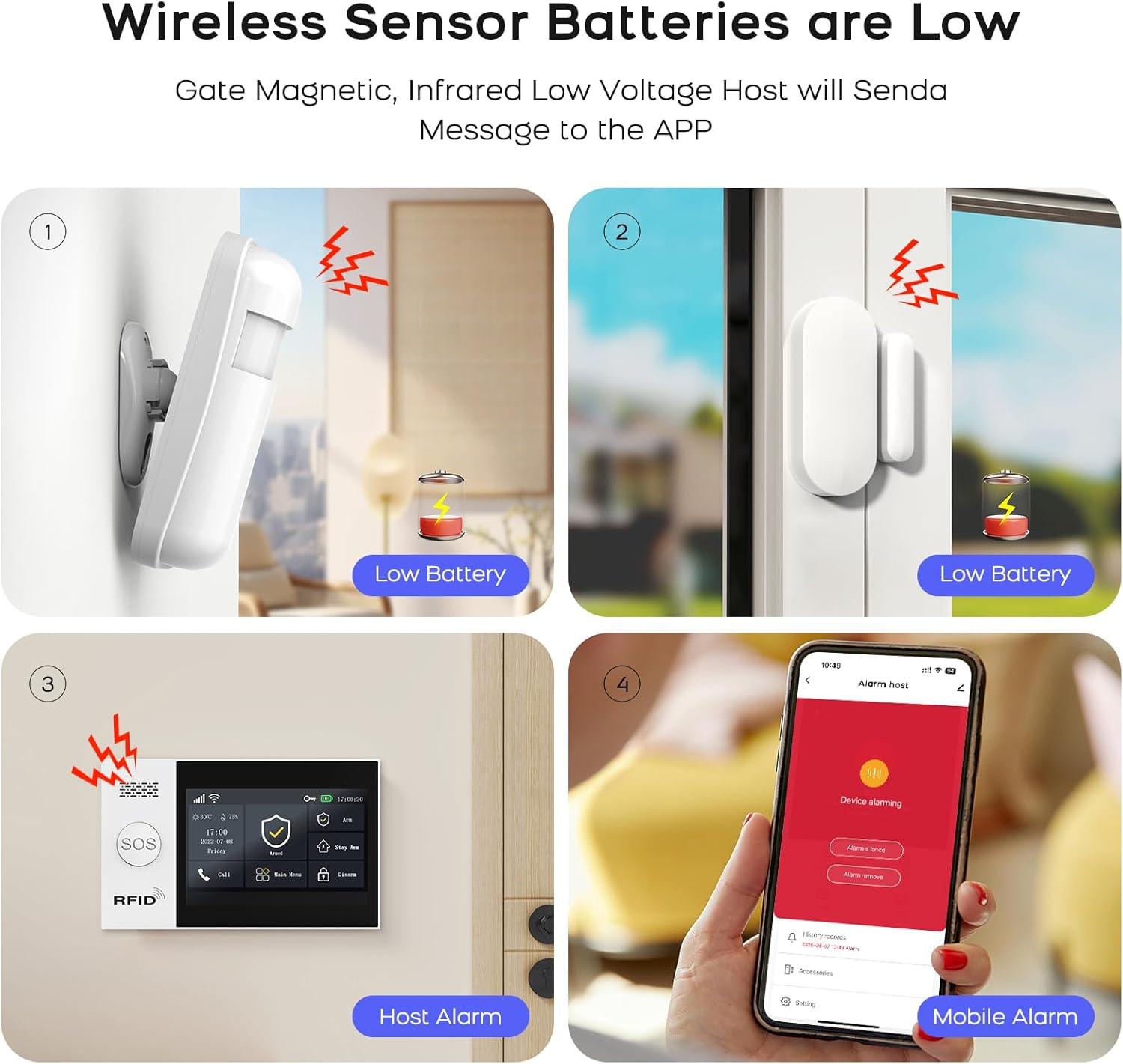
Figure 6.1: Visual representation of low battery alerts from wireless sensors and the alarm host, displayed on the host and mobile app.
- Зымсыз сенсордук батареялар: When a wireless sensor's battery is low, the host will send a message to the mobile app. Replace batteries promptly to ensure continuous protection.
- Сигнализация хостунун камдык көчүрмө батареясы: The alarm host has a built-in backup battery providing approximately 5.5 hours of operation during a power failure. The system will send an SMS notification if power is interrupted and restored.

Figure 6.2: The alarm host display indicating battery status and power consumption.
6.2 Тазалоо
Wipe the alarm host and sensors with a soft, dry cloth. Avoid using abrasive cleaners or solvents that could damage the devices.
7. Кыйынчылыктарды
| Көйгөй | Мүмкүн себеп | Чечим |
|---|---|---|
| Система WiFiга туташпай жатат | Туура эмес WiFi сырсөзү; 5 ГГц тармагы тандалды; сигнал начар. | Verify password. Ensure you are connecting to a 2.4GHz network. Move the alarm host closer to the router or improve signal strength. |
| Сенсорлор жооп бербей жатат | Low battery; out of range; not properly paired. | Replace sensor batteries. Relocate sensor closer to the alarm host. Re-pair the sensor with the alarm host. |
| No GSM network connection | SIM card not inserted correctly; invalid SIM card; no network coverage. | Ensure SIM card is correctly inserted. Verify SIM card is active and has credit. Check for GSM network coverage in your area. |
| Alarm host not powering on | Power adapter issue; backup battery depleted. | Check power adapter connection and power outlet. Allow backup battery to charge or replace if faulty. |
| Жалган коңгуроо | Сенсордун туура эмес жайгаштырылышы; айлана-чөйрөнүн факторлору (үй жаныбарлары, шамал). | Adjust sensor sensitivity. Reposition motion detectors to avoid pets or drafts. Ensure door/window sensors are securely mounted. |
8. Техникалык шарттар
| Өзгөчөлүк | Деталь |
|---|---|
| Бренд | PGST |
| Модел | Qek-a107s-b |
| Power Source | Батарея менен иштейт |
| Шайкеш түзмөктөр | SMART LIFE, TUYA, Amazon Alexa, Google Assistant |
| Элементтин өлчөмдөрү (LxWxH) | 18 x 12 x 3 см (7.09 x 4.72 x 1.18 дюйм) |
| Дисплей | 4.3 inch TFT Capacitive Touch IPS Display |
| Зымсыз жыштык | 2.4GHz WiFi (5GHz not supported) |
| Колдоого алынган максималдуу сенсорлор | 100 зымсыз, 3 зымдуу |
| Сиренанын чыгышы | 120dB (Wired Siren) |
| Батареянын иштөө мөөнөтү | Болжол менен 5.5 саат |
9. Кепилдик жана колдоо
For warranty information and technical support, please refer to the documentation included with your product or visit the official PGST webсайт. Сатып алуу квитанциясын кепилдик дооматтары үчүн сатып алуунун далили катары сактаңыз.
If you encounter any issues not covered in this manual, please contact PGST customer service for assistance.