
1. Киришүү
The Douk Audio BSA600 V2.0 is a 230W bridgeable stereo/mono subwoofer power amplifier designed to enhance tactile bass experiences. It delivers powerful low-frequency output, allowing users to feel explosions, rumbles, and music as tangible vibrations, adding realism to home theater, gaming, and simulation setups.

Image 1.1: Douk Audio BSA600 V2.0 Bass Shaker Ampөмүрлүү.
2. Кутуда эмне бар
Сураныч, кутудан чыгарганда пакеттин мазмунун текшерип, бардык буюмдар бар экенин текшериңиз:
- 1 × Douk Audio BSA600 V2.0 Ampөмүрлүү
- 1 × Wired Remote Controller (5m/16.4ft cable)
- 1 × Type-C Cable (for remote)
- 1 × Кубат кабели
- 1 Set × Mounting Brackets
- 2 × Double-sided Adhesive Pads

Image 2.1: Contents of the BSA600 V2.0 package.
3. Продукт бүтүп калдыview
3.1 Алдыңкы панелдин башкаруу элементтери
Алдыңкы панель негизги башкаруу элементтерине жана көрсөткүчтөрүнө мүмкүнчүлүк берет:
- Mono/Stereo Select Switch: Toggles between mono (bridged) and stereo output modes.
- Автоматтык / күйгүзүүчү: Selects between manual power on/off and signal-sensing auto-on mode.
- Күч көрсөткүчү: болгондо жарык берет ampкөтөргүч күйгүзүлгөн.
- Алыскы интерфейс: Connects the wired remote controller.
- Дисплей экраны: Shows the current volume level.
- ҮН (Үн) баскычы: Жалпы чыгаруу көлөмүн тууралайт.
- FREQ (жыштык) баскычы: Adjusts the low-pass filter cutoff frequency from 50Hz to 200Hz.
- BAL (Balance) Knob: Adjusts the balance between left and right channels in stereo mode, or output levels for dual shakers.
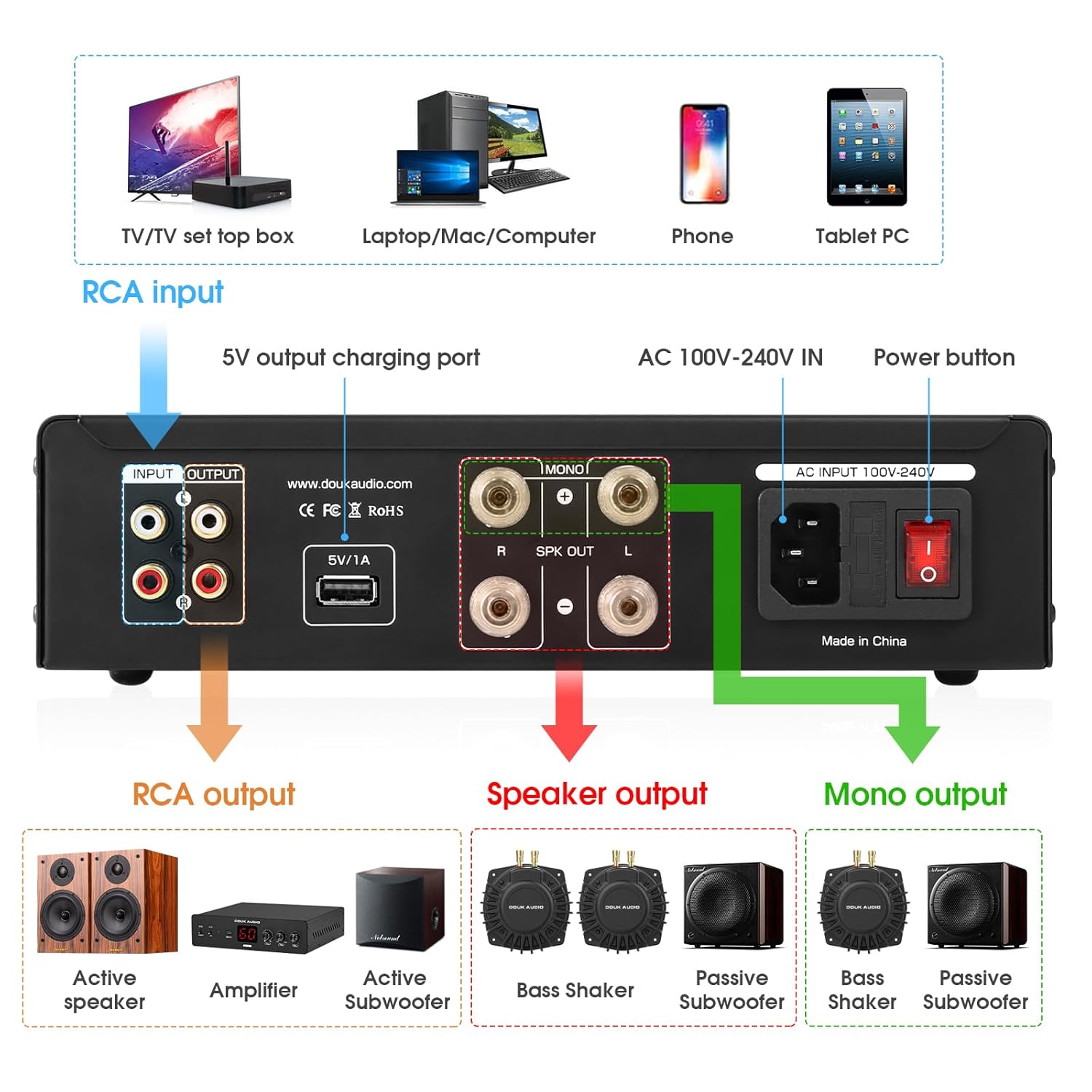
Image 3.1: Front panel layout with controls.
3.2 Арткы панелдин туташуулары
Арткы панелде бардык киргизүү жана чыгаруу байланыштары бар:
- RCA киргизүүсү (сол/оң): Connects to your audio source (e.g., AV receiver, sound card).
- RCA чыгышы (сол/оң): For daisy-chaining multiple amplifiers or connecting to other audio equipment.
- 5V/1A USB Charging Port: Provides power for small accessories (e.g., LED lights, cooling fans).
- AC 100V-240V IN: үчүн кубаттуулук киргизүү ampөмүрлүү.
- Кубат баскычы: Агрегаттын негизги өчүргүч.
- Динамиктин чыгышы (сол/оң): Connects to passive bass shakers or subwoofers in stereo mode.
- Mono Output (Bridged): Connects to a single passive bass shaker or subwoofer in bridged mono mode for maximum power.
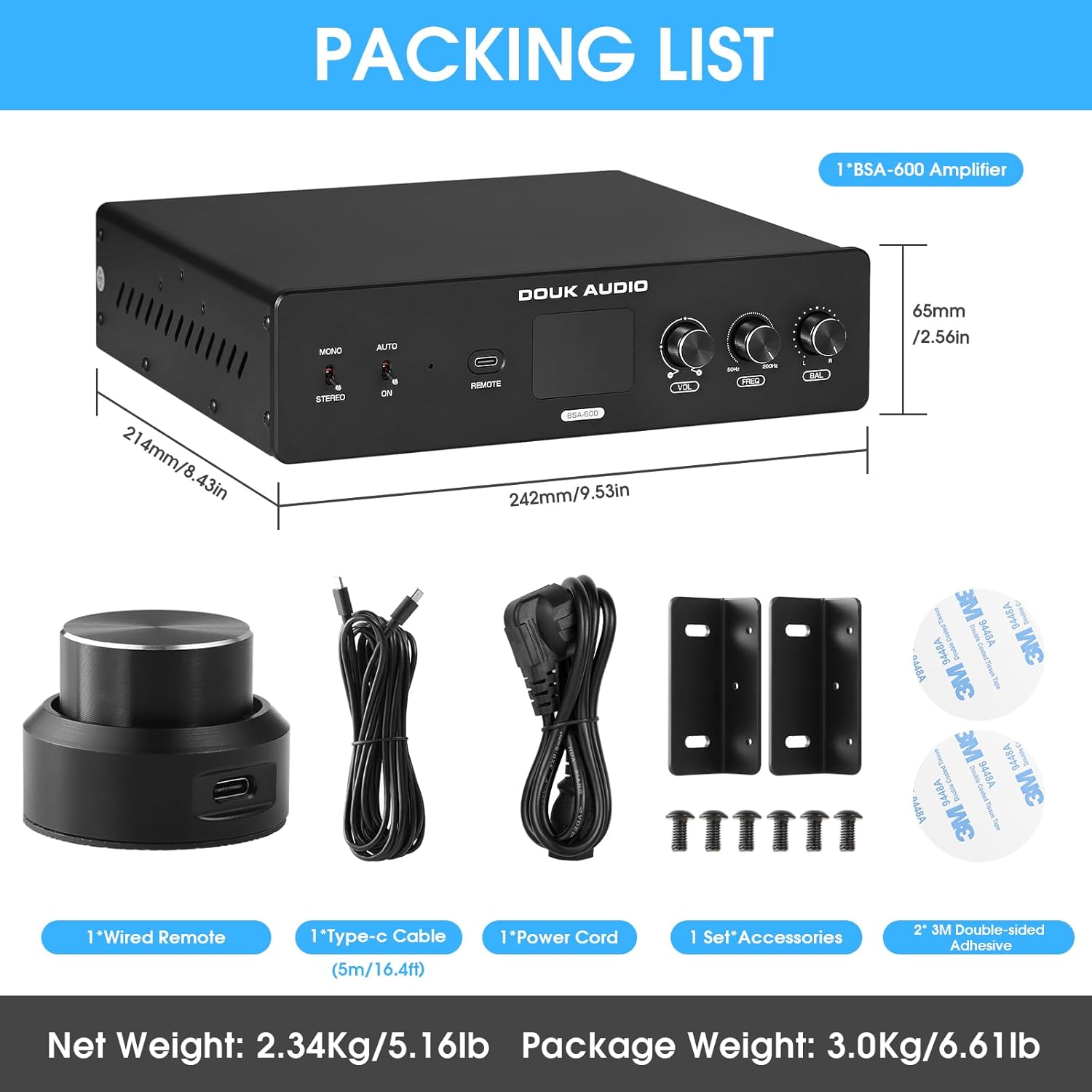
3.2-сүрөт: Арткы панелдин туташуулары.
3.3 Ички компоненттер
The BSA600 V2.0 utilizes a high-performance TPA3255 chip for efficient and powerful audio processing.

Image 3.3: TPA3255 high-performance audio chip.
4. Орнотуу
4.1 Орнотуу жана орнотуу
The compact design of the BSA600 V2.0 allows for flexible installation. Use the included mounting brackets and adhesive pads to secure the ampөмүр берүүчү:
- Under a couch or chair.
- Attached to a gaming chair or sim racing rig.
- Within an AV rack or cabinet.

Сүрөт 4.1: Мисample of amplifier mounting under furniture.
4.2 Аудио байланыштар
Follow these steps to connect your audio system:
- Аудио булагын туташтыруу: Use RCA cables to connect the audio output of your source device (e.g., AV receiver, PC sound card) to the RCA киргизүү (сол/оң) боюнча ampкөтөргүчтүн арткы панели.
- Connect Bass Shakers/Subwoofers:
- үчүн stereo operation (two bass shakers/subwoofers), connect each to the respective Динамиктин чыгышы (сол/оң) терминалдар.
- үчүн mono (bridged) operation (a single, larger bass shaker/subwoofer), connect it to the Mono Output (Bridged) terminals. Ensure the amplifier is set to Mono mode via the front panel switch.
- Ромашка чынжырын токуу (милдеттүү эмес): Эгер бир нече жолу туташса amplifiers, use RCA cables from the RCA чыгаруу (сол/оң) биринчилерден amplifier to the RCA Input of the next.
- Туташуу кубаты: Plug the included power cord into the AC 100V-240V IN port and then into a suitable power outlet.
- Зымдуу пультту туташтыруу: Plug the wired remote controller into the АЛЫСКЫ interface on the front panel.
- USB Accessory (Optional): Connect any small 5V/1A USB-powered accessories to the 5V/1A USB кубаттоочу порт.

Image 4.2: Connection diagram for audio sources and outputs.
Маанилүү: ар дайым камсыз кылуу amplifier is powered off before making any connections to prevent damage to the unit or connected devices.
5. Иштөө нускамалары
5.1 Күйгүзүү/өчүрүү жана режимдер
The amplifier offers three power modes:
- Кол менен күйгүзүү/өчүрүү: коюңуз Авто/Күйүк switch to "ON". Use the main power button on the rear panel or the wired remote to turn the unit on or off.
- Signal-Sensing Auto-On: коюңуз Авто/Күйүк switch to "AUTO". The amplifier will automatically power on when an audio signal is detected and enter standby after 10 minutes of no signal.
- Triggered Control: This mode is typically used in integrated home theater systems where a trigger signal from a receiver or processor controls the amplifier's power state.

Image 5.1: Power and stereo/mono mode switches.
5.2 Using the Wired Remote Controller
The included wired remote provides convenient control from your listening position:
- Кыска басуу: бурат amplifier on or mutes the audio.
- Узак басуу: бурат ampөмүр бою өчүрүлгөн.
- Айлантуу: Үн деңгээлин тууралайт.

Image 5.2: Wired remote controller for volume and power.
5.3 Аудио жөндөөлөрүн тууралоо
Use the front panel knobs to fine-tune your bass experience:
- VOL (Көлөмү): Rotate to increase or decrease the output volume. The current level is shown on the display.
- FREQ (Кроссовер жыштыгы): Rotate to set the low-pass filter cutoff frequency. This ensures only deep bass frequencies are sent to your shakers or subwoofers (range: 50Hz-200Hz).
- BAL (баланс): In stereo mode, adjust to balance the output between left and right channels. When using dual shakers, this helps match their output levels.

Image 5.3: Front panel adjustment knobs.
5.4 Продукциянын демонстрациялык видеосу
Video 5.4: A demonstration of the Douk Audio Bass Shaker Amplifier in use with a BS1 Tactile Transducer, showcasing its functionality and effect.
6. Техникалык тейлөө
To ensure the longevity and optimal performance of your Douk Audio BSA600 V2.0 amplifier, бул тейлөө көрсөтмөлөрүн аткарыңыз:
- Тазалоо: Сыртын тазалоо үчүн жумшак, кургак чүпүрөктү колдонуңуз amplifier. Avoid using liquid cleaners, aerosols, or solvents, as they may damage the finish or internal components.
- Вентиляция: камсыз кылуу amplifier has adequate ventilation. Do not block the ventilation holes. Avoid placing the unit in enclosed spaces without airflow, as this can lead to overheating.
- Курчап турган чөйрө: сактаңыз amplifier away from direct sunlight, heat sources, excessive dust, moisture, and strong electromagnetic fields.
- Колдонулбаганда өчүрүү: Эгерде ampкөтөргүч көпкө колдонулбайт, аны өчүрүп, розеткадан сууруп алуу сунушталат.
7. Кыйынчылыктарды
If you encounter issues with your BSA600 V2.0 amplifier үчүн, төмөнкү жалпы көйгөйлөрдү чечүү кадамдарын караңыз:
- Кубат жок:
- Кубат шнуру эки туташтыргычка тең бекем туташтырылганын текшериңиз ampкөтөргүч жана розетка.
- Ensure the main power button on the rear panel is in the "ON" position.
- Башка аспапка туташтыруу менен розетка иштеп жатканын текшериңиз.
- No Sound/Vibration:
- Confirm all audio input and output cables are correctly and securely connected.
- Check the volume level on the ampкөтөргүч жана аудио булагыңыз.
- камсыз кылуу amplifier is not muted (check the wired remote).
- Текшериңиз Моно/Стерео switch is set correctly for your speaker configuration.
- If using "AUTO" power mode, ensure an audio signal is present.
- Distorted Sound/Weak Vibration:
- Эки түзмөктүн тең үн деңгээлин азайтыңыз amplifier and the audio source to prevent clipping.
- Динамик зымдарынын туташууларынын туура полярдуулугун жана бекем байланышын текшериңиз.
- тууралаңыз FREQ (crossover frequency) knob to ensure appropriate frequencies are being sent to your shakers/subwoofers.
- Ensure the impedance of your connected speakers/shakers matches the amplifier's specifications (2Ω for mono, 4Ω for stereo).
- Алыстан башкаруу жооп бербейт:
- Ensure the remote cable is securely plugged into the front panel interface.
- Check for any physical damage to the remote or its cable.
If the issue persists after attempting these steps, please refer to the Support section for further assistance.
8. Техникалык шарттар
| Өзгөчөлүк | Спецификация |
|---|---|
| Модел | SUC-BSA-600-US (BSA600 V2.0) |
| Чыгуу күчү (стерео) | 115W × 2 (4Ω) |
| Output Power (Mono/Bridged) | 230W × 1 (2Ω) |
| Тtage | AC 100-240V |
| Каналдардын саны | 2 |
| Элементтин өлчөмдөрү (L×W×H) | 9.53 x 8.43 x 2.56 дюйм (242 x 214 x 65 мм) |
| Элемент Салмагы | 5.2 фунт (2.34 кг) |
| Материалдын түрү | Алюминий |
| Кроссовер жыштык диапазону | 50Hz - 200Hz (Low-Pass Filter) |
| USB Power Output | 5V/1A |
| Коопсуздук сертификаты | CE |
9. Кепилдик
The Douk Audio BSA600 V2.0 Bass Shaker Amplifier comes with an 18 айлык Чектелген Кепилдик сатып алынган күндөн тартып. Бул кепилдик өндүрүштүк кемчиликтерди жана нормалдуу колдонуудагы бузулууларды камтыйт. Кепилдик дооматтары үчүн сатып алганыңыздын далилин сактап коюңуз.
Optional extended protection plans may be available for purchase separately. Refer to your retailer for details on additional protection options.
10. Колдоо
For technical assistance, troubleshooting, or warranty inquiries regarding your Douk Audio BSA600 V2.0 amplifier, please contact Douk Audio Direct through the retailer's platform or visit the official Douk Audio webбайланыш маалыматы үчүн сайт.
Онлайн ресурстар:
- Douk Audio Official Store: Дүкөнгө кириңиз