
1. Киришүү
The Blackview D1 Smart Glasses are polarized Bluetooth sunglasses designed to integrate audio and voice control features into your eyewear. They offer UV protection and anti-blue light lenses, making them suitable for various outdoor and daily activities. This manual provides instructions for setup, operation, maintenance, and troubleshooting to ensure optimal use of your smart glasses.
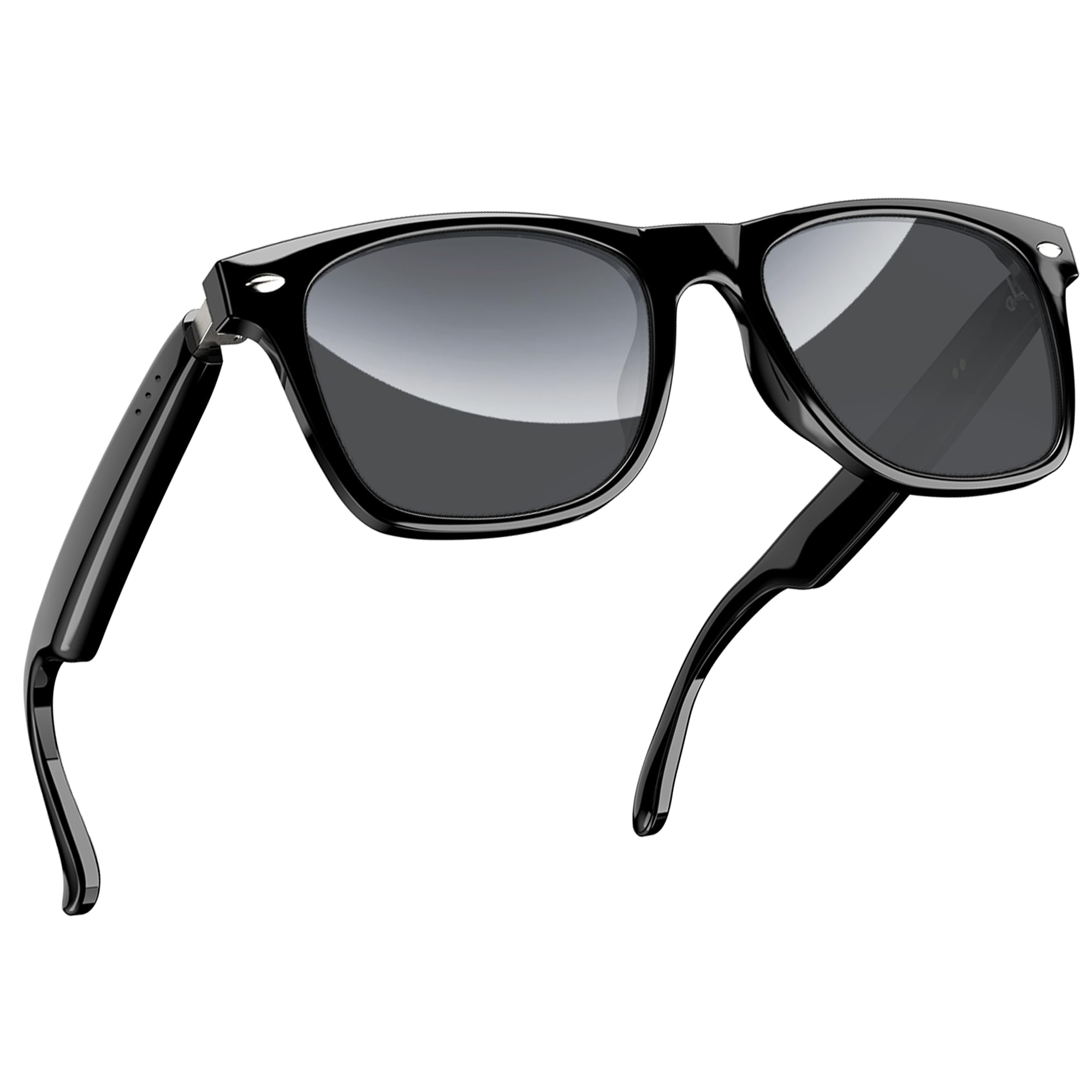
1-сүрөт: Караview D1 Smart Glasses, front view.
2. Орнотуу
2.1 Көз айнекти кубаттоо
Before first use, fully charge the smart glasses for at least 2 hours. The glasses are equipped with an 80mAh+80mAh rechargeable battery. Charging is performed via magnetic connection. A full charge typically takes approximately 90 minutes.

Figure 2: Magnetic charging connection for the smart glasses.
2.2 Bluetooth жупташтыруу
- Ensure the smart glasses are charged.
- Open the case of the smart glasses to power them on. They will automatically enter pairing mode.
- On your smartphone or compatible device, enable Bluetooth and search for available devices.
- "Кара" дегенди тандаңызview D1" (or similar name) from the list of devices to connect.
- Once paired, the glasses will automatically reconnect to the last paired device when powered on.
The glasses utilize Bluetooth 5.3 technology for stable and low-latency connections. They are compatible with both iOS and Android devices, as well as other Bluetooth-enabled devices like computers and tablets.

Figure 3: Compatibility of Blackview D1 Smart Glasses with various devices.
3. Иштөө нускамалары
3.1 Сенсордук башкаруу
The Blackview D1 Smart Glasses feature intuitive touch controls located on the temples. The convex touch range indicator helps in locating the touch points easily.
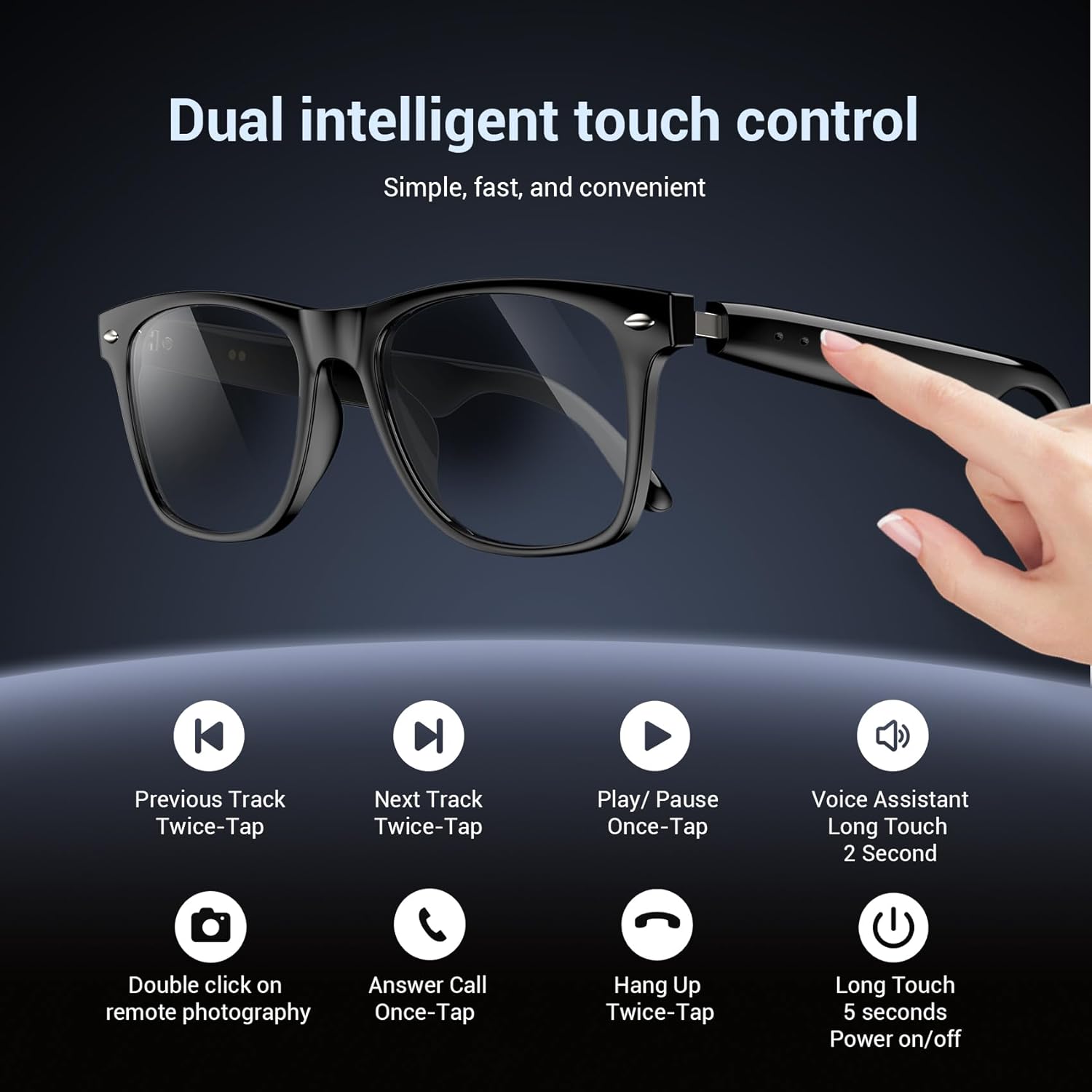
Figure 4: Touch control functions for Blackview D1 Smart Glasses.
- Күйгүзүү/өчүрүү: Long touch for 5 seconds.
- Музыканы ойнотуу/тындыруу: Once-tap.
- Кийинки трек: Twice-tap.
- Мурунку трек: Twice-tap.
- Чакырууга жооп берүү: Once-tap.
- Чакырууну токтотуу: Twice-tap.
- Үн Жардамчысын жандыруу: Long touch for 2 seconds.
- Алыстан сүрөткө тартуу: Double click (if supported by connected device).
3.2 Аудио тажрыйбасы
The open-ear speaker design, combined with a dynamic driver and ultra-sensitive polymer diaphragm, delivers clear audio. The balanced three-channel audio framework emphasizes vocals, allowing for an immersive listening experience while remaining aware of your surroundings.

Figure 5: Open-ear audio feature of the smart glasses.
3.3 Call Clarity
Advanced microphone design and noise reduction technology suppress up to 90% of background noise during calls, ensuring clear communication.
3.4 Үн жардамчысы
Activate your mobile device's voice assistant by long-touching the control area for 2 seconds. This allows for hands-free commands and queries.

Figure 6: Using the voice assistant feature while wearing the smart glasses.
4. Features Overview
- Bluetooth 5.3: Provides fast, stable, and low-latency wireless connectivity.
- IP65 суу өткөрбөйт рейтинги: Protects against sweat and light raindrops, ensuring durability during outdoor activities.
- Батареянын иштөө мөөнөтү: Approximately 7 hours for calls, 6 hours for music playback, and 160 hours standby time.
- Поляризацияланган линзалар: 100% UV400 protection, filtering UVA, UVB, UVC, and harmful blue light.
- Туруктуу кадр: Constructed with high-quality PC material and light steel frame for ergonomic fit and comfort.

Figure 7: Features of the smart glasses, including polarized lenses and IP64 waterproof rating.

Figure 8: Smart glasses with water droplets, illustrating the waterproof design.
5. Техникалык тейлөө
- Тазалоо: Wipe the lenses and frame with a soft, clean cloth. For stubborn smudges, use a lens cleaning solution. Avoid harsh chemicals.
- Суу таасири: While the glasses are IP65 rated for water and dust resistance, avoid submerging them in water. Dry them thoroughly if exposed to rain or sweat.
- Сактагыч: Store the glasses in their protective case when not in use to prevent scratches and damage. Avoid extreme temperatures.
- Заряддоо порту: Keep the magnetic charging contacts clean and dry to ensure efficient charging.
6. Кыйынчылыктарды
- Көз айнектер күйбөй жатат: Ensure the glasses are fully charged. Connect them to the magnetic charger and check the charging indicator light.
- Bluetooth аркылуу жупташтырылбай жатат:
- Түзмөгүңүздө Bluetooth иштетилгенин текшериңиз.
- Көз айнек жупташтыруу режиминде экенин текшериңиз (адатта, жаркылдаган жарык менен көрсөтүлөт).
- Телефонуңуздун Bluetooth жөндөөлөрүнөн түзмөктү унутуп, кайра жупташтырып көрүңүз.
- Ensure the glasses are within the Bluetooth range of your device.
- Аудио жок же үн сапаты начар:
- Көз айнектин жана туташкан түзмөгүңүздүн үн деңгээлин текшериңиз.
- Көз айнектер Bluetooth аркылуу туура туташып турганын текшериңиз.
- Restart both the glasses and your connected device.
- Тийүү башкаруулары жооп бербейт:
- Манжаларыңыздын таза жана кургак экенине ынаныңыз.
- Көз айнекти кайра иштетиңиз.
7. Техникалык шарттар
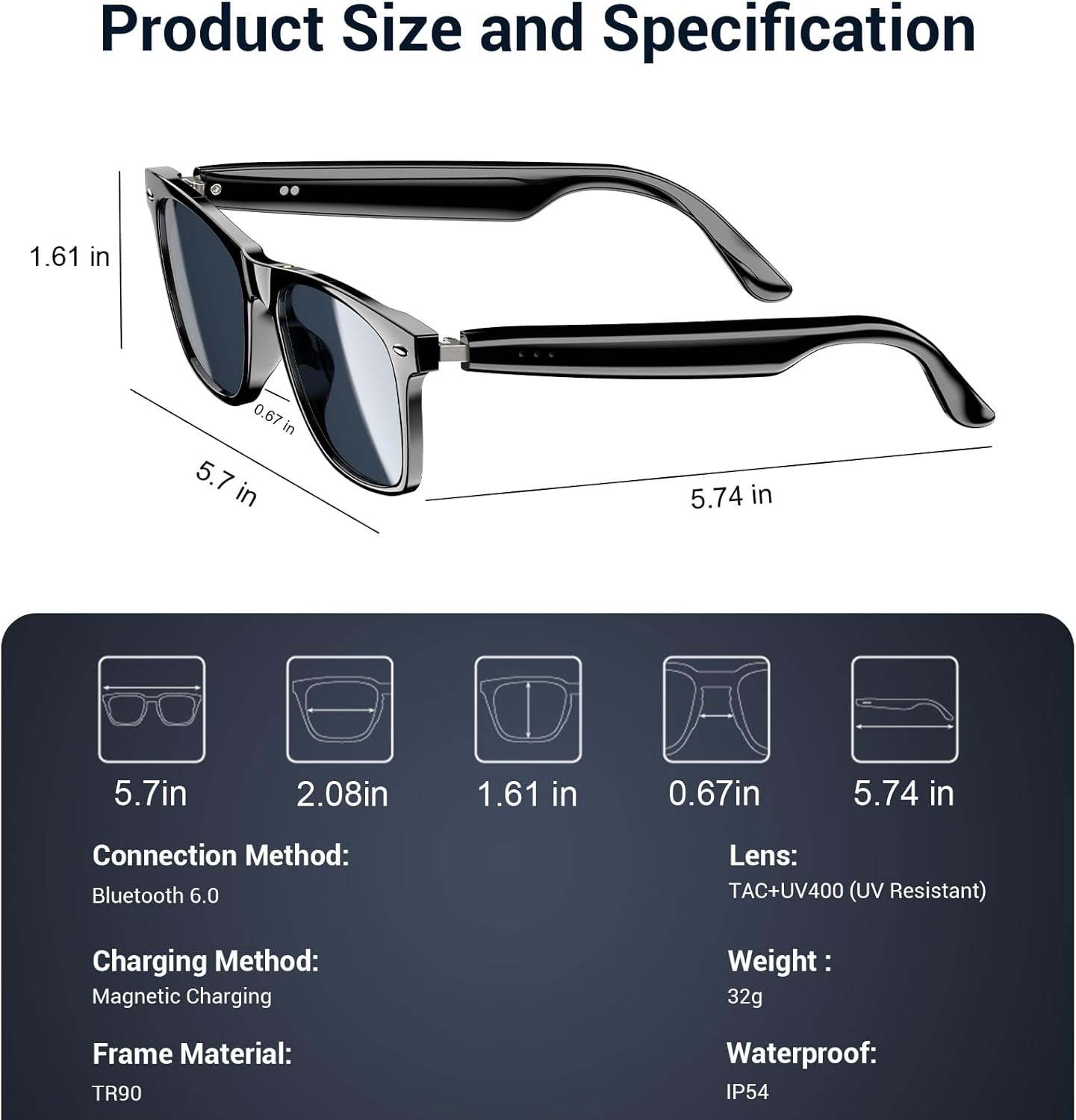
Figure 9: Product size and specification diagram.
| Өзгөчөлүк | Спецификация |
|---|---|
| Модель аты | D1 Black |
| Бренд | Караview |
| Байланыш технологиясы | Bluetooth 5.3 |
| Батарея сыйымдуулугу | 160 mAh (80mAh+80mAh) |
| Батареяны заряддоо убактысы | 90 мүнөт |
| Музыканы ойнотуу убактысы | Болжол менен 6 саат |
| Чалуу убактысы | Болжол менен 7 саат |
| Күтүү убактысы | Болжол менен 160 саат |
| Сууга туруктуулук деңгээли | IP65 |
| Линзанын түрү | Polarized, UV400 Protection, Anti Blue Light |
| Frame Material | PC & Light Steel |
| Салмагы | 0.13 килограмм |
| Адам интерфейсинин киргизүү | Микрофон, сенсордук экран |
| Колдоого алынган колдонмо | Voice Control, Voice Assistant |
8. Кепилдик жана колдоо
Караview offers a 2-year warranty for the D1 Smart Glasses. For any product-related questions or support, please contact our customer service. We provide 24/7 product support for your peace of mind.
9. Расмий продукт Video
Видео 1: Расмий продукт бүттүview Кара түстүүview Polarized Sport Smart Sunglasses. This video demonstrates key features and usage scenarios.