
1. Продукт бүтүп калдыview
The Sunster TB10 Diesel Air Heater is a versatile and efficient heating solution designed for various applications including vehicles (cars, RVs, campers, trucks), tents, and homes. This model features advanced Wi-Fi and Bluetooth connectivity for smart control via a dedicated mobile application, alongside a user-friendly LCD control panel. Its integrated toolbox design ensures portability and ease of installation, while optimized combustion technology provides rapid heating and energy efficiency.
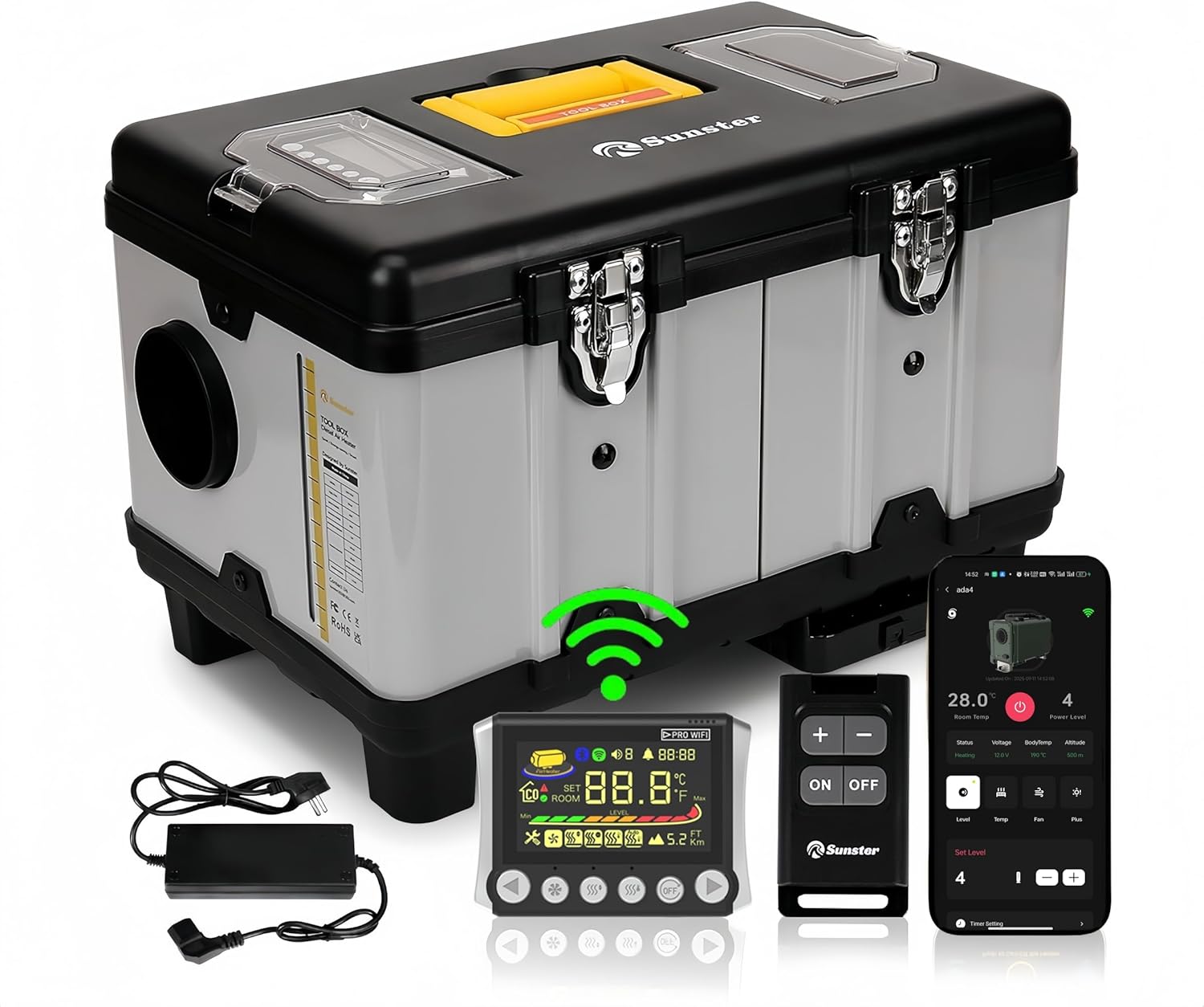
Сүрөт 1.1: Sunster TB10 Diesel Air Heater and its control accessories.
2. Коопсуздук маалыматы
Please read and understand all safety warnings and instructions before operating this product. Failure to follow these instructions may result in electric shock, fire, explosion, or serious injury.
- Көмүртек кычкылынын топтолушуна жол бербөө үчүн жылыткычты иштетип жатканда туура желдетүүнү камсыз кылыңыз.
- Аба кирүүчү же чыгаруучу вентиляторлорду жаппаңыз.
- Тез күйүүчү материалдарды жылыткычтан коопсуз аралыкта сактаңыз.
- Always use the correct fuel type (diesel) and power supply (12V, 24V, or 110-240V via transformer).
- The heater is equipped with overheat protection (≥ 518 °F/270 °C). Do not bypass or modify safety features.
- Балдар жана үй жаныбарлары жетпеген жерде сактаңыз.
- Кандайдыр бир тейлөө же тазалоо иштерин жүргүзүүдөн мурун электр энергиясын өчүрүңүз.

Сүрөт 2.1: Integrated safety features of the heater.
3. Product Components & Specifications
3.1 Кутуда эмне бар
- Diesel heater (with LCD control panel)
- Алыстан которуу
- AC power supply (110-240V transformer)
- Installation Accessories (including 4-meter switch extension cable, heat protection sleeve, battery power cord, exhaust pipe, fixture accessories set, 6.9ft air outlet pipe, silencer)

Сүрөт 3.1: Бардык компоненттер продукт пакетине киргизилген.
3.2 Түзүмдүн диаграммасы

Сүрөт 3.2: Detailed structure diagram of the heater.
3.3 Продукттун спецификациялары
| Спецификация | Деталь |
|---|---|
| Бренд | Sunster |
| Модел | TB10 Diesel Air Heater WiFi Version (WIFI-TB10) |
| Power Output | 8КВт |
| Тtage Шайкештик | 12V/24V/110V-240V |
| Күйүүчү май түрү | Дизель |
| Күйүүчү май багынын сыйымдуулугу | 6 Liters (Built-in) |
| Күйүүчү май керектөө | 0.16-0.45 liters/hour |
| Heating Area Coverage | 20-25 square meters (approx. 215-270 sq ft) |
| Ашыкча ысып кетүүдөн коргоо | ≥ 518 °F/270 °C |
| Контролдоо ыкмалары | LCD Panel, Remote Control, Wi-Fi Smart App, Bluetooth |
| Элемент Салмагы | 22 фунт |
| Пакеттин өлчөмдөрү | 18.5 x 14.96 x 12.6 дюйм |
4. Орнотуу жана орнотуу
The Sunster TB10 Diesel Air Heater is designed for rapid assembly and portability. Follow these guidelines for safe and effective setup.
4.1 Кубат туташтыруу
- үчүн DC 12V/24V operation: Connect directly to a vehicle battery (motorhomes, automobiles, boats, trucks, tractors) using the provided battery power cord.
- үчүн AC 110-240V operation: Use the included AC power supply transformer to plug the heater into a standard power outlet (professional workshop, garage, home).
- Ensure all connections are secure and correct voltagе берилет.

Сүрөт 4.1: Multiple power options for the Sunster TB10 heater.
4.2 Чыгаруучу жана аба өткөргүчтөрүн орнотуу
- The intake pipe has a fixed air filter at the bottom, requiring no additional installation.
- Install exhaust pipes on the side of the unit to prevent blockage.
- Utilize the exhaust pipe protective cover for safety.
- Connect the air outlet pipe to direct heated air.

Сүрөт 4.2: Rapid assembly for exhaust and intake components.
4.3 Control Panel Placement
The included 4-meter extension cable allows for mounting the LCD control panel indoors, providing easier access and operation, especially when the main heater unit is placed outside.
5. Иштөө нускамалары
The Sunster TB10 Diesel Air Heater offers multiple control methods: LCD panel, remote control, Wi-Fi smart app, and Bluetooth. This section details their operation.
5.1 LCD Control Panel Overview

Сүрөт 5.1: LCD Monitor with button functions.
5.2 Алыстан башкаруунун дал келүүсү
To match the remote control with the heater:
- On the LCD panel, long press the [ӨЧҮК] жана [Right button] simultaneously to enter match mode. The screen will display "Add".
- On the remote control, long press the [Plus button] to enter matching mode.
- The LCD screen will display "Suc" upon successful matching.
- You can now check the switch status and adjust settings (temperature, gear, mode) via the remote.
5.3 Wi-Fi App Connection & Functions
The Sunster app allows remote control of your heater via Wi-Fi. Ensure your phone is connected to a 2.4GHz Wi-Fi network.
- Түзмөк кошуу: In the app, click "Add Device", then select "Wi-Fi" to add. Choose your Wi-Fi network, enter the password, and follow the app's guidelines to put the device into network configuration mode (long press the add button on the LCD panel after power on).
- Башкаруу режимдери: Once connected, you can control various modes:
- Gear режими: Adjust the power level using plus/minus buttons.
- Температура режими: Каалаган температураны коюңуз.
- Желдетүү режими: Желдеткичтин ылдамдыгын башкаруу.
- Таймердин жөндөөлөрү: Set timed hours and minutes for automatic turn on/off.
- Параметр орнотуулары: Access "More Settings" in the app to modify:
- Temperature Unit (Fahrenheit/Celsius)
- Altitude Unit (meters/feet)
- Voice Languages (English, Russian, German)
- Убакыт алкагы
- Температураны өзгөртүү
- Арткы жарык деңгээли
- Start/Stop Temperature Offset
- Wi-Fi күйгүзүү/өчүрүү
- Орнотууларды баштапкы абалга келтирүү
- Түзмөктү бөлүшүү: Share control of the device with others using a share code.
- Ensure Wi-Fi is turned off on the heater (via parameter settings or by switching it on/off on the LCD panel).
- In the app, click "Add Device", then select "Bluetooth" connection.
- Select the Bluetooth name corresponding to your device (e.g., BYD-0509).
- Confirm binding. You can now control the heater via Bluetooth.
- Күйгүзүү/өчүрүү: In shutdown state, press the desired mode button to turn it on. In operation state, press the [ӨЧҮК] button to turn off the heater.
- Орнотуулар: In operation state, press the [Decrease/Increase] buttons to adjust the setting gear or temperature.
- Которуу режимдери: басыңыз [Режим] button to cycle through different modes (Gear, Temperature, Ventilation).
- Орнотуу режимине кирүү: In operation state, long press the [ӨЧҮК] button for 3 seconds to enter setting mode. Use [Decrease/Increase] buttons to navigate through settings (F0-FF).
- F0: Current Time Setting (Press Ventilation button to set hours, then minutes. Press Ventilation again to confirm.)
- F1: Timing Start Time Setting (Press Ventilation button to set hours, then minutes. Press Ventilation again to confirm.)
- F2: Set the Running Time After Timing Start (Range 00:00-10:00, 30 minutes is 1 unit. 00:00 is unlimited time. Press Ventilation again to confirm.)
- F3: Timing Function On or Off (ON indicates turn-on timing, OF indicates shutdown timing. Press Ventilation again to confirm.)
- F4: Voice Broadcast Language Setting (E=English, G=German, R=Russian, --=Mute. Press Ventilation again to confirm.)
- F5: Ambient Temperature Compensation Setting (Adjustment range: -27°F to +27°F. Press Ventilation again to confirm.)
- F6: Constant Temperature Mode Function Setting (ON=turned on, OF=turned off. Press Ventilation again to confirm.)
- F7: Temperature Unit Switch Setting (Cycle between Fahrenheit and Celsius. Press Ventilation again to confirm.)
- F8: Altitude Unit Switch Setting (Switch between kilometers and thousand feet. Press Ventilation again to confirm.)
- F9: Screen Brightness Adjustment (Adjustment range 0-10. Press Ventilation again to confirm.)
- FA: Network Configuration with Sub Devices
- FB: Ambient Temperature Reading (ON represents sub-device ambient temp, OF represents control panel ambient temp.)
- FC: Temperature Difference for Automatic Startup in Constant Temperature Mode
- FD: Temperature Difference for Automatic Shutdown in Constant Temperature Mode
- FE: Wi-Fi Function On/Off (ON=turn on, OF=turn off. Press Ventilation again to confirm.)
- FF: Wi-Fi Configuration (View Wi-Fi connection, OTA upgrade, unbind from APP, pre-registration, connection status.)
5.4 Bluetooth Operation (without Wi-Fi)
If Wi-Fi is not available, you can operate the heater via Bluetooth:
5.5 Manual Control Panel Functions (2409PW)
The LCD control panel allows direct operation and setting adjustments.
Setting Mode Items (F0-FF):
Видео 5.1: Detailed operation guide for the 2409PW control panel, including remote matching, app connectivity, and function settings.
6. Техникалык тейлөө
Regular maintenance ensures optimal performance and longevity of your Sunster TB10 Diesel Air Heater.
- Тазалоо: Мезгил-мезгили менен жылыткычтын сыртын жумшак, гamp кездеме. Абразивдүү тазалагычтарды же эриткичтерди колдонбоңуз.
- Аба чыпкасы: The fixed air filter at the bottom should be checked and cleaned regularly to ensure proper airflow.
- Чыгаруу системасы: Inspect the exhaust pipes and protective cover for any damage or blockages. Ensure exhaust gases are safely directed away from enclosed spaces.
- Күйүүчү май багы: Keep the fuel tank clean and free of contaminants. Use only clean diesel fuel.
- Сактагыч: When not in use for extended periods, ensure the heater is clean, dry, and stored in a safe location.
7. Кыйынчылыктарды
Эгерде сиз жылыткычыңыз менен көйгөйлөргө туш болсоңуз, анда төмөнкү жалпы көйгөйлөрдү чечүү кадамдарын караңыз:
- Жылыткыч иштебей жатат: Check power connections, fuel level, and ensure the control panel is properly connected and powered.
- Жылуулук чыгаруу жок: Verify the selected mode (e.g., not in ventilation mode), check temperature settings, and ensure fuel is flowing.
- Error codes on LCD: Refer to the detailed error code list in the full user manual (accessible via the app under "User Manual" or included physical manual) for specific diagnostics.
- Колдонмо туташуу көйгөйлөрү: Ensure your phone's Wi-Fi is 2.4GHz, the heater's Wi-Fi is enabled, and the device is within range. Try re-adding the device or resetting Wi-Fi settings.
- Алыстан башкаруу жооп бербей жатат: Check remote battery, ensure it's matched correctly (refer to section 5.2).
8. Firmware Upgrade (OTA)
To ensure your heater has the latest features and improvements, perform Over-The-Air (OTA) firmware upgrades via the mobile app.
- Prepare for Upgrade: First, switch the heater power off. Then, hold down the left and right buttons on the LCD panel simultaneously and connect the power supply. The screen will show "otA". Keep pressing until the last four IDs of the machine appear.
- Initiate Upgrade via App: In the app, navigate to the "Personal Center" interface, then select "Firmware Upgrade".
- Select Version: Find the ID corresponding to your local machine. Select the desired version number to upgrade.
- Жаңыртууну баштоо: Click "Update Now". The app will show the update progress. Keep the device close to the phone and avoid operation during the transfer.
- Аяктоо: The screen will show "Suc" and the app will indicate "Update complete" upon successful upgrade.
9. Кепилдик жана колдоо
For warranty information, technical support, or service inquiries, please refer to the contact details provided with your purchase or visit the official Sunster webсайт. Сатып алуу квитанциясын кепилдик дооматтары үчүн сатып алуунун далили катары сактаңыз.