
1. Киришүү
Сатып алганыңыз үчүн рахматasing the VIFLYKOO Bluetooth 5.4 Turntable. This device combines classic vinyl playback with modern connectivity, featuring integrated stereo speakers, Bluetooth 5.4 for both receiving and transmitting audio, USB recording, and multiple audio outputs. This manual provides essential information for safe operation, setup, and maintenance of your turntable.

Image: The VIFLYKOO Bluetooth 5.4 Turntable, showcasing its mahogany finish and classic design.
2. Коопсуздук нускамалары
Please read these safety instructions carefully before using the product and retain them for future reference. Incorrect use may result in electric shock, fire, or other hazards.
- Аппаратты жамгырга, нымдуулукка же экстремалдык температурага дуушар кылбаңыз.
- Кубат адаптери жергиликтүү электр менен камсыздооңузга шайкеш келерин текшериңиз.
- в ачпагылаasing; бардык тейлөөлөрдү квалификациялуу кызматкерлерге тапшырыңыз.
- Аппаратты жылуулук булактарынан, түз күн нурунан жана күчтүү магнит талааларынан алыс кармаңыз.
- Кургак чүпүрөк менен гана тазалаңыз. Суюк тазалагычтарды же аэрозолдорду колдонбоңуз.
- Титирөөнүн алдын алуу жана туура ойнотууну камсыз кылуу үчүн айланма табакты туруктуу, тегиз жерге коюңуз.
3. Пакеттин мазмуну
Пакетте бардык буюмдар бар экенин текшериңиз:
- VIFLYKOO Bluetooth 5.4 Turntable
- Кубаттуу адаптер
- Instruction Manual
- 45 RPM Adapter (for 7-inch records)
4. Продукт бүтүп калдыview
Familiarize yourself with the main components and features of your turntable.
4.1 Негизги өзгөчөлүктөрү
- Bluetooth 5.4 туташуусу: Supports both receiving audio from external devices and transmitting audio to Bluetooth speakers or headphones.
- Интеграцияланган стерео динамиктер: Two 5W speakers provide clear and authentic sound directly from the unit.
- 3 ылдамдыктагы айланма дөңгөлөк: Plays 33 1/3, 45, and 78 RPM records.
- USB функциясы: Allows recording vinyl to MP3/WAV files and playing digital audio from a USB drive.
- Multiple Audio Connections: RCA output for external amplifiers, 3.5mm AUX input for external audio sources, and a headphone output for private listening.
- Автоматтык токтотуу функциясы: Automatically lifts the tonearm at the end of a record to protect the stylus and vinyl.
- Removable Dust Cover: Protects the platter and stylus from dust accumulation.
- Anti-Resonance Belt Drive: Үн сапатын жакшыртуу үчүн титирөөнү азайтат.
4.2 Компоненттер
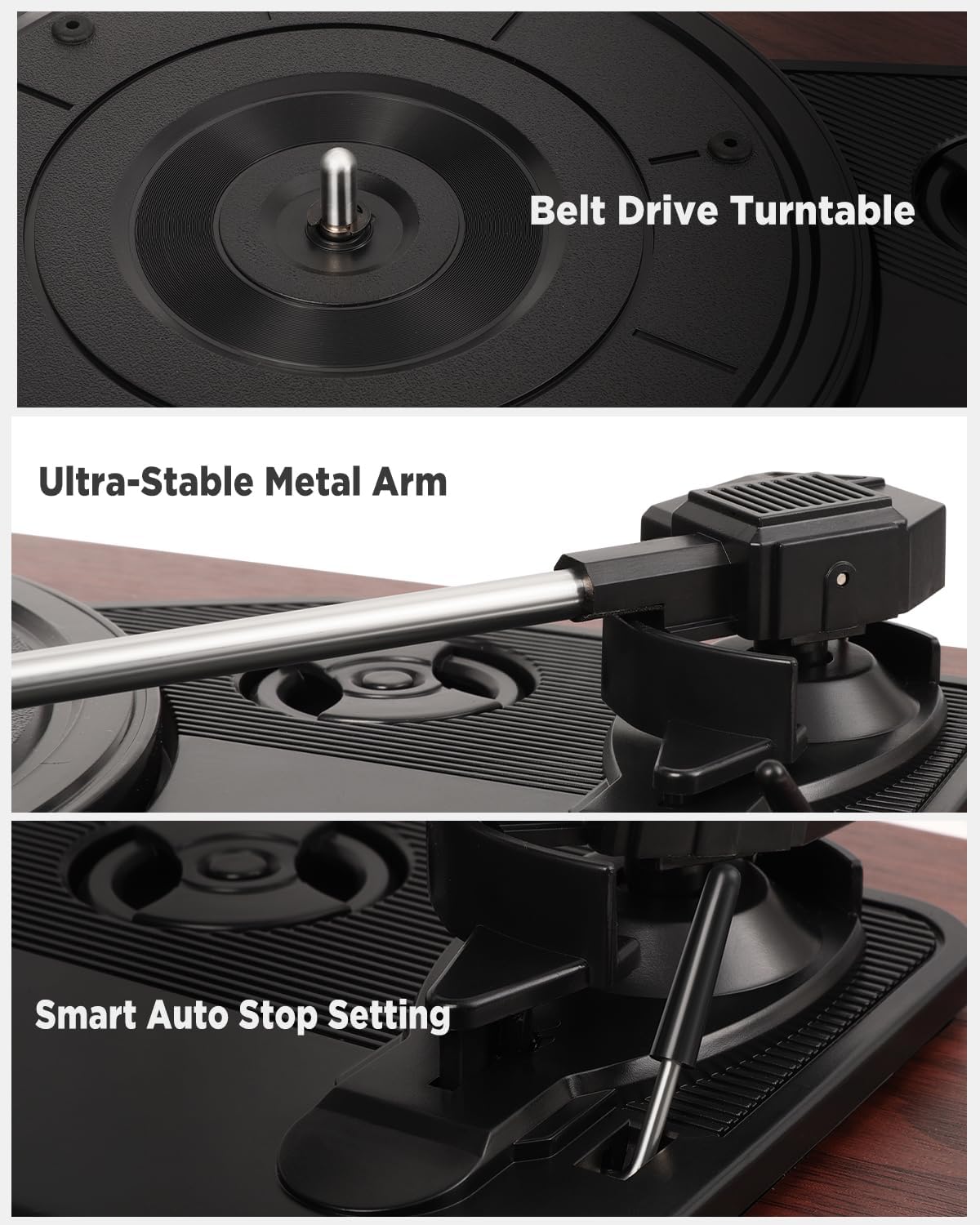
Сүрөт: деталдуу views of the belt drive system, the ultra-stable metal tonearm, and the smart auto-stop setting.

Image: An exploded diagram illustrating the internal structure of the integrated stereo speakers, highlighting the HiFi sound components.

Image: The rear panel of the turntable, showing the RCA output, AUX-in port, USB port, and headphone port, along with their respective functions.
5. Орнотуу
Айланма табакчаңызды биринчи жолу орнотуу үчүн төмөнкү кадамдарды аткарыңыз.
- Айланма табакты таңгактан чыгарыңыз: Бардык компоненттерди таңгактан кылдаттык менен алып салыңыз.
- Айлануучу столду жайгаштырыңыз: Place the unit on a flat, stable, and vibration-free surface. Ensure there is adequate ventilation around the unit.
- Чаң капкагын орнотуу: If not already installed, carefully attach the removable dust cover to the hinges at the back of the unit.
- Стилус коргоочусун алып салыңыз: Gently remove the protective cap from the stylus (needle). Be careful not to touch the stylus itself.
- Туташуу кубаты: Insert the DC plug of the power adapter into the DC IN port on the back of the turntable, then plug the adapter into a wall outlet.
- Баштапкы күйгүзүү: Turn the volume knob to power on the unit.
6. Иштөө нускамалары
6.1 Винил пластинкаларын ойнотуу
- Чаң капкагын ачыңыз.
- Place a vinyl record on the platter. If playing a 7-inch record, use the included 45 RPM adapter.
- Ылдамдыкты тандоо которгучун колдонуп, тиешелүү ылдамдыкты (33, 45 же 78 RPM) тандаңыз.
- Коюу рычагын колдонуп, колду акырын көтөрүңүз.
- Тонер рычагын жаздыруунун каалаган баштапкы оюгунун үстүнө жылдырыңыз.
- Slowly lower the tonearm using the cueing lever. The record will begin to play.
- Үн баскычын колдонуу менен үндү тууралаңыз.
- At the end of the record, the auto-stop function will automatically lift the tonearm and stop the platter rotation. Manually return the tonearm to its rest.
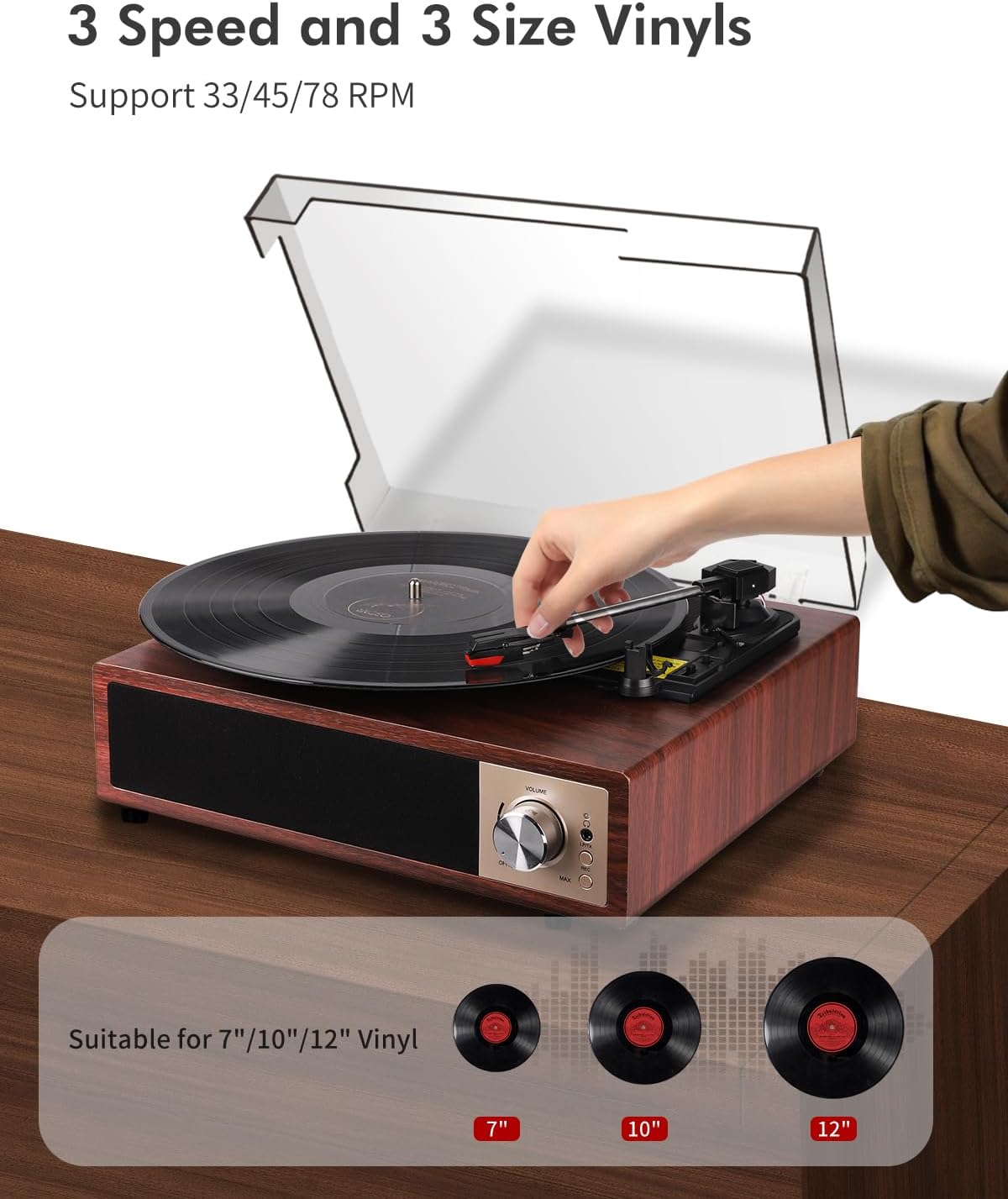
Image: A hand placing a record on the turntable, with visual representations of 7-inch, 10-inch, and 12-inch vinyl records, indicating support for all three sizes and 33/45/78 RPM speeds.
6.2 Bluetooth операциясы
The turntable supports Bluetooth 5.4 for both receiving and transmitting audio.
6.2.1 Bluetooth Receiving (Playing music from your phone)
- Айлануучу табакты күйгүзүңүз.
- Switch the function mode to Bluetooth (BT). The Bluetooth indicator light will flash.
- Enable Bluetooth on your smartphone, tablet, or other Bluetooth device.
- Издөө "VIFLYKOO" in the list of available devices and select it to pair.
- Once paired, the indicator light will stop flashing. You can now play music from your device through the turntable's speakers.
6.2.2 Bluetooth Transmitting (Playing vinyl through external Bluetooth speakers/headphones)
- Тышкы Bluetooth динамигиңиз же кулакчындарыңыз жупташтыруу режиминде экенин текшериңиз.
- Turn on the turntable and select the desired input source (e.g., Phono for vinyl).
- Press and hold the Bluetooth button on the turntable to activate transmitting mode. The Bluetooth indicator will flash rapidly.
- The turntable will automatically search for and connect to nearby Bluetooth audio devices.
- Once connected, the indicator light will stop flashing, and audio from the turntable will play through your external Bluetooth device.

Image: Two scenarios demonstrating Bluetooth 5.4 functionality: a user receiving music from a smartphone to the turntable, and the turntable transmitting vinyl audio to external Bluetooth speakers and headphones.
6.3 USB Function (Recording & Playback)
The USB port allows you to convert your vinyl records to digital files or play audio fileUSB дисктен.
6.3.1 Recording Vinyl to USB
- Insert a USB drive into the USB port on the back of the turntable.
- Select the Phono input mode.
- Start playing your vinyl record.
- Press the 'REC' button (usually near the USB port or control panel) to start recording. The indicator light will confirm recording is active.
- Press the 'REC' button again to stop recording. The recorded audio will be saved as an MP3 or WAV file USB дискте.
6.3.2 Playing Audio from USB
- MP3 же WAV аудио камтылган USB дискти салыңыз fileUSB портуна киргизиңиз.
- Switch the function mode to USB.
- The turntable will automatically detect and begin playing the audio files. Use the control buttons (if available) to skip tracks or pause playback.

Image: The turntable with a USB drive inserted, illustrating the process of recording vinyl to digital files (MP3 or WAV) and playing music files USB дискинен.
6.4 AUX киргизүү
Connect external audio devices like MP3 players or smartphones via the 3.5mm AUX IN port.
- Connect one end of a 3.5mm audio cable (not included) to the AUX IN port on the turntable.
- Экинчи учун тышкы аспабыңыздын гарнитура уячасына же аудио чыгышына туташтырыңыз.
- Switch the function mode to AUX.
- Play audio from your external device, and it will be output through the turntable's speakers.
6.5 RCA чыгаруу
Connect your turntable to an external ampҮндү жакшыртуу үчүн күчөткүч же кубаттоочу динамиктер.
- Connect an RCA cable (not included) to the RCA OUT ports (Red for Right, White for Left) on the back of the turntable.
- RCA кабелинин экинчи учун түзмөгүңүздөгү тиешелүү аудио киргизүүгө туташтырыңыз ampкөтөргүч же кубаттуу динамиктер.
- камсыз кылуу amplifier/speakers are powered on and set to the correct input.
- Play your vinyl record, and the audio will be routed through the external system.
6.6 Гарнитуранын чыгышы
Купуя угуу үчүн, кулакчындарды атайын кулакчын уячасына туташтырыңыз.
- Plug your headphones into the 3.5mm headphone jack on the front or side of the turntable.
- The integrated speakers will typically mute when headphones are connected.
- Үндү ыңгайлуу угуу деңгээлине тууралаңыз.
7. Техникалык тейлөө
Тийиштүү техникалык тейлөө сиздин айланма табагыңыздын узак мөөнөттүү иштешин жана оптималдуу иштешин камсыз кылат.
- Агрегатты тазалоо: Wipe the turntable's surface with a soft, dry, lint-free cloth. Avoid using abrasive cleaners, waxes, or solvents.
- Стилусту тазалоо: Use a soft brush designed for stylus cleaning, brushing gently from back to front. Avoid touching the stylus with your fingers.
- Dust Cover Care: The removable acrylic dust cover can be cleaned with a soft, damp cloth. Avoid harsh chemicals that may scratch or cloud the acrylic.
- Жазуу кам көрүү: Keep your vinyl records clean and free of dust to prevent damage to both the records and the stylus. Store them vertically in their sleeves.
- Стилус алмаштыруу: The stylus has a limited lifespan. If you notice a decrease in sound quality or increased skipping, consider replacing the stylus. Consult VIFLYKOO support for compatible replacement styli.
8. Кыйынчылыктарды
Эгерде кандайдыр бир көйгөйлөргө туш болсоңуз, төмөнкү көйгөйлөрдү чечүү боюнча көрсөтмөнү караңыз.
| Көйгөй | Мүмкүн себеп | Чечим |
|---|---|---|
| Күч жок | Кубат адаптери туташкан эмес же туура эмес розетка. | Кубат адаптери бекем туташтырылганын жана розетка иштеп турганын текшериңиз. |
| Динамиктерден үн жок | Volume too low; headphones connected; incorrect input mode. | Increase volume; disconnect headphones; select correct input mode (Phono, BT, AUX, USB). |
| Record skips or sound distortion | Dirty record; dirty or worn stylus; turntable not level. | Clean record; clean or replace stylus; ensure turntable is on a level surface. |
| Bluetooth жупташтыруу ишке ашпай калды | Device too far; incorrect mode; device not in pairing mode. | Ensure devices are close; select correct Bluetooth mode (receiving/transmitting); put external device in pairing mode. |
| USB жаздыруу иштебей жатат | USB drive full or incompatible format; incorrect recording procedure. | Use a formatted USB drive (FAT32); ensure enough space; follow recording steps carefully. |
9. Техникалык шарттар
Technical details of the VIFLYKOO Bluetooth 5.4 Turntable.
- Бренд: VIFLYKOO
- Модель номери: 3388651
- ASIN: B0FP57JZHX
- GTIN/UPC: 774882248156
- Айлануу ылдамдыгы: 33 1/3, 45, 78 RPM
- Мотор түрү: Кур менен айдалган
- Байланыш технологиясы: Bluetooth 5.4 (Receive & Transmit), Auxiliary (3.5mm), USB, RCA
- Интегралдык баяндамачылар: Yes, 2 x 5W Stereo
- Аудио чыгуулар: RCA, 3.5mm Headphone Jack
- Аудио киргизүү каражаттары: 3.5mm AUX-in, Bluetooth
- USB функциясы: MP3/WAV Recording, MP3/WAV Playback
- Өзгөчөлүктөр: Anti-resonance design, Automatic belt drive, Auto-stop function, Removable dust cover
- Материал: Инженердик жыгач, металл
- Элемент Салмагы: 2.15 килограмм
- Элементтин өлчөмдөрү (L x W x Y): 35 см х 29 см х 12 см
- Кубат булагы: Electric Cable (DC Adapter)
- Сигнал форматы: Аналогдук, санариптик
10. Кепилдик жана колдоо
Your VIFLYKOO Turntable is covered by a manufacturer's warranty and dedicated customer support.
- Кепилдик: Бул продукт сатып алынган күндөн тартып 2 жылдык өндүрүүчүнүн кепилдиги менен келет. Кепилдик боюнча дооматтар үчүн сатып алганыңызды тастыктаган документти сактап коюңуз.
- Кардарларды колдоо: For technical assistance, troubleshooting not covered in this manual, or warranty inquiries, please contact VIFLYKOO customer service through the retailer's platform or the official VIFLYKOO webсайт.