
1. Продукт бүтүп калдыview
This Ossuret car radio features the Android 14 operating system, an 8-core 1.8GHz CPU, 4GB RAM, and 32GB internal storage. It is equipped with a 9.7-inch QLED touchscreen display (768*1024 resolution) for clear visuals and responsive interaction. Key functionalities include wireless Apple CarPlay and Android Auto, integrated GPS navigation, FM/AM radio with RDS, and a built-in DSP for enhanced audio control. The unit supports 4G LTE connectivity (SIM card slot and antenna included) and WiFi, allowing for online navigation, streaming, and app usage. Steering wheel control compatibility ensures safe and convenient operation.
Негизги өзгөчөлүктөрү:
- Операция системасы: Android 14
- Процессор: 8-Core 1.8GHz CPU (2*A75 + 6*A5)
- Эстутум жана сактоо: 4 ГБ RAM + 32 ГБ Flash
- Дисплей: 9.7-inch QLED Touch Screen (768*1024)
- Байланыш: Wireless Apple CarPlay, Wireless/Wired Android Auto, Bluetooth, WiFi, 4G LTE (modem not included, supports external USB Dongle)
- Навигация: Built-in GPS with offline map data, supports online navigation apps (Maps, Waze)
- Аудио: FM/AM Radio with RDS, Built-in DSP (BU32107EFV), DAB/DAB+ (optional)
- Мультимедиа: Music, Video (up to 1280P), Photo Viewer
- Кошумча функциялар: Steering Wheel Control, Dual Zone, Mirror Link, APK Installer, Wallpapers, OBD2 (optional), DVR (USB Camera)
2. Шайкештик
This car radio is specifically designed for the following vehicle models and years:
- Opel Zafira C: 2010, 2011, 2012, 2013, 2014, 2015, 2016
- Vauxhall Zafira C: 2010, 2011, 2012, 2013, 2014, 2015, 2016
Маанилүү эскертүү: This unit is not compatible with the original rearview camera of the vehicle. Please confirm your vehicle's center console before installation.

Image 2.1: Visual guide for compatible and incompatible vehicle console types. The image displays four different car console configurations, with checkmarks indicating compatibility for three and an 'X' for one, specifically noting incompatibility with the original rearview камера.
3. Орнотуу жана орнотуу
3.1 Кутуда эмне бар:
- USB кабели
- RCA аркандары
- GPS антеннасы
- 4G Антенна
3.2 Орнотуу боюнча көрсөтмөлөр:
Professional installation is highly recommended to ensure correct wiring and functionality. Incorrect installation may damage the unit or vehicle electronics. Ensure the vehicle's power is disconnected before beginning installation.
- Carefully remove the original car radio or infotainment system.
- Connect the main power harness to the vehicle's wiring. Ensure all connections are secure.
- GPS антеннасын туташтырыңыз жана аны ачык жерге жайгаштырыңыз view оптималдуу сигнал кабыл алуу үчүн асман.
- If using 4G, connect the 4G antenna and insert your 4G SIM card into the designated slot before powering on the device.
- Connect the RCA harness for audio/video output and input, if applicable.
- Connect any additional accessories such as USB cables, external cameras (DVR), or OBD2 devices.
- Mount the new Ossuret car radio securely into the dashboard.
- Reconnect the vehicle's power and test all functions before fully reassembling the dashboard.
4. Иштөө нускамалары
4.1 Колдонуучунун интерфейси бүттүview and Key Features Demonstration:
Video 4.1: This video provides a comprehensive demonstration of the Ossuret Android 14 car radio's user interface and key functionalities. It showcases system settings, various applications including Bluetooth, Radio, Music, Navigation (Google Maps, Android Auto), DSP audio controls, CarAPP features (car info, AC settings, amplifier info), steering wheel control learning, and voice assistant interaction for music and navigation.
4.2 Apple CarPlay and Android Auto:
The unit supports both wireless Apple CarPlay and wireless/wired Android Auto. Connect your smartphone via Bluetooth or USB to access phone functions, online navigation, calls, messages, and music directly on the car radio display. This feature allows you to focus on driving while staying connected.

Image 4.2: The car radio display showing both Apple CarPlay (wireless) and Android Auto (wireless/wired) interfaces, highlighting seamless smartphone integration for navigation, communication, and entertainment.
4.3 Рулду башкаруу (SWC):
Control the car radio directly from your vehicle's steering wheel buttons. This allows for easy adjustment of music, volume, and other functions, enhancing driving safety by minimizing distractions.

Image 4.3: The car radio display illustrating the steering wheel control setup, enabling users to map vehicle steering wheel buttons to various radio functions for convenient and safe operation.
4.4 4G LTE and WiFi Connectivity:
The radio supports 4G network connectivity via a dedicated SIM card slot and antenna, as well as built-in WiFi. This enables online navigation, music streaming, video playback, and access to various internet services while on the go. Ensure the SIM card is inserted before powering on the device.
4.5 Digital Sound Processor (DSP):
Equipped with a built-in DSP (BU32107EFV), this unit allows for precise sound adjustments. You can customize the sound effect, enhance bass, and reduce car noise, providing a superior audio experience.

Image 4.4: The car radio display showing the Digital Sound Processor (DSP) interface with various sound adjustment options, including equalizer presets, surround sound, bass enhancement, and sound field settings.
4.6 Picture-in-Picture (PIP) and Split Screen:
The Picture-in-Picture (PIP) feature allows you to watch video in a small, resizable window on top of other applications. The split-screen function enables you to run two applications simultaneously, such as navigation and music, for enhanced multitasking.

Image 4.5: The car radio display demonstrating the Picture-in-Picture (PIP) feature, where a video plays in a small, adjustable window while other applications are visible.
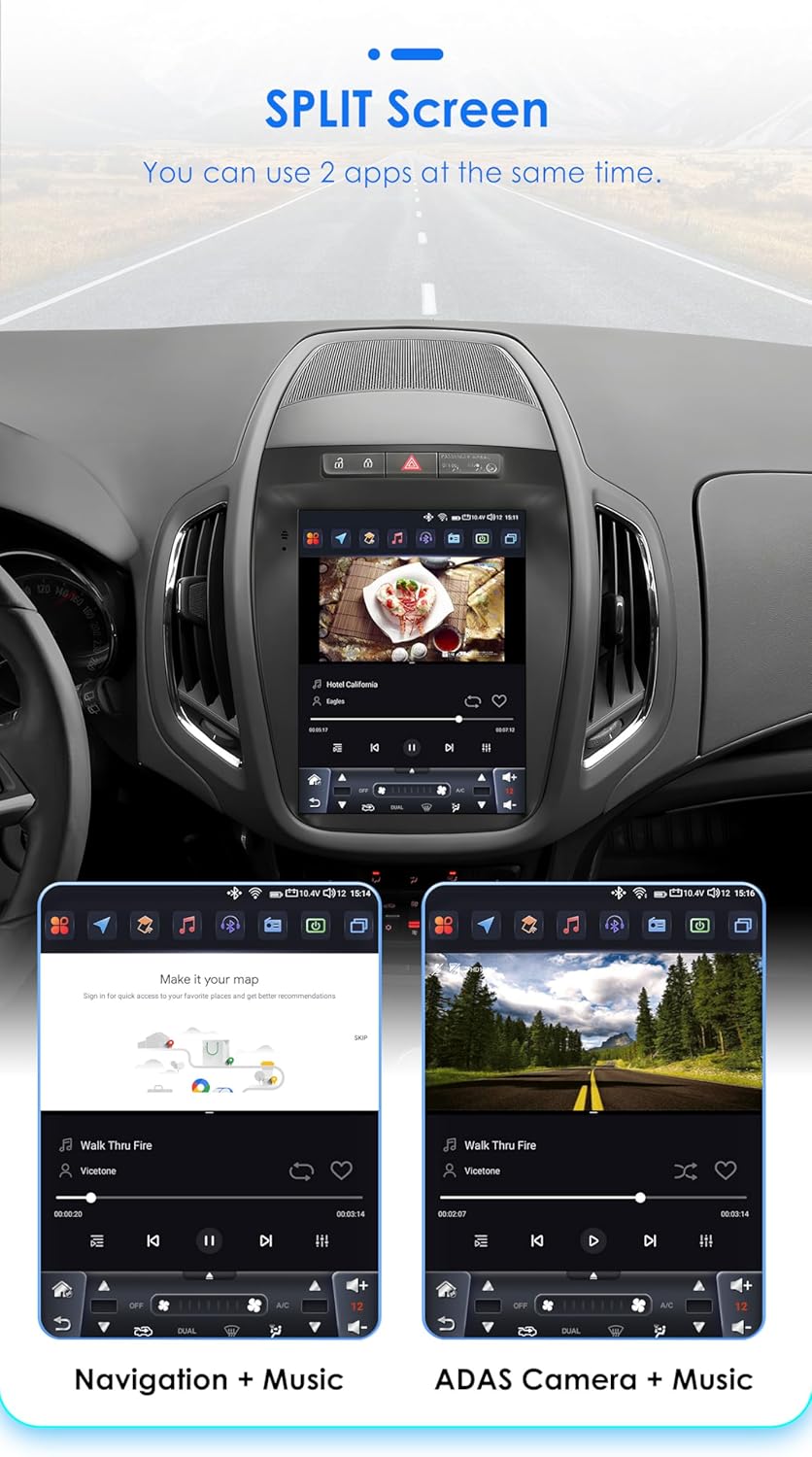
Image 4.6: The car radio display showcasing the split-screen feature, allowing two applications, such as navigation and a music player, to run side-by-side for improved user experience.
4.7 Original Car Information Display:
The unit can display original car information, integrating seamlessly with your vehicle's existing systems to provide relevant data directly on the screen.

Image 4.7: The car radio display showing the 'Original Car Information Display' interface, which provides access to various vehicle data and settings.
5. Техникалык тейлөө
To ensure the longevity and optimal performance of your Ossuret car radio, follow these maintenance guidelines:
- Тазалоо: Экранды жана сыртын тазалоо үчүн жумшак, кургак чүпүрөктү колдонуңуз. өжөр тактар үчүн, бир аз гampчүпүрөккө суу же экранды тазалоочу каражат. Абразивдүү материалдардан же катуу химиялык заттардан алыс болуңуз.
- Программалык камсыздоо жаңыртуулары: Periodically check for and install available software updates to ensure the system runs efficiently and has the latest features and security patches.
- Температура: Аппаратты өтө ысык жана муздак температурага узак убакыт бою тийгизүүдөн сактаңыз.
- Энергияны башкаруу: Ensure the vehicle's electrical system is in good condition to prevent power fluctuations that could affect the unit.
6. Кыйынчылыктарды
Унаа радиоңузда көйгөйлөргө туш болсоңуз, төмөнкү жалпы көйгөйлөрдү жана чечимдерди караңыз:
- Кубат жок:
- Check the power connections and fuses.
- Унаанын от алдыруу күйгүзүлгөнүн текшериңиз.
- Үн жок:
- Динамиктердин туташууларын текшериңиз.
- Үн деңгээлин жана үнсүз кылуу жөндөөлөрүн текшериңиз.
- Туура аудио булагы тандалганын текшериңиз.
- GPS сигналынын көйгөйлөрү:
- GPS антеннасынын туура туташтырылганын жана тунук экенин текшериңиз view асмандын.
- Зарыл болсо, картанын маалыматтарын жаңыртыңыз.
- Bluetooth туташуу көйгөйлөрү:
- Унаа радиосунда жана түзмөгүңүздө Bluetooth иштетилгенин текшериңиз.
- Мурунку жупташтырууларды жок кылып, кайра туташып көрүңүз.
- Эки түзмөктү тең өчүрүп күйгүзүңүз.
- Сенсордук экран жооп бербейт:
- Бөлүктү өчүрүп-күйгүзүңүз.
- Экран таза жана таштандылардан таза экенин текшериңиз.
Эгер көйгөй чечилбесе, кошумча жардам алуу үчүн кардарларды колдоо бөлүмүнө кайрылыңыз.
7. Техникалык шарттар
| Өзгөчөлүк | Спецификация |
|---|---|
| Операция системасы | Android 14 |
| CPU | 8-Core 1.8GHz (2*A75 6*A5) |
| RAM | 4 ГБ |
| Flash сактагыч | 32 ГБ |
| Screen Size | 9.7 дюйм |
| Экран түрү | QLED сенсордук экраны |
| Резолюция | 768*1024 |
| CarPlay | Зымсыз |
| Android Auto | Зымсыз/Зымдуу |
| Радио тюнер | FM/AM, RDS (DAB/DAB+ optional) |
| DSP | Built-in BU32107EFV |
| Байланыш | Bluetooth, USB, WiFi, 4G LTE (external dongle support) |
| GPS | Yes, with offline map data (Europe map type) |
| Аудио чыгаруу режими | Стерео |
| Шайкеш түзмөктөр | Смартфон |
| Башкаруу ыкмасы | Application, Buttons, Touchscreen |
| Пакеттин өлчөмдөрү | 20 x 10 x 10 см |
| Салмагы | 2 кг |
| Келип чыккан өлкө | Кытай |
8. Кепилдик жана колдоо
This Ossuret car radio comes with a 1 жылдык кепилдик сатып алынган күндөн тартып. Бул кепилдик өндүрүштүк кемчиликтерди жана нормалдуу колдонуудагы бузулууларды камтыйт.
8.1 What is Covered:
- Материалдык жана жасалгалоодогу кемчиликтер.
- Malfunctions occurring during normal operation.
8.2 What is Not Covered:
- Damage caused by improper installation or unauthorized repairs.
- Damage due to accidents, misuse, abuse, neglect, or external causes.
- Cosmetic damage, including scratches, dents, or broken plastic on ports.
- Damage from operating the product outside the permitted or intended uses described in this manual.
8.3 Кардарларды колдоо:
For technical assistance, warranty claims, or any questions regarding your Ossuret car radio, please contact your retailer or the manufacturer's customer service. Please have your purchase receipt and product model information ready when contacting support.