
Introduction
This manual provides essential information for the safe and efficient use of your Google Pixel 9 Pro 5G smartphone. Please read these instructions carefully before operating your device.
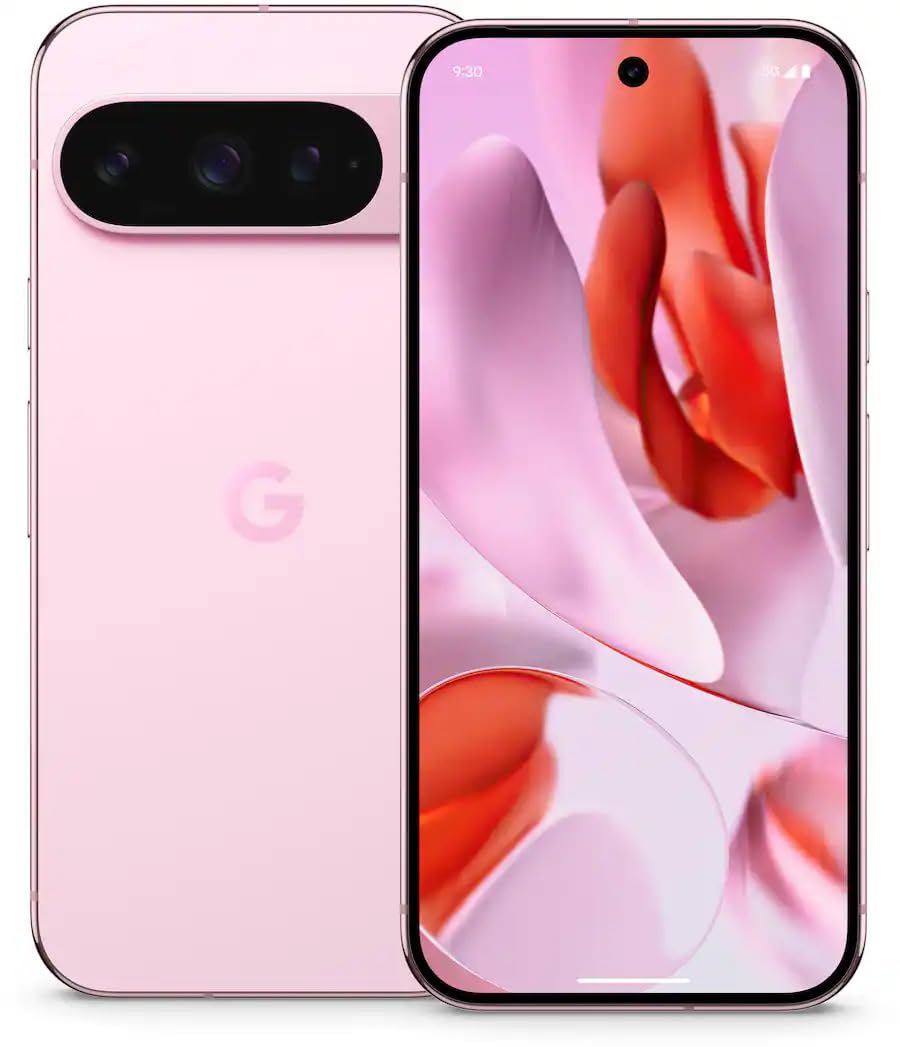
Сүрөт 1: Алдыңкы view of the Google Pixel 9 Pro 5G.
Кутуда эмне бар
Таңгакта бардык буюмдар бар экенин текшериңиз:
- Google Pixel 9 Pro смартфону
- USB-Cден USB-Cге кабел (1 м, USB 2.0)
- SIM лоток чыгаруучу курал
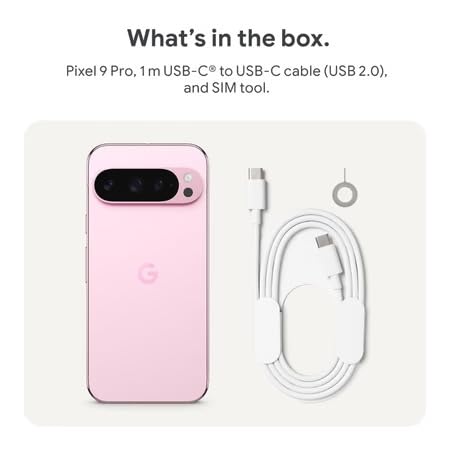
Figure 2: Included items in the Pixel 9 Pro packaging.
Жайгашуу
1. SIM картаны салуу
- Locate the SIM tray on the side of your Pixel 9 Pro.
- Берилген SIM карта чыгаргыч куралды SIM карта салгычындагы кичинекей тешикке салып, салгыч чыгып кеткенче акырын басыңыз.
- Place your Nano-SIM card into the tray with the gold contacts facing down. Ensure it is seated correctly.
- Carefully push the SIM tray back into the device until it is flush.
2. Баштапкы заряддоо
Биринчи колдонуудан мурун, аппаратыңызды толук заряддоо сунушталат.
- USB-C кабелин телефонуңуздун түбүндөгү заряддоо портуна туташтырыңыз.
- Connect the other end of the cable to a compatible USB power adapter (sold separately) and plug it into a power outlet.
- Экрандагы батареянын сөлөкөтү заряддоо абалын көрсөтөт.
3. Күйгүзүү / Өчүрүү
- Күйгүзүү үчүн: Экранда Google логотиби пайда болгонго чейин Кубат баскычын (оң жакта жайгашкан) басып, кармап туруңуз.
- Өчүрүү үчүн: Кубат баскычын басып, кармап туруңуз, андан кийин экрандагы "Өчүрүү" баскычын таптаңыз.
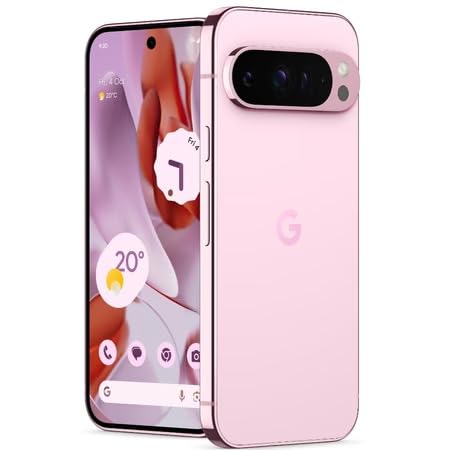
Figure 3: Power and volume buttons on the side of the device.
4. Биринчи жолу орнотуу устасы
Upon powering on for the first time, follow the on-screen instructions to:
- Тилди жана аймакты тандаңыз.
- Wi-Fi тармагына туташыңыз.
- Google аккаунтуңуз менен кириңиз же жаңысын түзүңүз.
- Set up security features such as fingerprint unlock, face unlock, PIN, pattern, or password.
- Эски түзмөктөн берилиштерди өткөрүү (милдеттүү эмес).
Иштөө нускамалары
Негизги навигация
- Сенсордук экран жаңсоолор: Interact with the device using taps, swipes, pinches (for zoom), and long presses.
- Башкы экран: Access your applications, widgets, and customize your layout.
- Эскертмелер: Экрандын өйдө жагынан төмөн карай сүрүңүз view эскертмелер.
- Ыкчам орнотуулар: Swipe down twice from the top of the screen to access quick settings toggles (Wi-Fi, Bluetooth, etc.).
Камеранын иштеши
The Pixel 9 Pro features a powerful triple rear camera system.
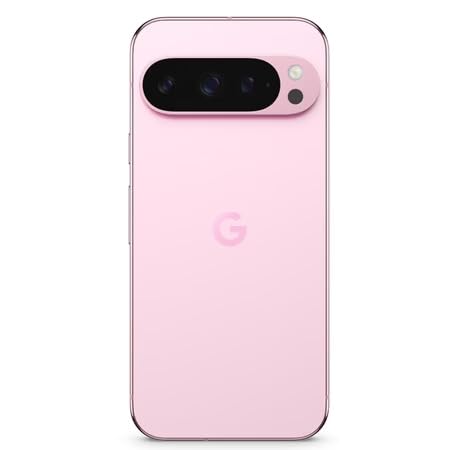
Figure 4: Rear camera system of the Pixel 9 Pro.
- Камераны ачуу: Tap the Camera app icon on your home screen or lock screen.
- Линзаларды алмаштыруу: Tap the icons on the viewfinder to switch between wide, ultrawide, and 5x telephoto lenses.
- Атуу режимдери: Select from various modes such as Night Sight for low-light conditions, Астрофотография for capturing stars, Макро for close-up shots, Көп таасири for creative effects, and Портрет for depth-of-field effects.
- Super Res Zoom: Pinch the screen to digitally zoom up to 30x. For video, Super Res Zoom supports up to 20x.
- Pro Controls: Access advanced camera settings like shutter speed and manual focus for greater creative control.
Батарея башкаруу
- Батареянын деңгээлин текшерүү: View батареянын пайызыtage in the status bar or in Settings > Battery.
- Батареяны өтө үнөмдөө: Enable this mode in Settings > Battery > Extreme Battery Saver to significantly extend battery life.
- Заряддоо: Use the provided USB-C cable and a compatible power adapter for optimal charging speed.
Коопсуздук өзгөчөлүктөрү
Your Pixel 9 Pro incorporates multiple hardware security layers to protect your data.
- Манжа ачуу: Манжа издериңизди Жөндөөлөр > Коопсуздук жана купуялык > Түзмөктүн кулпусун ачуу бөлүмүнөн каттаңыз.
- Жүзүнөн ачуу: Set up facial recognition for convenient unlocking.
- PIN/Үлгү/Парол: Always set a strong screen lock method.
- Программалык камсыздоо жаңыртуулары: Regularly install system updates to ensure your device has the latest security patches.
Температура сенсору
The Pixel 9 Pro includes a thermometer for measuring temperature.
- Open the dedicated Thermometer app.
- Follow the on-screen instructions to measure body temperature or the temperature of objects.
- Temperature data can be saved and tracked within the Fitbit application.
Техникалык тейлөө
Аппаратыңызды тазалоо
- Телефонуңуздун экранын жана корпусун тазалоо үчүн жумшак, мамыксыз чүпүрөктү колдонуңуз.
- Avoid using abrasive materials, harsh chemicals, or aerosol sprays.
- Do not submerge the device in water, despite its water-resistant rating.
Программалык камсыздоо жаңыртуулары
Google regularly releases software updates to improve performance, add features, and enhance security.
- To check for updates, go to Settings > System > System update.
- Ensure your device is connected to Wi-Fi and has sufficient battery charge before installing updates.
Физикалык кам көрүү
The Pixel 9 Pro is built with Corning Gorilla Glass Victus 2 and is water-resistant, offering durability against everyday drops and spills.
- While durable, avoid excessive impacts or drops to prevent damage.
- Consider using a screen protector and a protective case for additional safeguarding.
Проблемаларды чечүү
Түзмөк жооп бербей жатат
If your phone becomes unresponsive, perform a force restart:
- Түзмөк кайра күйгүчө кубат баскычын болжол менен 10-15 секунд басып туруңуз.
Колдонмолор бузулуп жатат же катып жатат
- Көйгөйлүү колдонмону жаап, кайра ачыңыз.
- Clear the app's cache: Go to Settings > Apps > See all apps > [App Name] > Storage & cache > Clear cache.
- Колдонмонун Google Play Дүкөнүнөн эң акыркы версиясына жаңыртылганын текшериңиз.
- Телефонуңузду өчүрүп күйгүзүңүз.
Network Connectivity Issues (Wi-Fi/Cellular)
- Toggle Wi-Fi or cellular data off and then back on.
- Телефонуңузду өчүрүп күйгүзүңүз.
- SIM картаңыз туура салынганын текшериңиз.
- Reset network settings: Go to Settings > System > Reset options > Reset Wi-Fi, mobile & Bluetooth.
Батареянын бат түгөнү
- Электр кубатын керектөөчү колдонмолорду аныктоо үчүн Жөндөөлөр > Батареядан батареянын колдонулушун текшериңиз.
- Экран жарыктыгын жана экрандын күтүү мөөнөтүн азайтыңыз.
- Disable unnecessary features like GPS, Bluetooth, and Wi-Fi when not in use.
- Enable Extreme Battery Saver mode.
Заводдук баштапкы абалга кайтаруу (Акыркы чара)
Warning: A factory reset will erase all data from your phone. Back up all important data before proceeding.
- Орнотуулар > Система > Параметрлерди калыбына келтирүү > Бардык дайындарды өчүрүү (заводдук абалга кайтаруу) бөлүмүнө өтүңүз.
- Confirm your decision when prompted.
Техникалык шарттар
| Өзгөчөлүк | Деталь |
|---|---|
| Бренд | Гугл |
| Модел | Pixel 9 Pro |
| Операция системасы | Android 15 |
| Процессор | Google Tensor G4 (3.1 ГГц) |
| RAM | 16 ГБ |
| Ички сактагыч | 256 ГБ |
| Дисплей | 6.3 Inches LTPO OLED (Actua), 1280 x 2856 Pixels, 120 Hz Refresh Rate |
| Арткы камера | 50 MP wide + 48 MP ultrawide (Macro) + 48 MP 5x telephoto |
| Алдыңкы камера | 42 депутат |
| Батарея сыйымдуулугу | 4700 миллионamp Hours (up to 24 hours average life) |
| Байланыш | 5G, Wi-Fi 7, Bluetooth 5.3, NFC, UWB, USB-C |
| SIM карта | Жалгыз Nano SIM |
| Суу каршылык | Сууга чыдамдуу |
| Өлчөмдөр | 8 x 72 x 153 Миллиметр |
| Салмагы | 198 грамм |
Кепилдик жана колдоо
Кепилдик маалымат
Your Google Pixel 9 Pro 5G comes with a 1 жылдык Өндүрүүчүнүн Кепилдиги сатып алынган күндөн тартып. Бул кепилдик нормалдуу колдонуудагы өндүрүш кемчиликтерин камтыйт. Кепилдик дооматтары үчүн сатып алганыңыздын далилин сактап коюңуз.
Кардарларды колдоо
For technical assistance, warranty claims, or other support inquiries, please contact Google customer service:
- Өндүрүүчү: Google LLC, 1600 AmpParkway hitway театры, Тоо View, CA 94043, АКШ
- Phone Support (India): +91 7718892303
- Импорттоочунун байланыш маалыматы (Индия): Nexora Axis Private Limited (+91 7718892303)
For the most up-to-date support information, please visit the official Google Pixel support webсайт.