
1. Киришүү
This manual provides instructions for the Hagibis 6-in-1 USB-C Docking Station, designed for the Steam Deck and Steam Deck OLED. This docking station expands the connectivity of your device, offering video output, network access, additional USB ports, and power delivery.
2. Продукт бүтүп калдыview
The Hagibis 6-in-1 Docking Station integrates multiple essential ports into a compact design, enhancing your Steam Deck experience. It features a unique hidden cable design for portability and a dedicated kickstand.
2.1 Порттун жайгашуусу
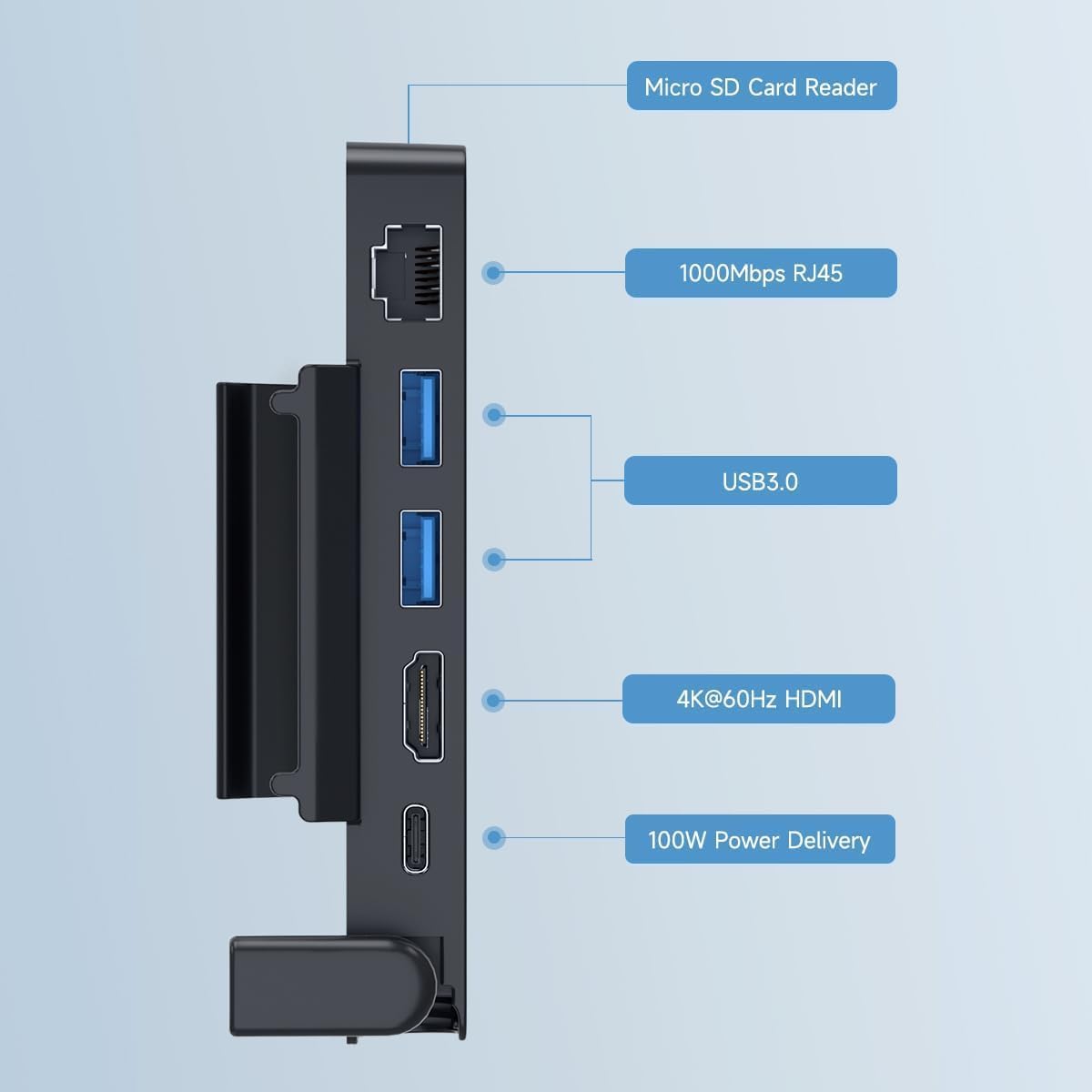
Сүрөт 2.1: Бүттүview of the Hagibis docking station ports, including Micro SD Card Reader, 1000Mbps RJ45 Ethernet, two USB 3.0 ports, 4K@60Hz HDMI, and 100W Power Delivery USB-C port.
- Микро SD картаны окугуч: For expanding storage or transferring data.
- 1000Mbps RJ45 Ethernet Port: Туруктуу зымдуу тармак байланышын камсыз кылат.
- 2 x USB 3.0 порттору: For connecting external peripherals like keyboards, mice, or external storage.
- 4K@60Hz HDMI 2.0 Port: Connects your Steam Deck to an external display for high-resolution video output.
- 100W Power Delivery USB-C Port: Allows for fast charging of your Steam Deck while using the dock. Note: The Steam Deck's maximum charging speed is 45W.
2.2 Дизайн өзгөчөлүктөрү
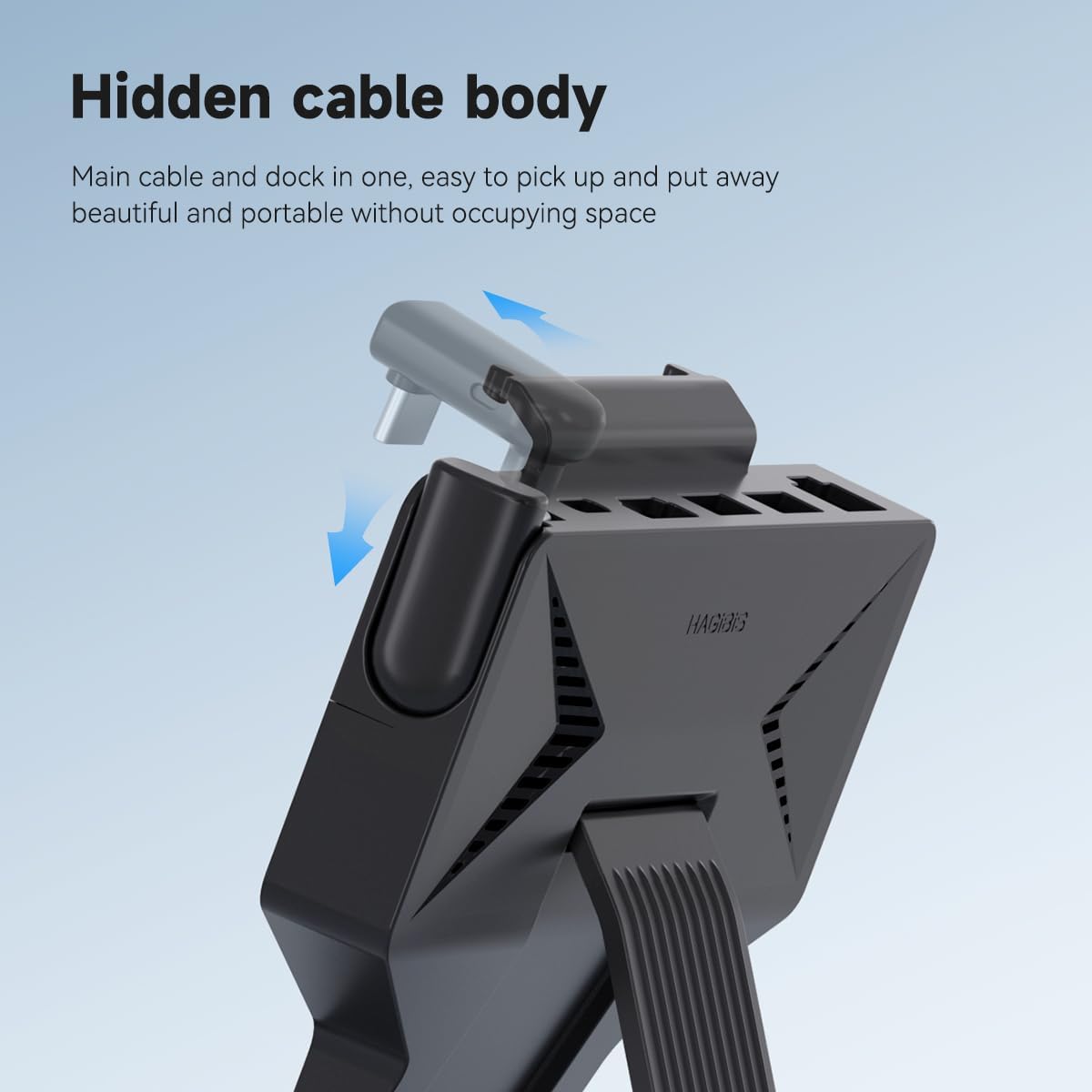
Сүрөт 2.2: The docking station features a hidden, retractable USB-C cable for connection to the Steam Deck, ensuring a compact and tidy setup.
The docking station incorporates a hidden USB-C cable that neatly tucks away when not in use, contributing to its portable design. It also features a built-in kickstand for stable placement of your Steam Deck.

Сүрөт 2.3: The docking station's design includes ventilation features to prevent blocking the Steam Deck's cooling hole, aiding in heat dissipation during extended use.
The design ensures that the Steam Deck's cooling vents are not obstructed, promoting efficient heat dissipation during prolonged gaming sessions.
3. Орнотуу нускамалары
- Докту таңгактан чыгаруу: Remove the Hagibis docking station from its packaging.
- Connect to Steam Deck:
- Locate the hidden USB-C cable on the docking station.
- Gently pull out and extend the USB-C connector.
- Insert the USB-C connector into the USB-C port on your Steam Deck.
Видео 3.1: This video demonstrates the simple installation process of attaching the Hagibis docking station to the Steam Deck, highlighting the retractable USB-C cable and the integrated kickstand.
- Тиркөө стендин жайгаштыруу: Extend the integrated kickstand on the docking station to provide stable support for your Steam Deck.
- Кубатты туташтыруу (милдеттүү эмес, бирок сунушталат): For optimal performance and charging, connect your Steam Deck's original charger (or a compatible 100W PD charger) to the 100W Power Delivery USB-C port on the docking station.
- Тышкы дисплейди туташтыруу (милдеттүү эмес): Use an HDMI 2.0 cable to connect the docking station's 4K@60Hz HDMI port to your monitor or TV.
- Перифериялык түзүлүштөрдү туташтыруу (кошумча):
- For wired internet, connect an Ethernet cable to the 1000Mbps RJ45 port.
- Connect USB devices (e.g., keyboard, mouse, external drive) to the USB 3.0 ports.
- Insert a Micro SD card into the Micro SD card reader if needed.
4. Иштөө нускамалары
4.1 Using with an External Display
Once connected via the HDMI port, your Steam Deck should automatically detect the external display. You may need to adjust display settings within the Steam Deck's operating system (SteamOS) for optimal resolution and refresh rate (up to 4K@60Hz).

Сүрөт 4.1: The Steam Deck connected to a large screen TV through the docking station, enabling a larger display for gaming.
4.2 Тармактык туташуу
Connecting an Ethernet cable to the RJ45 port will provide a stable wired internet connection, which can be beneficial for online gaming or large downloads. The Steam Deck should prioritize the wired connection over Wi-Fi automatically.
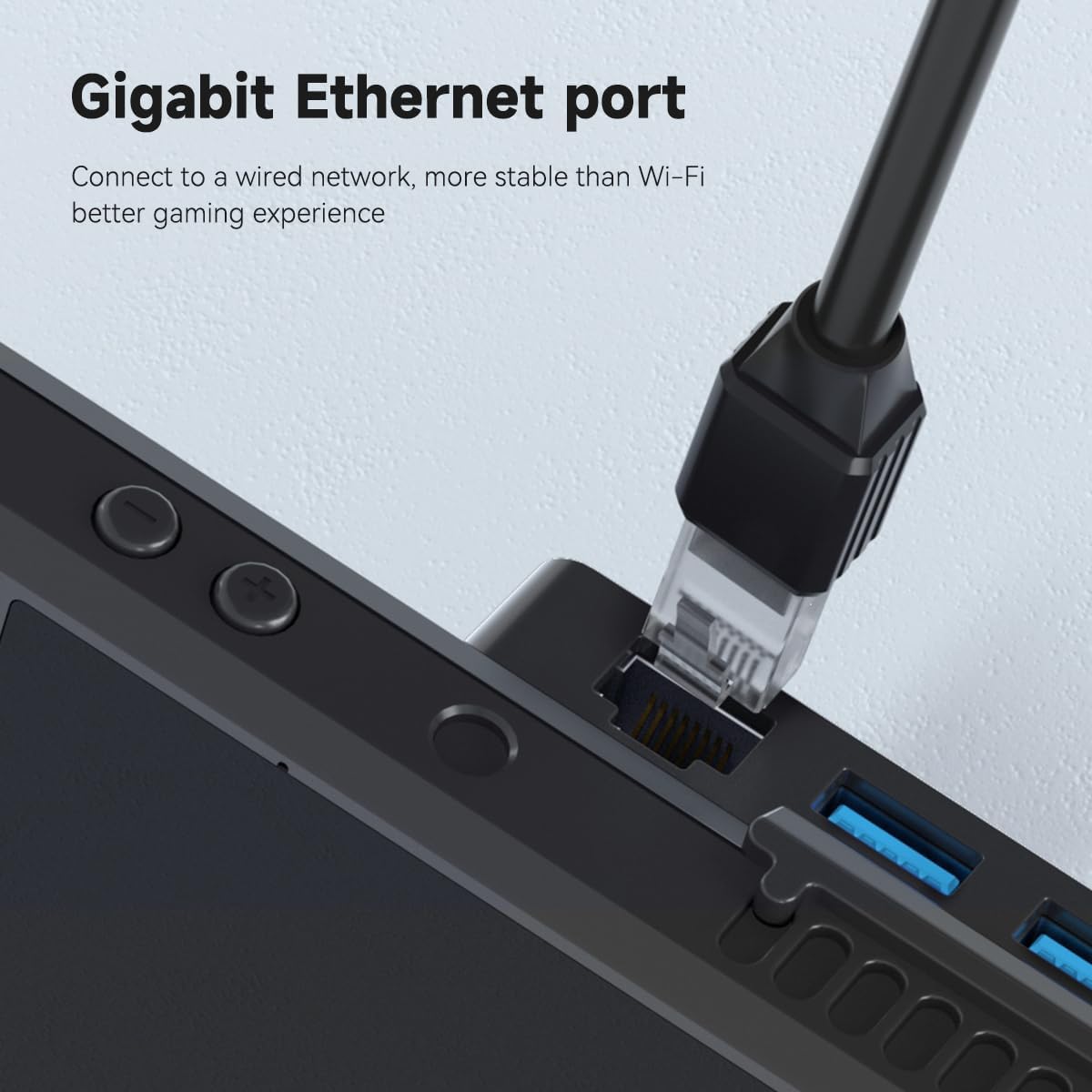
Сүрөт 4.2: Жакын план view of an Ethernet cable securely connected to the Gigabit Ethernet port on the docking station, providing a stable wired network.
4.3 Заряддоо
When a power adapter is connected to the 100W PD USB-C port, the docking station will pass through power to charge your Steam Deck. While the dock supports up to 100W, the Steam Deck itself will draw a maximum of 45W.
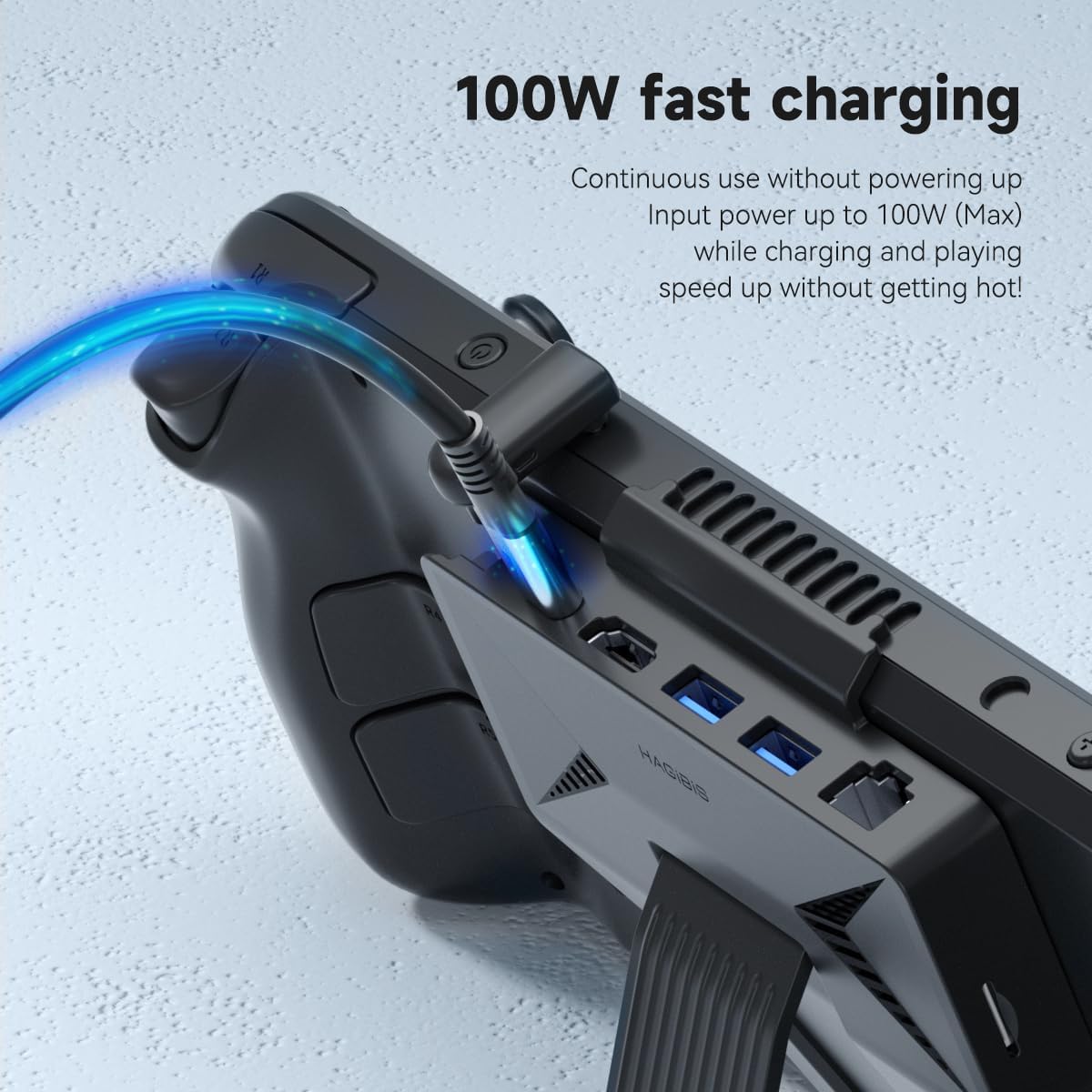
Сүрөт 4.3: The Steam Deck receiving power through the docking station's 100W Power Delivery port, indicated by a glowing blue cable.
4.4 Using USB Peripherals and Micro SD Card
Connect any standard USB devices to the USB 3.0 ports. Insert a Micro SD card into the designated slot for additional storage or data access. The Steam Deck's operating system will recognize these devices automatically.
5. Техникалык тейлөө
- Тазалоо: Use a soft, dry cloth to wipe the surface of the docking station. Avoid using liquid cleaners or abrasive materials.
- Сактагыч: When not in use, retract the USB-C cable into its hidden compartment to protect it. Store the dock in a cool, dry place away from direct sunlight.
- Кабельге кам көрүү: Зыяндын алдын алуу үчүн интегралдык USB-C кабелин ашыкча ийип же бурмалоодон алыс болуңуз.
- Вентиляция: Ensure the ventilation areas on the dock and your Steam Deck remain clear of dust and debris to maintain optimal heat dissipation.
6. Кыйынчылыктарды
| Көйгөй | Мүмкүн себеп | Чечим |
|---|---|---|
| No video output to external display. |
|
|
| Steam Deck is not charging. |
|
|
| USB devices or Micro SD card not recognized. |
|
|
| No wired internet connection. |
|
|
7. Техникалык шарттар
| Өзгөчөлүк | Деталь |
|---|---|
| Бренд | Хагибис |
| Модел | 6-in-1 USB-C Dock Stand |
| Түс | Кара |
| Аппараттык интерфейс | Ethernet, HDMI, MicroSD, USB 3.0 |
| Шайкеш түзмөктөр | Steam Deck, Steam Deck OLED, tablets, laptops, and Android phones with full-featured USB-C ports. |
| Жалпы USB порттору | 2 3.0 (USB XNUMX) |
| Порттардын саны | 6 |
| HDMI чыгышы | 4K@60Hz HDMI 2.0 |
| Ethernet порту | 1000Mbps RJ45 |
| Power Delivery | Up to 100W (Max 45W for Steam Deck) |
| Микро SD картаны окугуч | Ооба |
| Элемент Салмагы | 4 унция |
| Өндүрүүчү | Shanghai Xinxie Industrial Co., Ltd. |

Сүрөт 7.1: Basic dimensions of the Hagibis docking station: 120mm width, 122mm height, and 15mm thickness.
8. Кепилдик жана колдоо
8.1 Кепилдик маалыматы
The Hagibis 6-in-1 USB-C Docking Station comes with a 1 жылдык Чектелген Кепилдик from the date of purchase. This warranty covers manufacturing defects and malfunctions under normal use. It does not cover damage caused by misuse, accidents, unauthorized modifications, or external causes.
Кепилдик дооматтары үчүн сатып алганыңыздын далилин сактап коюңуз.
8.2 Кардарларды колдоо
For technical assistance, troubleshooting, or warranty inquiries, please contact Hagibis customer support through the official webсайт же сатуучуңуздун колдоо каналдары.
You can visit the Hagibis Store on Amazon for more information: Hagibis Amazon Store