
1. Киришүү
This manual provides comprehensive instructions for the installation, operation, and maintenance of your Ossuret 7-inch Android 13 Carplay Autoradio. Please read this manual thoroughly before using the device to ensure proper functionality and safety. This unit is designed to enhance your driving experience with advanced multimedia and navigation features.
2. Пакеттин мазмуну
Төмөндө тизмеленген нерселердин баары пакетиңизге камтылганын текшериңиз. Эгерде кандайдыр бир нерселер жок болсо же бузулса, кардарларды колдоо менен байланышыңыз.
- Main Autoradio Unit
- Электр кабели
- USB Cable (4-pin)
- USB Cable (6-pin)
- GPS антеннасы
- RCA кабели
- Тышкы микрофон
- Rear Camera Input RCA Cable
- Canbus Decoder (if applicable)
- Радио антенна адаптеринин кабели

3. Шайкеш келген унаа моделдери
This Ossuret Autoradio is compatible with the following Opel/Vauxhall/Holden models:
- Opel/Vauxhall/Holden Antara (from 2005)
- Opel/Vauxhall/Holden Astra H (from 2004)
- Opel/Vauxhall/Holden Corsa C (2004-2006)
- Opel/Vauxhall/Holden Corsa D (from 2006)
- Opel/Vauxhall/Holden Meriva (from 2004)
- Opel/Vauxhall/Holden Signum (from 2003)
- Opel/Vauxhall/Holden Tigra Twintop (from 2004)
- Opel/Vauxhall/Holden Vectra C (from 2004)
- Opel/Vauxhall/Holden Vivaro 6
- Opel/Vauxhall/Holden Zafira (from 2005)
4. Орнотуу жана орнотуу
Installation of this autoradio requires technical knowledge and experience with car electronics. It is highly recommended to seek professional installation to avoid damage to the unit or your vehicle.
4.1 Орнотууга чейинки текшерүү
- Орнотууну баштоодон мурун унаанын от алдыруу өчүрүлгөнүн жана батареянын ажыратылганын текшериңиз.
- Confirm compatibility with your vehicle model and year.
- Identify the existing wiring harness and dashboard opening.
4.2 Зымдарды туташтыруу
- Кубат кабели: Connect the provided power cable to the vehicle's power supply, ensuring correct polarity (ACC, B+, GND).
- USB кабелдери: Connect the 4-pin and 6-pin USB cables to the corresponding ports on the autoradio. These can be routed to a convenient location for external USB devices.
- GPS антеннасы: GPS антеннасын ачык жерге орнотуңуз view асмандын түзүлүшүн, адатта, башкаруу панелинде же алдыңкы айнектин астында орнотуп, аны түзмөккө туташтырыңыз.
- RCA кабелдери: Аудио чыгаруу үчүн RCA кабелдерин туташтырыңыз (мисалы, тышкы amplifiers) or video input/output as needed.
- Тышкы микрофон: Connect the external microphone for improved call quality and route it to a suitable position (e.g., near the sun visor).
- Арткы камера киргизүү: Арткы орнотулган болсо view camera, connect its video output to the dedicated RCA input on the autoradio.
- Canbus декодери: If your vehicle requires a Canbus decoder for steering wheel controls or other vehicle data integration, connect it according to the vehicle-specific wiring diagram.
- Радио антенна: Connect the vehicle's radio antenna using the provided adapter cable if necessary.
4.3 Агрегатты монтаждоо
Carefully insert the autoradio into the dashboard opening, securing it with the appropriate mounting brackets. Ensure all cables are properly routed and not pinched.

5. Иштөө нускамалары
5.1 Күйгүзүү/өчүрүү
The unit will typically power on automatically with the vehicle's ignition. To manually power off, press and hold the power button (if available) or turn off the vehicle's ignition.
5.2 Wireless Carplay / Android Auto
This autoradio supports wireless Apple Carplay and Android Auto via the pre-installed Zlink application. This allows seamless integration with your smartphone for navigation, music, calls, and other apps.
- Смартфонуңуздун Wi-Fi жана Bluetooth иштетилгенин текшериңиз.
- On the autoradio, open the Zlink application.
- Follow the on-screen prompts to connect your phone via Bluetooth first, then confirm the Wi-Fi connection.
- Once connected, your phone's Carplay or Android Auto interface will appear on the autoradio screen.

5.3 Bluetooth функциясы
The unit features Bluetooth for hands-free calling and audio streaming.
- Жупташтыруу: Go to the Bluetooth settings on the autoradio and your smartphone. Издөө available devices on your phone and select the autoradio (e.g., "Ossuret Car"). Confirm the pairing code if prompted.
- Hands Free Чалуу: Once paired, you can make and receive calls directly from the autoradio screen. The built-in microphone captures your voice.
- Bluetooth Music (A2DP): Stream audio from your phone to the autoradio wirelessly.
- Phonebook Download: The unit supports downloading your phone's contacts for easy access.

5.4 USB туташуу
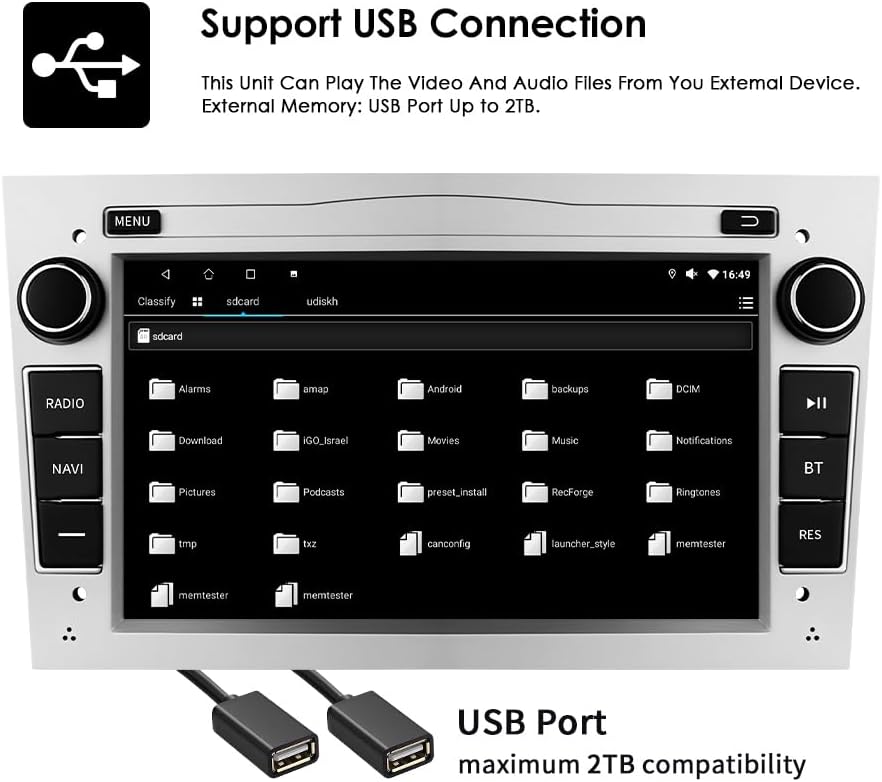
Connect external USB devices to play audio and video files or access other data. The unit supports USB storage up to 2TB.
- Insert your USB drive into one of the provided USB ports.
- дегенге өтүңүз file explorer or media player application on the autoradio.
- Select the USB device to browse and play your media files.
5.5 Мультимедиа ойнотуу
The autoradio supports various audio and video formats for local playback.
- Музыка форматтары: MP3, WMA, AAC, RM, FLAC, etc.
- Видео форматтары: MPEG-1/2/4, H.264, H.263, VC1, RV, RMVB, DivX, Sorenson Spark, VP8, AVS Stream, etc.

5.6 GPS навигациясы
The unit comes with preloaded European maps and supports both online and offline navigation.
- Access the navigation application from the main menu.
- Enter your destination to receive turn-by-turn voice guidance.
- Connect to Wi-Fi for online map updates and real-time traffic information.
5.7 Рулду башкаруу
The autoradio is compatible with your vehicle's factory steering wheel controls, allowing you to manage volume, change tracks, and answer calls without taking your hands off the wheel. Configuration may be required in the unit's settings menu.
5.8 Арткы View Камера киргизүү
Качан ылайыктуу арткы view камера туташтырылганда, унаа артка берүүчү ылдамдыкка өткөндө дисплей автоматтык түрдө камеранын берүүсүнө которулуп, так маалымат берет view унаанын артындагы тоскоолдуктар.
6. Техникалык тейлөө
To ensure the longevity and optimal performance of your Ossuret Autoradio, follow these maintenance guidelines:
- Экранды тазалоо: Сенсордук экранды акырын сүртүү үчүн жумшак, түксүз чүпүрөктү колдонуңуз. өжөр тактар үчүн, бир аз гampчүпүрөккө суу же экранды тазалоочу каражат. Катуу химиялык заттардан же абразивдүү материалдардан алыс болуңуз.
- Жалпы тазалоо: Агрегатты чаңдан жана таштандыдан алыс кармаңыз. Желдетүүчү тешиктерди жана баскычтардын жаракаларын тазалоо үчүн жумшак щетка же кысылган абаны колдонуңуз.
- Программалык камсыздоо жаңыртуулары: Акыркы функцияларды жана каталарды оңдоону камсыз кылуу үчүн, өндүрүүчүнүн программалык камсыздоо жаңыртууларын мезгил-мезгили менен текшерип туруңуз.
- Ашыкча температурадан сактаныңыз: Do not expose the unit to extreme heat or cold, as this can affect performance and lifespan.
7. Кыйынчылыктарды
If you encounter issues with your autoradio, refer to the following common problems and solutions:
| Көйгөй | Мүмкүн себеп | Чечим |
|---|---|---|
| Күч жок | Туура эмес зымдар, күйүп кеткен сактагыч, унаанын аккумуляторундагы көйгөй | Check power connections, inspect fuses, ensure vehicle battery is charged. |
| Үн жок | Volume too low, incorrect audio settings, speaker wiring issue | Increase volume, check audio output settings, verify speaker connections. |
| GPS сигналы жоголду/алсыз | Antenna obstruction, poor antenna placement | GPS антеннасынын таза болушун текшериңиз view асмандан, зарыл болсо, ордун өзгөртүңүз. |
| Bluetooth туташпай жатат | Bluetooth off, incorrect pairing, interference | Ensure Bluetooth is enabled on both devices, re-pair, move away from other wireless devices. |
| Сенсордук экран жооп бербейт | Программалык камсыздоодогу мүчүлүштүк, экрандын бузулушу | Түзмөктү өчүрүп күйгүзүңүз. Эгерде көйгөй чечилбесе, колдоо кызматына кайрылыңыз. |
If the problem persists after attempting these solutions, please contact Ossuret customer support for further assistance.
8. Техникалык шарттар
Below are the technical specifications for the Ossuret Autoradio Model B0FPLCMTNZ:
| Өзгөчөлүк | Спецификация |
|---|---|
| Бренд | Ossuret |
| Модель номери | B0FPLCMTNZ |
| Операция системасы | Android 13 |
| RAM | 2 ГБ |
| ROM | 32 ГБ |
| CPU | 4Core*A53 1.5Ghz |
| Screen Size | 7 дюйм |
| Screen Resolution | 1024 x 600 |
| Сенсордук экран түрү | Capacitive |
| Байланыш технологиясы | Bluetooth, USB, Wi-Fi |
| Өзгөчөлүктөр | Wireless Carplay/Android Auto, GPS Navigation, DSP Support |
| Шайкеш түзмөктөр | Смартфон |
| Жалпы HDMI порттору | 1 |
| Аудио чыгаруу режими | Стерео |
| Видеону коддоо | H.264, H.265/HEVC, MPEG-4 |
| Каналдардын саны | 4 |
| Башкаруу ыкмасы | Тийүү, Үн |
| Origin | Кытай |
9. Кепилдик жана колдоо
9.1 Кепилдик маалыматы
This Ossuret Autoradio comes with a 1 жылдык өндүрүш кепилдиги сатып алынган күндөн тартып. Бул кепилдик нормалдуу колдонуудагы материалдардагы жана жасалгадагы кемчиликтерди камтыйт. Бул туура эмес орнотуудан, авариядан, туура эмес колдонуудан, кыянаттык менен пайдалануудан, көңүл бурбоодон, уруксатсыз өзгөртүүдөн же кадимки эскирүүдөн келип чыккан зыянды камтыбайт.
9.2 Кардарларды колдоо
For technical assistance, warranty claims, or any questions regarding your Ossuret Autoradio, please contact your retailer or the Ossuret customer support team. Have your model number (B0FPLCMTNZ) and proof of purchase ready when contacting support.