
Introduction
Thank you for choosing the TNICER G1EX Bluetooth 5.2 Motorcycle Intercom System. This device is designed to enhance your riding experience by providing clear communication, music playback, and navigation assistance. Please read this manual thoroughly before use to ensure proper operation and to maximize the product's potential.
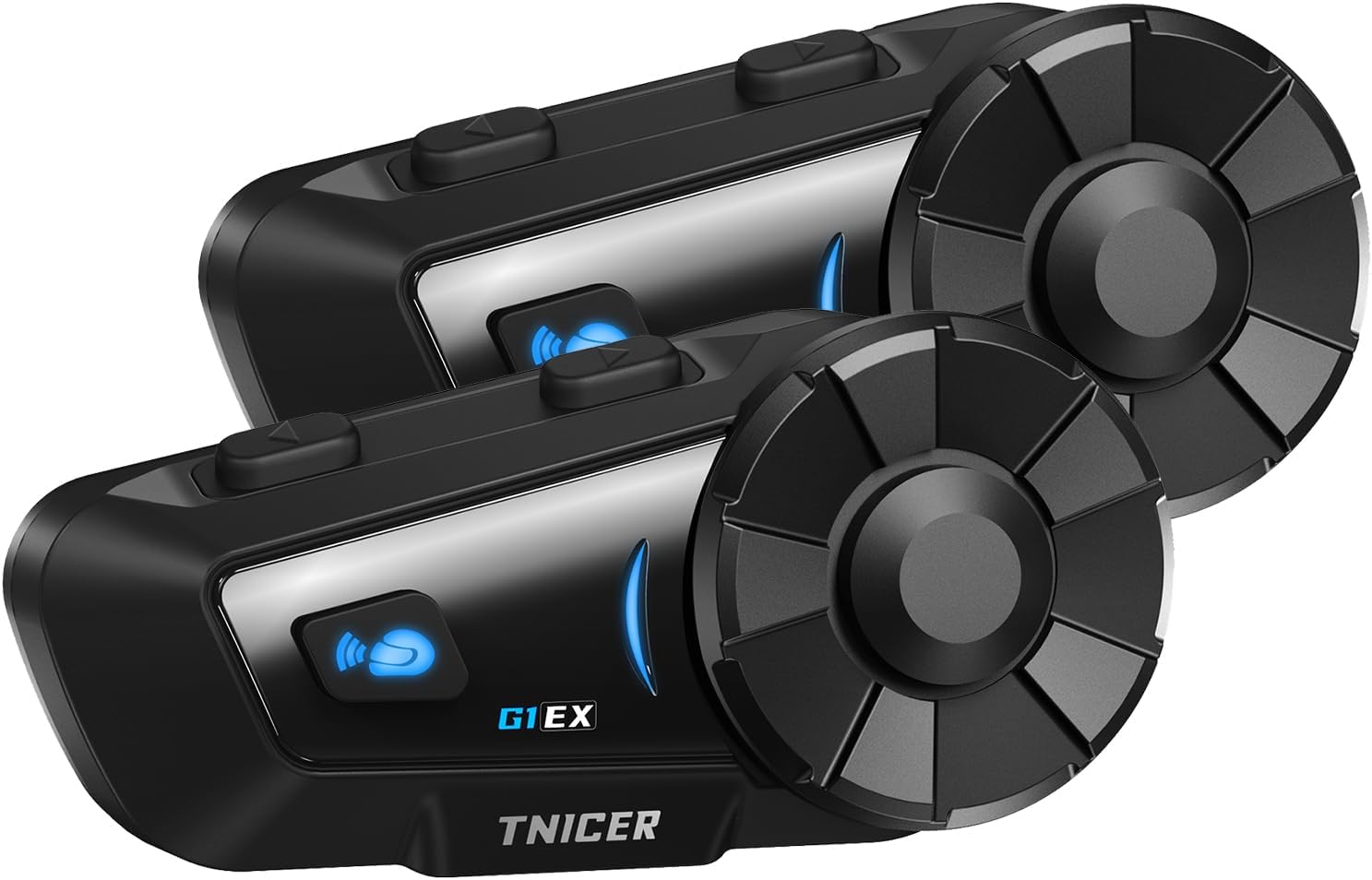
Image: Two TNICER G1EX intercom units, showcasinалардын кооз дизайны жана башкаруу баскычтары.
Пакеттин мазмуну
Пакетиңизде бардык буюмдар бар экенин текшериңиз:
- G1EX Main Unit (x2)
- 3.5mm Universal Jack (x2)
- Speaker & Arm Microphone (x2 sets)
- Негизги плита (x2)
- Speaker Velcro (x2 sets)
- Speaker Spacer (x2 sets)
- Металл кыскыч (x2)
- Microphone Velcro (x2 sets)
- 3M Double-sided Tape (x2 sets)
- USB кубаттоо кабели (x2)
- Колдонуучунун колдонмосу (жапонча)

Image: A visual representation of all components included in the TNICER G1EX package.
Продукт өзгөчөлүктөрү
- Өркүндөтүлгөн Bluetooth 5.2: Ensures stable and fast data transmission for seamless communication.
- Multi-Rider Intercom: Supports simultaneous communication for up to 6 riders with a maximum range of 1000 meters.
- Бир тийүү менен автоматтык жупташтыруу: Simplifies connection with other G1EX units and compatible TNICER models (e.g., T2, T4X).
- Жалпы шайкештик: Connects with most third-party intercoms on the market.
- Автоматтык кайра туташуу: Automatically re-establishes communication if temporarily disconnected within range.
- Superior Noise Cancellation: Features CVC and DSP technologies to reduce wind and engine noise for clear audio.
- Музыка бөлүшүү: Share your music with fellow riders.
- Үн жардамчысын колдоо: Compatible with smartphone voice assistants for hands-free control.
- Батареянын узак иштөө мөөнөтү: 1000mAh battery provides up to 25 hours of music playback, 22 hours of talk time, and 300 hours of standby.
- IP65 суу өткөрбөйт рейтинги: Designed to withstand dust, rain, and harsh weather conditions.
- FM радио функциясы: Enjoy local FM broadcasts during your ride.
- 3.5mm Universal Earphone Interface: Allows for custom speaker replacement.

Сүрөт: An overview of the TNICER G1EX's main features, including its robust design and audio capabilities.
Жайгашуу
1. Орнотуу
The G1EX unit can be mounted to your helmet using either the metal clip or the 3M double-sided adhesive tape. Choose the method that best suits your helmet and preference.
- Mounting the Intercom Unit:
- Металл клипсти колдонуу: Slide the metal clip between the helmet shell and the inner padding. Secure the intercom unit to the clip.
- Using 3M Adhesive: Clean the desired mounting area on your helmet. Attach the base plate with the 3M adhesive tape, then secure the intercom unit to the base plate.
- Installing Speakers:
- Attach the speaker Velcro pads inside your helmet, aligning them with your ears.
- Place the speakers onto the Velcro pads. Use speaker spacers if needed for a better fit and sound quality.
- Connect the speaker cable to the 3.5mm universal jack on the intercom unit.
- Installing Microphone:
- Attach the microphone Velcro pad inside the helmet, positioning the microphone close to your mouth.
- Connect the microphone cable to the intercom unit.
2. Заряддоо
Before first use, fully charge the G1EX unit. Use the provided USB charging cable and a 5V/1A power adapter. Avoid using fast chargers as this may damage the battery.
- Connect the USB charging cable to the charging port on the G1EX unit.
- Connect the other end of the cable to a 5V/1A USB power adapter.
- The indicator light will show charging status (refer to the device's LED indicators for specific colors/patterns).
- Толук кубаттоо, адатта, болжол менен 2 саатты талап кылат.

Image: The TNICER G1EX unit being charged, highlighting its battery capacity and usage times.
3. Баштапкы жупташтыруу
The G1EX features one-touch automatic pairing for convenience.
- Ensure both G1EX units (or compatible TNICER models) are powered off.
- Press and hold the power button on both units simultaneously until they enter pairing mode (indicator light will flash rapidly, typically blue and red).
- The units will automatically detect and pair with each other. A voice prompt or a change in the indicator light will confirm successful pairing.
- For pairing with a smartphone, refer to the "Operating Instructions - Phone Calls" section.

Image: Riders communicating via TNICER G1EX intercoms, demonstrating the multi-rider connection capability.
Иштөө нускамалары
1. Күйгүзүү/өчүрүү
- Күйгүзүү: Индикатор жарыгы күйүп, үн сигналын укканга чейин Кубат баскычын болжол менен 3 секунд басып туруңуз.
- Өчүрүү: Индикатор жарыгы өчүп, үн сигналын укканга чейин Кубат баскычын болжол менен 5 секунд басып туруңуз.
2. Домофон байланышы
After successful pairing, you can initiate intercom communication.
- Домофонду баштоо: Briefly press the Intercom button once.
- Домофондун аягы: Briefly press the Intercom button once again.
- Автоматтык кайра туташуу: If communication is temporarily lost due to distance, the G1EX will automatically reconnect when units are back within range.
3. Музыканы ойнотуу
Музыка ойнотуу үчүн смартфонуңузду Bluetooth аркылуу туташтырыңыз.
- Ойнотуу/тындыруу: Көп функциялуу баскычты кыскача басыңыз.
- Кийинки трек: Rotate the jog dial forward.
- Мурунку трек: Rotate the jog dial backward.
- Көлөмү: Rotate the jog dial forward and hold.
- Үнүн азайтуу: Rotate the jog dial backward and hold.
- Музыка бөлүшүү: While music is playing, press and hold the Music Sharing button to share audio with a paired intercom unit.
4. FM радиосу
- FM радиосун күйгүзүү/өчүрүү: FM баскычын 2 секунд басып, кармап туруңуз.
- Каналдарды сканерлөө: Briefly press the Multi-function button to automatically scan and save available FM stations.
- Алмаштыруу бекети: Rotate the jog dial forward or backward to switch between saved stations.
5. Үн жардамчысы
Activate your smartphone's voice assistant (Siri, Google Assistant) for hands-free control.
- Үн Жардамчысын жандыруу: Briefly press the Voice Assistant button.
6. Телефон чалуулар
Pair your G1EX with your smartphone via Bluetooth.
- Смартфон менен жупташтыруу:
- Ensure the G1EX is powered on and not in intercom mode.
- Enter Bluetooth pairing mode on the G1EX (refer to the manual for specific button press, usually holding a button until indicator flashes blue/red).
- On your smartphone, go to Bluetooth settings and select "TNICER G1EX" from the list of available devices.
- Үн эскертүүсү ийгиликтүү туташууну ырастайт.
- Чалууларга жооп берүү: Көп функциялуу баскычты кыскача басыңыз.
- Аяктаган чалуулар: Көп функциялуу баскычты кыскача басыңыз.
- Чалууларды четке кагуу: Көп функциялуу баскычты 2 секунд басып туруңуз.
- Акыркы номерди кайра терүү: Көп функциялуу баскычты эки жолу басыңыз.

Image: The TNICER G1EX highlighting its diverse functionalities including music, radio, voice assistant, and call management.
Техникалык тейлөө
- Тазалоо: Аппаратты жумшак менен сүртүңүз, гamp кездеме. Катуу химиялык заттарды же абразивдүү тазалагычтарды колдонбоңуз.
- Сактагыч: Түзмөктү колдонбогон учурда салкын, кургак жерде сактаңыз. Ашыкча температурадан алыс болуңуз.
- Батареяга кам көрүү: To prolong battery life, avoid fully discharging the battery frequently. Charge the unit regularly, even if not in active use.
- Суу таасири: While IP65 rated, avoid prolonged submersion in water. Ensure the charging port cover is securely closed.

Image: The TNICER G1EX unit undergoing a water splash test, illustrating its IP65 water resistance.
Проблемаларды чечүү
| Көйгөй | Мүмкүн себеп | Чечим |
|---|---|---|
| Күч жок | Батарея аз; түзмөк заряддалган эмес. | Charge the unit fully. Ensure the charging cable and adapter are working. |
| Cannot pair with other units/smartphone | Units are too far apart; Incorrect pairing mode; Interference. | Ensure units are close (within 1 meter) during pairing. Follow pairing instructions carefully. Restart both devices. |
| Intercom communication is unclear or has static | Out of range; Environmental interference; Microphone position. | Move closer to the other intercom unit. Avoid areas with strong electromagnetic interference. Adjust microphone position closer to your mouth. |
| Music/FM radio not playing | Not connected to smartphone; FM radio off; Low volume. | Ensure smartphone is connected via Bluetooth. Activate FM radio. Adjust volume. |
| Үн жардамчысы жооп бербей жатат | Smartphone not connected; Voice assistant not enabled on phone. | Ensure smartphone is connected. Verify voice assistant is active on your phone. |

Image: The TNICER G1EX's noise cancellation system actively reducing ambient sounds for clearer communication.
Техникалык шарттар
| Өзгөчөлүк | Деталь |
|---|---|
| Модель аты | G1EX |
| Байланыш технологиясы | Зымсыз (Bluetooth 5.2) |
| Зымсыз байланыш технологиясы | Bluetooth |
| Батарея сыйымдуулугу | 1000mAh |
| Talk Time | 22 саатка чейин |
| Музыканы ойнотуу убактысы | 25 саатка чейин |
| Күтүү убактысы | 300 саатка чейин |
| Заряддоо убактысы | Болжол менен 2 саат |
| Домофон диапазону | 1000 метрге чейин (2 бирдиктин ортосунда) |
| Max Intercom колдонуучулары | 6 чабандес |
| Суу өткөрбөйт рейтинги | IP65 |
| Салмагы | Approx. 0.3 kg (per unit) |
| Наушник стили | Наушник |
| Наушник уясы | Mini USB (for charging/data), 3.5mm (for speakers) |
Кепилдик жана колдоо
For warranty information and technical support, please refer to the documentation included with your purchase or contact TNICER customer service through their official webсайтына же продуктуну сатып алган сатуучуга кайрылыңыз. Кепилдик талаптары үчүн сатып алгандыгыңызды тастыктаган документти сактап коюңуз.
Өндүрүүчү: TNICER
ASIN: B0FPLX8F43