
1. Продукт бүтүп калдыview
The HEIBAS G7 Bluetooth Headset is designed for clear communication and audio playback, featuring advanced Bluetooth 6.0 connectivity, active and environmental noise cancellation, and a long-lasting battery. Its ergonomic design ensures a comfortable and secure fit for extended use.

Сүрөт: бүттүview of the HEIBAS G7 Bluetooth Headset highlighting Bluetooth 6.0 features.
2. Пакеттин мазмуну
Сураныч, пакетте төмөнкү нерселерди текшериңиз:
- HEIBAS G7 Bluetooth Headset x 1
- Ear tips (S/M/L) x 3 pairs (6 pieces total)
- Type-C заряддоо кабели x 1
- Колдонмо колдонмо x 1

Image: Diagram showing the headset, charging case, ear tips, and charging cable included in the package.
3. Орнотуу жана жупташтыруу
3.1 Баштапкы төлөм
Before first use, fully charge the headset and its charging case using the provided Type-C cable. The LED display on the charging case indicates the battery level.

Image: The charging case with an LED display showing battery percentage, кубаттоо абалын көрсөтөт.
3.2 Түзмөк менен жупташтыруу
- Гарнитура заряддалганын текшериңиз.
- Open the charging case. The headset will automatically enter pairing mode.
- Смартфонуңузда, планшетиңизде же компьютериңизде Bluetooth'ду күйгүзүп, жеткиликтүү түзмөктөрдү издеңиз.
- Select "G7" from the list of devices to connect.
- Once connected, the headset is ready for use.
The headset supports automatic connection to previously paired devices when taken out of the case.

Image: The headset and charging case next to a smartphone, illustrating automatic connection upon removal from the case.
4. Гарнитураны тагынуу
The G7 headset features an adjustable design for a secure and comfortable fit on either ear.
4.1 Шайкештикти тууралоо
- The ear hook can be rotated 180° and 360° to fit various ear shapes.
- The head part can rotate 45° left or right, allowing use on either the left or right ear.
- Choose the appropriate ear tip size (S, M, L) for optimal comfort and sound quality.

Image: Diagrams illustrating the 180°, 360°, and 45° adjustment capabilities of the headset for a customized fit.
4.2 Wearing Method
- Rotate the ear hook 90 degrees to the left (for right ear use, rotate 90 degrees to the right).
- Rotate the ear hook 90 degrees upwards.
- Rotate the earphone head and adjust its position to fit your ear shape.
Image: Step-by-step guide on how to wear the headset, including selecting the correct ear tip size (S, M, L).
5. Башкаруу элементтери жана функциялар
The G7 headset features physical buttons for intuitive control of various functions.

Image: Diagram showing the physical buttons on the headset and their corresponding functions, including power, volume, play/pause, call control, mute, and Siri activation.
5.1 Негизги операциялар
- Күйгүзүү/өчүрүү: Негизги баскычты 3 секунд басып туруңуз.
- Ойнотуу/тындыруу: Негизги баскычты бир жолу басыңыз.
- Үнүн жогорулатуу/төмөндөтүү: Press the volume buttons (indicated by +/-).
- Кийинки / Мурунку трек: Press and hold the volume buttons for 2 seconds.
5.2 Чалууларды башкаруу
- Чалууга жооп берүү/аяктоо: Негизги баскычты бир жолу басыңыз.
- Чакырууну четке кагуу: Негизги баскычты 2 секунд басып туруңуз.
- Үнсүз/Ачуу: During a call, press the dedicated mute button (located on the side of the headset).
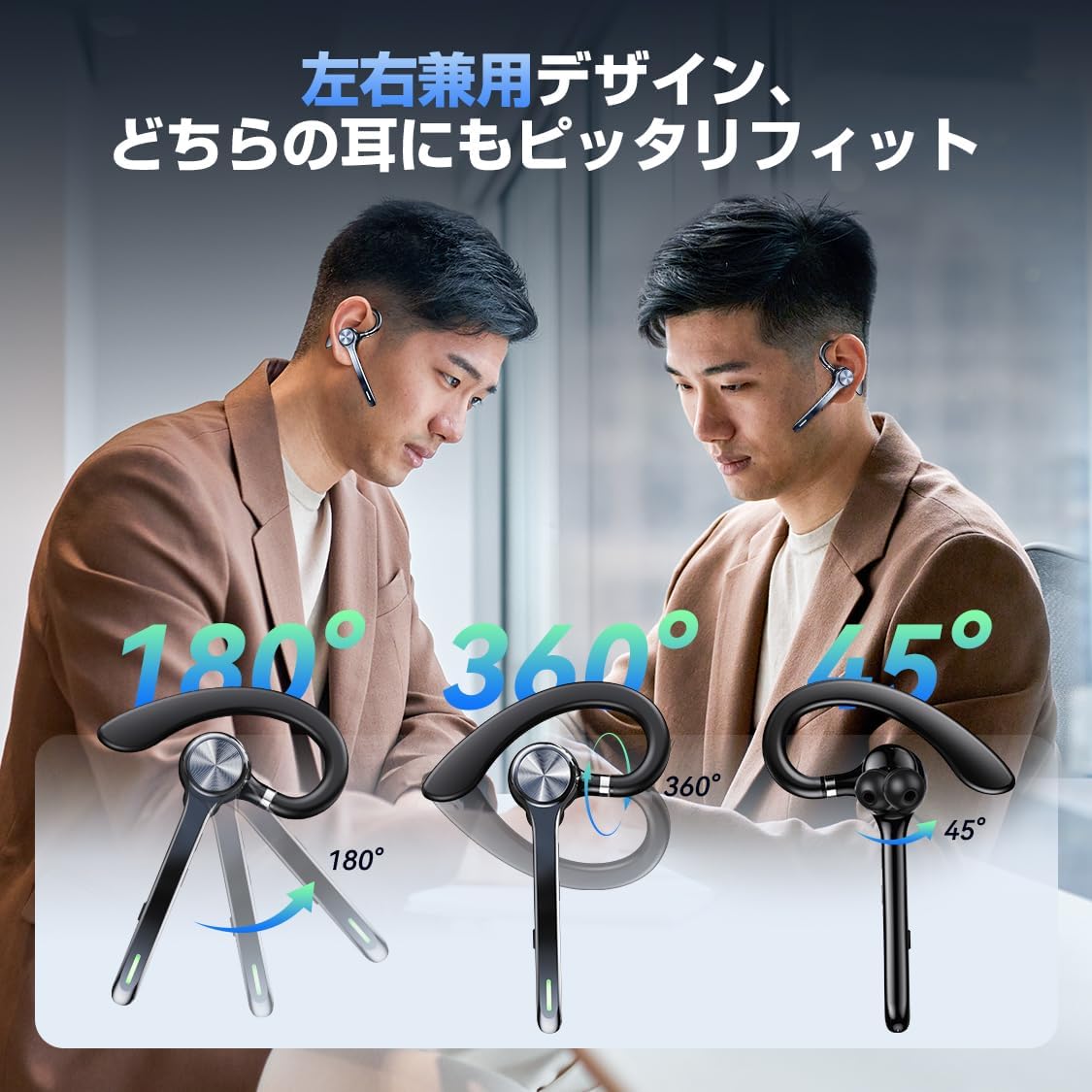
Image: A person using the headset during a call, demonstrating the mute function.
5.3 Үн жардамчысы (Siri)
- Siri иштетүү: Double-press the main button.
6. Өркүндөтүлгөн функциялар
6.1 Көп чекиттүү туташуу
The G7 headset supports simultaneous connection to two devices (e.g., a smartphone and a PC). This allows for seamless switching between music playback on one device and calls on another.

Image: The headset connected to both a smartphone and a laptop, demonstrating the multipoint connection feature.
6.2 Noise Cancellation (ANC & ENC)
- Активдүү ызы-чууну жокко чыгаруу (ANC): Reduces low-frequency ambient noise during music playback (e.g., train sounds, air conditioner hum).
- Экологиялык чууну жокко чыгаруу (ENC): Suppresses background noise during calls, ensuring your voice is transmitted clearly to the other party.

Image: Diagram illustrating the effect of ANC and ENC on sound, showing noise reduction before and after cancellation.
7. Батарея жана заряддоо
The G7 headset offers extended battery life for prolonged use.
- Headset Playback Time: Approximately 21-23 hours on a single charge.
- Total Playback Time (with charging case): 108 саатка чейин.
- Кубаттоо кубаттуулугу: 500mAh.
- Заряддоо интерфейси: Type-C.
- Заряддоо убактысы: Толук кубаттоо үчүн болжол менен 2-2.5 саат.

Image: Visual representation of the headset's battery life, including single playback time, total time with the charging case, and standby time.
8. Техникалык шарттар
| Модель аты | G7 |
| Бренд | HEIBAS (Origin qilin) |
| Байланыш технологиясы | Зымсыз (Bluetooth 6.0) |
| Наушник форма фактору | Bluetooth Headset (Single Ear) |
| Noise Cancellation | ANC + ENC Dual Noise Cancellation |
| Батареянын иштөө мөөнөтү (гарнитура) | 21-23 саат |
| Батареянын жалпы иштөө мөөнөтү (корпусу менен) | 108 саатка чейин |
| Заряддоо кутусунун кубаттуулугу | 500mAh |
| Заряддоо интерфейси | Type-C |
| Салмагы | Approx. 12g (headset) |
| Суу каршылык | Waterproof (level not specified, generally splash-proof) |
| Шайкеш түзмөктөр | Смартфондор, планшеттер, ноутбуктар |
| Камтылган компоненттер | Bluetooth Headset, Ear tips, Cable, Instruction Manual |
9. Кыйынчылыктарды
9.1 Күйгүзүү мүмкүн эмес
- Гарнитура толук заряддалганын текшериңиз.
- Күч баскычын 3 секунддан кем эмес басып туруңуз.
9.2 Жупташтырууга болбойт
- Make sure the headset is in pairing mode (usually indicated by a flashing LED).
- Түзмөгүңүздөгү Bluetooth'ду өчүрүп, кайра иштетиңиз.
- Гарнитура түзмөгүңүздөн 10 метр аралыкта экенин текшериңиз.
- Forget "G7" from your device's Bluetooth list and try pairing again.
9.3 Үн сапатынын начардыгы же байланыштын үзүлүшү
- Гарнитура толук заряддалганын текшериңиз.
- Reduce the distance between the headset and your device.
- Avoid obstacles (walls, large electronic devices) between the headset and your device.
- Башка зымсыз аппараттардын кийлигишүүсүн текшериңиз.
9.4 Микрофон көйгөйлөрү
- Ensure the microphone is not muted during a call.
- Check your device's audio settings to ensure the headset is selected as the input/output device.
10. Техникалык тейлөө
- Гарнитураны дайыма жумшак, кургак чүпүрөк менен тазалаңыз.
- Avoid exposing the headset to extreme temperatures, humidity, or corrosive liquids.
- Гарнитураны коргоо жана кубатталып туруу үчүн колдонулбаган учурда кубаттоочу кутучасында сактаңыз.
- Do not attempt to disassemble or repair the headset yourself. Contact customer support if issues arise.
11. Кепилдик жана колдоо
For warranty information or technical support, please refer to the contact details provided on the product packaging or the official HEIBAS webсайт. Кепилдик дооматтары үчүн сатып алуу дүмүрчөгүңүздү сактаңыз.
12. Продукт видеосу
Видео: Кыскача алдын ала маалыматview demonstrating key features of the HEIBAS G7 Bluetooth Headset, including its design, charging, and controls.