
1. Киришүү
Thank you for choosing the MERCUSYS MC510 2K 3MP Outdoor WiFi Camera. This manual provides detailed instructions for the installation, operation, and maintenance of your security camera. Please read this manual carefully before use to ensure proper functionality and safety. The MC510 offers 2K 3MP resolution, 360-degree panoramic view, color night vision, two-way audio, smart motion detection, and IP65 weather resistance for reliable outdoor surveillance.

Image: MERCUSYS MC510 2K Pan/Tilt Wi-Fi Camera mounted on a wall, highlighting its 2K resolution and IP65 weather resistance.
2. Коопсуздук маалыматы
- Кубат адаптери жергиликтүү электр менен камсыздооңузга ылайыктуу экенин текшериңиз.
- Камераны өтө жогорку температурага, нымдуулукка же коррозиялуу чөйрөлөргө дуушар кылбаңыз.
- Камераны күчтүү электромагниттик талаалардын жанына коюудан качыңыз.
- Камераны жана анын аксессуарларын балдар жетпеген жерде сактаңыз.
- Өндүрүүчүлөр көрсөткөн аксессуарларды гана колдонуңуз.
- Тазалоодон же тейлөөдөн мурун электр энергиясын өчүрүңүз.
- The camera is IP65 rated for outdoor use, but avoid submerging it in water.
3. Пакеттин мазмуну
Пакетиңизде бардык буюмдар бар экенин текшериңиз:
- MC510 Camera × 1
- Power адаптер × 1
- Mounting Sticker × 1
- Монтаждык кронштейн × 1
- Mounting Screws × 4 + Bracket Screws × 2
- Монтаждоо анкерлери × 4
- Waterproof Gasket × 1
- Quick Start Guide
4. Продукт бүтүп калдыview
The MERCUSYS MC510 is a versatile outdoor security camera designed to provide comprehensive surveillance with advanced features.
Негизги өзгөчөлүктөрү:
- 2K QHD with 360° View: Provides clear 2K 3MP video and full 360° horizontal coverage to see every corner and detail.
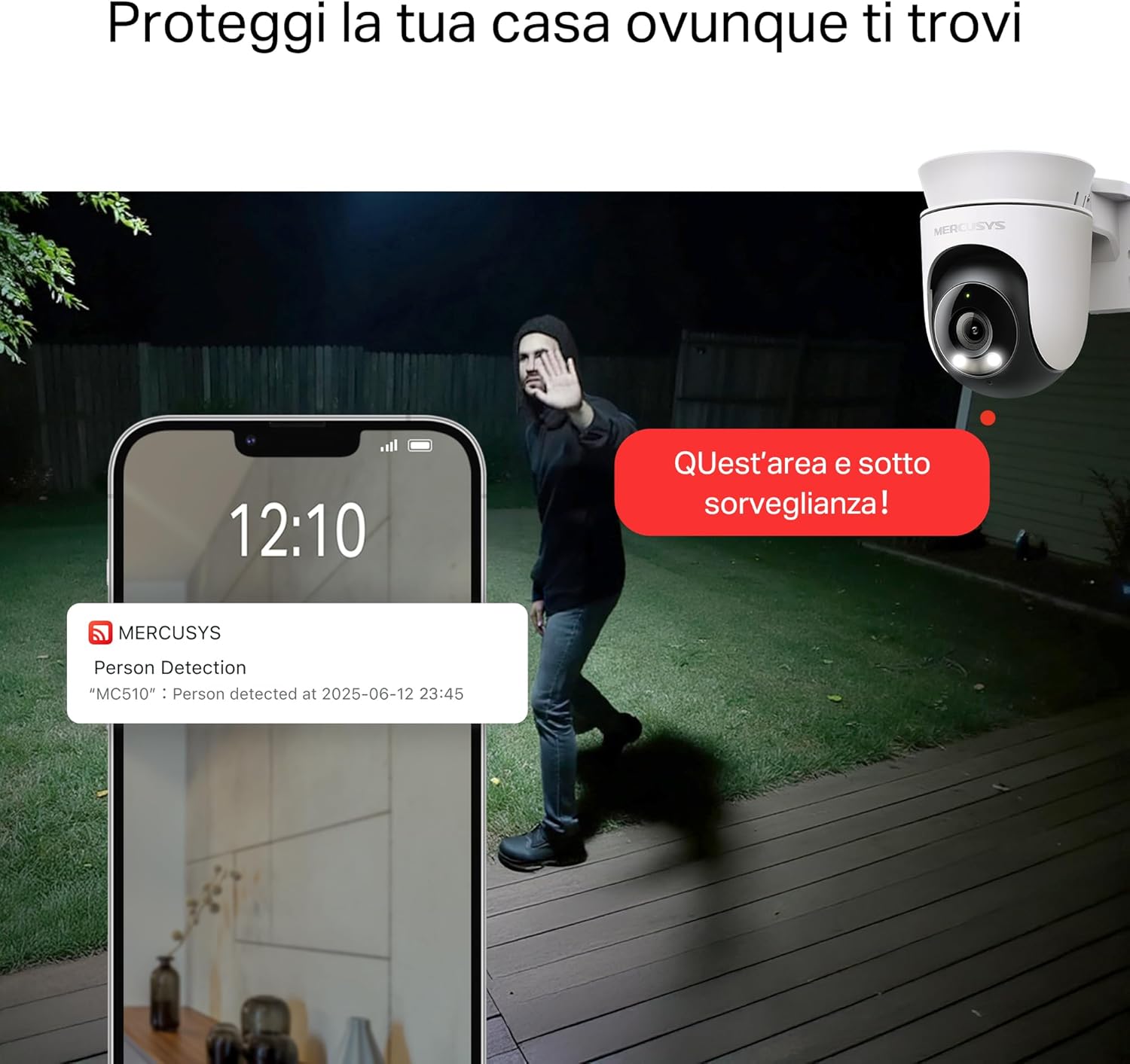
- Smart Motion Detection and Person Tracking: Automatically detects and tracks motion or people, ensuring key activities remain in focus.
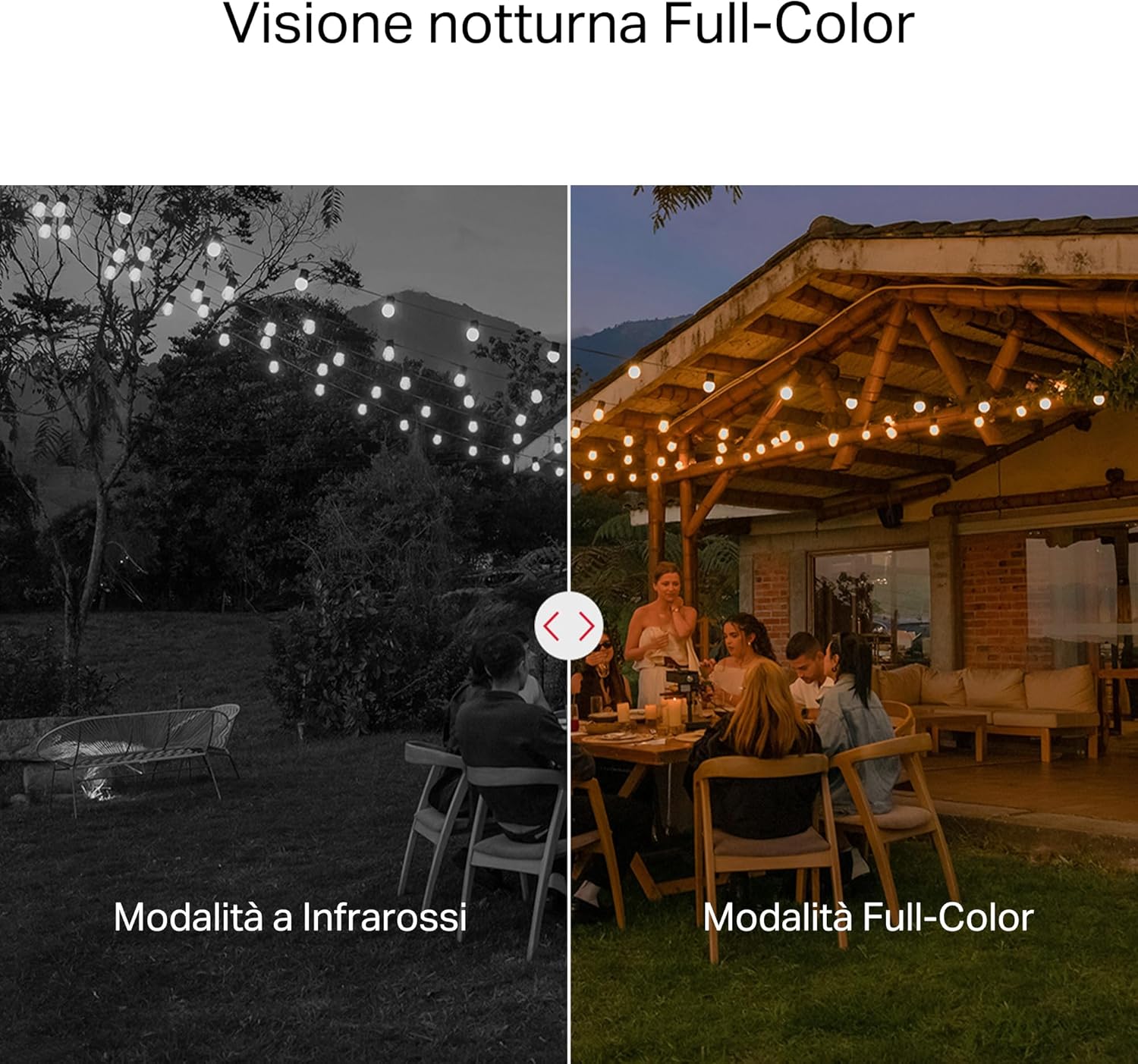
- Түнкү көрүнүш: Provides vivid and detailed images even at night for 24/7 protection.
- Ыңгайлаштырылуучу иш-аракеттер зоналары: Helps filter out irrelevant events and sends alerts only when necessary.
- Жергиликтүү жана булуттагы сактагыч: Supports microSD cards up to 512GB and cloud storage for secure and flexible video backup.
- Сыртта колдонуу үчүн аба ырайы: IP65 certified for reliable performance in rain, dust, or snow. Easily mounts on walls, ceilings, or poles.
- Privacy Protection with Lens Shield: Activate the physical lens cover when surveillance is not needed for greater peace of mind at home.
- Эки тараптуу аудио: Түздөн-түз камера аркылуу байланышыңыз.
Визуалдык өзгөчөлүктөрү:

High-resolution 2K 3MP video capture.
360-degree panoramic rotation for full coverage.
Full-Color Night Vision for clear images in low light.

Physical lens shield for enhanced privacy.
5. Орнотуу
5.1 Физикалык орнотуу
The MC510 camera is designed for outdoor use and can be mounted on walls, ceilings, or poles. Its IP65 rating ensures protection against dust and water jets.
- Жайгашкан жерди тандаңыз: Каалаганды камсыз кылган ылайыктуу сырткы жерди тандаңыз viewбурчу жана туруктуу Wi-Fi сигналы бар.
- Монтаждоо: Use the provided mounting sticker to mark drill holes. Drill holes, insert anchors, and secure the mounting bracket with screws. Attach the camera to the bracket.
- Кубат туташуу: Connect the power adapter to the camera and plug it into a power outlet. Ensure the waterproof gasket is properly installed for outdoor power connections.

Image: The camera is shown mounted outdoors, demonstrating its weather-resistant design.
5.2 Колдонмону орнотуу жана туташуу
The MC510 connects exclusively via Wi-Fi. An Ethernet port is not available.
- Колдонмону жүктөп алыңыз: Download the official MERCUSYS app from your smartphone's app store (iOS or Android).
- Эсеп түзүү: Колдонмону ачып, жаңы аккаунт түзүңүз же сизде мурунтан эле бар болсо, кириңиз.
- Камера кошуу: Follow the in-app instructions to add your MC510 camera. This typically involves scanning a QR code on the camera and connecting it to your home Wi-Fi network.
5.3 MicroSD картасын орнотуу
For local storage, install a microSD card (up to 512GB, not included).
- Өчүрүү: Disconnect the camera from power before inserting or removing the microSD card.
- Орун табыңыз: Refer to the camera's physical design to locate the microSD card slot, often protected by a cover.
- Картаны кыстаруу: microSD картаны уячага акырын кыстарыңыз.
- Формат картасы: After powering on the camera and connecting it to the app, navigate to the camera settings to format the microSD card.

Image: Close-up of the camera showing the microSD card slot, indicating flexible storage options.
6. Иштөө нускамалары
6.1 Live View & Ойнотуу
- Live View: Open the MERCUSYS app and select your MC510 camera to view жандуу тоют.
- Pan/Tilt Control: Use the controls in the app to remotely rotate the camera horizontally (pan) and vertically (tilt) to adjust the viewбурч.
- Ойнотуу: Жазылган footage from the app's playback section. You can filter by date and event.

Image: Illustration of 360-degree rotation with motion tracking.
6.2 Кыймылды аныктоо жана көзөмөлдөө
- Аныктоого уруксат берүү: In the app settings, enable motion detection and person tracking.
- Customize Activity Zones: Камеранын ичинде белгилүү бир аймактарды аныктаңыз view where you want motion to be detected. This helps reduce false alarms.
- Эскертмелерди алуу: The camera will send notifications to your smartphone when motion or a person is detected in the monitored zones.

Image: A person running in a yard, with detection boxes, demonstrating motion detection and tracking.
6.3 Эки тараптуу аудио
The built-in microphone and speaker allow for two-way communication.
- Аудиону иштетүү: Түз эфирде view interface of the app, tap the microphone icon to speak through the camera.
- Угуу: The speaker icon allows you to hear audio from the camera's vicinity.

Image: A person detected by the camera, with a phone notification and an on-screen alert, demonstrating customizable alarms and two-way audio.
6.4 Түстүү түнкү көрүү
The MC510 provides full-color night vision for enhanced clarity in low-light conditions.
- Автоматтык иштетүү: Color night vision activates automatically in low-light conditions.
- Infrared режими: The camera also supports traditional infrared night vision (black and white) if preferred or in extremely dark environments.

Image: Comparison of infrared (monochrome) and full-color night vision modes.
6.5 Privacy Zone & Lens Shield
Protect your privacy by defining privacy zones or activating the physical lens shield.
- Купуялык зоналары: In the app, you can set up specific areas within the camera's view to be excluded from recording.
- Lens Shield: For complete privacy, use the app to activate the physical lens shield, which covers the camera lens.
7. Техникалык тейлөө
7.1 Тазалоо
- Тазалоодон мурун камеранын өчүк экенин текшериңиз.
- Камеранын корпусун сүртүү үчүн жумшак, кургак чүпүрөктү колдонуңуз.
- For the lens, use a lens cleaning cloth to avoid scratches. Do not use harsh chemicals or abrasive cleaners.
7.2 Микропрограмма жаңыртуулары
Regularly check for firmware updates through the MERCUSYS app. Updates provide new features, performance improvements, and security enhancements. Follow the in-app instructions to perform updates.
8. Кыйынчылыктарды
If you encounter issues with your MERCUSYS MC510 camera, refer to the following common problems and solutions:
| Көйгөй | Мүмкүн чечим |
|---|---|
| Камера Wi-Fi'га туташпай жатат | Ensure the camera is within range of your Wi-Fi router. Check Wi-Fi password. Restart the camera and router. The MC510 only supports Wi-Fi connection, no Ethernet. |
| Видеонун сапаты начар | Check your Wi-Fi signal strength. Ensure the camera lens is clean. Adjust camera placement to avoid glare or obstructions. |
| Кыймылды аныктоо көйгөйлөрү | Verify motion detection is enabled in the app. Adjust sensitivity settings. Ensure activity zones are correctly configured. |
| MicroSD card not working | Ensure the card is inserted correctly. Format the microSD card via the app. Try a different compatible microSD card. Power cycle the camera after inserting the card. |
| Эки тараптуу аудио жок | Колдонмодон микрофондун жана динамиктин жөндөөлөрүн текшериңиз. Телефонуңуздун үнү жогору экенин текшериңиз. |
9. Техникалык шарттар
| Өзгөчөлүк | Деталь |
|---|---|
| Бренд | MERCUSYS |
| Модель аты | MC510 |
| Ички/тышкы колдонуу | Сыртта |
| Туташуу Протоколу | Wi-Fi |
| Монтаж түрү | Шып, устун, дубал |
| Дагы эле сүрөттүн чечилиши | 3 депутат |
| Эл аралык коргоо рейтинги | IP65 |
| Зымсыз технология | Wi-Fi |
| Батареялар талап кылынат | Жок |
| Видео тартуунун резолюциясы | 2К 3 МП |
| Видео тартуу форматы | MPEG-4 |
| Элементтердин саны | 1 |
| Камтылган компоненттер | MC510 Camera, Power Adapter, Mounting Sticker, Mounting Bracket, Mounting Screws, Mounting Anchors, Waterproof Gasket, Quick Start Guide |
| Келип чыккан өлкө | Кытай |
| Өндүрүүчү | TP-Link |
| Элементтин өлчөмдөрү | 14.1 x 9.3 x 12.2 см |
10. Кепилдик жана колдоо
Кепилдик жөнүндө маалымат жана техникалык колдоо алуу үчүн, расмий MERCUSYS компаниясына кайрылыңыз website or contact their customer service. Details can typically be found in the Quick Start Guide included with your product or on the manufacturer's webсайт.
Онлайн колдоо: Visit www.mercusys.com for FAQs, user manuals, and support resources.