
1. Киришүү
Thank you for choosing the suevery Gaming Desktop Computer. This manual provides essential information for setting up, operating, maintaining, and troubleshooting your new computer. This system is equipped with an AMD Ryzen 5 5600GT processor, 16GB DDR4 memory, and a 512GB SSD, designed for efficient performance in various applications, including gaming and multitasking.

Image 1: suevery Gaming Desktop Computer overview, highlighting key specifications like R5-5600GT, 16GB DDR4 RAM, 512GB NVMe SSD, and AMD Radeon GPU.
2. Коопсуздук маалыматы
Please read and follow these safety guidelines to ensure safe operation and to prevent damage to your computer:
- Электр камсыздоо: Use only the power adapter provided with your computer. Ensure the power outlet is properly grounded.
- Вентиляция: Do not block ventilation openings. Ensure adequate airflow around the computer to prevent overheating.
- Суюктук жана нымдуулук: Keep the computer away from liquids and excessive moisture. Do not operate the computer with wet hands.
- Жайгашкан жери: Place the computer on a stable, flat surface. Avoid placing it near heat sources or in direct sunlight.
- Тейлөө: Do not attempt to service the computer yourself. Refer all servicing to qualified service personnel.
3. Пакеттин мазмуну
Пакетте бардык буюмдар бар экенин текшериңиз:
- suevery Gaming Desktop Computer (Tower)
- Электр кабели
- Документтер (бул колдонмо)
4. Орнотуу колдонмосу
4.1 Кутудан чыгаруу жана жайгаштыруу
- Компьютерди таңгагынан этияттык менен чыгарыңыз.
- Place the computer on a flat, stable surface with adequate space for ventilation.
- Remove any protective films or packaging materials from the exterior.
4.2 Перифериялык түзүлүштөрдү туташтыруу
Connect your monitor, keyboard, mouse, and other peripherals to the appropriate ports on the computer.

Image 2: Rear ports of the suevery Gaming Desktop Computer, including HDMI, VGA, USB, LAN, and Audio Jacks.
- Монитор: Connect your monitor to the HDMI or VGA port on the back of the computer. Ensure the monitor is also powered on.
- Баскычтоп жана чычкан: Баскычтопту жана чычканды USB портторуна туташтырыңыз.
- Тармак: For a wired connection, connect an Ethernet cable to the LAN port. For Wi-Fi, ensure the Wi-Fi antenna (if external) is connected.
- Аудио: Динамиктерди же гарнитураны аудио уячаларына туташтырыңыз.
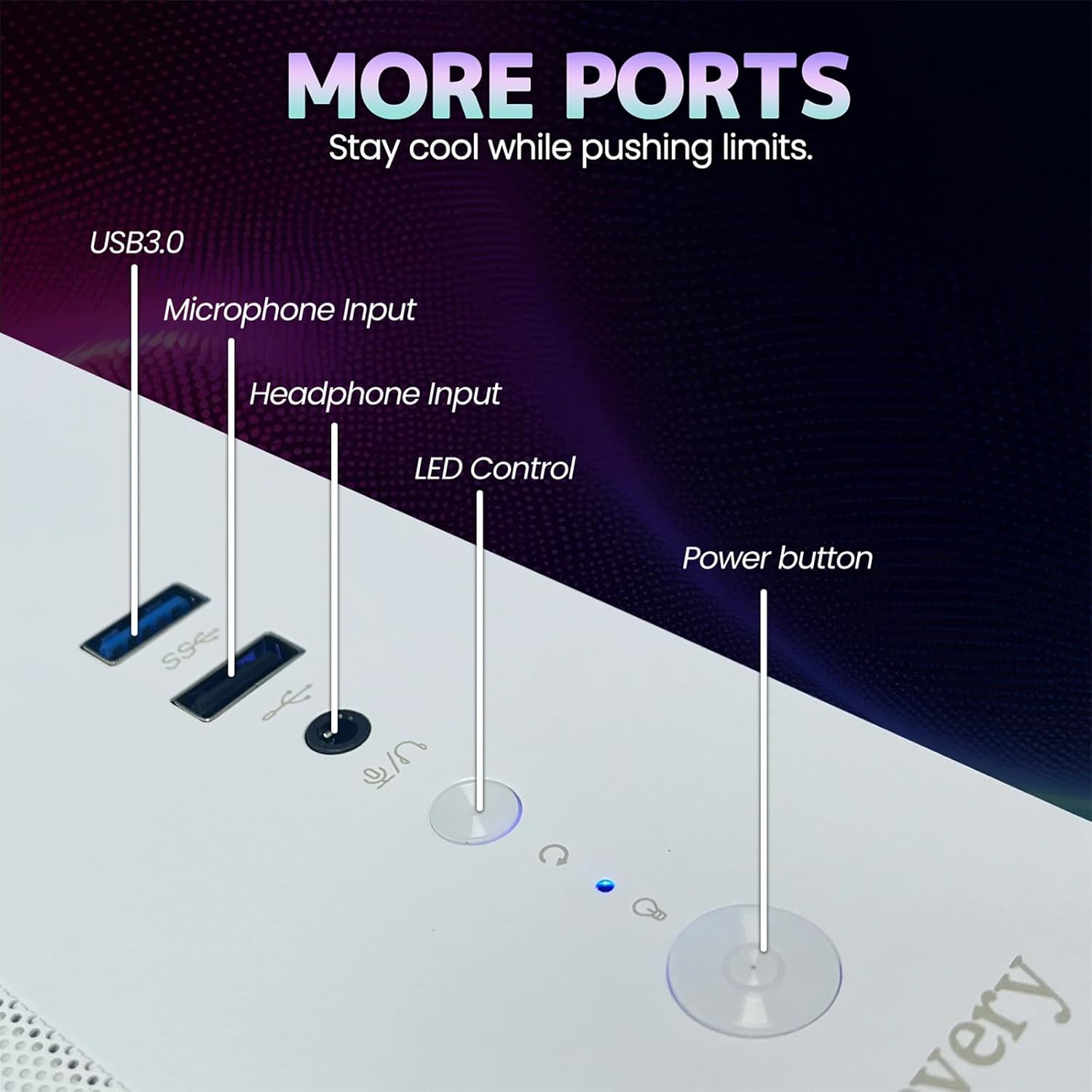
Image 3: Front panel of the suevery Gaming Desktop Computer, showing USB 3.0 ports, Microphone Input, Headphone Input, LED Control button, and Power button.
4.3 Кубат туташтыруу жана биринчи жүктөө
- Connect the power cable to the power input on the back of the computer and then to a wall outlet.
- Аны күйгүзүү үчүн компьютердин алдындагы кубат баскычын басыңыз.
- The computer comes with DOS pre-installed. You will need to install your preferred operating system (e.g., Windows) to fully utilize the system. Follow the on-screen instructions for OS installation.
5. Иштөө нускамалары
5.1 Күйгүзүү/өчүрүү
- Күйгүзүү үчүн: Алдыңкы панелдеги кубат баскычын басыңыз.
- Өчүрүү үчүн: Use the shutdown option within your operating system. For a forced shutdown, press and hold the power button for 5-7 seconds.
5.2 RGB жарыкты башкаруу
Your computer features 5 RGB fans and a tempered glass panel, allowing for customizable lighting effects. Use the dedicated LED Control button on the front panel to cycle through various lighting modes and colors to match your preference.

Сүрөт 4: Ички view of the suevery Gaming Desktop Computer, showcasing the RGB fans and internal components.
5.3 Аткаруучулук жана көп тапшырма
The AMD Ryzen 5 5600GT processor and 16GB DDR4 memory provide robust performance for demanding applications. You can run office software, stream 4K videos, edit documents, and play games simultaneously without significant lag. The 512GB SSD ensures fast boot times and quick application loading.
6. Техникалык тейлөө
6.1 Тазалоо
- Сырткы: Use a soft, dry cloth to wipe the exterior of the computer. Avoid abrasive cleaners or solvents.
- Чаң: Periodically use compressed air to clean dust from ventilation openings and fan grilles. Ensure the computer is powered off and unplugged before cleaning.
6.2 Optimal Airflow
The computer features an optimal airflow design to keep components cool. Ensure that the computer's vents are not obstructed to maintain proper cooling and stable temperatures, which is crucial for peak performance and longevity.
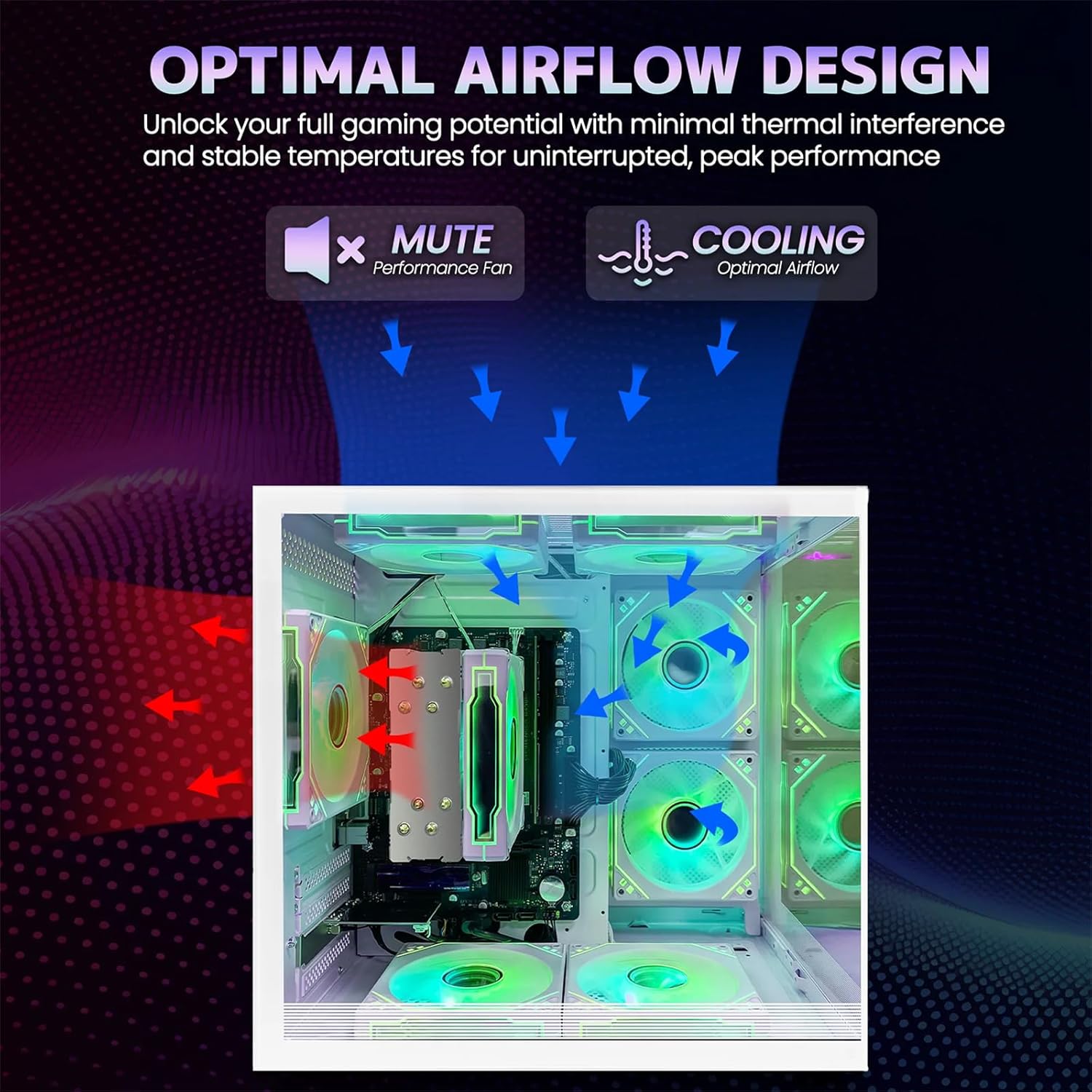
Image 5: Optimal airflow design diagram, showing air intake and exhaust paths for efficient cooling.
7. Кыйынчылыктарды
If you encounter issues with your computer, refer to the following common troubleshooting steps:
| Көйгөй | Мүмкүн чечим |
|---|---|
| Computer does not power on | Check power cable connections to the computer and wall outlet. Ensure the power button is fully pressed. |
| Монитордо дисплей жок | Ensure the monitor is powered on and connected correctly to the computer's video output (HDMI/VGA). Try a different video cable or monitor if available. |
| No internet connection (Wi-Fi) | Check if Wi-Fi is enabled in your operating system. Ensure the Wi-Fi antenna is securely connected. Restart your router and computer. |
| Система жай же жооп бербей жатат | Close unnecessary applications. Check for background processes consuming resources. Ensure adequate ventilation to prevent thermal throttling. |
8. Техникалык шарттар
Detailed technical specifications for the suevery Gaming Desktop Computer:
| Өзгөчөлүк | Деталь |
|---|---|
| Бренд | сувери |
| Модель аты | SUT1-5600GT |
| CPU модели | AMD Ryzen 5 5600GT (6-Core, 12-Thread) |
| CPU ылдамдыгы | 3.6 GHz (Base), up to 4.4 GHz (Max Boost) |
| Операция системасы | DOS (User-installable OS required) |
| RAM эс тутуму | 16 ГБ DDR4 (3200 МГц) |
| Сактагыч | 512 GB SSD (Serial ATA-600) |
| Графикалык карта | Integrated AMD Radeon Vega Graphics (2 GB GDDR5) |
| Байланыш | Wi-Fi (802.11ax), Ethernet, USB |
| Video Output | Сапаттуу, VGA |
| USB порттору | 6 Total USB Ports |
| Муздатуу ыкмасы | Air Cooling (with RGB fans) |
| Энергияны керектөө | 400 Ватт |
| Түс | Ак |
| Өлчөмдөрү (болжол менен) | 13.25 дюйм (тереңдик) x 10.71 дюйм (туурасы) x 12.36 дюйм (бийиктик) |
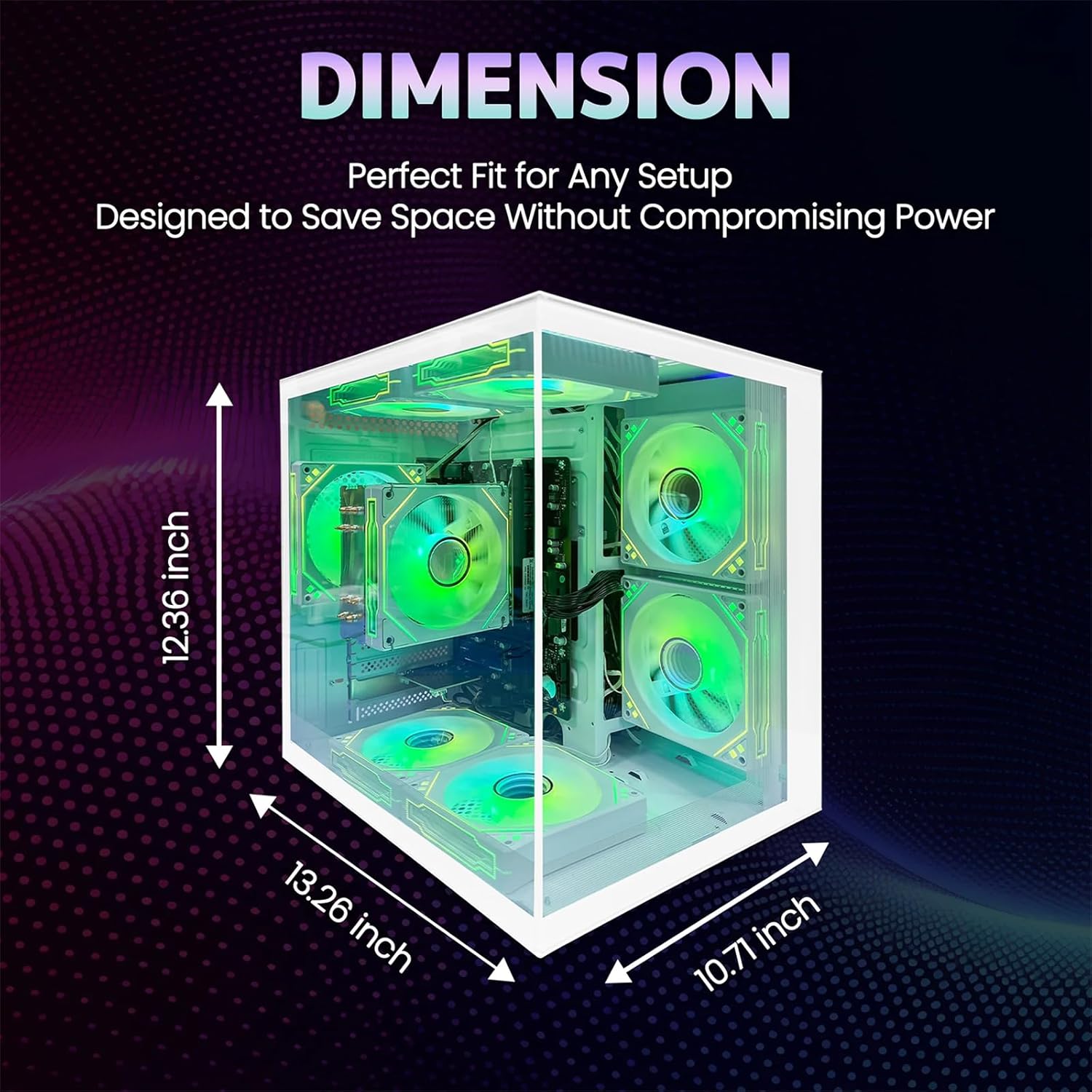
Image 6: Dimensions of the suevery Gaming Desktop Computer case.
9. Кепилдик жана колдоо
9.1 Продукциянын кепилдиги
This suevery Gaming Desktop Computer comes with a 1 жылдык Өндүрүүчүнүн Кепилдиги from the date of purchase. This warranty covers defects in materials and workmanship under normal use. It does not cover damage caused by accident, misuse, unauthorized modifications, or external causes.
9.2 Кардарларды колдоо
For technical assistance, warranty claims, or any questions regarding your suevery Gaming Desktop Computer, please contact our customer support. Refer to the contact information provided on the product packaging or the official suevery webэң заманбап колдоо каналдары үчүн сайт.