1. Киришүү
This manual provides essential instructions for the setup, operation, and maintenance of your VOOPEAK 4G LTE Trail Camera TC27-1. Please read this guide thoroughly before using the device to ensure optimal performance and longevity.
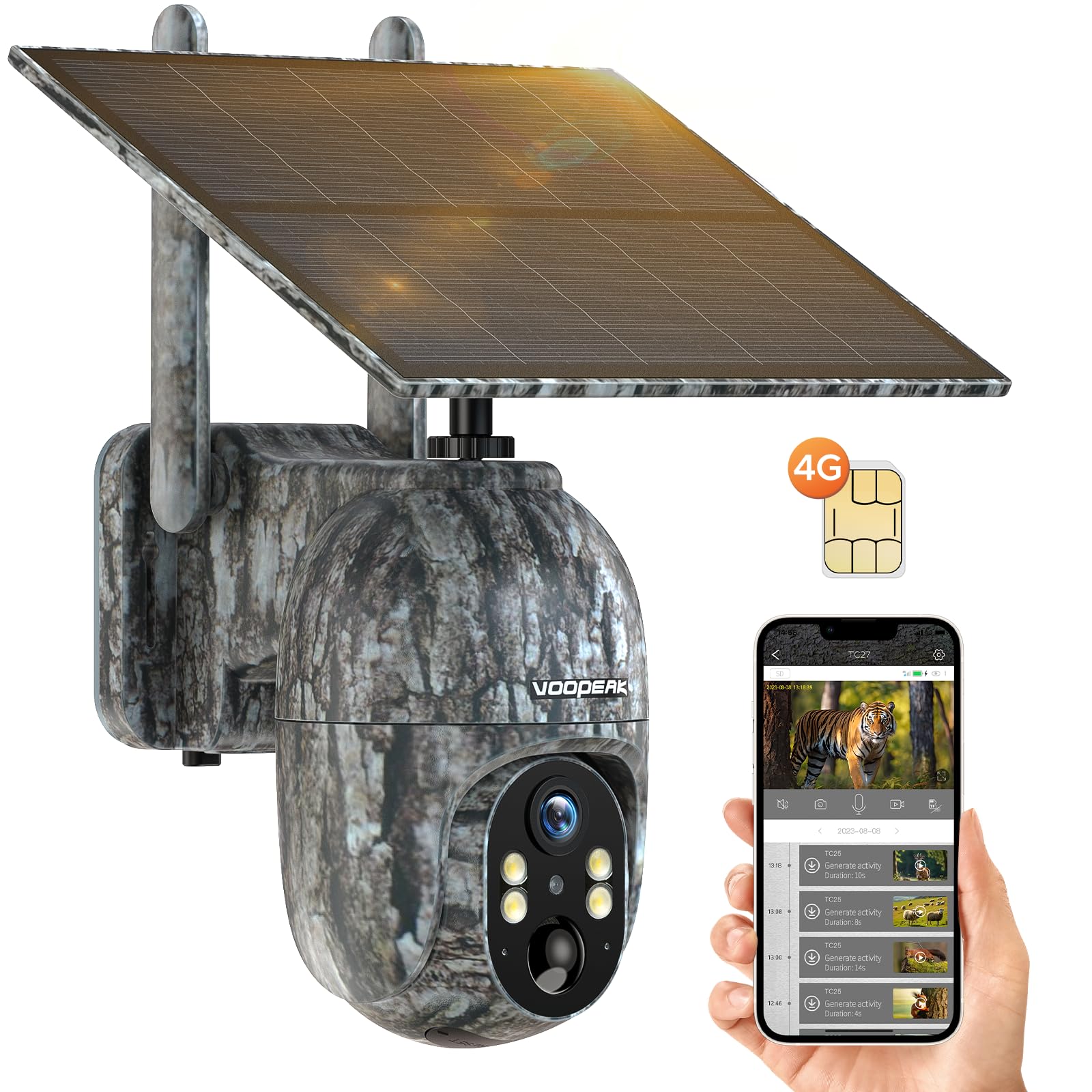
Figure 1: VOOPEAK 4G LTE Trail Camera TC27-1
2. Негизги өзгөчөлүктөрү
- 4G LTE уюлдук байланышы: Built-in SIM card compatible with major US carriers (Verizon, T-Mobile, AT&T). No Wi-Fi required. Includes trial data for new users.
- 2.5K HD Video & Color Night Vision: Captures high-definition 2560x1440 video. Offers color night vision when ambient brightness exceeds 0.5 lux, otherwise switches to infrared black and white.
- Solar Powered with Built-in Battery: Equipped with a 6W solar panel and a 10400mAh battery for extended operation, providing up to one year of standby time.
- 360° Pan & 90° Tilt Remote Control: Adjust camera direction (355° pan, 90° tilt) remotely via the UCon app for optimal wildlife monitoring.
- Motion-Activated Notifications & Playback: Receives real-time alerts on your phone. Supports video and image storage on Micro SD card (up to 128GB) or cloud service (30-day free trial).
- Durable & Waterproof Design: IP66 waterproof rating, suitable for various outdoor environments.

Figure 2: AI Animal Recognition feature in action.
3. Пакеттин мазмуну
Upon unboxing, verify that all items listed below are present and in good condition:
- VOOPEAK 4G LTE Trail Camera (TC27-1)
- Күн панели (интеграцияланган)
- Mounting Hardware (screws, wall anchors, tree strap)
- USB заряддоо кабели
- Колдонуучунун Колдонмосу (бул документ)
- Built-in SIM Card (non-removable, pre-installed)
- (Micro SD card not included)
Video 1: Demonstrates how to connect the solar panel to the camera.
4. Орнотуу колдонмосу
4.1. Баштапкы заряддоо
Before first use, ensure the camera's built-in battery is fully charged. Connect the camera to a power source using the provided USB cable. The solar panel will maintain charge during outdoor use.
4.2. SIM Card Activation & Data Plan
Your camera comes with a built-in, non-removable SIM card. New users receive 100MB trial data for 7 days. To activate and manage your data plan, download the UCon app and follow the in-app instructions. Data plans are required for cellular functionality.

Figure 3: Information regarding the built-in SIM card and data plans.
4.3. Микро SD картаны орнотуу (кошумча)
The camera supports a Micro SD card up to 128GB for local storage. Locate the SD card slot, insert the card with the contacts facing down, and gently push until it clicks into place. Ensure the waterproof cover is securely closed after installation.
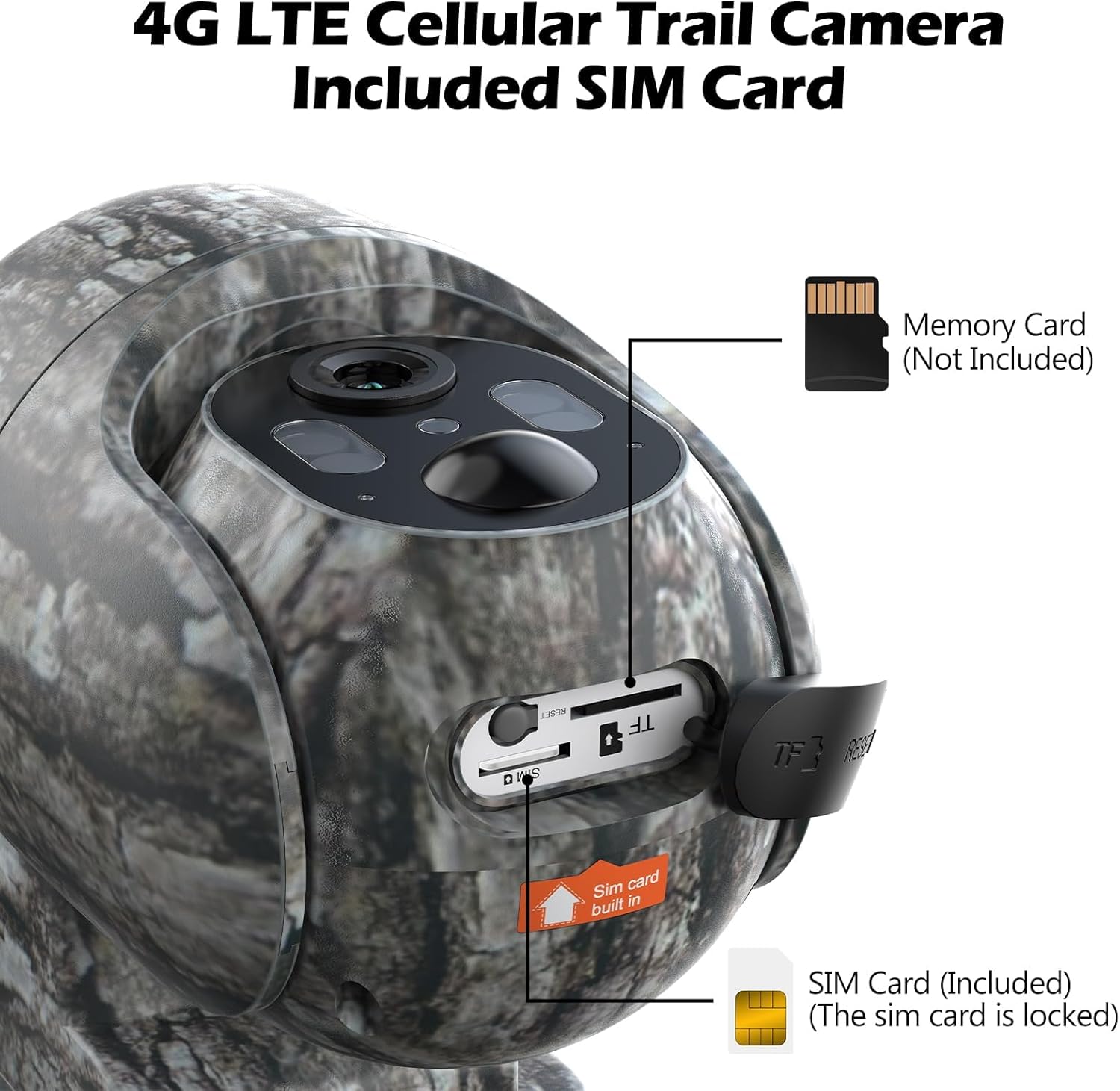
Figure 4: Location of the built-in SIM card and Micro SD card slot.
4.4. Камераны орнотуу
Choose a suitable location with good cellular signal and direct sunlight exposure for the solar panel. Use the provided mounting hardware (screws, wall anchors, or tree strap) to secure the camera. Ensure the camera is stable and has a clear view каалаган мониторинг аймагынын.

Figure 5: Trail camera installed on a tree, powered by its solar panel.
5. Иштөө нускамалары
5.1. Downloading the UCon App
Издөө "UCon" in your smartphone's app store (iOS or Android) and download the application. Follow the on-screen instructions to register an account and add your camera device.
5.2. Түз эфир View жана Алыстан башкаруу
Once connected, you can access live video streaming from your camera through the UCon app. Use the pan (355°) and tilt (90°) controls within the app to adjust the camera's viewалыстан бурчу.
Video 2: Guide on adjusting the camera's angle using the UCon app.

Figure 6: Live 2.5K video view from the UCon app.

Figure 7: Remote pan and tilt control via the app.
5.3. Motion Detection & Notifications
The camera features motion-activated recording. Ensure app notifications are enabled on your phone to receive real-time alerts when motion is detected. You can review recorded videos and images directly from the app.

Figure 8: Real-time motion notifications on a smartphone.

Figure 9: Motion detection of a squirrel.
5.4. Түнкү көрүү режимдери
The camera offers two night vision modes: color night vision (when ambient light > 0.5 lux) and infrared black & white night vision. The camera automatically switches between modes based on lighting conditions.

10-сүрөт: Мисample of colorful video capture at night.

Figure 11: Day and Color Night Vision comparison.
6. Техникалык тейлөө
- Тазалоо: Камера линзасын жана күн панелин жумшак, d менен үзгүлтүксүз сүртүп туруңузamp cloth to ensure clear images and efficient charging.
- Батареяны текшерүү: Monitor battery levels via the UCon app. While solar-powered, extreme weather or prolonged low light may require manual charging.
- Программалык камсыздоонун жаңыртуулары: Check the UCon app periodically for firmware updates to ensure your camera has the latest features and security enhancements.
- Data Plan Monitoring: Keep track of your cellular data usage through the UCon app to avoid service interruptions.
7. Кыйынчылыктарды
| Көйгөй | Мүмкүн чечим |
|---|---|
| Камера 4G тармагына туташпай жатат. | Check cellular signal strength in the camera's location. Ensure your data plan is active and has sufficient balance via the UCon app. |
| App screen appears black after several days. | This may indicate depleted cellular data. Recharge the SIM card through the UCon app or the website mentioned on the SIM packaging. |
| Кыймылды аныктоо боюнча эскертүүлөр жок. | Verify that motion detection is enabled in the UCon app settings. Ensure app notifications are allowed in your phone's system settings. Check camera placement for obstructions. |
| Сүрөт/видео сапаты начар. | Clean the camera lens. Ensure the camera is securely mounted and not vibrating. Check lighting conditions, especially for night vision. |
| Батарея заряддалбай жатат. | Ensure the solar panel is receiving direct sunlight. Check the USB charging cable connection. Verify the solar panel is clean and free of debris. |
8. Продукттун спецификациялары
| Өзгөчөлүк | Деталь |
|---|---|
| Модель номери | TC35 (Note: Product title refers to TC27-1, but specifications list TC35. Please verify with manufacturer if discrepancy exists.) |
| Power Source | Solar Powered (with built-in 10400mAh Lithium Metal battery) |
| Connectivity Protocol | Уюлдук байланыш (4G LTE) |
| Шайкеш операторлор | Verizon, T-Mobile, AT&T (US only) |
| Controller Type | Android (via UCon App, also iOS compatible) |
| Натыйжалуу Video Resolution | 2.5K (2560x1440) |
| Pan/Tilt диапазону | Пан 355°, Тилт 90° |
| Түнкү көрүнүш | Color Night Vision (>0.5 lux), Infrared Black & White Night Vision |
| Сактагыч | Micro SD Card (up to 128GB, not included), Cloud Service (30-day free trial) |
| Суу өткөрбөйт рейтинги | IP66 |
| Продукциянын өлчөмдөрү | 10 x 2 x 2.7 дюйм |
| Элемент Салмагы | 2.51 фунт |
| UPC | 758918449212 |
9. Additional Media
9.1. Wildlife Footage
Видео 3: Мурункуampле фуtage captured by the VOOPEAK Trail Camera, showing deer in a natural habitat.
Видео 4: Бүттүview of the TC27 Cellular Trail Camera features.
Video 5: Demonstration of the 4G LTE Cellular Trail Camera, highlighting solar power capabilities.
Video 6: Detailed look at the VOOPEAK 4G LTE Cellular Trail Camera.
Video 7: Features of the 4G Trail Camera.
Video 8: Additional features of the 4G Cellular Trail Camera.
10. Кепилдик жана колдоо
VOOPEAK is committed to providing high-quality products and professional service. For any inquiries or support needs:
- Кардарларды тейлөө: Responses typically within 24 hours.
- Кайтаруулар жана алмашуулар: Hassle-free returns and exchanges within 30 days of purchase.
- Продукт колдоо: Lifetime continuous support for VOOPEAK trail cameras.
Кошумча жардам алуу үчүн, сураныч, баш багыңыз VOOPEAK Store on Amazon же кардарларды колдоо кызматына түздөн-түз кайрылыңыз.