
Introduction
This manual provides detailed instructions for the WESEARY WG1 Wireless Gaming Headset. Please read this guide thoroughly to ensure proper setup, operation, and maintenance of your device. The WG1 headset offers dual wireless connectivity (2.4GHz USB/Type-C and Bluetooth), 3D stereo sound, and an omnidirectional noise-canceling microphone for an enhanced gaming experience across multiple platforms.
Кутуда эмне бар
Пакетте бардык буюмдар бар экенин текшериңиз:
- Wireless Gaming Headset (1 unit)
- Кубаттоочу кабель (1 даана)
- 2.4GHz USB & Type-C Dongle (1 unit)
- Колдонуучунун колдонмосу (бул документ)
Продукт өзгөчөлүктөрү
Аудио сапаты
The WG1 headset is equipped with 50mm dynamic drivers designed to deliver rich, spatial audio. This allows for precise sound localization, enabling users to identify in-game audio cues such as footsteps and gunshots with clarity. The drivers produce profound bass and clear high frequencies for an immersive auditory experience.

Image: The WESEARY WG1 headset illustrating its 3D Stereo Surround Sound feature, showing sound waves emanating from the headset to enhance gaming immersion.
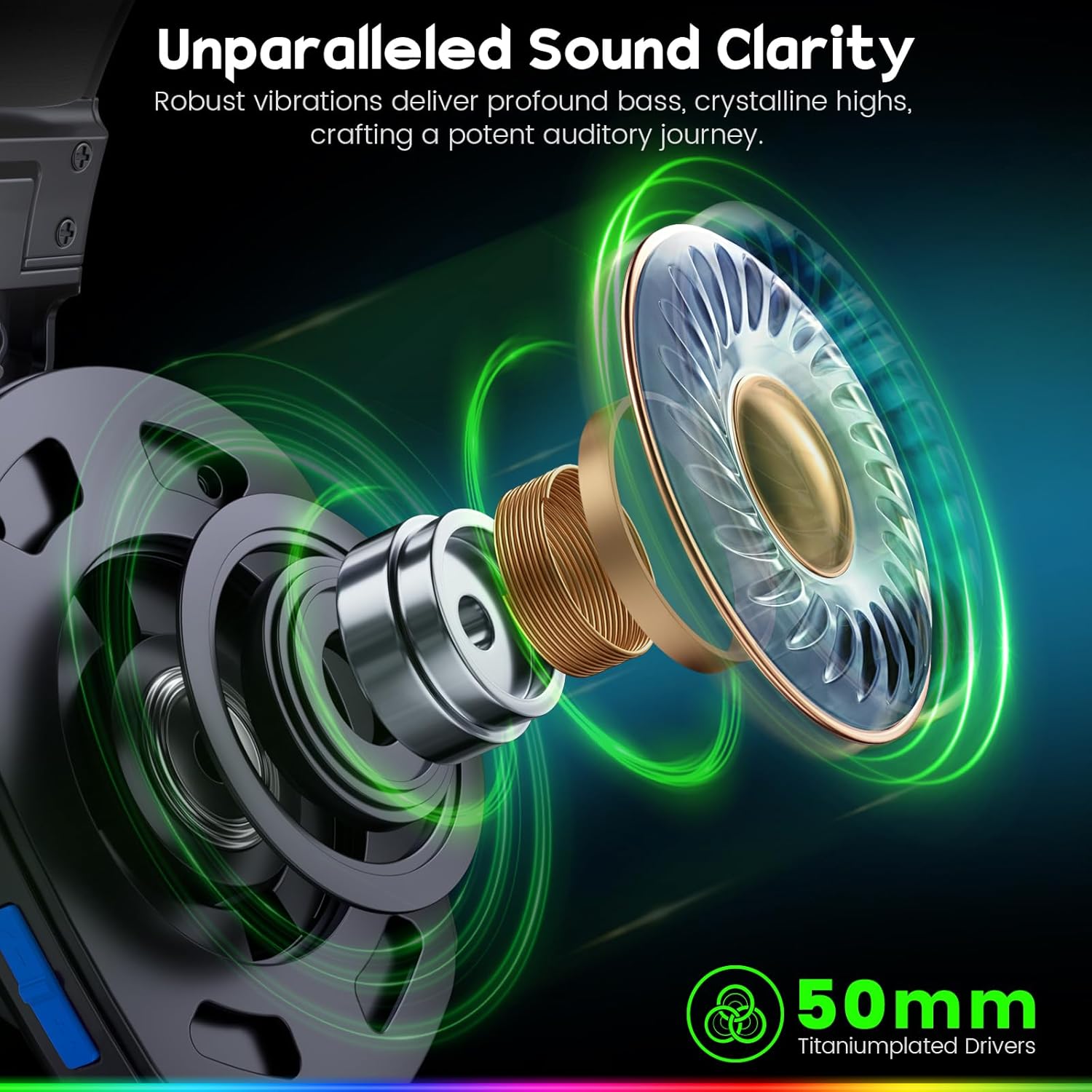
Image: An exploded diagram of the WESEARY WG1 headset's earcup, highlighting the 50mm titanium-plated drivers responsible for sound clarity and powerful bass.
Dual-Mode Connectivity
The headset supports two wireless modes: 2.4GHz and Bluetooth. The 2.4GHz mode is compatible with PS5, PS4, PC, Phone, Laptop, and Switch (audio only). The Bluetooth mode is compatible with PC, Mac, Switch (audio only), Mobile, Laptops, and Tablets. Note that the 2.4GHz USB and Type-C dongles must be used together for PS5/PS4/PC/Laptop/Mac. Neither mode is compatible with Xbox consoles. The microphone is not compatible with Nintendo Switch, and Bluetooth mode is not compatible with PS5/PS4.

Image: The WESEARY WG1 headset highlighting its dual wireless capabilities, featuring both USB-A and Type-C dongles for broad device compatibility.
Ультра төмөн кечигүү
For competitive gaming, the 2.4GHz dongle mode provides an audio latency of ≤20ms, ensuring real-time audio synchronization. Bluetooth mode maintains a latency of less than 48ms, offering smooth and responsive audio for general use.

Image: A close-up of the WESEARY WG1 headset and its 2.4GHz dongle, emphasizing the ultra-low latency feature (≤20ms) for swift connectivity.
Комфорт жана дизайн
The headset is designed for extended wear with soft, breathable earcups and an adjustable headband. This ergonomic design aims to provide a pressure-free fit for various head sizes, ensuring comfort during long gaming sessions.

Image: The WESEARY WG1 headset in a cosmic setting, highlighting its lightweight, breathable earcups and adjustable headband for comfortable wear.
Батареянын иштөө мөөнөтү
The WG1 features a 1200mAh battery, providing up to 50 hours of playtime without LED lighting, or up to 35 hours with dynamic LED lighting activated. A full charge via USB-C takes approximately 2.5 hours.
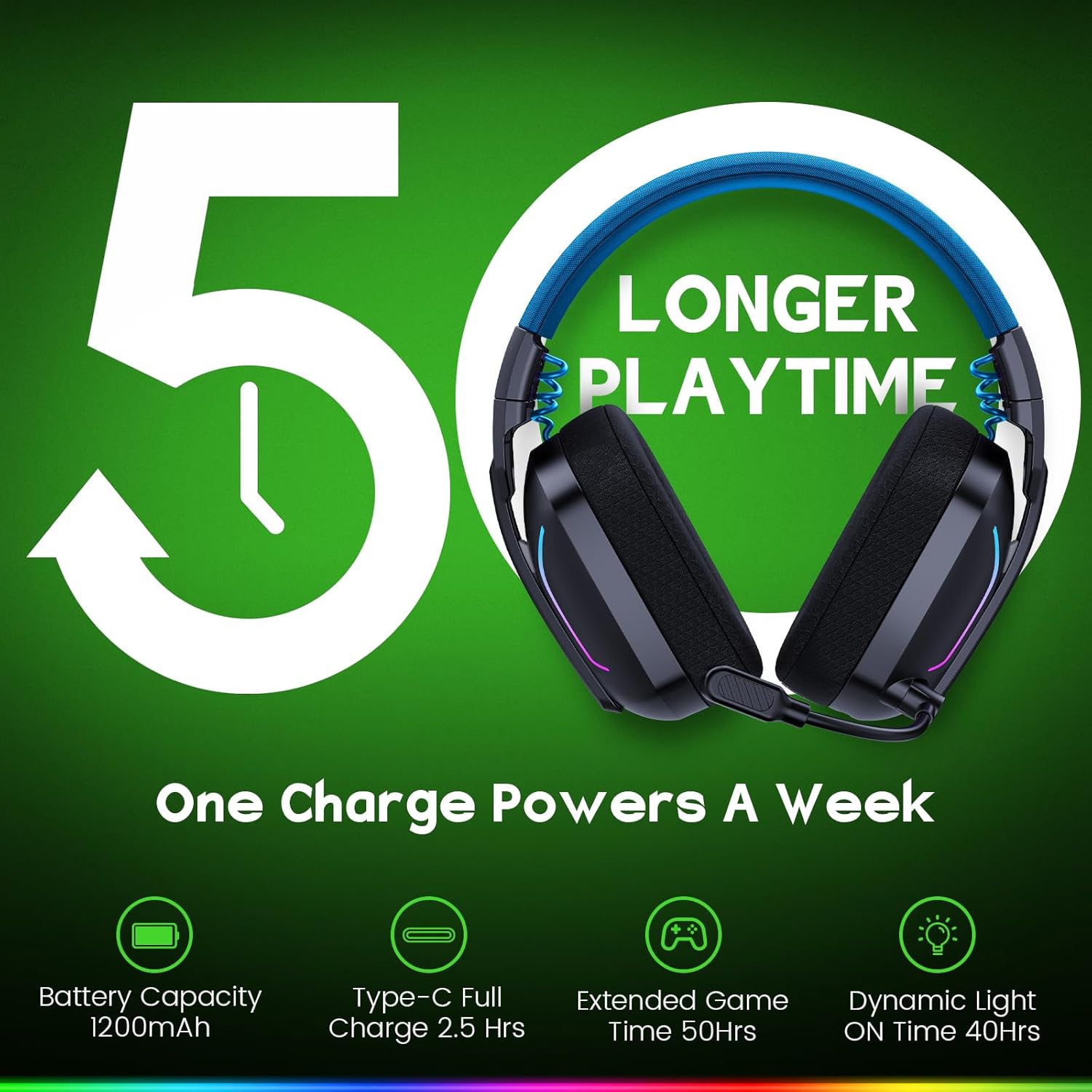
Image: The WESEARY WG1 headset with an overlay indicating its 1200mAh battery capacity and up to 50 hours of extended playtime on a single charge.
Dynamic LED Lighting
The headset includes dynamic, color-shifting LED lights that can be activated with a single button press. This feature allows users to customize their gaming setup's aesthetic.
Omnidirectional Microphone with ENC
The integrated 360° omnidirectional microphone is designed for clear communication. Advanced Environmental Noise Cancellation (ENC) technology suppresses up to 95% of background noise, ensuring your voice is heard clearly by teammates. The microphone can be muted with a single click.

Image: The WESEARY WG1 headset's microphone, demonstrating its crystal-clear voice call capability with 95% background noise suppression. A note indicates microphone incompatibility with Nintendo Switch.
Жайгашуу
Гарнитураны заряддоо
Before first use, fully charge the headset. Connect the provided USB-C charging cable to the headset's charging port and to a compatible USB power source. The LED indicator will show charging status. A full charge takes approximately 2.5 hours.
2.4GHz Wireless Connection (for PS5, PS4, PC, Laptop, Mac)
- Insert the 2.4GHz USB dongle into an available USB-A port on your device.
- If your device only has Type-C ports, use the provided Type-C adapter with the USB dongle.
- Power on the headset by long-pressing the power button for 3 seconds.
- The headset will automatically connect to the dongle. The LED indicator on the headset will show a stable light once connected.
- On your device's audio settings, ensure the WESEARY WG1 headset is selected as the input and output audio device.
Bluetooth Connection (for PC, Mac, Mobile, Laptops, Tablets)
- Гарнитура өчүрүлгөнүн текшериңиз.
- Long-press the power button for 3 seconds to turn on the headset.
- Long-press the microphone button for 2 seconds to toggle to Bluetooth mode. The LED indicator will flash, indicating pairing mode.
- Түзмөгүңүздө Bluetooth жөндөөлөрүнө өтүп, жеткиликтүү түзмөктөрдү издеңиз.
- Select "WESEARY WG1" from the list to pair. The LED indicator on the headset will show a stable light once connected.
Маанилүү шайкештик эскертүүлөрү:
- Both 2.4GHz and Bluetooth modes are NOT compatible with Xbox consoles.
- The microphone is NOT compatible with Nintendo Switch in either mode.
- Bluetooth mode is NOT compatible with PS5 or PS4 consoles.
Иштөө нускамалары

Сүрөт: деталдуу view of the WESEARY WG1 headset's left earcup, illustrating the location and function of its various control buttons and ports.
Power and Playback Controls (Button 1)
- Күйгүзүү/өчүрүү: 3 секунд узак басуу.
- Ойнотуу / Тыныгуу: Single click.
- Чакырууга жооп берүү: Single click.
- Чалууну токтотуу: Single click.
- Чакырууну четке кагуу: 2 секунд узак басуу.
- Кайрадан терүү (Акыркы номерди кайра терүү): Эки жолу басуу.
Volume Down / Previous Track (Button 2)
- Үнүн төмөндөтүү: Single click.
- Мурунку трек: 2 секунд узак басуу.
Volume Up / Next Track (Button 3)
- Үнүн көтөрүү: Single click.
- Кийинки трек: 2 секунд узак басуу.
- Clear all devices (Reset pairing): Press Volume Up and Volume Down together for 6 seconds.
Microphone and Mode Toggle (Button 4)
- Mic on / off: Single click.
- Bluetooth mode ↔ Dongle mode: Long press for 2 seconds to switch between 2.4GHz and Bluetooth modes.
LED Control and Game/Music Mode (Button 5)
- LED Turn on / off: Single click.
- Оюн режими / Музыка режими: Эки жолу басуу.
- Re-pairing (BT mode): Long press for 3 seconds (when in Bluetooth mode).
Техникалык тейлөө
- Гарнитураны жумшак, кургак чүпүрөк менен үзгүлтүксүз тазалап туруңуз. Катуу химиялык заттарды же абразивдүү материалдарды колдонуудан алыс болуңуз.
- Do not expose the headset to extreme temperatures, humidity, or direct sunlight.
- Колдонбогондо гарнитураны салкын, кургак жерде сактаңыз.
- Гарнитураны түшүрүүдөн же катуу таасирлерге дуушар кылуудан качыңыз.
Проблемаларды чечүү
Үн жок / Төмөн үнү
- Гарнитура күйгүзүлгөнүн жана толук заряддалганын текшериңиз.
- Гарнитурадагы жана туташкан түзмөгүңүздүн үнүнүн деңгээлин текшериңиз.
- Verify that the headset is correctly connected via 2.4GHz dongle or Bluetooth.
- For 2.4GHz, ensure the dongle is properly inserted and recognized by the device.
- Bluetooth үчүн, гарнитура жупташып, түзмөгүңүздүн жөндөөлөрүндө аудио чыгаруу түзмөгү катары тандалганын текшериңиз.
- Try clearing all paired devices (Volume Up + Volume Down for 6 seconds) and re-pairing.
Микрофон иштебейт
- Ensure the microphone is not muted (single click on Button 4).
- Check the microphone input settings on your connected device to ensure the WESEARY WG1 is selected.
- Confirm compatibility: The microphone is NOT compatible with Nintendo Switch.
- Ensure the headset is in the correct mode (2.4GHz for PS5/PS4/PC/Laptop/Mac, Bluetooth for PC/Mac/Mobile/Laptops/Tablets).
Туташуу маселелери
- Ensure the headset is within the operating range of your device.
- Башка зымсыз түзмөктөрдүн кийлигишүүсүн азайтыңыз.
- Гарнитураны түзмөгүңүз менен кайра жуптаңыз.
- For 2.4GHz, ensure both USB and Type-C dongles are used if required by your device (e.g., PS5/PS4/PC/Laptop/Mac).
Техникалык шарттар
| Өзгөчөлүк | Деталь |
|---|---|
| Модель аты | WG1 |
| Байланыш технологиясы | Зымсыз (2.4 ГГц, Bluetooth) |
| Зымсыз байланыш технологиясы | 2.4 ГГц зымсыз, Bluetooth |
| Аудио драйвер түрү | Динамикалык драйвер (50 мм) |
| Noise Control | Sound Isolation, Noise Cancellation (ENC Mic) |
| Батареянын иштөө мөөнөтү | Up to 50 Hours (without LED), Up to 35 Hours (with LED) |
| Батарея сыйымдуулугу | 1200mAh |
| Заряддоо убактысы | 2.5 саат (USB-C) |
| Материал | Композиттик, Пластик |
| Элемент Салмагы | 11.7 унция |
| Шайкеш түзмөктөр | PC, Mac, Laptop, Mobile, Nintendo Switch (Audio only, Mic invalid). Not compatible with Xbox series. Bluetooth mode not compatible with PS5/PS4. |
Расмий продукт Video
Видео: Аткаминерview of the WESEARY WG1 Wireless Gaming Headset, showcasinанын негизги өзгөчөлүктөрү жана дизайны.
Кепилдик жана колдоо
For warranty information and technical support, please refer to the contact details provided on the product packaging or visit the official WESEARY webсайт. Сатып алуу квитанциясын кепилдик дооматтары үчүн сатып алуунун далили катары сактаңыз.