
Introduction
This user manual provides detailed instructions for the installation, operation, maintenance, and troubleshooting of your LongPlus 8MP 4K UHD PoE Wired Security Camera Outdoor, Model LP8MEF8. This camera is designed to deliver high-quality surveillance with advanced features for enhanced security. Please read this manual thoroughly before using the product to ensure proper setup and functionality.
Кутуда эмне бар
Carefully unpack the box and ensure all items are present and in good condition. If any items are missing or damaged, please contact LongPlus customer support.
- 1 x LongPlus Dome Camera
- 1 x Түс кутучасы
- 1 x эскертүү чаптамалары
- 1 x Positioning Sticker
- 1 x Foam Bag/1 x Protective Film
Продукт бүттүview
Негизги өзгөчөлүктөрү
- 4K UHD токтому: Captures video at 3840x2160 pixels with a 132° wide viewing angle and HDR for clear, detailed footage.
- Кыймылды аныктоо: Жасалма интеллект Advanced object detection for humans and vehicles, with customizable activity zones and privacy masks to reduce false alerts.
- Triple Night Vision Modes: Offers IR Night Vision, Color Night Vision, and Smart Night Vision for clear visibility up to 100ft (30m) in various lighting conditions.
- Two-Way Audio & Strobe Light Alarm: Communicate with visitors or deter intruders using the built-in speaker and microphone, complemented by an automatic strobe light and siren alarm.
- Туруктуу дизайн: IP67 weatherproof metal housing ensures reliable operation in extreme weather conditions (-30°C to 60°C / -22°F to 140°F).
- Алыстан кирүү: Live foo мониторинг жүргүзүүtage and recordings via the Longvision app, compatible with iOS, Mac, Windows, and Android devices. Supports up to 32 users.
- Натыйжалуу сактоо: Utilizes H.265 High Efficiency Video Coding to optimize storage space. Supports local storage (via NVR, up to 10TB expandable) and cloud storage options.
- PoE байланышы: Power over Ethernet (PoE) simplifies installation by delivering power, audio, and video through a single Ethernet cable.
Камера компоненттери
The LongPlus LP8MEF8 camera features a robust dome design with integrated LED spotlights for color night vision, an infrared sensor for IR night vision, a lens, and a microphone/speaker for two-way audio. The durable metal housing provides protection against environmental elements.

Image: The LongPlus LP8MEF8 camera highlighting its IP67 weatherproof rating for all-season security and durable metal housing for efficient heat dissipation.

Image: Illustration of the camera's 132-degree wide field of view, capturing a broad area in 4K UHD resolution.
Жайгашуу
1. Planning Installation Location
Каалаганыңызды эске алып, камераңыз үчүн ылайыктуу жерди тандаңыз viewing area, proximity to an NVR or PoE switch, and protection from direct impact. The camera is IP67 weatherproof, making it suitable for outdoor use in various conditions.
2. Камераны орнотуу
- Use the provided positioning sticker to mark the drill holes on the mounting surface.
- Drill holes according to the marks. Insert wall anchors if mounting on masonry.
- Бурамаларды колдонуп, камеранын негизин орнотуучу бетке бекитиңиз.
- Каалаган аймакты жабуу үчүн камеранын бурчун тууралаңыз.
3. Камераны туташтыруу
The LP8MEF8 camera uses Power over Ethernet (PoE) for simplified connectivity.
- Ethernet кабелинин бир учун камеранын PoE портуна туташтырыңыз.
- Connect the other end of the Ethernet cable to a PoE-enabled NVR (Network Video Recorder) or a PoE switch.
- Ensure the NVR/PoE switch is powered on. The camera will receive power and transmit data through this single cable.

Image: Diagram showing the easy plug-and-play PoE connection between the LongPlus camera and an NVR, supporting distances up to 660ft.
4. Initial Configuration (via NVR or App)
Refer to your NVR's manual for specific camera addition procedures. Generally, the NVR will automatically detect PoE cameras. For app-based setup:
- жүктөп алыңыз Longvision App Store (iOS) же Google Play Дүкөнүнөн (Android) колдонмо.
- Каттоо эсебин жана кирүү.
- Follow the in-app instructions to add your camera. This typically involves scanning a QR code on the camera or manually entering its device ID.
- Кошулгандан кийин, сиз төмөнкүлөрдү жасай аласыз view жаша фооtage and configure settings.
Иштөө нускамалары
1. Түз эфир View жана Ойнотуу
- Open the Longvision app or access your NVR interface.
- Select the desired camera to view жаша фооtage.
- Кайра ойнотуу үчүн ойнотуу функциясын колдонуңузview жазылган видео.
2. Түнкү көрүү режимдери
The camera supports three night vision modes:
- IR Түнкү Көрүнүшү: Provides black and white video using infrared LEDs in low-light conditions.
- Түнкү көрүнүш: Аз жарыкта толук түстүү видео тартуу үчүн орнотулган прожекторлорду колдонот.
- Акылдуу түнкү көрүнүш: Automatically switches between IR and color modes based on detected motion or light conditions.
You can switch between these modes via the Longvision app or NVR settings.

Image: Visual representation of the three night vision modes (Full-Color, AI, IR) available on the LongPlus camera, adapting to various lighting scenarios.
3. AI Motion Detection and Alerts
- Аныктоого уруксат берүү: In the app/NVR settings, enable AI motion detection for humans and/or vehicles.
- Иш зоналары: Камеранын ичинде белгилүү бир аймактарды аныктаңыз view where motion detection should be active. This helps filter out irrelevant alerts.
- Купуялык маскасы: Configure privacy zones to block out sensitive areas from being recorded.
- Эскертмелер: Set up push notifications to receive real-time alerts on your mobile device when motion is detected.

Image: The camera's smart AI motion detection feature, capable of distinguishing between persons and vehicles to provide more accurate alerts.
4. Two-Way Audio and Alarm Functions
- Эки тараптуу аудио: Use the microphone and speaker in the Longvision app to communicate with individuals near the camera.
- Strobe Light & Siren Alarm: When motion is detected, the camera can automatically trigger a strobe light and siren to deter intruders. This can also be manually activated via the app.

Image: A scenario depicting the camera's two-way audio and strobe light alarm features, allowing interaction and deterrence.
5. Жазуу режимдери
The camera supports various recording options when connected to a compatible NVR:
- Кыймылдан улам жаздыруу: Records only when motion is detected (default).
- Scheduled recording: Records during specific times of the day.
- 24/7 continuous recording: Records continuously.
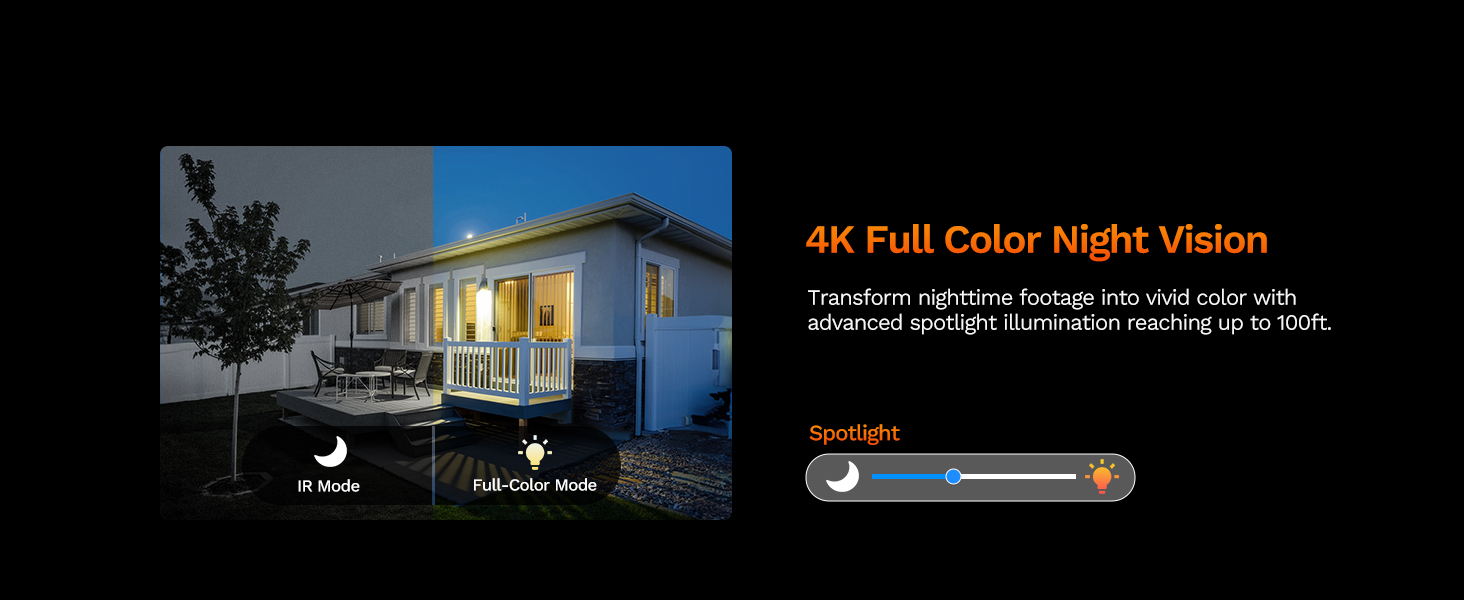
Image: The LongPlus NVR illustrating the benefits of H.265 (HEVC) video compression for saving storage space while maintaining video quality.
Техникалык тейлөө
- Тазалоо: Дайыма камеранын линзасын жана корпусун жумшак, гamp кездеме. Линзаны чийип салуучу абразивдүү тазалагычтардан алыс болуңуз.
- Программалык камсыздоонун жаңыртуулары: Check the Longvision app or LongPlus website periodically for firmware updates. Keeping your camera's firmware updated ensures optimal performance and security.
- Кабелдик текшерүү: Periodically inspect the Ethernet cable for any signs of wear or damage, especially in outdoor installations. Ensure connections are secure.
- Экологиялык текшерүүлөр: Камеранын алдына эч кандай тоскоолдуктар тоскоол болбогонун текшериңиз view or interfering with its sensors.
Проблемаларды чечүү
If you encounter issues with your LongPlus camera, refer to the following common problems and solutions:
| Көйгөй | Мүмкүн себеп | Чечим |
|---|---|---|
| Видео түрмөгү жок | No power; Loose cable connection; Network issue. | Check PoE connection to NVR/switch. Ensure NVR/switch is powered on. Verify Ethernet cable integrity. |
| Сүрөттүн сапаты начар | Кир линза; жетишсиз жарыктандыруу; Тармактын өткөрүү жөндөмдүүлүгү маселелери. | Clean the camera lens. Ensure adequate lighting for color night vision or switch to IR mode. Check network speed. |
| Кыймылды аныктоо иштебей жатат | Detection disabled; Incorrect sensitivity; Activity zone not set correctly. | Enable motion detection in app/NVR settings. Adjust sensitivity. Verify activity zone configuration. |
| Колдонмого туташуу мүмкүн эмес | Incorrect network settings; App issues; Camera not online. | Ensure camera is connected to the network. Restart camera and router. Re-add camera to the app. Check app permissions. |
| Эки тараптуу аудио иштебейт | Microphone/speaker disabled; Volume too low; Network latency. | Check audio settings in the app. Adjust volume levels. Ensure stable network connection. |
If the problem persists after trying these solutions, please contact LongPlus customer support for further assistance.
Техникалык шарттар
| Өзгөчөлүк | Description |
|---|---|
| Бренд | LongPlus |
| Модель номери | LP8MEF8 |
| Байланыш технологиясы | Wired (Power over Ethernet - PoE) |
| Видео тартуунун резолюциясы | 4K UHD (3840x2160) |
| Оптикалык сенсор технологиясы | CMOS |
| Линзанын түрү | Оңдолду |
| Viewбурч | 132 градус |
| Түнкү көрүнүш | Yes, up to 100 Feet (30m) range (IR, Color, Smart modes) |
| Frame Rate | 30 кадр/сек |
| Жазуу режимдери | Motion-triggered, Scheduled, 24/7 (via NVR) |
| Өзгөчөлүктөр | H.265 Video Coding, Siren Alarm, Strobe Light Alarm, Two-Way Audio, Vehicle/Person Detection, Activity Zones, Privacy Mask, IP67 Waterproof |
| Power Source | Зымдуу электр (PoE) |
| Иштөө температурасы | -30°Cден 60°Cге чейин (-22°Fтен 140°Fге чейин) |
| Шайкеш түзмөктөр | Cameras, Laptops, Personal Computers, Smartphones |
| Операциялык системаны колдоо | Android, Mac OS, Windows, iOS |
| Элементтин өлчөмдөрү | 3.3 x 3.3 x 3.5 дюйм |
| Түс | Ак |
Кепилдик жана колдоо
Кепилдик маалымат
LongPlus provides a 2 жылдык кепилдик for this product from the date of purchase. This warranty covers manufacturing defects and ensures the product meets its specified performance standards under normal use.
Техникалык колдоо
LongPlus offers өмүр бою техникалык колдоо for its customers. If you have any questions, require assistance with setup, operation, or troubleshooting, or encounter any issues not covered in this manual, please do not hesitate to contact our professional technical team. We are committed to responding to your inquiries within 24 hours.
For support, please visit the official LongPlus webсайтка же продуктунун таңгагында берилген байланыш маалыматына кайрылыңыз.