
1. Киришүү
The Radioddity X1 Walkie Talkies are designed for reliable two-way communication in various environments. Featuring an IP67 waterproof and dustproof rating, durable construction, and advanced noise reduction, these FRS radios are suitable for outdoor adventures, professional use, and emergency situations. They offer a long communication range and include essential features like NOAA weather alerts and voice-activated transmission (VOX).

Image: The Radioddity X1 Walkie Talkie, showcasing анын бекем дизайны.
2. Кутуда эмне бар
Upon opening your Radioddity X1 package, you should find the following items:
- 2 x Radioddity X1 Walkie Talkies
- 2 x Кайра заряддалуучу батареялар
- 1 x 2-in-1 USB-C Charging Cable
- 2 x Белдик клиптер
- 2 x Кол Боо
- 1 х адаптер
- 1 х Колдонуучунун колдонмосу (бул документ)

Image: All components included in the Radioddity X1 package, including two radios, batteries, charging cable, belt clips, hand straps, and adapters.
3. Орнотуу
3.1. Батареяны орнотуу
- Рация өчүрүлгөнүн текшериңиз.
- Бирдиктин артындагы батарея отсегин табыңыз.
- Align the battery with the contacts and gently push it into the compartment until it clicks into place.
3.2. Батареяны заряддоо
The Radioddity X1 features a 2500mAh rechargeable lithium battery. For optimal performance, fully charge the battery before first use.
- Connect the provided USB-C charging cable to the charging port on the walkie talkie.
- Connect the other end of the USB-C cable to the adapter, and then plug the adapter into a standard power outlet. Alternatively, you can connect the USB-C cable to a compatible USB power source (e.g., computer, power bank).
- Дисплейдеги батареянын индикатору кубаттоо абалын көрсөтөт. Толук кубаттоо, адатта, бир нече саатка созулат.
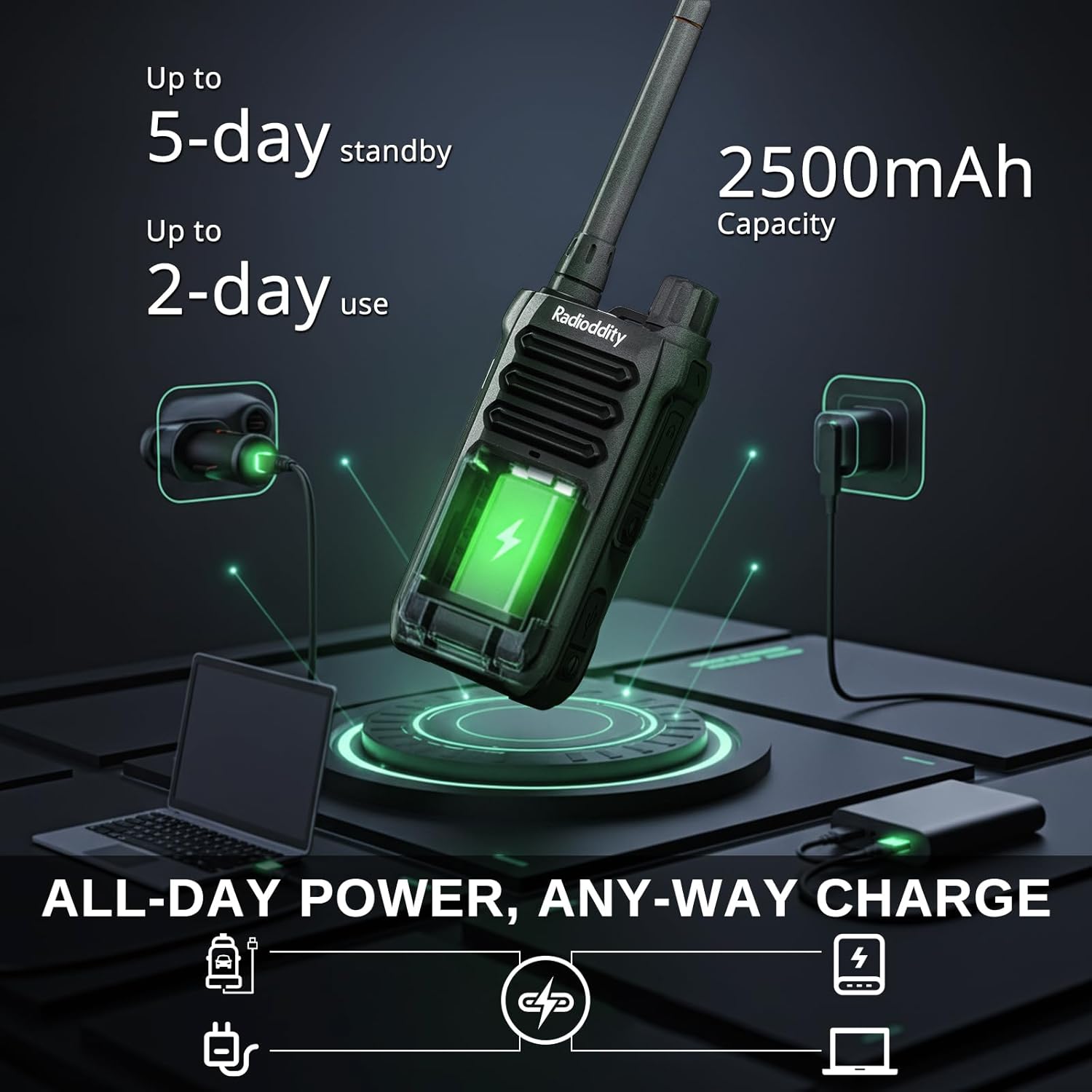
Image: The Radioddity X1 Walkie Talkie connected to a USB-C charger, illustrating the charging process.
3.3. Аксессуарларды тиркөө
- Кур клип: Secure the belt clip to the designated slot on the back of the walkie talkie.
- Кол боо: Thread the hand strap through the loop on the top or side of the walkie talkie for added security.
3.4. Күйгүзүү / Өчүрүү
To power on or off the device, rotate the power/volume knob located on the top of the unit clockwise to turn on, and counter-clockwise until it clicks to turn off.
4. Иштөө нускамалары
4.1. Канал тандоо
The Radioddity X1 comes pre-programmed with 22 FRS channels. To select a channel:
- басыңыз МЕНЮ менюга кирүү үчүн баскычты басыңыз.
- колдонуу Өйдө/төмөн жебе buttons to navigate to the channel setting.
- Басыңыз OK ырастоо үчүн, анан колдонуңуз Өйдө/төмөн жебе каалаган каналды тандоо үчүн баскычтар (1-22).
- Басыңыз OK again to save the selection and МЕНЮ чыгуу.
4.2. Купуялык коддору (CTCSS/DCS)
The radio supports 155 privacy codes (CTCSS/DCS) to filter out unwanted conversations on a channel. While not providing true privacy, these codes ensure you only hear transmissions from radios set to the same channel and code.
- басыңыз МЕНЮ баскычы.
- Navigate to the CTCSS or DCS setting using the Өйдө/төмөн жебе баскычтар.
- Басыңыз OK, then select your desired code.
- Басыңыз OK сактоо жана МЕНЮ to exit. Ensure all radios in your group use the same channel and privacy code.
4.3. Push-to-Talk (PTT)
Өтүү үчүн чоң баскычты басып, кармап туруңуз PTT button on the side of the radio. Speak clearly into the microphone. Release the PTT угуу үчүн баскыч.
4.4. VOX Function (Voice Operated Transmission)
The VOX function allows for hands-free operation. When activated, the radio transmits automatically when it detects your voice.
- басыңыз МЕНЮ баскычы.
- дегенге өтүңүз VOX орнотуу.
- Басыңыз OK, then select an appropriate sensitivity level (higher numbers for lower sensitivity).
- Басыңыз OK сактоо жана МЕНЮ чыгуу.

Image: Icon representing the Voice Operated Transmission (VOX) function.
4.5. NOAA аба ырайы жөнүндө эскертүүлөр
Stay informed with 10 built-in NOAA weather channels providing real-time alerts.
- басыңыз МЕНЮ баскычы.
- дегенге өтүңүз NOAA орнотуу.
- Басыңыз OK, then select the desired NOAA channel or activate weather alerts.
- Басыңыз OK сактоо жана МЕНЮ чыгуу.

Image: Icon representing the NOAA Scan & Alert feature.
4.6. Жазып ойнотуу
The Radioddity X1 features a unique recording playback function for up to 20 messages.
- To record, press and hold the dedicated ЖАЗУУ button (if available, or refer to specific menu options).
- To play back recorded messages, press the КАЙТАЛОО баскычы.

Image: The Radioddity X1 display showing the recording and replay functions, highlighting its audio safety net capability.

Image: Icon representing the Recording function.
4.7. Ызы-чууну азайтуу
The dual-way noise reduction feature ensures clear communication even in noisy environments.

Image: The Radioddity X1 in a construction setting, illustrating its noise reduction capabilities for clear communication.
5. Техникалык тейлөө
5.1. IP67 Waterproof and Dustproof Care
The Radioddity X1 is rated IP67, meaning it is dustproof and can withstand submersion in up to 1 meter of water for 30 minutes. To maintain its integrity:
- Ensure all port covers (e.g., charging port, accessory port) are securely closed before exposure to water or dust.
- After exposure to water, wipe the radio dry with a clean cloth. Do not charge the radio if the charging port is wet.
- Avoid prolonged submersion beyond the specified depth and time.

Image: The Radioddity X1 Walkie Talkie submerged in clear water, demonstrating its IP67 waterproof capability.

Image: The Radioddity X1 Walkie Talkie partially covered in sand, highlighting its dustproof design.
5.2. Батареяга кам көрүү
The 2500mAh battery provides up to 48 hours of average use. To prolong battery life:
- Батареяны дайыма толугу менен зарядсыздандырбаңыз.
- Радиону колдонбогондо салкын, кургак жерде сактаңыз.
- Берилген заряддоо кабелин жана адаптерди гана колдонуңуз.
5.3. Тазалоо
Радиону жумшак менен сүртүңүз, гamp кездеме. Катуу химиялык заттарды же абразивдүү тазалагычтарды колдонбоңуз.
6. Кыйынчылыктарды
| Көйгөй | Мүмкүн себеп | Чечим |
|---|---|---|
| Күч жок | Батарея аз же туура орнотулган эмес. | Charge the battery or re-install it. |
| Өткөрүп же кабыл албайт | Туура эмес канал же купуялык коду. Кызмат көрсөтүү диапазонунан тышкары. | Verify channel and privacy code settings. Move closer to the other radio. |
| Аудио сапаты начар | Weak signal, interference, or volume too low. | Adjust volume. Move to an area with less obstruction. Check for interference sources. |
| Кыска байланыш диапазону | Obstructions (buildings, terrain), low power channel. | Move to an open area. Use channels 1-7 or 15-22 for higher power output. |
7. Техникалык шарттар
| Өзгөчөлүк | Деталь |
|---|---|
| Бренд | Radioioddity |
| Модель номери | X1 |
| Түс | Кара |
| Каналдардын саны | 22 (FRS) |
| Жыштык диапазону | FRS |
| Сүйлөшүү диапазону максималдуу | 5 Miles (open areas), 2 Miles (urban settings) |
| Сууга туруктуулук деңгээли | IP67 суу өткөрбөйт |
| Өзгөчөлүктөр | Dust Proof, Emergency Alarm (SOS), Long Range, Shockproof, Voice Operated Transmission (VOX), Noise Reduction, NOAA Weather Alerts, Recording Playback |
| Батарея сыйымдуулугу | 2500 мАч литий |
| Батареянын орточо иштөө мөөнөтү | 48 саат |
| Заряддоо | USB-C |
| Продукциянын өлчөмдөрү (D x W x Y) | 1.1" x 2.4" x 7.1" |
| FCC ID | 2AN62-X1 |

Image: Visual representation of the Radioddity X1's communication range, showing up to 5 miles in open areas and 2 miles in urban settings.

Image: The Radioddity X1 Walkie Talkie on the ground at a construction site, illustrating its durability and shockproof design after 1,000+ drop tests.
8. Кепилдик жана колдоо
8.1. Кепилдик маалыматы
The Radioddity X1 Walkie Talkies come with an 18 айлык кепилдик from the date of purchase. This warranty covers manufacturing defects and ensures your product is free from material and workmanship flaws under normal use. Please retain your proof of purchase for warranty claims.
8.2. Кардарларды колдоо кызматы
For technical assistance, troubleshooting, or warranty inquiries, please visit the official Radioddity website or contact their customer support team. You can find contact information and additional resources on their webсайт: www.radioddity.com.
9. Продукт видеолору
Radioddity X1 | Built for Harsh Conditions
Video: This official Radioddity video demonstrates the X1's robust features, including its IP67 dustproof and waterproof capabilities, drop resistance, car-crush resistance, long-range communication, and noise-cancelling audio, highlighting its suitability for challenging environments.