
WLIVE B0FQJPRSDR
WLIVE 40-inch Lift Top Coffee Table User Manual
Бренд: WLIVE | Модел: B0FQJPRSDR
Introduction
This manual provides detailed instructions for the assembly, operation, and maintenance of your WLIVE 40-inch Lift Top Coffee Table. Designed for versatility, this 4-in-1 coffee table adapts to various needs, functioning as a standard coffee table, a two-person desk, or a dining table for up to eight. It features integrated storage solutions, smart LED lighting, and a convenient USB charging station. Please read this manual thoroughly before assembly and use to ensure proper function and longevity of your product.

Image: The WLIVE 40-inch Lift Top Coffee Table in a living room, demonstrating its lift-top functionality and integrated storage with LED lighting.
Продукт өзгөчөлүктөрү
4-in-1 Lift Design
This coffee table offers a versatile 4-in-1 design to suit various activities. It can be used as a standard coffee table, raised halfway to serve as a two-person desk, or fully extended to function as a dining table for up to eight people. The effortless height adjustment mechanism allows for smooth transitions between modes.
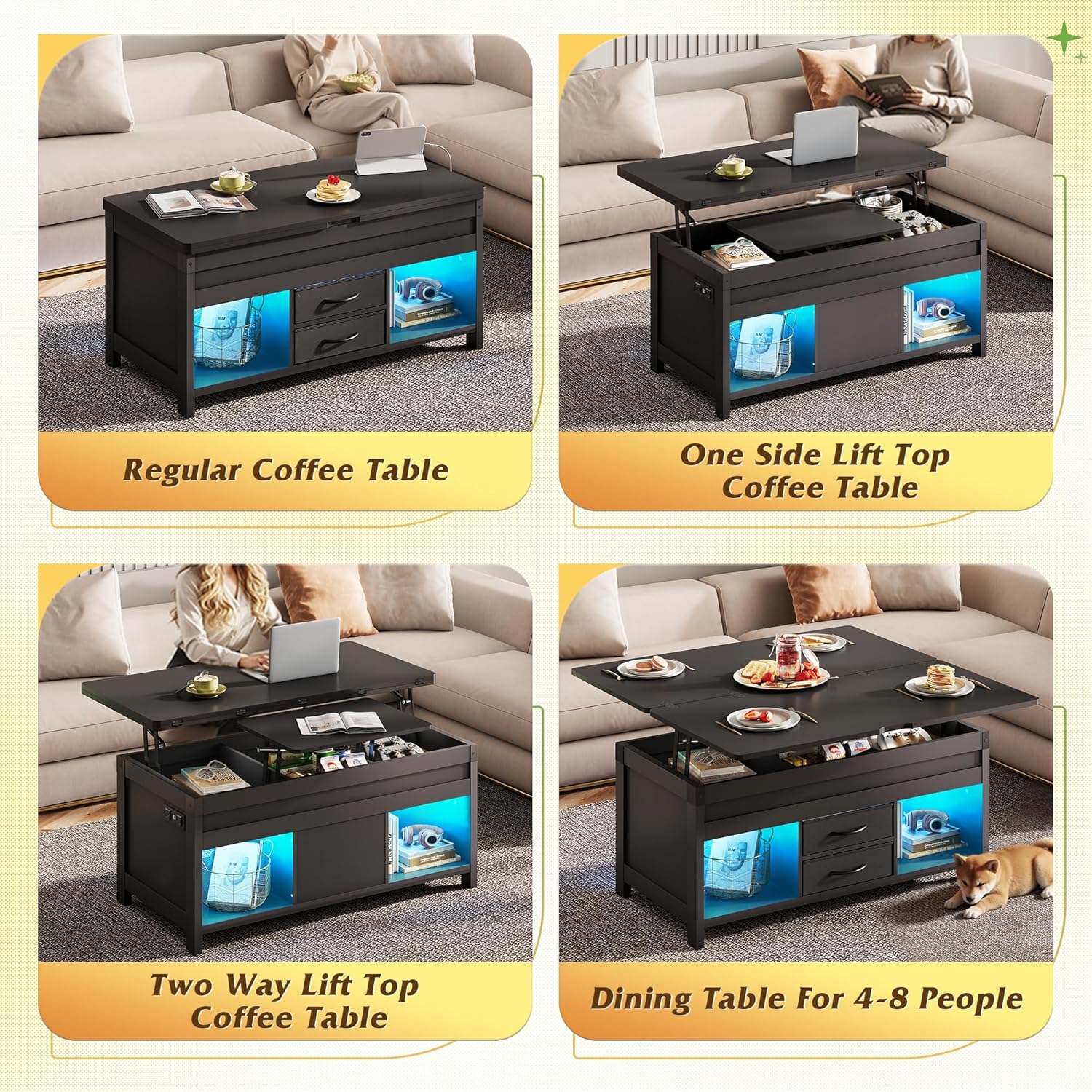
Image: Visual representation of the 4-in-1 functionality, showing the table as a regular coffee table, a one-side lift-top, a two-way lift-top, and a dining table.
Кошумча сактоо мейкиндиги
The lift-top coffee table is designed with practicality in mind, featuring dedicated storage compartments beneath the lift-top, two fabric drawers, and two large open shelves. These areas provide ample space to store living room essentials, keeping items like remote controls, magazines, and snacks organized and within easy reach, contributing to a clutter-free environment.

Сүрөт: деталдуу view of the table's storage capacity, including hidden compartments, fabric drawers, and open shelves.
USB & Smart LED Light
The table includes a smart RGB LED strip offering over 70,000 colors, music synchronization, and app control for customizable ambiance. Additionally, a built-in USB port allows for direct phone charging, ensuring your devices remain powered. The LED and USB features are integrated for convenience and modern functionality.

Image: The table showcasing its smart LED lighting and USB charging capabilities, controlled via an app.

Image: Detail of the built-in charging station with AC outlets and USB ports.
Quality Lift Mechanism
Equipped with a high-quality hydraulic lifting mechanism, the coffee table provides solid support for the tabletop. This mechanism allows for effortless lifting and a slow, safe lowering action, designed to prevent accidental pinches during use.

Image: Illustration of the high-quality hydraulic lifting mechanism and anti-pinch design.
Бекем жана бышык курулуш
The lift coffee table is constructed from high-quality MDF (Medium-Density Fiberboard) to ensure stability and durability. The material is also waterproof and scratch-resistant, facilitating easy cleaning and maintenance.
Орнотуу жана чогултуу
Assembly of the WLIVE 40-inch Lift Top Coffee Table is required. Please ensure all parts and hardware are present before beginning. Follow the included step-by-step instructions carefully. It is recommended to have a clear, spacious area for assembly.
For detailed visual guidance, refer to the assembly instructions provided in your product packaging. Ensure all screws and connectors are securely fastened to guarantee stability.
Иштөө нускамалары
Using the Lift-Top Mechanism
- To raise the tabletop: Gently lift the desired section of the tabletop. The hydraulic mechanism will assist in a smooth upward movement.
- To lower the tabletop: Apply gentle downward pressure on the tabletop. The hydraulic mechanism is designed for a slow and controlled descent to prevent sudden drops.
- Маанилүү коопсуздук эскертүүсү: Always ensure the tabletop is fully raised before attempting to lower it to avoid potential damage or pinching.
Controlling the Smart LED Light
- Ачкыч башкаруу: Use the inline controller on the LED strip cable to cycle through basic colors and modes.
- Колдонмону башкаруу: Download the dedicated smartphone application (refer to packaging or product information for app name/QR code). Connect your device via Bluetooth to access over 70,000 RGB colors, music sync features, and advanced lighting effects.
Using the USB Charging Station
- Plug the table's power cord into a standard 125V/12A AC outlet.
- Connect your devices to the two AC outlets or the two 5V/2.1A USB ports located on the side of the table.
- Түзмөктөрдүн берилген кубаттуулук мүнөздөмөлөрүнө шайкеш келерин текшериңиз.
Video: A demonstration of the WLIVE coffee table's 4-in-1 functionality, showing its use as a coffee table, work desk, and dining table, along with the integrated storage and LED lighting.
Техникалык тейлөө
- Тазалоо: The table's high-quality MDF surface is waterproof and scratch-resistant. Wipe clean with a damp кездеме жана жумшак жуугуч. Абразивдүү тазалагычтардан алыс болуңуз.
- Аппараттык камсыздоо: Periodically check all screws and fasteners to ensure they remain tight. Tighten as necessary to maintain stability.
- LED жарыктары: If LED lights malfunction, check the power connection. If issues persist, contact customer support.
Проблемаларды чечүү
- Tabletop not lifting smoothly: Ensure no objects are obstructing the hydraulic mechanism or the internal storage compartments. Check that all assembly hardware is correctly installed and tightened.
- LED чырактары иштебей жатат: Verify the power adapter is securely plugged into both the wall outlet and the LED strip. If using app control, ensure Bluetooth is enabled and the app is correctly paired with the device.
- USB ports not charging: Confirm the table's power cord is plugged into a live electrical outlet. Test with different devices and cables to rule out device-specific issues.
- For any persistent issues not covered here, please refer to the contact information for customer support.
Техникалык шарттар
| Бренд | WLIVE |
| Модель номери | B0FQJPRSDR |
| Түс | Кара |
| Өлчөмү | 40" |
| Стиль | Заманбап |
| Продукциянын өлчөмдөрү | 18.11 x 23.62 x 39.37 дюйм |
| Элемент Салмагы | 83.9 фунт |
| Ассамблея талап кылынат | Ооба |
| Өзгөчө өзгөчөлүк | Bagged (referring to fabric drawers) |
| Power Input | 125V/12A (AC Outlets) |
| USB чыгышы | 5V/2.1A |

Image: Product dimensions and weight capacities diagram.
Кепилдик жана колдоо
For warranty information or technical support, please refer to the documentation included with your purchase or contact WLIVE customer service directly. Keep your purchase receipt and model number (B0FQJPRSDR) handy for faster service.
WLIVE Customer Service: Please refer to the product packaging or the official WLIVE webучурдагы байланыш маалыматы үчүн сайт.
Ask a question about this manual
Ask about setup, troubleshooting, compatibility, parts, safety, or missing instructions. Manuals+ will review the question and use this page’s manual context to help answer it.