
BAOFENG DM32UV
BAOFENG DM32 DM-32UV DMR Radio Instruction Manual
Model: DM32UV
Introduction
This manual provides detailed instructions for the safe and efficient operation of your BAOFENG DM32 DM-32UV DMR Radio. Please read this manual thoroughly before using the device to ensure proper functionality and to prevent damage. This radio operates in both advanced DMR digital mode and traditional analog mode, offering versatile communication capabilities.
Кутуда эмне бар
Пакетти ачканда, төмөндө көрсөтүлгөн бардык буюмдардын бар экендигин текшериңиз:
- 1 X Radio
- 1 X Type-C кабели
- 1 X Base Charger
- 1 X Earpiece
- 1 X Radio Case
- 7 X Antenna Silicone Cover
- 1 X Battery (2500mAh)
- 1 X SRH-805S Antenna
- 1 X 33cm Antenna
- 1 X 21cm Gooseneck Antenna
Жайгашуу
1.1 Батареяны заряддоо
The BAOFENG DM32 DM-32UV radio comes with a 2500mAh high-capacity battery. Ensure the battery is fully charged before first use.
- Using the Base Charger: Place the radio into the provided base charger. Ensure the charging contacts align. The indicator light on the charger will show the charging status.
- Type-C портун колдонуу: Connect the provided Type-C cable to the radio's Type-C port and to a compatible power source (e.g., wall adapter, power bank, laptop, car charger). The Type-C port supports convenient charging and data transfer.
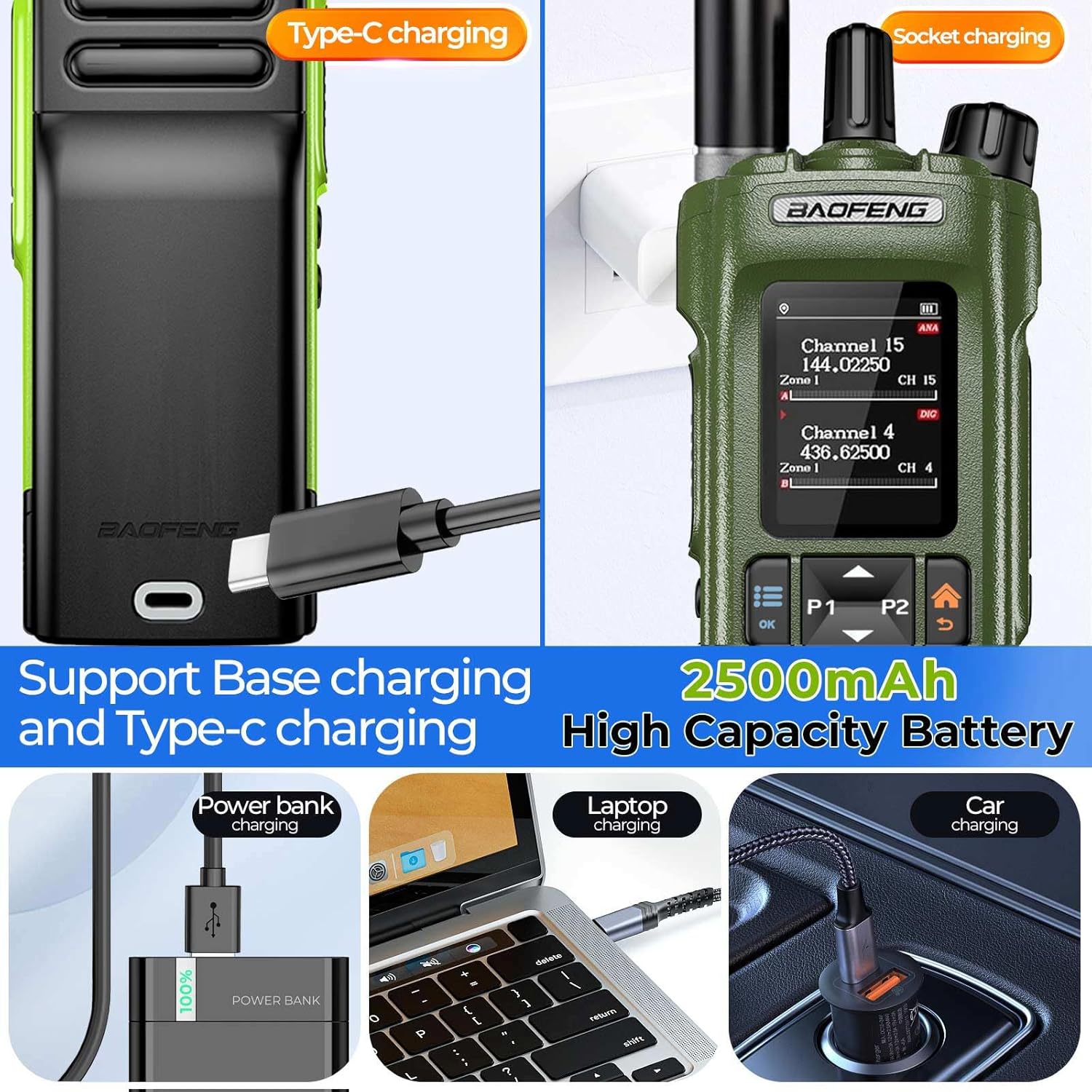
Image: The BAOFENG DM32 DM-32UV radio demonstrating both Type-C cable charging and charging via the included base charger. Various power sources like power banks, laptops, and car chargers are shown as compatible with Type-C charging.
1.2 Антеннаны бекитүү
The radio comes with two types of antennas: a 33cm antenna and a 21cm gooseneck antenna. Select the appropriate antenna for your communication needs.
- Carefully screw the chosen antenna onto the antenna connector at the top of the radio.
- Ensure it is securely fastened but do not overtighten.

Image: A BAOFENG DM32 DM-32UV radio with an antenna attached, illustrating the overall form factor and key controls.
1.3 Installing Programming Software
To program the radio with custom frequencies and settings, you need to download and install the official software.
- Turn on the walkie-talkie and ensure the programming cable is securely connected to both the radio and your computer.
- Visit the official Baofeng webсайт (www.baofengradio.com).
- Navigate to the "Support" or "Download" section.
- Издөө the software compatible with the DM-32UV model (e.g., "Baofeng DM-32UV CPS").
- Download and install the software following the on-screen instructions.
Video: This video demonstrates the process of downloading and installing the programming software for Baofeng walkie-talkies from the official website. It shows how to connect the radio, find the correct software, and complete the installation steps.
1.4 Programming the Radio
After installing the software, you can program channels and other settings.
- Launch the installed CPS (Customer Programming Software).
- Select the correct communication port (COM port) for your connected radio within the software settings.
- Read the existing data from the radio to ensure compatibility and to back up current settings.
- Edit the channel frequencies, power levels, CTCSS/DCS codes, and other parameters as needed. The radio supports up to 4,000 channels.
- Once editing is complete, write the new data back to the radio.
Video: This video demonstrates how to program the Baofeng DM-32UV radio using the CPS software. It covers selecting the communication port, reading data from the radio, editing channel settings, and writing the updated configuration back to the device.
Иштөө нускамалары
2.1 Күйгүзүү/өчүрүү жана үндү башкаруу
To power on the radio, rotate the Volume knob/switch (04 in diagram) clockwise. Continue rotating to adjust the volume. Rotate counter-clockwise until a click is heard to power off.

Image: A detailed diagram of the BAOFENG DM32 DM-32UV radio, highlighting and numbering its various components including the antenna, channel knob, indication light, volume knob/switch, LCD screen, PTT key, side keys, digital keyboard, accessory port, built-in microphone, charging contact, and Type-C interface.
2.2 Digital & Analog Dual-Mode
The DM32 DM-32UV supports both advanced DMR digital mode and traditional analog mode. This allows for compatibility with existing analog systems while providing access to digital features like text messaging, call recording, and enhanced encryption. The radio can seamlessly switch between these modes.

Image: The BAOFENG DM32 DM-32UV radio displayed with text emphasizing its capability for seamless switching between digital and analog modes, ensuring compatibility and efficient communication.
2.3 High Power & Crystal-Clear Audio
The radio offers 10W maximum output power, which can be switched to Mid/Low to conserve battery. Advanced voice coding technology and anti-interference algorithms ensure exceptionally clear and loud audio, even in noisy environments or over long distances.
2.4 Advanced GPS & Safety Features
The built-in GPS and APRS (Automatic Packet Reporting System) allow for real-time location tracking and reporting. In emergencies, the emergency alarm function can be used to send distress signals. Digital encryption (ARC4/AES128/AES256) provides secure and private communications.

Image: Multiple BAOFENG DM32 DM-32UV radios shown in an urban landscape with a GPS positioning icon, illustrating the device's advanced GPS and APRS capabilities for real-time location tracking.
2.5 Channel Management & Programming Flexibility
The radio supports up to 4,000 channels and utilizes TDMA dual-time slot technology for efficient frequency use. Manual programming is possible directly on the device using the full keyboard and 2.0-inch screen. Side keys can be customized for quick access to frequently used functions.

Image: A BAOFENG DM32 DM-32UV radio with text emphasizing its 4000-channel capacity and various features like 2.0" LCD, Type-C charging, numeric keypad, message support, lithium battery, and high power.
2.6 One-Click Frequency Copying
The radio features a one-click frequency copying function for convenience:
- 1-кадам: Long press the P1 button to enter frequency scanning mode.
- 2-кадам: The screen will display "search" as it scans. If sub-tones are present, their values will be displayed.
- 3-кадам: Once a frequency is found, the screen will show the frequency, and you can save it to a channel.

Image: A visual guide on the BAOFENG DM32 DM-32UV radio screen showing the three steps for one-click frequency copying: long-pressing P1 for scanning, displaying search results, and saving the found frequency to a channel.
2.7 Multi-Band Transmission and Reception
The radio supports a wide range of frequencies for various applications:
- Civilian: 400-470 МГц
- Деңиз: 136-174 МГц
- FM радиосу: 65-108 МГц
- Aviation: 108-136MHz (receive only)

Image: The BAOFENG DM32 DM-32UV radio highlighting its UV Dual Band capabilities, specifying frequency ranges for Civilian, Marine, FM Radio, and Aviation (receive) use.
2.8 Multi-Call Modes
The radio supports various call modes for flexible communication:
- Жеке чалуу: Communicate directly with a specific radio.
- Топтук чалуу: Set up small groups for communication among specific team members.
- Бардык чалуулар: Broadcast to all radios within range.

Image: An illustration showing multiple BAOFENG DM32 DM-32UV radios and the concept of multi-call modes, including individual, group, and all calls, along with digital encryption.
2.9 Text Messaging and Contacts
Utilize the radio's text messaging function (supporting CN/EN, 128 characters) and contacts function for efficient communication beyond voice.

Image: Two BAOFENG DM32 DM-32UV radios depicted with speech bubbles, emphasizing the contacts and SMS (text messaging) functions available on the device.
Техникалык тейлөө
- Тазалоо: жумшак колдонуу, damp cloth to clean the radio's exterior. Avoid using harsh chemicals or abrasive cleaners.
- Батареяга кам көрүү: To prolong battery life, avoid overcharging and fully discharging the battery frequently. Store the radio and battery in a cool, dry place when not in use for extended periods.
- Антеннага кам көрүү: Ensure antennas are securely attached and not bent or damaged. Replace damaged antennas to maintain optimal performance.
- Программалык камсыздоо жаңыртуулары: Periodically check the official Baofeng website for firmware updates to ensure your radio has the latest features and bug fixes.
Проблемаларды чечүү
- Кубат жок: Ensure the battery is fully charged and correctly installed. Check the power knob for proper rotation.
- Берүү/кабыл алуу мүмкүн эмес: Verify the antenna is securely attached. Check channel settings and ensure you are on an active frequency. Confirm the radio is in the correct mode (digital/analog).
- Начар аудио сапаты: Check antenna connection. Ensure you are within range of other radios or repeaters. Adjust volume.
- Программалоо маселелери: Ensure the programming cable is correctly connected and the software is installed properly. Verify the correct COM port is selected in the software.
- GPS иштебейт: Ensure the radio has a clear view спутник алуу үчүн асмандын.
Техникалык шарттар
| Өзгөчөлүк | Деталь |
|---|---|
| Бренд | БАОФЕНГ |
| Модель номери | DM32UV |
| Каналдардын саны | 4000 |
| Жыштык диапазону | 108-136 MHz (AM), 65-108 MHz (FM), UHF 400.000-470.000 MHz (RX, TX), VHF 136.000-174.000 MHz (RX, TX) |
| Сүйлөшүү диапазону максималдуу | 10 километр |
| Тtage | 9 вольт |
| Суу өткөрбөйт рейтинги | IP67 (Dust tight and protected against immersion in water up to 1 meter for 30 minutes) |
| Продукциянын өлчөмдөрү | 8.87"D x 2.84"W x 10.88"H |
| Батареялардын саны | 1 9V батарейка (киргизилген) |
| Connectivity Protocol | USB (Type-C) |
| Температура диапазону | -10°C to +55°C Degrees Celsius |
| Импеданс | 50 Ом |
| GTIN | 755745220700 |
Кепилдик маалымат
For detailed warranty information, please refer to the documentation provided with your purchase or contact BAOFENG customer support directly. Protection plans may be available for extended coverage.
Кардарларды колдоо
If you encounter any issues or have questions regarding your BAOFENG DM32 DM-32UV radio, please visit the official BAOFENG webколдоо ресурстары, көп берилүүчү суроолор жана байланыш маалыматы үчүн сайт:
Ask a question about this manual
Ask about setup, troubleshooting, compatibility, parts, safety, or missing instructions. Manuals+ will review the question and use this page’s manual context to help answer it.