
OHAYO X10 Max
OHAYO X10 Max Bluetooth Speaker Instruction Manual
Welcome to your new OHAYO X10 Max Portable Bluetooth Speaker.
1. Коопсуздук боюнча маанилүү маалымат
- Динамикти экстремалдык температурага же түз күн нуруна узак убакытка калтырбаңыз.
- Keep the speaker away from heat sources, sharp objects, and corrosive materials.
- Динамикти өз алдынча бөлүктөргө бөлбөңүз, оңдобоңуз же өзгөртпөңүз. Зарыл болсо, квалификациялуу тейлөө кызматкерлерине кайрылыңыз.
- Динамиктин IPX7 суу өткөрбөөчүлүк рейтингин сактоо үчүн, кубаттоо портунун капкагын суунун жанында колдонуп жатканда бекем жабык экенин текшериңиз.
- Заряддоо үчүн берилген кубаттоо кабелин же тастыкталган USB-C кабелин гана колдонуңуз.
2. Пакеттин мазмуну
- 1 x OHAYO X10 Max Bluetooth Speaker (White)
- 1 x USB-C Charging Cable (charging plug not contained)
- 1 х 3.5 мм AUX кабели
- 1 x User Manual
- 1 x Lanyard
3. Продукт бүтүп калдыview
The OHAYO X10 Max is a versatile portable Bluetooth speaker designed for high-quality audio and durability. It features a powerful 25W sound output with active bass, IPX7 waterproofing, and a long-lasting 24-hour battery. Enjoy dynamic sound with colorful RGB lighting effects, dual pairing for stereo sound, and multiple input modes.
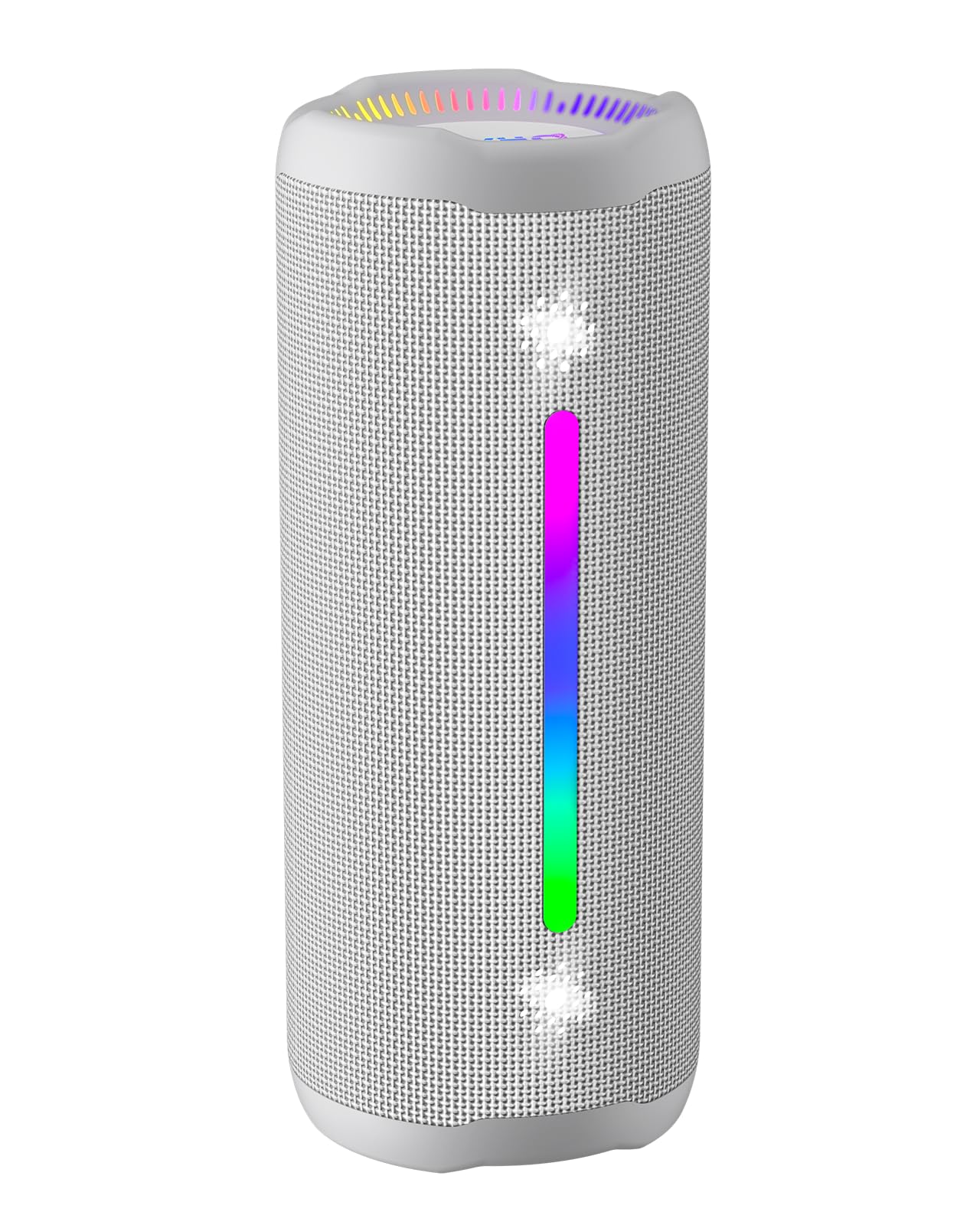
Figure 3.1: OHAYO X10 Max Bluetooth Speaker (White)

Figure 3.2: OHAYO X10 Max Bluetooth Speaker - Fully upgraded from appearance to performance.

Figure 3.3: 25W Deep Bass Sound - Independent channel design for accurate audio performance.

Figure 3.4: 6 Dazzling RGB Light Effects - Syncs with music for an immersive experience.

Figure 3.5: IPX7 Waterproof - Highly sealed design for use in various environments.

Figure 3.6: 24H Ultra-Long Battery Life - 6600mAh battery for extended playback.
4. Башкаруу каражаттары жана көрсөткүчтөр
The OHAYO X10 Max features intuitive controls for easy operation.

Figure 4.1: Control Panel and Ports
- Кубат баскычы: Press and hold to power on/off. Short press to switch between input modes (Bluetooth, AUX, TF Card, USB-Audio).
- Volume Up (>): Үнүн жогорулатуу үчүн кыска басыңыз. Кийинки трекке көпкө басыңыз.
- Volume Down (<): Үндү азайтуу үчүн кыска басыңыз. Мурунку трек үчүн көпкө басыңыз.
- Басс баскычы: Press to activate/deactivate Bass Boost mode.
- Ойнотуу/Тындыруу/Чакыруу баскычы: Short press to play/pause music. Short press to answer/end calls. Long press to reject calls. Double press to activate voice assistant.
- Батарея индикатор жарыктары: Four LED lights indicate battery level.
- RGB жарык тилкеси: Ар кандай түстүү жарык эффекттерин көрсөтөт.
- Заряддоо порту (USB-C): Динамикти заряддоо үчүн.
- AUX-кирүү порту: Зымдуу аудио туташуу үчүн.
- TF карта уячасы: MicroSD картадан түз музыка ойнотуу үчүн.
5. Орнотуу
5.1 Динамикти заряддоо
Before first use, fully charge the speaker. Connect the provided USB-C charging cable to the speaker's charging port and the other end to a 5V/2A USB power adapter (not included). The battery indicator lights will blink during charging and remain steady when fully charged.
5.2 Күйгүзүү/өчүрүү
Press and hold the Power button for approximately 3 seconds to turn the speaker on or off. A voice prompt will confirm the action.
5.3 Bluetooth жупташтыруу
- Turn on the speaker. It will automatically enter Bluetooth pairing mode, indicated by a blinking blue LED.
- Түзмөгүңүздө Bluetooth'ду иштетиңиз (смартфон, планшет ж.б.).
- Издөө "X10 Max" in your device's Bluetooth list and select it to connect.
- Туташкандан кийин үн билдирүүсү ийгиликтүү жупташтырууну ырастайт.
5.4 Чыныгы зымсыз стерео (TWS) жупташтыруу
To achieve a true wireless stereo experience, you can pair two OHAYO X10 Max speakers together.

5.1-сүрөт: Чыныгы зымсыз стерео жупташтыруу
- Ensure both X10 Max speakers are powered on and not connected to any other Bluetooth device.
- Бир динамикте (бул негизги динамик болот), Күйгүзүү баскычын эки жолу басыңыз. Ал TWS жупташтыруу режимине өтөт.
- The two speakers will automatically connect to each other. A voice prompt will confirm successful TWS pairing.
- Эми түзмөгүңүздү 5.3 бөлүмүндө сүрөттөлгөндөй Bluetooth аркылуу негизги динамикке туташтырыңыз.
5.5 AUX аркылуу туташуу
Use the provided 3.5mm AUX cable to connect the speaker to devices without Bluetooth capability.
Figure 5.2: 4 Input Modes - Including AUX, TF, and USB-Audio.
- Connect one end of the AUX cable to the speaker's AUX-in port.
- Экинчи учун түзмөгүңүздүн аудио чыгышына туташтырыңыз.
- The speaker will automatically switch to AUX mode. If not, short press the Power button to cycle through modes until AUX mode is activated.
5.6 TF картасын колдонуу
Insert a MicroSD (TF) card with MP3/WAV/FLAC/WMA audio files into the TF card slot. The speaker will automatically switch to TF card mode and begin playback. Short press the Power button to cycle through modes if needed.
5.7 Using USB-Audio
Connect the speaker to a computer using the USB-C cable. The speaker can function as an external audio output device for your computer. Short press the Power button to cycle through modes if needed.
6. Иштөө нускамалары
6.1 Музыка ойнотуу
- Ойнотуу/тындыруу: Short press the Play/Pause/Call button.
- Үндү көзөмөлдөө: Short press the Volume Up (>) or Volume Down (<) buttons.
- Кийинки трек: Long press the Volume Up (>) button.
- Мурунку трек: Long press the Volume Down (<) button.
6.2 Бассты күчөтүү функциясы
Press the 'BASS' button to activate or deactivate the enhanced bass mode. This feature provides deeper and richer low frequencies for a more impactful audio experience.
6.3 RGB жарык режимдери
The speaker features dynamic RGB lighting. The lights will automatically sync with the music beat. To turn the lights on/off, refer to the specific control instructions in your quick start guide or experiment with the mode button if available.
6.4 Hands-Free чалуу
When connected via Bluetooth to your smartphone, the speaker can be used for hands-free calls.

Figure 6.1: Hands-Free Calling Feature
- Чалууга жооп берүү/аяктоо: Short press the Play/Pause/Call button.
- Чакырууну четке кагуу: Long press the Play/Pause/Call button.
- Үн Жардамчысын жандыруу: Double press the Play/Pause/Call button.
7. Техникалык тейлөө
- Тазалоо: Динамикти жумшак менен сүртүңүз, гamp кездеме. Катуу химиялык заттарды же абразивдүү тазалагычтарды колдонбоңуз.
- Сактагыч: Динамикти узак убакыт бою колдонбогондо, түз күн тийбеген, кургак, салкын жерде сактаңыз.
- Батареяга кам көрүү: Батареянын иштөө мөөнөтүн узартуу үчүн, эгерде үзгүлтүксүз колдонулбаса, динамикти жок дегенде үч айда бир жолу кубаттаңыз.
8. Кыйынчылыктарды
| Көйгөй | Мүмкүн себеп | Чечим |
|---|---|---|
| Динамик күйбөйт. | Батарея аз. | Динамикти толук заряддаңыз. |
| Bluetooth аркылуу жупташтыруу мүмкүн эмес. | Динамик жупташтыруу режиминде эмес; түзмөк Bluetooth өчүк; аппараттан өтө алыс. | Ensure speaker is in pairing mode (blinking blue LED). Turn on device Bluetooth. Move device closer to speaker (within 10 meters). |
| Үн жок же үнү төмөн. | Volume too low on speaker or device; incorrect input mode. | Increase volume on both speaker and device. Check if the correct input mode (Bluetooth, AUX, TF) is selected. |
| TWS жупташтыруу ишке ашкан жок. | Speakers too far apart; one speaker already connected to another device. | Ensure speakers are close to each other. Disconnect any existing Bluetooth connections before TWS pairing. |
| Үндүн бузулушу. | Үн өтө жогору; батареянын заряды аз. | Үндү азайтыңыз. Динамикти кубаттаңыз. |
9. Техникалык шарттар
| Өзгөчөлүк | Спецификация |
|---|---|
| Модель аты | X10 Макс |
| Bluetooth версиясы | 5.3 |
| Зымсыз байланыш технологиясы | Bluetooth |
| Динамиктин максималдуу чыгаруу күчү | 35 Watts (25W effective) |
| Батарея сыйымдуулугу | 6600 мАч |
| Оюн убактысы | Up to 24 hours (varies with volume and light use) |
| Сууга туруктуулук деңгээли | IPX7 (Суу өткөрбөйт) |
| Киргизүү көлөмүtage | 5 вольт (ток) |
| Frequency Response | 20 KHz |
| Ызы-чуунун катышы | 80 дБ |
| Аудио драйвер түрү | Динамикалык драйвер |
| Вуфердин диаметри | 75 миллиметр |
| Tweeter диаметри | 26 миллиметр |
| Продукциянын өлчөмдөрү | 2.95"D x 2.95"W x 7.28"H |
| Элемент Салмагы | 450 грамм (15.9 унция) |
| Материал | Акрилонитрил бутадиен стирол (ABS), алюминий |
| Башкаруу ыкмасы | Push Button |
| Өзгөчөлүктөр | Bass Boost, AUX, Hi-Res Audio, 24-Hour Playtime, IPX7 Waterproof, TF Card Port, Dual Passive Radiators, Hands-free, True Wireless Stereo Pairing, Shockproof |
10. Кепилдик жана колдоо
The OHAYO X10 Max Bluetooth Speaker comes with an extended warranty. For specific warranty details and to register your product, please refer to the information provided in your quick start guide or contact OHAYO customer support.
For technical support or customer service inquiries, please contact OHAYO Direct. Contact information may be found in your product packaging or on the official OHAYO webсайт.
11. Расмий продукт Video
Video 11.1: Official OHAYO Portable Bluetooth Speaker overview by OHAYO Direct. This video highlights key features and design elements of the speaker.
Ask a question about this manual
Ask about setup, troubleshooting, compatibility, parts, safety, or missing instructions. Manuals+ will review the question and use this page’s manual context to help answer it.