
Cuifati CUIFATIvd1g4kecbu
Cuifati 4G CPE Cat6 мобилдик WiFi хотспот роутеринин колдонуучу колдонмосу
Model: CUIFATIvd1g4kecbu
1. Киришүү
This manual provides detailed instructions for the setup, operation, and maintenance of your Cuifati 4G CPE Cat6 Mobile WiFi Hotspot Router. This device offers secure, high-speed internet sharing across multiple devices using a SIM card, making it suitable for various environments including home, office, and outdoor activities.
2. Пакеттин мазмуну
Төмөндө тизмеленген нерселердин баары пакетиңизде бар экенин текшериңиз:
- Cuifati 4G CPE Cat6 Mobile WiFi Hotspot Router
- Кубаттуу адаптер
- Ethernet кабели
- Carabiner (for portability)
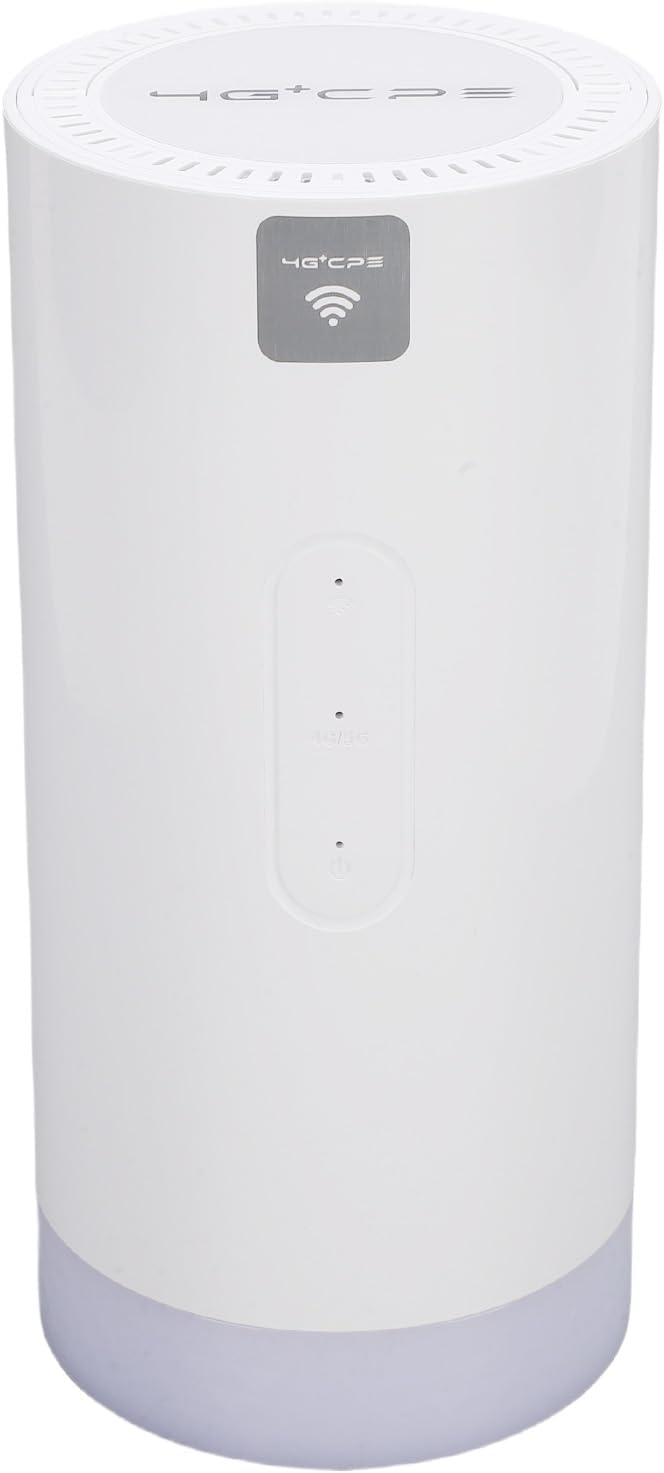
Image: Package contents including the router, power adapter, Ethernet cable, and carabiner.
3. Продукт бүтүп калдыview
3.1 алдыңкы панели

Сүрөт: алдыңкы view of the router, showing LED indicators and the 4G+CPE logo.
The front panel features LED indicators for WiFi connection status, network connection status, and battery level, providing an intuitive display of the device's operational status.
3.2 Арткы панель жана порттор

Сүрөт: Арткы view of the router, displaying various ports and the product information label.
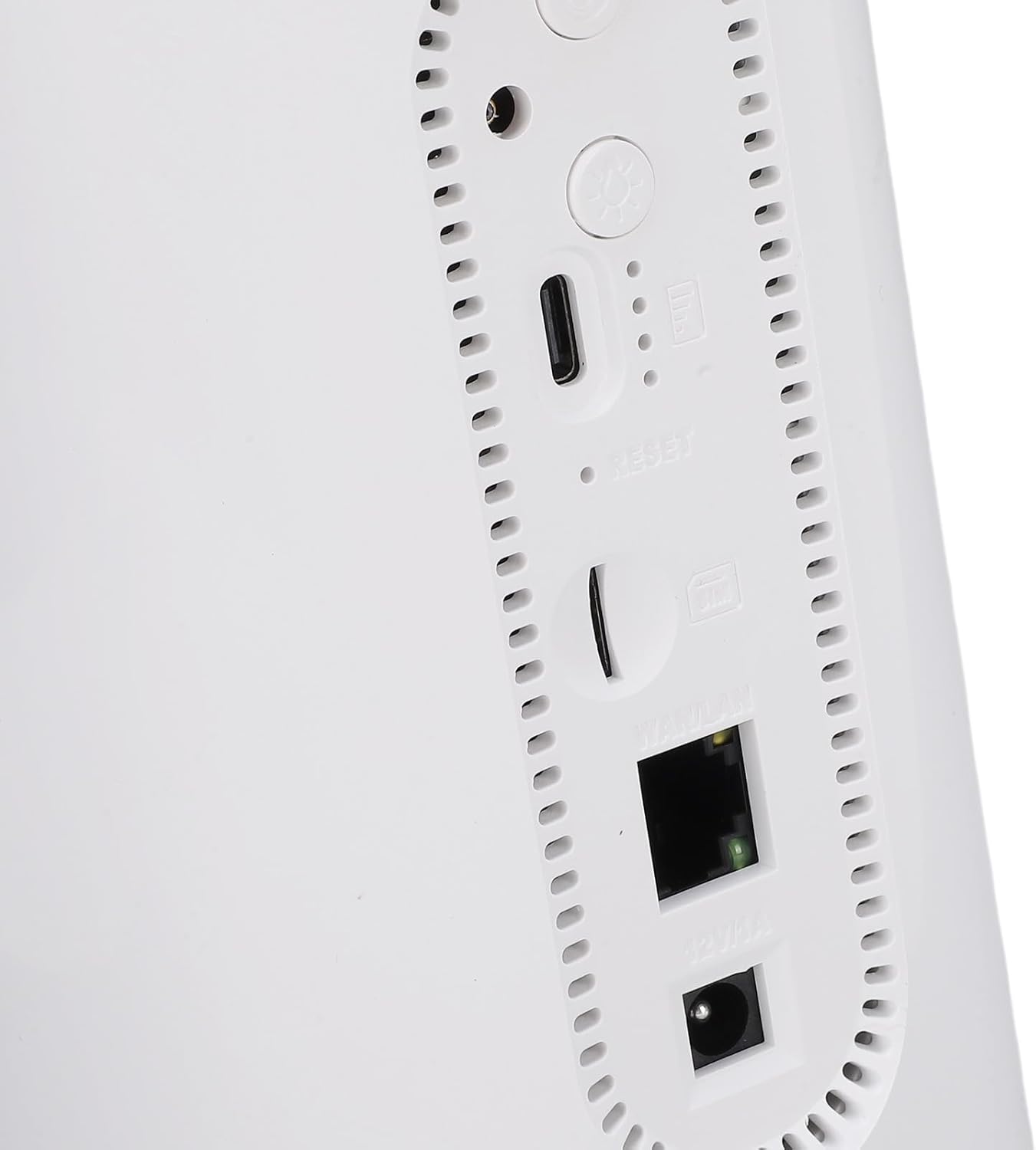
Сүрөт: Жакын план view of the rear ports, including SIM card slot, Reset button, WAN/LAN port, and power input.
The rear panel includes essential ports and controls:
- SIM карта слоту: For inserting a Micro SIM card.
- Калыбына келтирүү баскычы: Заводдук жөндөөлөрдү калыбына келтирүү үчүн колдонулат.
- WAN/LAN порту: An Ethernet port for wired connections or connecting to an existing network.
- Кубат киргизүү: Кубат адаптерин туташтыруу үчүн.
- Кубат баскычы: Аппаратты күйгүзүү же өчүрүү үчүн.
- Camping Light Button: To activate or deactivate the colorful light feature.
4. Орнотуу
4.1 SIM картаны орнотуу
- Роутер өчүрүлгөнүн текшериңиз.
- Арткы панелдеги SIM картанын уячасын табыңыз.
- Insert a Micro SIM card into the slot with the gold contacts facing down and the notched corner oriented correctly. Push until it clicks into place.
- To remove, gently push the SIM card again until it ejects.
4.2 Күйгүзүү
- Connect the provided power adapter to the power input port on the rear panel.
- Кубат адаптерин розеткага сайыңыз.
- Press and hold the Power Button until the LED indicators illuminate. The device will begin to boot up.
4.3 Initial WiFi Connection
- Once the router is powered on and the network indicator shows a stable connection, locate the default WiFi Network Name (SSID) and Password (PWD) on the label at the bottom or rear of the device. (Example: SSID: 4G+CPE-XXXX, PWD: XXXXXXXXXX)
- On your smartphone, tablet, or computer, search for available WiFi networks.
- Select the SSID corresponding to your router.
- Enter the default PWD when prompted.
- Сиз азыр интернетке туташкан болушуңуз керек.
5. Иштөө нускамалары
5.1 Түзмөктөрдү туташтыруу
You can connect multiple devices to the router via WiFi. For wired connections, use an Ethernet cable to connect a device to the WAN/LAN port.
5.2 Кирүү Web Башкаруу интерфейси
To configure advanced settings, access the web башкаруу интерфейси:
- Ensure your device is connected to the router's WiFi network.
- ачуу а web браузер (мисалы, Chrome, Firefox).
- Демейки IP даректи киргизиңиз (мисалы, 192.168.199.1) into the address bar and press Enter. This IP address is typically found on the product label.
- Демейки колдонуучу атын киргизиңиз (мисалы, админ) жана сырсөз (мисалы, админ) when prompted. These credentials are also on the product label.
- From the interface, you can change WiFi settings, view connected devices, and manage network preferences.
5.3 LED көрсөткүчтөрү
The LED indicators on the front panel provide visual feedback on the router's status:
- WiFi көрсөткүчү: Shows the status of the WiFi network.
- Тармак көрсөткүчү: Displays the status of the 4G/3G/2G mobile network connection.
- Батарея көрсөткүчү: Учурдагы батареянын деңгээлин көрсөтөт.
Refer to the full product specifications for detailed indicator behavior (e.g., solid, blinking, color codes).
5.4 CampLight Function
This router includes a colorful light feature. Press the dedicated Camping Light Button on the rear panel to activate or deactivate this function. This can be useful for outdoor activities.
6. Техникалык тейлөө
- Тазалоо: Аппаратты тазалоо үчүн жумшак, кургак чүпүрөктү колдонуңуз. Суюк тазалагычтардан же абразивдүү материалдардан алыс болуңуз.
- Сактагыч: Store the router in a cool, dry place away from direct sunlight and extreme temperatures.
- Батареяга кам көрүү: Батареянын иштөө мөөнөтүн оптималдаштыруу үчүн, батареяны тез-тез толук зарядсыздандырбаңыз. Эгер узак убакытка сактасаңыз, батареяны болжол менен 50% га чейин заряддаңыз.
- Программалык камсыздоонун жаңыртуулары: Мезгил-мезгили менен өндүрүүчүнүн текшерүү webсайт же web оптималдуу аткарууну жана коопсуздукту камсыз кылуу үчүн жеткиликтүү микропрограмма жаңыртуулары үчүн башкаруу интерфейси.
7. Кыйынчылыктарды
- Интернет байланышы жок:
- SIM карта туура салынганын жана маалымат планы менен иштетилгенин текшериңиз.
- Check the network LED indicator. If it's off or red, there might be a network issue or no signal.
- Роутерди жана туташкан аппаратты өчүрүп күйгүзүңүз.
- APN жөндөөлөрүн текшериңиз web management interface (if applicable).
- WiFiга туташа албай жатат:
- Ensure the WiFi LED indicator is on.
- Verify you are entering the correct WiFi password.
- Сигналдын күчүн жакшыртуу үчүн роутерге жакыныраак жылыңыз.
- Роутерди кайра иштетиңиз.
- Жай Интернет ылдамдыгы:
- Check your mobile network signal strength.
- Туташкан түзмөктөрдүн санын азайтыңыз.
- Фондук колдонмолор ашыкча өткөрүү жөндөмдүүлүгүн талап кылбасын текшериңиз.
- Try moving the router to a location with better signal reception.
- Роутер жооп бербей жатат:
- Press and hold the Power Button for 10 seconds to force a shutdown, then restart.
- If issues persist, perform a factory reset by pressing the Reset button with a pin for 5-10 seconds. Note: This will erase all custom settings.
8. Техникалык шарттар
| Өзгөчөлүк | Спецификация |
|---|---|
| Модель номери | CUIFATIvd1g4kecbu |
| Бренд | Cuifati |
| Байланыш технологиясы | 4G LTE (Cat6), Ethernet |
| Зымсыз стандарт | 802.11 b/g/n/AC (2.4G, 5.8G) |
| WiFi ылдамдыгы | 2.4G: 300Mbps, 5.8G: 866Mbps |
| Жыштык тилкесинин классы | Tri-Band (LTE FDD, TDD, WCDMA, EDGE) |
| SIM карта түрү | Micro SIM x 1 |
| Батарея сыйымдуулугу | 10000mAh Lithium Cell (Built-in) |
| Шифрлөө | WiFi Protected Access™ (WPA/WPA2) 2 |
| Өлчөмдөр | Болжол менен 200x95x92мм / 7.87x3.74x3.62 дюйм |
| Элемент Салмагы | 1.88 фунт |
| Шайкеш түзмөктөр | Смартфондор, планшеттер, ноутбуктар, компьютерлер |
| Сунушталган колдонуу | Ички/тышкы |
9. Кепилдик жана колдоо
For warranty information and technical support, please refer to the documentation included with your purchase or contact Cuifati customer service directly. You may also visit the official Cuifati webкошумча жардам жана ресурстар үчүн сайт.
Ask a question about this manual
Ask about setup, troubleshooting, compatibility, parts, safety, or missing instructions. Manuals+ will review the question and use this page’s manual context to help answer it.