
Introduction
The Rapoo M308 is a versatile multi-mode wireless mouse designed for efficiency and comfort. It features an ambidextrous design, allowing comfortable use for both right-handed and left-handed individuals. With its dual connectivity options, Bluetooth 5.0 and 2.4 GHz wireless, you can seamlessly connect to up to three devices and switch between them with ease. The mouse is engineered for long-lasting performance, offering a battery life of up to 12 months.
Пакеттин мазмуну
- Rapoo M308 Multi-mode Wireless Mouse
- USB кабыл алгыч (чычкандын ичинде сакталат)
- 2 АА батарейкалар
- Ыкчам баштоо колдонмосу (бул колдонмо)
Продукт бүттүview
Familiarize yourself with the components of your Rapoo M308 mouse.
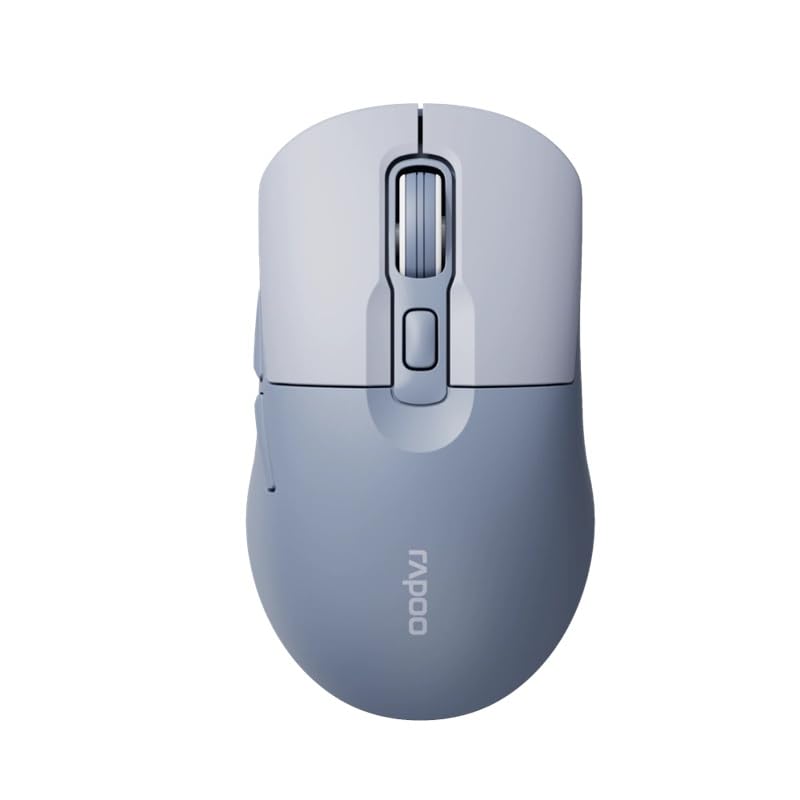
Image: The Rapoo M308 Multi-mode Wireless Mouse in blue, showcasing its ergonomic, ambidextrous design with a scroll wheel and multiple buttons.
- Сол баскыч: Стандарттык сол чыкылдатуу функциясы.
- Оң баскыч: Стандарттык оң баскычты чыкылдатуу функциясы.
- Жылдыруу дөңгөлөгү: Жылдыруу жана ортоңку чыкылдатуу функциясы үчүн.
- DPI баскычы: Курсордун сезгичтигин (DPI) тууралайт.
- Mode Switch Button/Indicator: Switches between connected devices (2.4G, Bluetooth 1, Bluetooth 2) and indicates current mode.
- Каптал баскычтары: Forward/Backward navigation (programmable).
- Батарея бөлүмү: Located on the underside, holds 2 AA batteries.
- USB Receiver Slot: Located inside the battery compartment for storage.
Жайгашуу
1. Батареяны орнотуу
- Чычкандын астыңкы жагындагы батарея бөлүмүнүн капкагын ачыңыз.
- Туура полярдуулукту (+/-) камсыз кылып, эки АА батарейканы салыңыз.
- Батарея уясынын капкагын жабыңыз.
2. 2.4 ГГц зымсыз байланыш аркылуу туташуу
- Remove the USB receiver from its storage slot inside the battery compartment.
- USB ресиверди компьютериңиздеги жеткиликтүү USB портуна сайыңыз.
- Turn on the mouse. The mouse should automatically connect to your computer. The mode indicator light will show a steady green light for a few seconds.
3. Bluetooth аркылуу туташуу
The M308 mouse supports two Bluetooth connections (BT1 and BT2).
- Чычканды күйгүзүңүз.
- Press the mode switch button to select either Bluetooth 1 (blue light flashes slowly) or Bluetooth 2 (blue light flashes slowly).
- Press and hold the mode switch button for 3 seconds until the blue light starts flashing rapidly. This indicates the mouse is in pairing mode.
- Компьютериңизден же түзмөгүңүздөн Bluetooth жөндөөлөрүнө өтүп, жаңы түзмөктөрдү издеңиз.
- Select "Rapoo M308" from the list of available devices to pair.
- Once paired, the blue light will become steady for a few seconds and then turn off.
Иштөө нускамалары
Түзмөктөрдүн ортосунда которулуу
The Rapoo M308 allows you to connect to up to three devices (one 2.4G wireless and two Bluetooth devices) and switch between them.
- Briefly press the mode switch button to cycle through the connected devices: 2.4G (green light), Bluetooth 1 (blue light), Bluetooth 2 (blue light).
- The indicator light will briefly illuminate in the corresponding color to confirm the selected mode.
DPI тууралоо
Press the DPI button (usually located behind the scroll wheel) to cycle through different DPI settings. This changes the cursor speed and sensitivity. The indicator light may flash to show the current DPI level (e.g., one flash for low DPI, two for medium, etc.).
Техникалык тейлөө
- Тазалоо: Чычканды тазалоо үчүн жумшак, кургак чүпүрөктү колдонуңуз. өжөр кир үчүн, бир аз гamp чүпүрөктү колдонсо болот, бирок аппаратка ным кирбеши керек.
- Батареяны алмаштыруу: When the mouse performance degrades or the indicator light signals low battery, replace the two AA batteries following the installation steps.
- Сактагыч: When not in use for extended periods, turn off the mouse to conserve battery life. Store the USB receiver inside the mouse to prevent loss.
Проблемаларды чечүү
- Чычкан жооп бербей жатат:
- Чычкандын күйүк экенин текшериңиз.
- Батареялардын туура орнотулганын жана түгөнүп калбагандыгын текшериңиз. Керек болсо алмаштырыңыз.
- 2.4G туташуусу үчүн, USB кабыл алгычы иштеп жаткан USB портуна бекем сайылып турганын текшериңиз. Башка USB портун колдонуп көрүңүз.
- For Bluetooth connection, ensure the mouse is in the correct Bluetooth mode (BT1 or BT2) and successfully paired with your device. Re-pair if needed.
- Курсордун кыймылы туруксуз же жай:
- Чычкандын астындагы оптикалык сенсорду тазалаңыз.
- Чычканды ылайыктуу жерде (чагылтпаган, тунук эмес) колдонуп жатканыңызды текшериңиз.
- DPI баскычын колдонуп DPI жөндөөсүн тууралаңыз.
- Түзмөктөрдүн ортосунда которулуу мүмкүн эмес:
- Ensure all devices are properly connected (2.4G receiver plugged in, Bluetooth devices paired).
- Briefly press the mode switch button to cycle through modes. A long press will initiate Bluetooth pairing mode.
Техникалык шарттар
| Бренд аты | Rapoo |
| Модел | M308 |
| Байланыш технологиясы | Bluetooth 5.0, 2.4 ГГц радио жыштыгы |
| Өзгөчөлүктөр | Жеңил |
| Motion Detection | Оптикалык |
| Button Quantity | 4 |
| Колдун багыты | Эки тараптуу |
| Сунушталган Колдонуулар | Office |
| Шайкеш түзмөктөр | Персоналдык компьютер, ноутбук |
| Элемент Салмагы | 50 грамм |
| Операция системасы | Linux, Mac, Windows |
| Батареянын иштөө мөөнөтү | 12 ай |
| Батареялардын саны | 2 AA (кошулган) |
| Power Source | Батарея менен иштейт |
| Минималдуу OS талап кылынат | Mac OS 14 Sonoma, Windows 11 |
| Материал | Пластик |
| Келип чыккан өлкө | Кытай |
| Камтылган компоненттер | Чычкан |
Кепилдик жана колдоо
The Rapoo M308 Multi-mode Wireless Mouse comes with a 2 жылдык кепилдик сатып алынган күндөн тартып. Бул кепилдик өндүрүштүк кемчиликтерди жана нормалдуу колдонуудагы бузулууларды камтыйт.
For technical support, warranty claims, or further assistance, please refer to the contact information provided on the Rapoo official website or your local distributor's support channels. Please retain your proof of purchase for warranty validation.