
Introduction
Thank you for choosing the Digitus DA-70919 USB-C 8K 12-Port Docking Station. This device is designed to expand the connectivity of your USB-C enabled laptop or computer, providing a comprehensive solution for video output, data transfer, network access, and power delivery. Please read this manual carefully to ensure proper installation and operation.
Продукт бүттүview
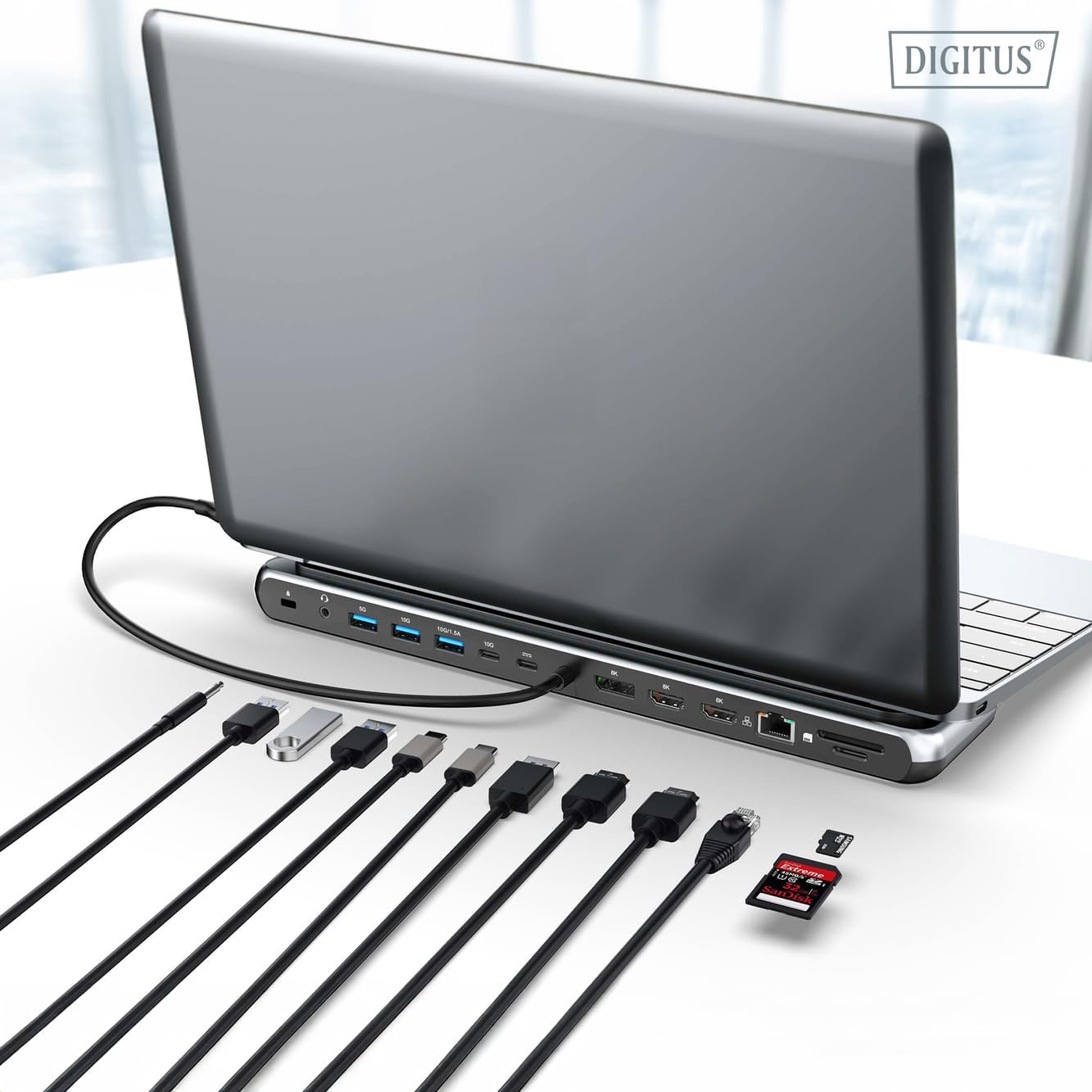
The Digitus DA-70919 docking station offers 12 essential ports to enhance your workspace. It supports high-resolution video output, fast data transfer, and efficient power delivery to your host device.

1-сүрөт: Detailed diagram of the Digitus DA-70919 docking station ports and their functions. This diagram labels each of the 12 ports on the docking station, including Audio Jack, USB-A, USB-C, USB-C PD, DisplayPort, HDMI, RJ45 Gigabit Ethernet, and SD/MicroSD card slots, along with anti-theft protection.

2-сүрөт: Фронт view of the Digitus DA-70919 docking station showing all accessible ports. A clear view of the docking station's front panel, displaying the various input and output ports including USB-A, USB-C, HDMI, DisplayPort, Ethernet, and card readers.
Негизги өзгөчөлүктөрү:
- Видео чыгаруу: 2x HDMI, 1x DisplayPort (DP) supporting up to 8K/30Hz for single display, or multi-display configurations.
- USB маалымат порттору: 2x USB-A 3.2 Gen 2 (10Gbps), 1x USB-A 3.2 Gen 1 (5Gbps), 1x USB-C 3.2 Gen 2 (10Gbps).
- Кубат жеткирүү (PD): USB-C PD 3.0 port for charging your host laptop (up to 85W output).
- Тармак: Gigabit Ethernet (RJ45) for stable wired internet connection.
- Картаны окугучтар: SD and MicroSD card slots with 104 MBps transfer speed.
- Аудио: Кулакчындар же динамиктер үчүн 3.5 мм аудио уяча.
Орнотуу нускамалары
Follow these steps to set up your Digitus DA-70919 docking station:
- Check Host USB-C Port Compatibility: Ensure your laptop's USB-C port supports DisplayPort Alternate Mode (DP Alt Mode) for video output and Power Delivery for charging. Without DP Alt Mode, video output will not function.

3-сүрөт: Guide to USB-C port compatibility for DisplayPort Alternate Mode. This graphic explains which types of USB-C ports on your laptop support the full functionality of the docking station, specifically highlighting the requirement for DisplayPort Alternate Mode (DP Alt Mode) for video output.
- Хост түзмөккө туташуу: Connect the integrated USB-C cable from the docking station to the USB-C port on your laptop.
- Кубат адаптерин туташтыруу (кошумча, бирок сунушталат): If you wish to charge your laptop via the docking station or power high-demand peripherals, connect a USB-C Power Delivery adapter (not included, up to 100W recommended) to the USB-C PD input port on the docking station.
- Тышкы дисплейлерди туташтыруу: Мониторлоруңузду тиешелүү кабелдерди колдонуп, док станциясындагы HDMI жана/же DisplayPort чыгыштарына туташтырыңыз.
- Перифериялык түзүлүштөрдү туташтыруу: Plug in your USB devices (keyboard, mouse, external drives), Ethernet cable, SD/MicroSD cards, and audio devices to the corresponding ports on the docking station.
- Драйверди орнотуу: In most cases, the docking station is plug-and-play and does not require additional drivers. If prompted, allow your operating system to install any necessary drivers automatically.
Иштөө нускамалары
Дисплей режимдери
Док-станция ар кандай дисплей конфигурацияларын колдойт:
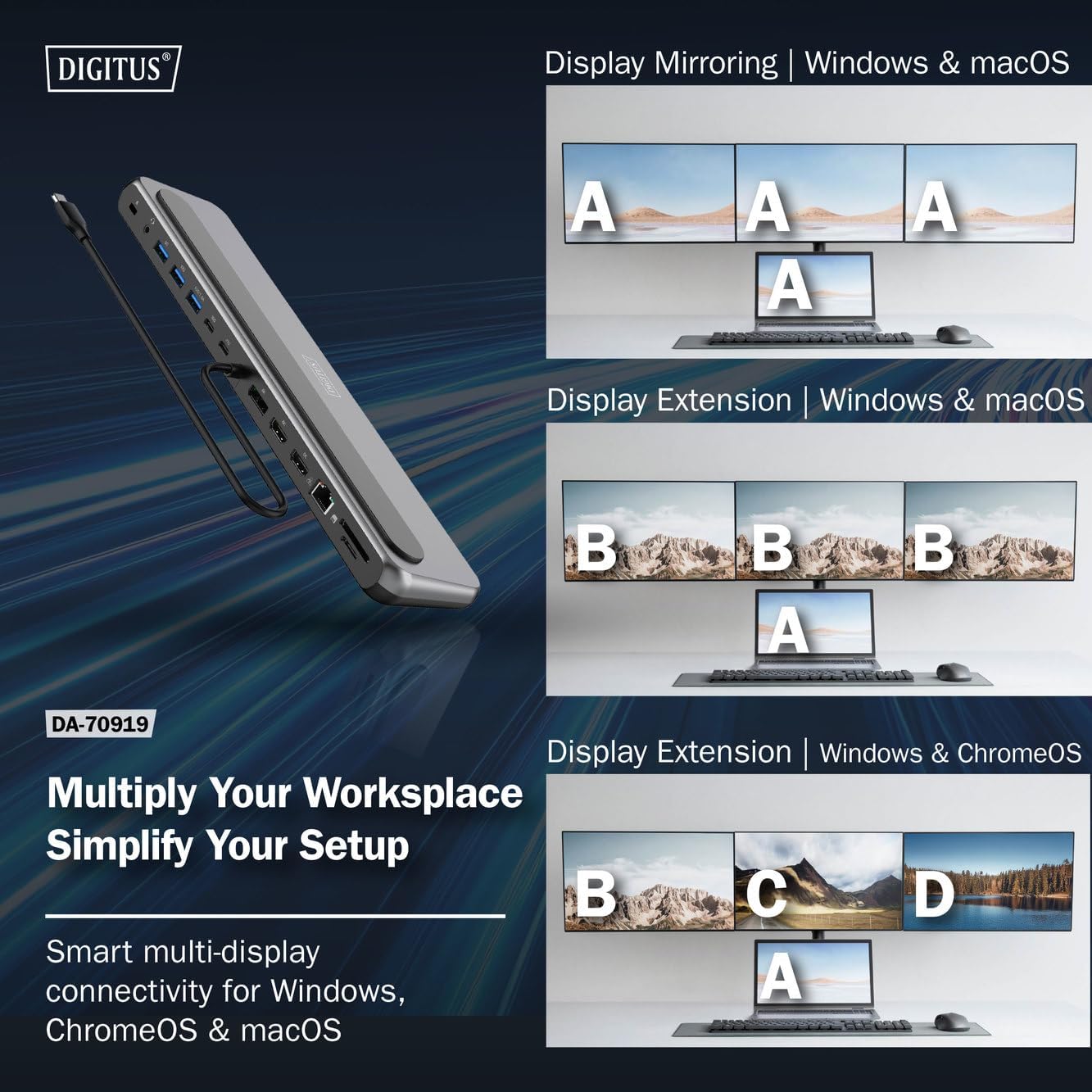
4-сүрөт: Diagram showing display mirroring and extension modes for Windows, macOS, and ChromeOS. This image illustrates the various display configurations supported by the docking station, including mirroring your screen or extending it across multiple external monitors on Windows, macOS, and ChromeOS.
- MirrorMode: Duplicates your laptop's display onto the external monitors.
- Extend Mode (Windows/ChromeOS): Extends your desktop across multiple external monitors, allowing for a multi-tasking environment. Supports dual monitors (2x 4K/60Hz) and triple monitors (1x 4K/60Hz + 2x 4K/30Hz) in MST (Multi Stream Transport) mode.
- Extend Mode (macOS): macOS typically supports extended desktop to one external monitor, with other external monitors mirroring each other.
To configure display settings, access your operating system's display settings (e.g., Windows Display Settings, macOS System Preferences > Displays).
Маалыматтарды өткөрүү
Utilize the USB-A and USB-C data ports for connecting external storage devices, keyboards, mice, and other USB peripherals. The USB 3.2 Gen 2 ports offer speeds up to 10Gbps, while the USB 3.2 Gen 1 port offers speeds up to 5Gbps.
Power Delivery
When a compatible USB-C PD power adapter is connected to the docking station's PD input port, the docking station can deliver up to 85W of power to charge your connected laptop. This allows you to power your laptop and peripherals through a single USB-C connection.
5-сүрөт: Illustration of the docking station's fast charging capability via USB-C Power Delivery. This image demonstrates the Power Delivery function, showing a 100W input to the docking station and an 85W output to charge the connected laptop.
Network Connection
Connect an Ethernet cable to the RJ45 port for a stable and high-speed wired network connection (10/100/1000 Mbps Gigabit Ethernet).
Card Readers
Insert SD or MicroSD cards into the dedicated slots for quick access to photos, videos, and other files. The card readers support transfer speeds up to 104 MBps.
Аудио чыгаруу
Connect your headphones or speakers to the 3.5mm audio jack for audio output.
Техникалык тейлөө
- Тазалоо: Use a soft, dry cloth to clean the surface of the docking station. Avoid using liquid cleaners or solvents.
- Сактагыч: Док-станцияны салкын, кургак жерде, күндүн түз тийген нурларынан жана өтө жогорку температурадан алыс сактаңыз.
- Колдонуу: Avoid dropping or subjecting the device to strong impacts. Do not attempt to disassemble the docking station.
Проблемаларды чечүү
If you encounter issues with your docking station, please refer to the following common solutions:
- Дисплей чыгышы жок:
- Ensure your laptop's USB-C port supports DisplayPort Alternate Mode.
- Check all video cables (HDMI/DP) are securely connected to both the docking station and the monitor.
- Монитор күйгүзүлгөнүн жана туура киргизүү булагына коюлганын текшериңиз.
- Көйгөйдү чечүү үчүн бир эле мониторду туташтырып көрүңүз.
- Ноутбугуңуздун графикалык драйверлерин жаңыртыңыз.
- Ноутбукка кубат жеткирүү жок:
- Ensure a compatible USB-C PD power adapter (up to 100W) is connected to the docking station's PD input port.
- Ноутбугуңуздун USB-C порту Power Delivery функциясын колдой турганын текшериңиз.
- Кубат адаптерин жана кабелин бузулган эместигин текшериңиз.
- USB түзмөктөрү таанылбайт:
- USB түзмөгүн док станциясынын башка портуна кайра туташтырыңыз.
- Ensure the docking station is properly connected to the host laptop.
- If using a high-power USB device, ensure the docking station is connected to an external power adapter.
- Ethernet туташуу маселелери:
- Ethernet кабелинин док станциясына жана роутерге/модемге туташуусун текшериңиз.
- Ноутбугуңуздагы тармак жөндөөлөрүн текшериңиз.
- Роутериңизди/модемиңизди жана ноутбугуңузду өчүрүп-күйгүзүңүз.
- Карта окугуч иштебей жатат:
- Ensure the SD/MicroSD card is inserted correctly and fully.
- Test the card with another device to confirm it is not damaged.
Техникалык шарттар
| Өзгөчөлүк | Спецификация |
|---|---|
| Модел | DA-70919 |
| Хост байланышы | USB-C (интеграцияланган кабель) |
| Video Output | 2x HDMI, 1x DisplayPort (DP) |
| Max. Single Display Resolution | 8K (7680x4320) @ 30Гц |
| Max. Dual Display Resolution (MST) | 2x 4K (3840x2160) @ 60Hz |
| Max. Triple Display Resolution (MST) | 1x 4K@60Hz + 2x 4K@30Hz |
| USB-A маалымат порттору | 2x USB 3.2 Gen 2 (10Gbps), 1x USB 3.2 Gen 1 (5Gbps) |
| USB-C маалымат порт | 1x USB 3.2 Gen 2 (10Gbps) |
| Power Delivery (PD) Input | USB-C PD 3.0 (up to 100W) |
| Power Delivery (PD) Output to Host | 85 Вт чейин |
| Ethernet | RJ45 Gigabit (10/100/1000 Mbps) |
| Card Readers | SD, MicroSD (104 MBps) |
| Аудио | 1x 3.5 мм аудио уячасы |
| Шайкештик | Windows, macOS, ChromeOS |
| Иштөө температурасы | 0°Cден 45°Cге чейин (32°F—113°F) |
| Сактоо температурасы | -10°Cден 70°Cге чейин (14°Fтен 158°Fге чейин) |
Кепилдик жана колдоо
The Digitus DA-70919 USB-C 8K 12-Port Docking Station comes with a 2 жылдык кепилдик from the date of purchase. This warranty covers manufacturing defects and ensures the product functions as described under normal use.
For technical support, warranty claims, or further assistance, please contact your retailer or visit the official Digitus website for contact information. Please have your product model number (DA-70919) and proof of purchase ready when seeking support.