
Introduction
This manual provides detailed instructions for the setup, operation, maintenance, and troubleshooting of your GMKtec Mini PC M2Pro S. This compact desktop computer is equipped with an 11th generation Intel Core i7-1185G7 processor, 32GB DDR4 RAM, and a 512GB NVMe SSD, designed for efficient performance in various applications. Please read this manual thoroughly before using the device to ensure proper functionality and longevity.
Пакеттин мазмуну
Төмөндө тизмеленген нерселердин баары пакетиңизде бар экенин текшериңиз:
- 1 x GMKtec Nucbox Mini PC Computer
- 1 х кубат адаптери
- 1 x VESA монтаждоо бурамалар менен
- 1 x HDMI кабели
- 1 х Колдонуучунун колдонмосу (бул документ)

Image: Contents of the GMKtec Mini PC M2Pro S retail box.
Продукт бүттүview
The GMKtec Mini PC M2Pro S is a high-performance, compact desktop solution. Key features include:
- Процессор: 11th Gen Intel Core i7-1185G7 (up to 4.8 GHz, 4 Cores, 8 Threads, 12MB Cache)
- Эстутум: 32GB DDR4 SODIMM (dual-channel, expandable up to 64GB)
- Сактагыч: 512GB M.2 2280 NVMe SSD (PCIe3.0, expandable up to 2TB), additional M.2 2242 SATA slot (expandable up to 2TB)
- Графика: Intel Iris Xe Graphics G7 96EU
- Дисплей чыгаруу: Supports triple 4K displays via 2 x HDMI (4K@60Hz) and 1 x USB Type-C (4K@60Hz)
- Тармак: 2.5Gbps LAN (RJ45), WiFi 6 (802.11ax), Bluetooth 5.2
- Порттор: USB 3.2, USB Type-C (40Gbps), Audio (3.5mm CTIA)
- Муздатуу: Upgraded quiet cooling fan with copper vapor chamber and multiple exhaust vents
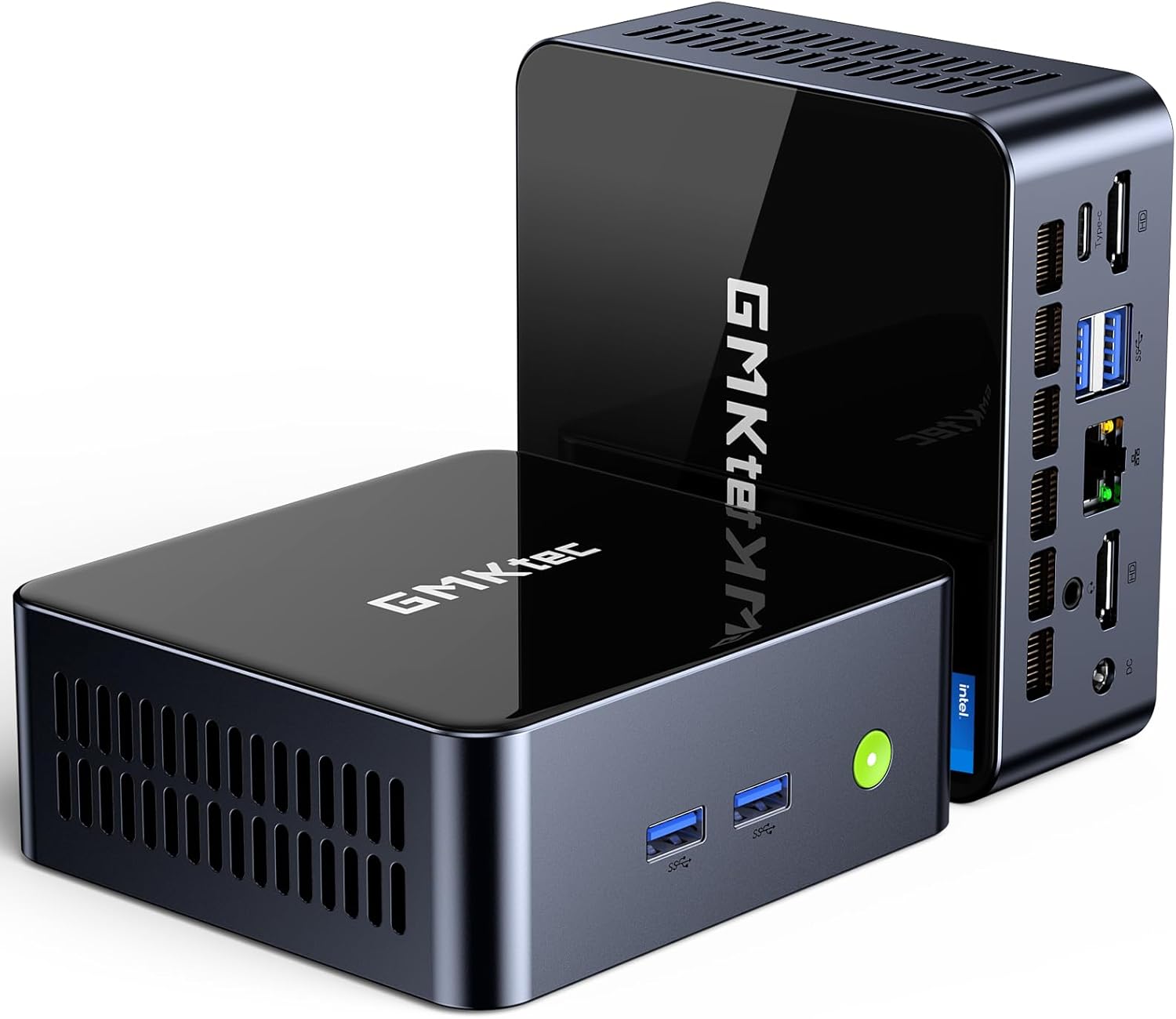
Сүрөт: алдыңкы view of the GMKtec Mini PC M2Pro S.
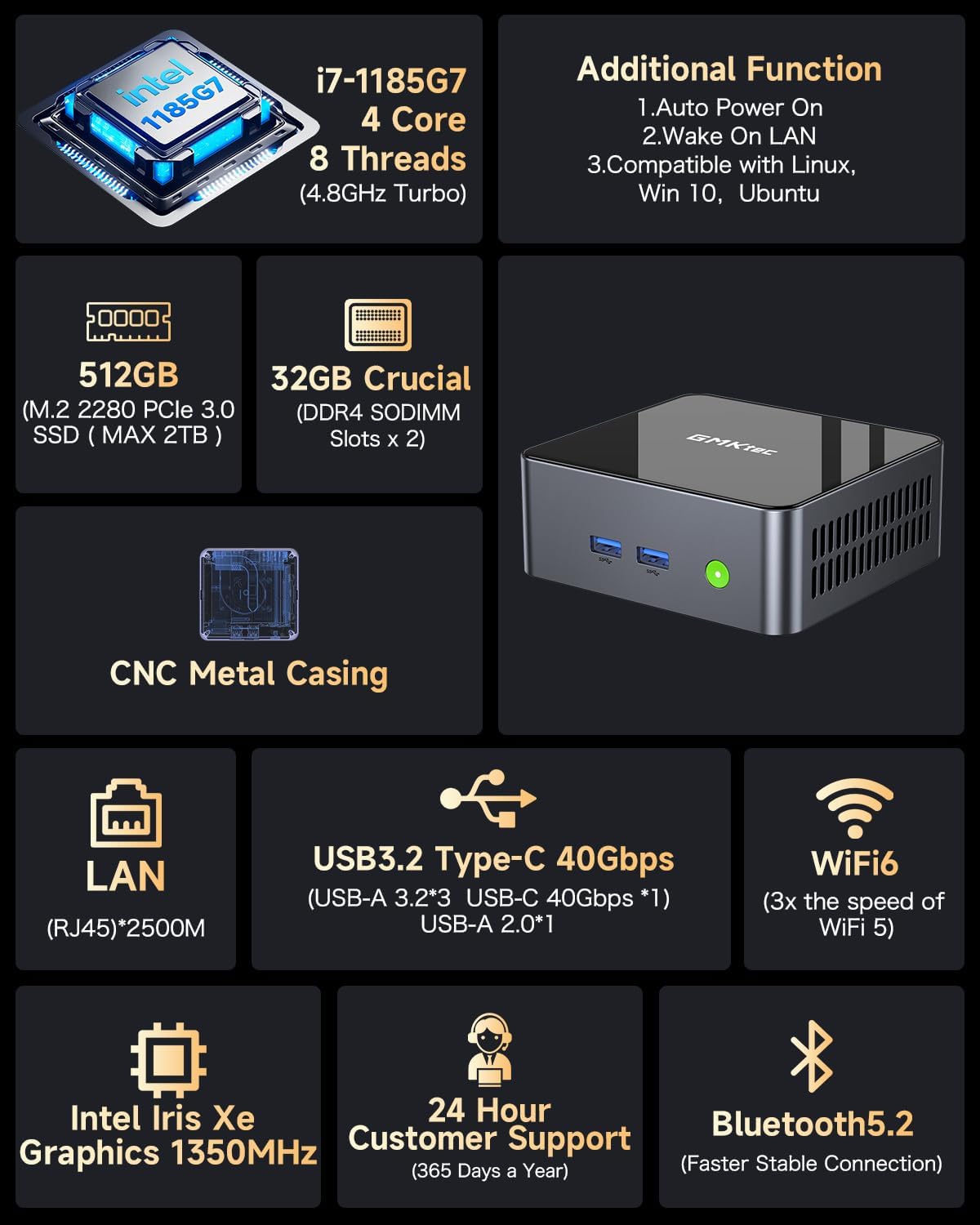
Сүрөт: бүттүview of the GMKtec Mini PC M2Pro S features and specifications.
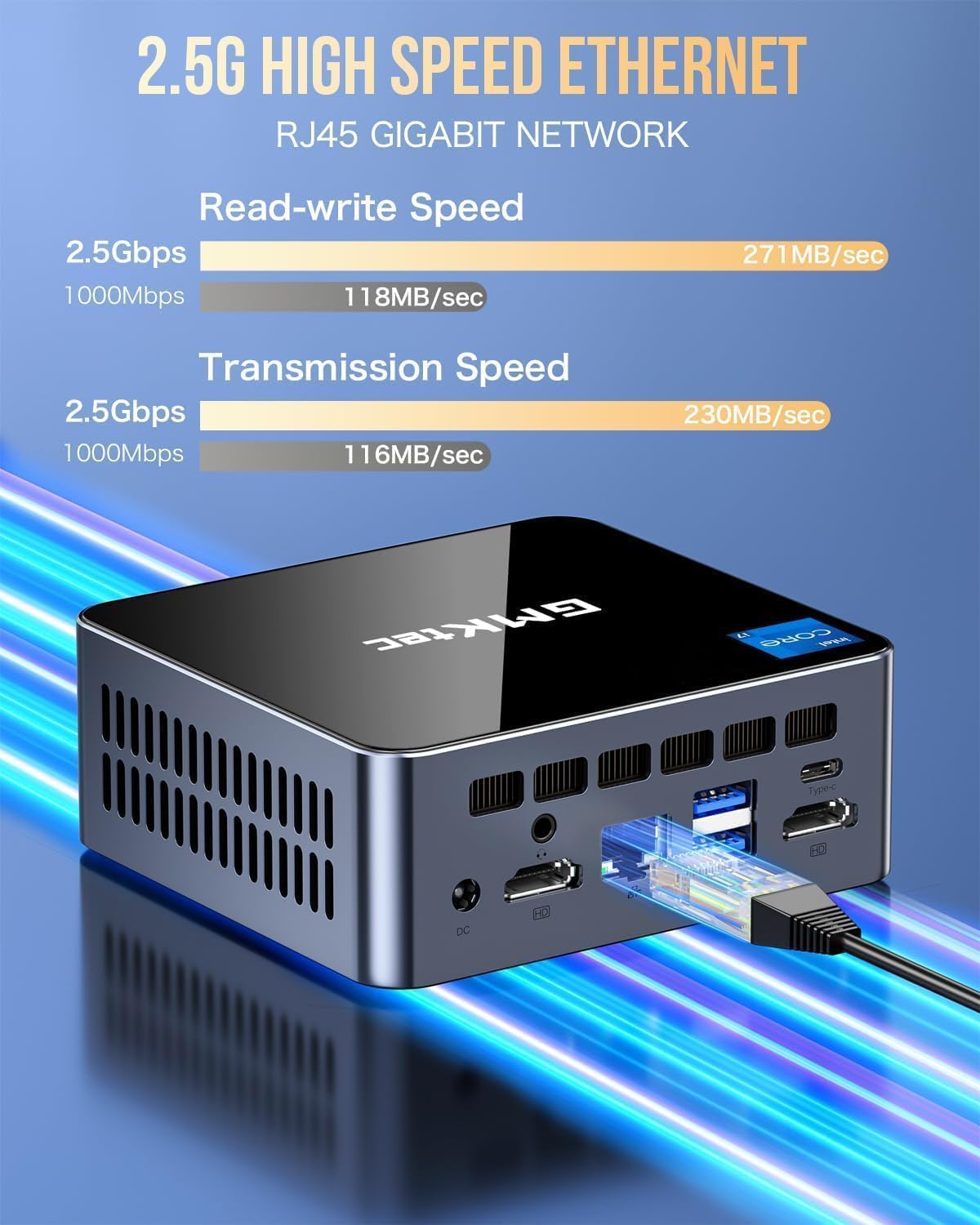
Сүрөт: деталдуу view of the multi-purpose ports on the GMKtec Mini PC M2Pro S.
Орнотуу колдонмосу
- Перифериялык түзүлүштөрдү туташтыруу: Connect your monitor(s) using the HDMI or USB Type-C ports. Connect your keyboard and mouse to the available USB ports.
- Тармак туташуусу: For a wired connection, plug an Ethernet cable into the 2.5Gbps LAN port. For wireless, the device supports WiFi 6 and Bluetooth 5.2, which can be configured after initial boot.
- Кубат туташуу: Connect the provided power adapter to the DC IN port on the mini PC and then to a power outlet.
- Күйгүзүү: Press the power button located on the front of the mini PC. The system will boot up.
- Алгачкы Windows орнотуулары: Follow the on-screen instructions to complete the Windows 11 Pro setup, including language, region, network, and user account creation.
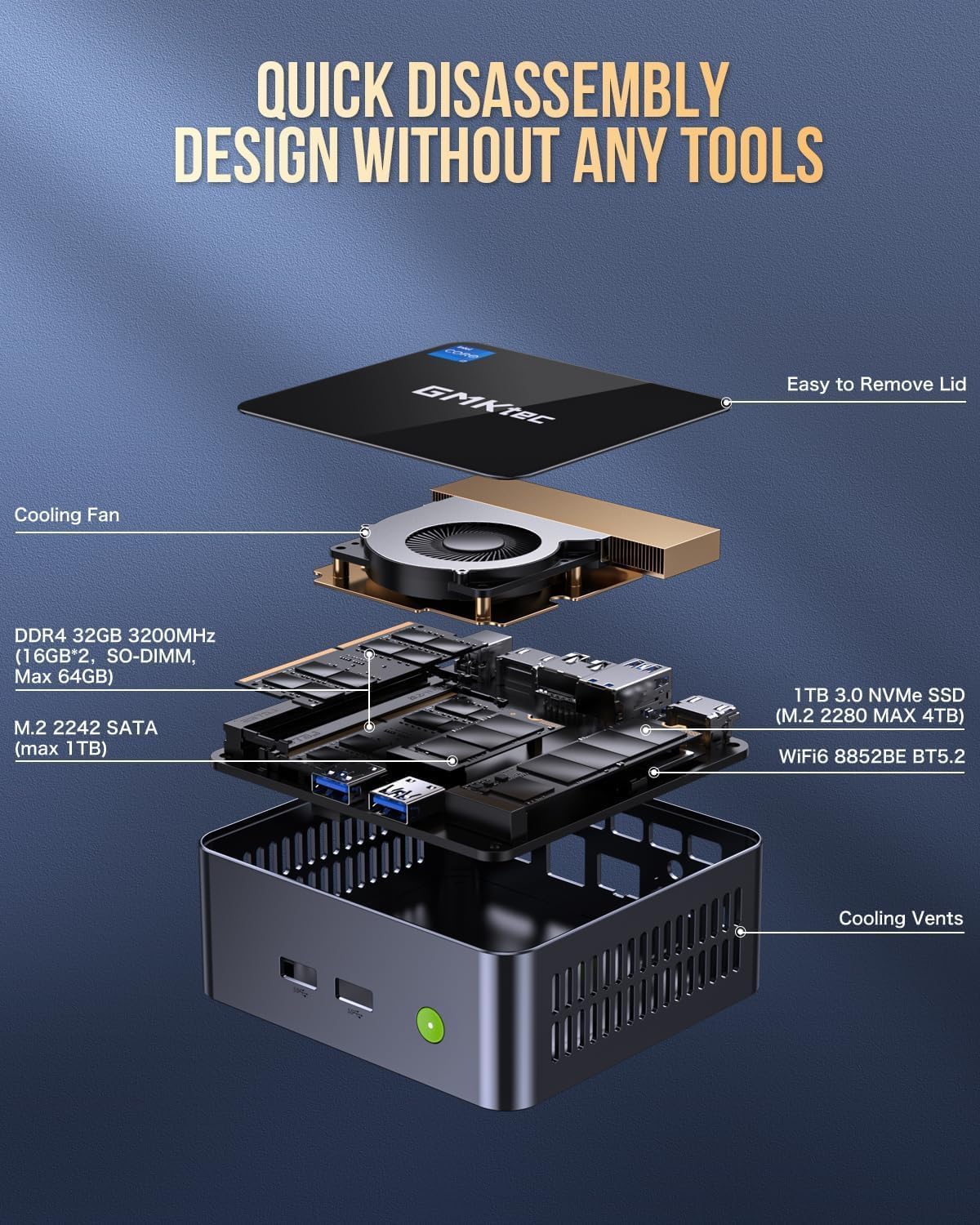
Image: Desktop placement and VESA mount installation options for the Mini PC.
Иштөө нускамалары
Күйгүзүү/өчүрүү
- Күйгүзүү үчүн: Аппараттын алдындагы кубат баскычын басыңыз.
- Жабуу: Windows'тун Start баскычын чыкылдатып, андан кийин Кубат > Өчүрүү дегенди тандаңыз.
- Кайра баштоо үчүн: Windows'тун Start баскычын чыкылдатып, андан кийин Кубат > Кайра баштоону тандаңыз.
Triple Display Setup
The GMKtec Mini PC M2Pro S supports up to three 4K displays simultaneously. Connect your monitors to the available HDMI ports and the USB Type-C port. Once connected, Windows will automatically detect the displays. You can configure display settings (e.g., extend, duplicate) via Орнотуулар > Система > Дисплей.

Сүрөт: Мисample of a triple 4K display setup with the Mini PC.
Network Connectivity
- Зымдуу (LAN): Connect an Ethernet cable to the RJ45 port for a stable 2.5Gbps connection.
- Зымсыз (WiFi): Access network settings in Windows to connect to a WiFi 6 network.
- Bluetooth: Pair Bluetooth devices (e.g., headphones, keyboard, mouse) via Windows Bluetooth settings.
Техникалык тейлөө жана жаңыртуу
Сактагычты кеңейтүү
The GMKtec Mini PC M2Pro S supports storage expansion:
- The existing M.2 2280 NVMe (PCIe3.0) SSD can be upgraded to a maximum of 2TB.
- An additional M.2 2242 SATA slot is available for expansion up to 2TB.
RAM кеңейтүү
The device comes with 32GB DDR4 SODIMM RAM in a dual-channel configuration. It can be expanded up to a maximum of 64GB by replacing the existing modules with higher capacity ones.
Ички компоненттерге кирүү
The mini PC features a quick disassembly design for easy access to internal components for upgrades or maintenance. Carefully remove the lid to access the RAM and SSD slots. Refer to the diagram below for guidance.

Image: Quick disassembly design for internal component access.

Image: Illustration of the upgraded quiet cooling fan system.
Проблемаларды чечүү
If you encounter issues with your GMKtec Mini PC M2Pro S, refer to the following common solutions:
- Кубат жок: Ensure the power adapter is securely connected to both the mini PC and a working power outlet. Check the power button for any damage.
- Дисплей жок: Verify that the monitor is powered on and correctly connected to the mini PC via HDMI or USB Type-C. Try a different cable or monitor if possible. Ensure the correct input source is selected on your monitor.
- No Network Connection (Wired): Check if the Ethernet cable is properly connected to both the mini PC and your router/modem. Verify router status.
- No Network Connection (Wireless): Ensure WiFi is enabled in Windows settings. Check if the correct WiFi network is selected and the password is entered correctly.
- Жай аткаруу: Close unnecessary applications. Check for background processes. Ensure sufficient free storage space. Consider upgrading RAM or SSD if performance issues persist after basic troubleshooting.
- Windowsту активдештирүүдөгү көйгөйлөр: If you experience problems activating Windows 11 Pro, ensure your internet connection is active. If the issue persists, contact GMKtec customer support for assistance.
For further assistance, please contact GMKtec customer support.
Техникалык мүнөздөмөлөр
| Өзгөчөлүк | Спецификация |
|---|---|
| Бренд | GMKtec |
| Модель номери | M2 Pro S |
| Процессор | Intel Core i7-1185G7 (4.8 GHz Turbo, 4 Cores, 8 Threads) |
| RAM | 32GB DDR4 SDRAM (3200 MHz, Dual-channel, expandable to 64GB) |
| Сактагыч | 512GB M.2 2280 NVMe SSD (PCIe 3.0, expandable to 2TB), M.2 2242 SATA slot (expandable to 2TB) |
| Графикалык сопроцессор | Intel Iris Xe Graphics G7 96EU |
| Max Screen Resolution | 5120 x 2880 пиксел |
| Операция системасы | Windows 11 Pro |
| Зымсыз түрү | WiFi 6 (802.11ax), Bluetooth 5.2 |
| LAN | 2.5Gbps RJ45 Ethernet |
| USB порттору | 3 x USB 3.2, 1 x USB Type-C (40Gbps) |
| Video Output | 2 x HDMI (4K@60Hz), 1 x USB Type-C (4K@60Hz) |
| Аудио порт | 3.5 мм CTIA |
| Элемент Салмагы | 3.3 фунт |
| Пакеттин өлчөмдөрү | 6.38 x 6.26 x 4.69 дюйм |
Кепилдик жана колдоо
Your GMKtec Mini PC M2Pro S comes with a standard manufacturer's warranty. Please refer to the warranty card included in your package for specific terms and conditions. For technical support, troubleshooting assistance, or warranty claims, please contact GMKtec customer service directly. Contact information can typically be found on the GMKtec official webсайтка же продуктуну сатып алган сатуучу аркылуу.
Бул продуктунун сатуучусу GMKtec一Store. Please reach out to them for product-specific inquiries.