
1. Киришүү
Thank you for choosing the INFIYA K1 2K Window Camera. This manual provides detailed instructions for setting up, operating, and maintaining your camera to ensure optimal performance and home security. Please read this manual thoroughly before use and retain it for future reference.
2. Кутуда эмне бар
Сиздин пакетте бардык компоненттер бар экенин текшериңиз:
- 1 x INFIYA K1 Camera
- 1 х кубат адаптери
- 1 x Type-C Power Cable
- Magnetic Stickers
- Кабелдик клиптер
- 1 x Quick Start Guide

Image: Contents of the INFIYA K1 camera box.
3. Продукт бүтүп калдыview
Familiarize yourself with the main components of your INFIYA K1 camera:

Image: Labeled diagram of the INFIYA K1 camera components.
- Индикатор жарыгы: Камера абалын көрсөтөт.
- Объектив: 2K резолюциядагы видеону тартат.
- Magnetic Part: For easy window mounting.
- Калыбына келтирүү баскычы: Used for factory reset or pairing.
- TF карта уячасы: For local storage (supports up to 128GB, card not included).
- Баяндамачы: эки тараптуу аудио байланыш үчүн.
- Type-C Power Cable: Connects the camera to the power adapter.
4. Орнотуу колдонмосу
4.1 Physical Installation (Drill-Free)
The INFIYA K1 camera features a magnetic design for easy, drill-free installation on any interior window.
- Clean the Window: Ensure the glass surface is clean and dry to prevent condensation issues.
- Apply Magnetic Sticker: Peel off the protective film from the magnetic sticker and firmly attach it to the desired location on your window.
- Камераны тиркөө: Align the camera with the magnetic sticker and attach it. The magnetic connection will hold it securely.
- Күйгүзүү: Connect the Type-C power cable to the camera and plug the power adapter into an electrical outlet.

Image: Step-by-step physical installation of the camera.
4.2 App Connection and Wi-Fi Configuration
To access your camera's features, you need to connect it to the Wansview Булут колдонмосу.
- Колдонмону жүктөп алуу: Download the Wansview Cloud App from your smartphone's app store (available for Android and iOS).
- Каттоо эсеби: Колдонмону ачып, жаңы каттоо эсебин каттаңыз же сизде мурунтан эле бар болсо кириңиз.
- Түзмөк кошуу: Follow the in-app instructions to add a new device. Select the INFIYA K1 model.
- Wi-Fi'га туташуу: Ensure your camera is powered on and near your Wi-Fi router (within 3 feet for initial setup). The K1 camera supports dual-band Wi-Fi (2.4Ghz & 5Ghz). Follow the app prompts to connect the camera to your home Wi-Fi network.

Image: App connection and Wi-Fi configuration steps.
5. Операция
5.1 Live View жана 2K чечилиши
Туташкандан кийин, түз эфирге Wans аркылуу кириңизview Cloud App. The INFIYA K1 provides sharp 2K resolution video, capturing clear details of your outdoor environment through the window, optimized to reduce glare and reflection.
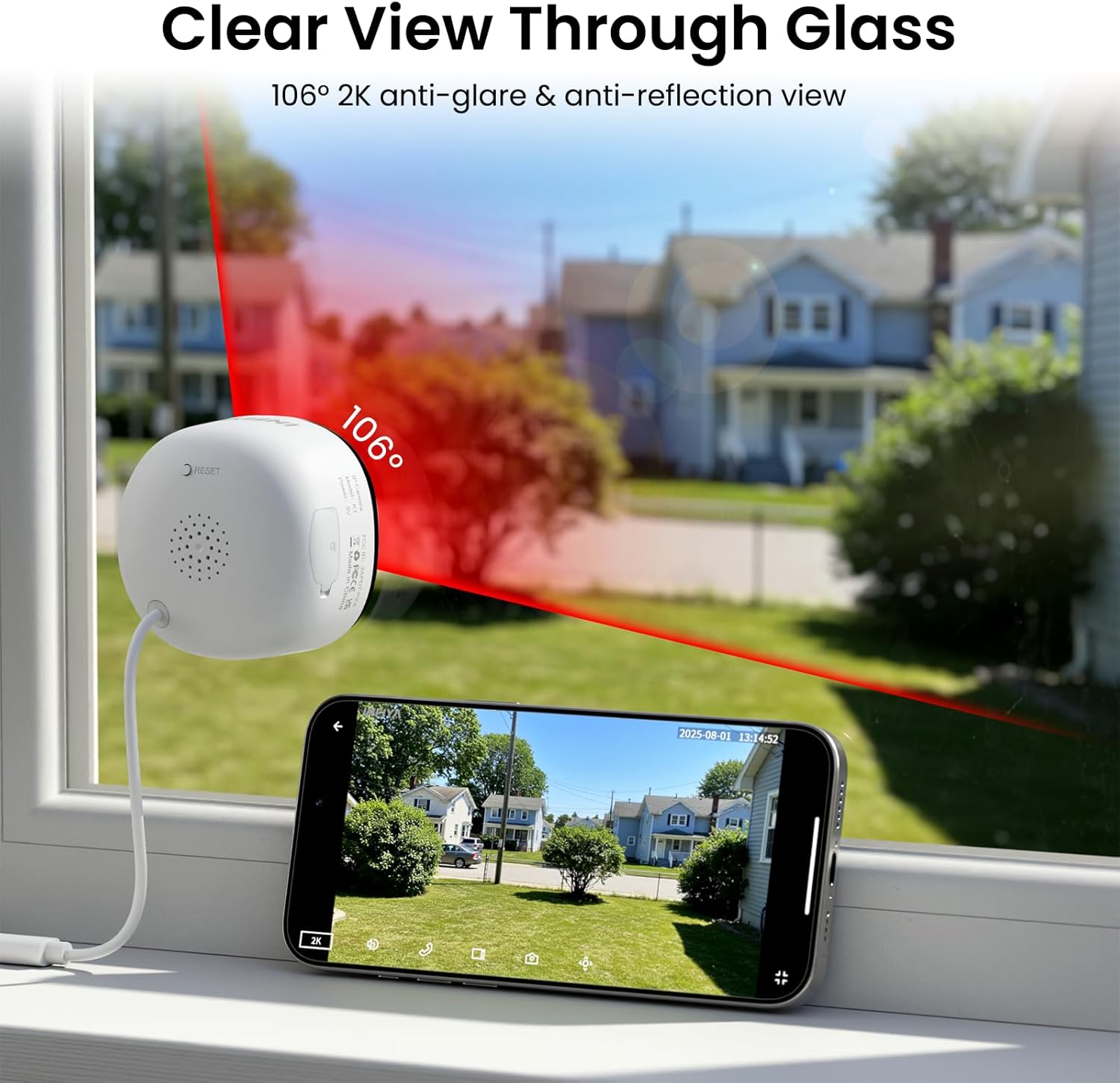
Image: Clear 2K view through glass from the camera.
5.2 Толук түстүү түнкү көрүү
The camera features advanced Black Light Color Technology, enabling vivid full-color footage even in low-light conditions (e.g., starlight/moonlight). This allows for better identification of details at night compared to traditional infrared black and white night vision.

Image: Comparison of night vision capabilities.
5.3 Motion & Human Detection with Alerts
The INFIYA K1 camera utilizes AI-powered human detection to minimize false alarms. When human activity is detected, the camera activates a three-layer alert system:
- Immediate app notifications to your phone.
- An optional siren (can be configured in the app).
- Automatic video clip recording of the event.
You can customize detection zones and sensitivity levels within the app.
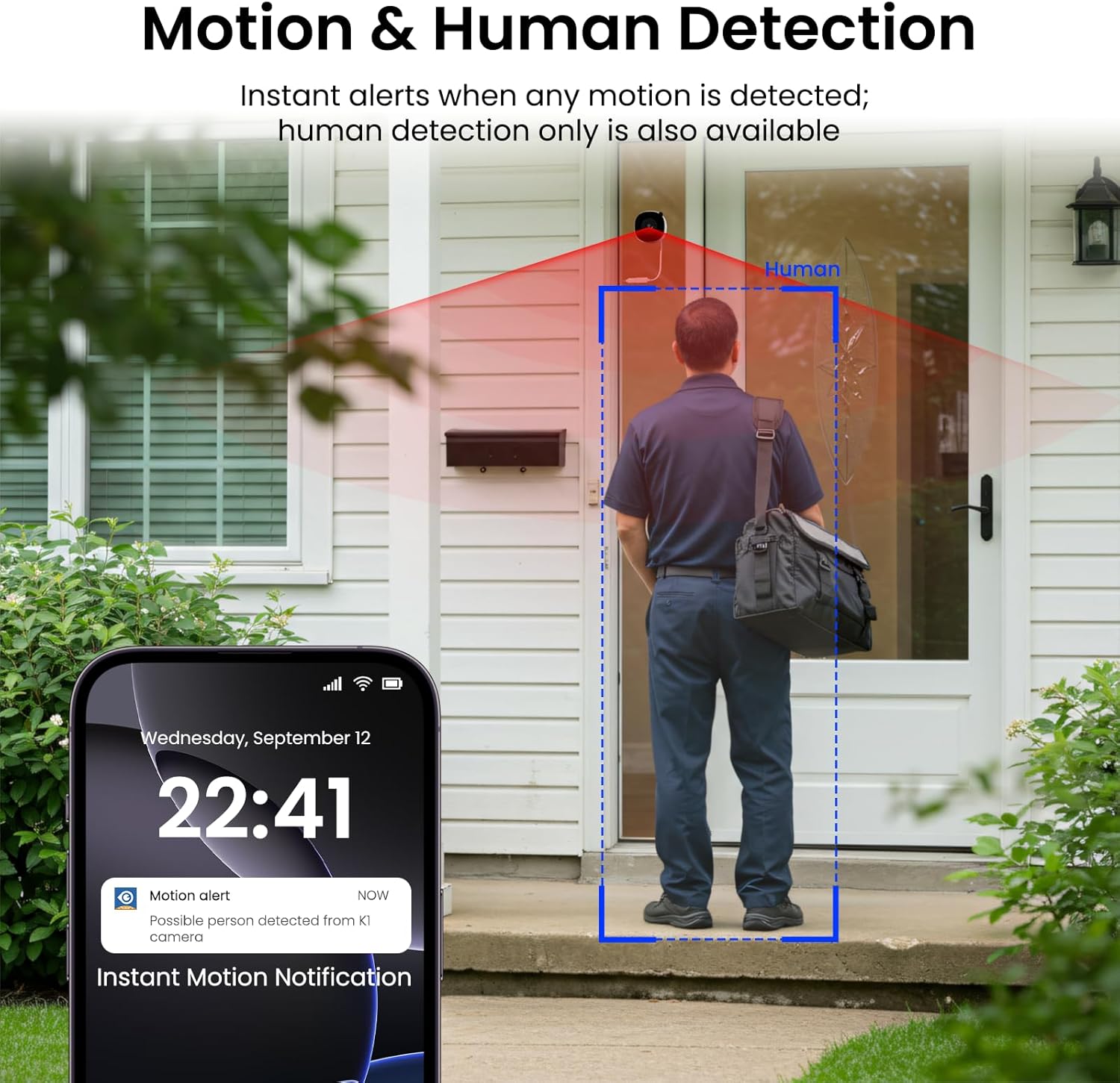
Image: Motion and human detection in action.
5.4 Эки тараптуу аудио
The integrated speaker and microphone allow for two-way communication. You can speak through the camera to visitors or deter intruders directly from your smartphone app.
5.5 Multi-User Sharing & Multi-Device Support
Share camera access with family members through the app. The camera also supports integration with multiple devices and smart home platforms like Alexa and Google Assistant for convenient voice control and viewing.

Сүрөт: Көп колдонуучу менен бөлүшүү функциясы.

Image: Multi-device support with smart assistants.
6. Сактоо параметрлери
The INFIYA K1 camera offers flexible recording and storage solutions:
6.1 Local Storage (TF Card)
Insert a TF (microSD) card (up to 128GB, not included) into the camera's slot for continuous 24/7 recording. The camera features a smart overwrite function that automatically manages storage space by cycling old footage.
6.2 Cloud Storage (Optional)
For enhanced security and accessibility, you can opt for cloud storage. All videos uploaded to the cloud are encrypted. Cloud plans offer various features and storage durations, as detailed in the app.

Сүрөт: Жергиликтүү жана булуттагы сактоо параметрлери.
6.3 Recording Modes Comparison

Image: Comparison table of recording modes.
7. Техникалык шарттар
Detailed technical specifications for the INFIYA K1 camera:
| Өзгөчөлүк | Деталь |
|---|---|
| Модель аты | K1 |
| Бренд | ИНФИЯ |
| Байланыш технологиясы | Зымсыз (Wi-Fi) |
| Wi-Fi жыштыгы | 5 ГГц жана 2.4 ГГц |
| Видео тартуунун резолюциясы | 3 МП (2К) |
| Viewбурч | 105 градус |
| Түнкү көрүнүш | Color Night Vision (Black Light Color Technology) |
| Түнкү көрүү диапазону | 29.5 Фут |
| аныктоо өзгөчөлүктөрү | Кыймыл жана адамды табуу |
| Эскертүү түрү | Motion Only (Configurable) |
| Аудио | Эки тараптуу сүйлөшүү |
| Сактагыч параметрлери | TF Card (up to 128GB), Cloud Storage (Optional) |
| Power Source | Corded Electric (5V, 5 Watt-hours) |
| Тоо түрү | Window Mount (Magnetic) |
| Шайкеш түзмөктөр | Alexa / Google Жардамчысы |
| Элементтин өлчөмдөрү | 2.41 x 1.57 x 2.41 дюйм |
| Ички сыртта колдонуу | Indoor (for window monitoring) |
8. Кыйынчылыктарды
If you encounter issues with your INFIYA K1 camera, refer to the following common problems and solutions:
- Камера Wi-Fiга туташпай жатат:
- Камеранын роутериңиздин диапазонунда экенин текшериңиз.
- Wi-Fi сырсөзүңүздүн туура экенин текшериңиз.
- Check if your router supports 2.4Ghz or 5Ghz, and ensure the camera is attempting to connect to a compatible band.
- Try resetting the camera using the reset button and re-attempting the setup process.
- Видеонун сапаты начар:
- Камера объективинин таза экенин текшериңиз.
- Check your internet connection speed; a stable connection is crucial for 2K streaming.
- Verify the camera is positioned correctly on the window to minimize glare or reflections.
- Кыймыл жөнүндө эскертүүлөр иштебей жатат:
- Confirm motion detection is enabled in the app settings.
- Adjust the detection sensitivity and detection zones.
- Смартфонуңузда колдонмо эскертмелери иштетилгенин текшериңиз.
- TF картасына жаздыруу жок:
- Ensure a TF card is properly inserted into the slot.
- Check if the TF card is formatted correctly (usually FAT32). Format it via the app if necessary.
- Verify that continuous recording or event recording to TF card is enabled in the app settings.
For further assistance, please refer to the in-app help section or contact INFIYA customer support.
9. Коопсуздук маалыматы
Please observe the following safety guidelines to ensure safe operation and prevent damage to your device:
- Берилген кубат адаптерин жана кабелин гана колдонуңуз.
- Do not expose the camera to extreme temperatures, humidity, or direct water.
- Avoid placing the camera near strong magnetic fields.
- Камераны балдар жана үй жаныбарлары жетпеген жерде сактаңыз.
- Камераны өз алдынча бөлүүгө же оңдоого аракет кылбаңыз. Тейлөө үчүн квалификациялуу кызматкерлерге кайрылыңыз.
- Камеранын кулап түшпөшү үчүн бекем орнотулганын текшериңиз.
10. Кепилдик жана колдоо
Your INFIYA K1 camera comes with a standard manufacturer's warranty. Please refer to the warranty card included in your package or visit the official INFIYA webдеталдуу кепилдик шарттары жана шарттары үчүн сайт.
For technical support, product inquiries, or warranty claims, please contact INFIYA customer service through the contact information provided in the app or on the official webсайт.