
1. Киришүү
Thank you for choosing the ROCKBROS Bike Taillight Smart Tag. This device is designed to enhance your cycling safety and provide additional security features. It integrates a powerful taillight with smart functionalities, including brake sensing, multiple light modes, and a built-in tracking locator compatible with iOS devices. Please read this manual carefully before use to ensure proper operation and maintenance.
2. Product List (What's in the Box)
Орнотуудан мурун, бардык компоненттердин бар экендигин текшериңиз:
- ROCKBROS Bike Taillight Smart Tag
- Type-C заряддоо кабели
- M5 гайка
- Бурама
- Seat cushion bracket
- ачкыч
- Rubber rings for seat post mounting

3. Орнотуу жана орнотуу
The taillight offers dual mounting options: under the seat (saddle bow) or on the seat post.
3.1. Орундуктун мамысын орнотуу
- Attach the seat post bracket to your bicycle's seat post using the provided rubber rings. Ensure a snug fit.
- Slide the taillight onto the bracket until it clicks into place.
- Adjust the angle of the taillight as desired.

3.2. Under-Seat (Saddle Bow) Mounting
- Secure the seat cushion bracket to the saddle rails using the M5 nut and screw with the provided wrench.
- Slide the taillight onto the bracket until it locks securely.
- Adjust the angle of the taillight for optimal visibility.
3.3. Adjustable Angle
The taillight features an adjustable angle mechanism, allowing you to tilt it up or down to suit your riding position and ensure maximum visibility.

4. Иштөө нускамалары
4.1. Күйгүзүү/өчүрүү жана режимди тандоо
Press and hold the power button to turn the taillight on or off. Short press the button to cycle through the 6 available light modes. The device includes a memory function, retaining the last used mode upon restart.
4.2. Light Modes and Brightness
The taillight offers 6 distinct light modes and 2 brightness levels. To switch between high and low brightness, press the button when the taillight is off.
- Ring Steady: 11-15 hours runtime
- Center Steady: 26-35 hours runtime
- Center Slow Flash: 12-14 hours runtime
- Ring Fast Flash: 11-13 hours runtime
- Дем алуу режими: 27-29 hours runtime
- Center Fast Flash: 42-45 hours runtime

4.3. Акылдуу тормоз сенсору
The taillight is equipped with a smart brake sensor. When deceleration is detected, the light will automatically brighten and flash rapidly for approximately 3 seconds to alert vehicles and pedestrians behind you.

Turning Brake Sensor On/Off:
- Өчүрүү үчүн: Rotate the light upward and hold for 1 second.
- Иштетүү үчүн: Rotate the light in the opposite direction and hold for 1 second. When enabled, the light will stay bright if tilted.
4.4. Built-in Tracking Locator
The taillight features an integrated tracking locator, compatible with iOS devices. This allows you to monitor your bike's location in real-time via a connected app, aiding in theft prevention and tracking during rides or when parked. Follow the instructions provided with your iOS device for pairing and tracking setup.
5. Заряддоо жана Батарея
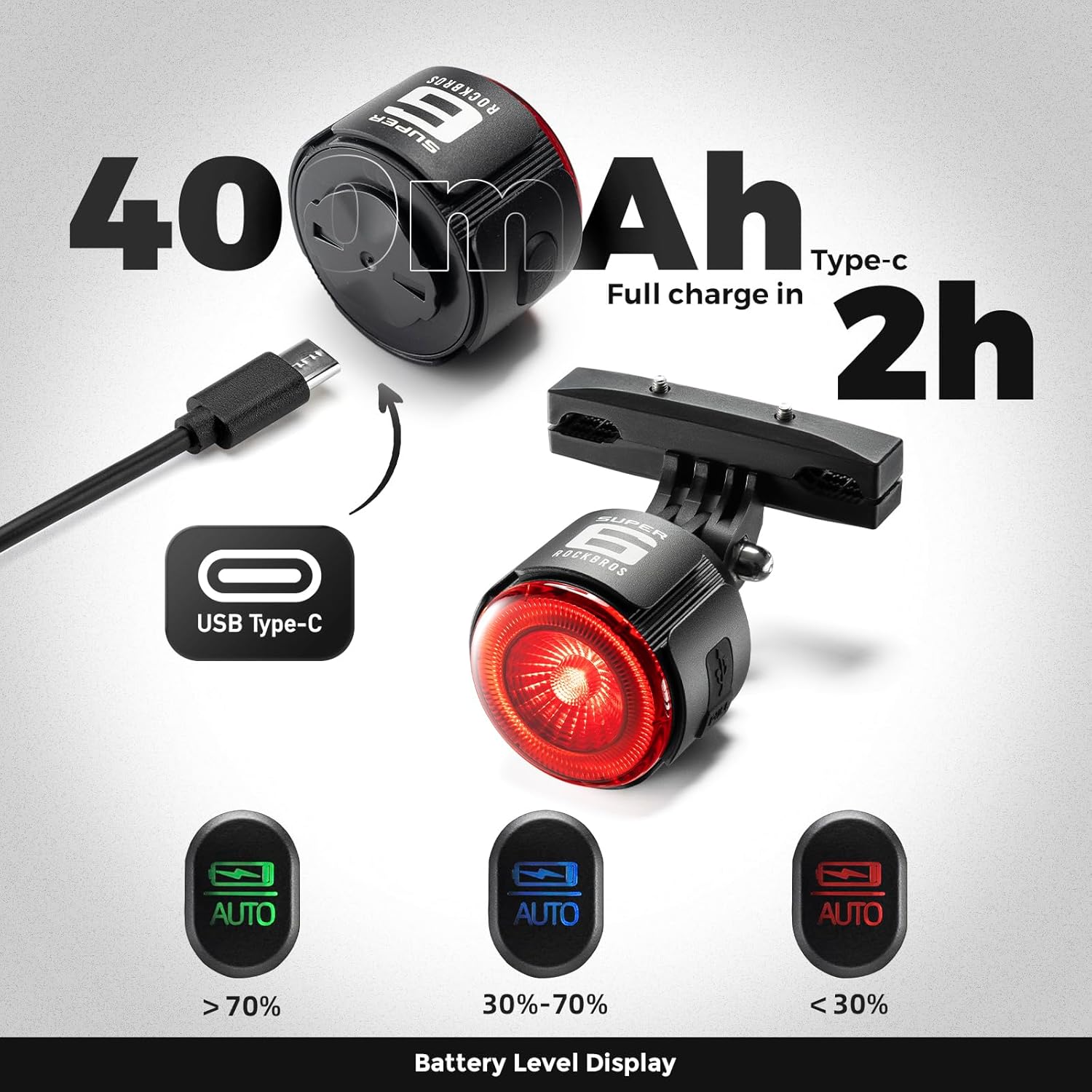
The taillight is powered by a 420mAh battery and charges via a Type-C port. A full charge typically takes approximately 2 hours.
5.1. Заряддоо көрсөткүчү
- Кызыл жарык: Түзмөк учурда кубатталып жатканын көрсөтөт.
- Жашыл жарык: Indicates the device is fully charged.
5.2. Power Status Indication
The remaining battery power is indicated by different light colors:
- Жашыл жарык: Батарея деңгээли > 70%
- Көк жарык: Батареянын деңгээли 30% - 70%
- Кызыл жарык: Батарея деңгээли < 30%
6. Техникалык тейлөө
- Тазалоо: Wipe the taillight with a soft, damp кездеме. Абразивдүү тазалагычтарды же эриткичтерди колдонуудан алыс болуңуз.
- Суу каршылык: The device is rated IPX5 waterproof. Ensure the Type-C charging port's dust plug is firmly inserted to maintain water resistance, especially before riding in wet conditions.
- Жылуулук таркатылышы: The aluminum alloy shell is designed for efficient heat dissipation. Ensure the light is not covered during operation to prevent overheating.
- Сактагыч: Store the taillight in a cool, dry place when not in use. If storing for extended periods, charge the battery to approximately 50% to prolong its lifespan.

7. Кыйынчылыктарды
- Жарык күйбөйт: Ensure the battery is charged. Connect the taillight to a power source using the Type-C cable.
- Тормоз сенсору иштебей жатат: Verify that the brake sensor is enabled (refer to section 4.3). Ensure the taillight is mounted securely and not obstructed.
- Tracking locator not connecting to iOS: Ensure Bluetooth is enabled on your iOS device. Follow the specific pairing instructions for the tracking feature. If issues persist, try resetting the taillight or consulting your iOS device's support resources.
- Батарейканын кыска мөөнөтү: Ensure the taillight is fully charged before use. Operating in high brightness or certain flash modes will consume battery faster. Check for any background processes if the tracking feature is constantly active.
- Light appears dim: The light has two brightness levels. Ensure you have selected the desired brightness level (refer to section 4.2).
8. Техникалык шарттар
| Бренд | РОКБРОС |
| Модель номери | 2420002001 |
| Материал | Алюминий |
| Түс | Кара |
| Power Source | Батарея менен иштейт (420mAh) |
| Заряддоо порту | Type-C |
| Сууга туруктуулук деңгээли | IPX5 (Суу өткөрбөйт) |
| Number of Light Settings | 6 Modes, 2 Brightness Levels |
| Монтаж түрү | Seat Mount & Seatpost Mount |
9. Кепилдик жана колдоо
9.1. Кепилдик маалыматы
This ROCKBROS Bike Taillight Smart Tag менен келет 2 жылдык Өндүрүүчүнүн КепилдигиБул кепилдик кадимки колдонуудагы материалдардын жана жасалгалоодогу кемчиликтерди камтыйт. Ал туура эмес колдонуудан, кырсыктардан, уруксатсыз өзгөртүүлөрдөн же кадимки эскирүүдөн келип чыккан зыянды камтыбайт. Кепилдик дооматтары үчүн сатып алганыңызды тастыктаган документти сактап коюңуз.
9.2. Кардарларды колдоо кызматы
For technical assistance, warranty claims, or any questions regarding your ROCKBROS product, please visit the official ROCKBROS store or contact their customer service. You can find more information and contact details at the Amazon'догу ROCKBROS дүкөнү.