
1. Киришүү
This manual provides detailed instructions for the safe and efficient use of your Surfans F20 Pro Android Hi-Res Music Player. Please read this manual thoroughly before operating the device and retain it for future reference.
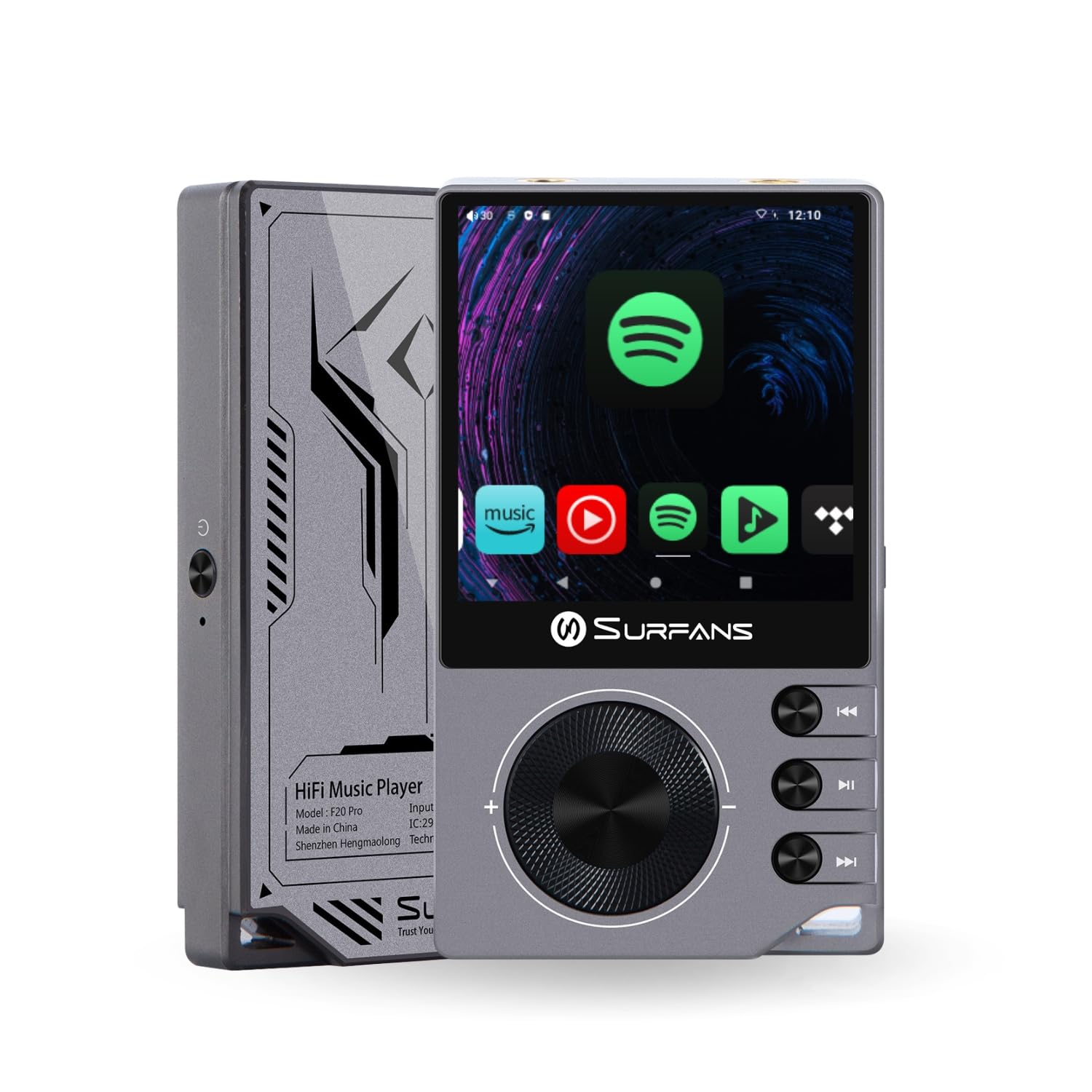
The Surfans F20 Pro Hi-Res Music Player, showcasing its compact design and touchscreen interface.
2. Пакеттин мазмуну
Пакетте бардык буюмдар бар экенин текшериңиз:
- Surfans F20 Pro Hi-Res Music Player
- USB Type-C кабели
- 32 GB MicroSD Memory Card (pre-installed or separate)
- Коргоочу кап
- Колдонуучунун Колдонмосу (бул документ)
3. Түзмөк бүттүview
Familiarize yourself with the physical components and ports of your F20 Pro player.

Алдыңкы жана арткы view of the Surfans F20 Pro, highlighting its robust CNC metal chassis and button layout.
3.1. Негизги өзгөчөлүктөрү
- Dual ESS9018Q2M DACs: For high-fidelity audio processing.
- Octa-Core Android 12 System: Enables streaming app compatibility and smooth operation.
- 3.5mm Single-Ended & 4.4mm Balanced Outputs: Versatile headphone connectivity.
- Bluetooth 5.0 with LDAC: High-quality wireless audio transmission.
- Dual-Band Wi-Fi (2.4GHz & 5GHz): For stable internet connectivity.
- Кеңейтүүчү сактагыч: Supports up to 1TB via MicroSD card.
- 2.7 дюймдук сенсордук экран: Интуитивдик колдонуучу интерфейси.
4. Орнотуу
4.1. Аппаратты заряддоо
Before first use, fully charge the F20 Pro. Connect the included USB Type-C cable to the device's charging port and a compatible USB power adapter (not included) or computer USB port. The charging indicator will show the charging status.
4.2. MicroSD картасын салуу
The F20 Pro supports MicroSD cards up to 1TB for expanded storage. Locate the MicroSD card slot on the side of the device. Gently insert the card until it clicks into place. To remove, push the card in again until it springs out.
4.3. Баштапкы күйгүзүү
Press and hold the power button until the screen illuminates. Follow the on-screen prompts to complete the initial setup, including language selection and Wi-Fi connection.
4.4. Wi-Fiга туташуу
багыттоо Орнотуулар > Тармак жана интернет > Wi-Fi. Select your desired network and enter the password if prompted. The F20 Pro supports both 2.4GHz and 5GHz Wi-Fi bands.

The Surfans F20 Pro demonstrating its dual-band Wi-Fi capability for fast and stable connections.
4.5. Bluetooth Жупташтыруу
Bluetooth гарнитурасын же динамиктерин туташтыруу үчүн:
- Bluetooth түзмөгүңүз жупташтыруу режиминде экенин текшериңиз.
- On the F20 Pro, go to Орнотуулар > Туташкан түзмөктөр > Жаңы аппаратты жупташтыруу.
- Select your device from the list and confirm pairing.

An illustration of the Bluetooth 5.0 chip, indicating support for high-resolution wireless audio codecs like LDAC.
5. Аппаратты иштетүү
5.1. Негизги навигация
The F20 Pro features a 2.7-inch touchscreen for navigation. Swipe to scroll, tap to select, and use the physical buttons for quick controls:
- Кубат баскычы: Power on/off, screen on/off.
- Көлөм дөңгөлөгү: Аудио чыгаруунун үнүн тууралайт.
- Ойнотуу башкаруу баскычтары: Ойнотуу/тындыруу, кийинки трек, мурунку трек.
5.2. Музыканы ойнотуу
The F20 Pro supports various audio formats including DSD512, 192kHz/24bit, FLAC, WAV, WMA, M4A, MP3, MP2, and AAC.
5.2.1. Жергиликтүү Files
Музыканы которуу files to the device's internal storage or MicroSD card via USB connection to a computer. Use the pre-installed music player application to browse and play your library.
5.2.2. Агымдуу тиркемелер
The Android 12 operating system allows installation of streaming apps like Spotify, Apple Music, Tidal, or YouTube. Connect to Wi-Fi and download apps from the Google Play Store or other compatible sources.

The Surfans F20 Pro's screen showing various streaming application icons, demonstrating its Android capabilities.
5.3. Headphone Connections
The device offers both single-ended and balanced audio outputs.
- 3.5 мм бир учтуу чыгаруу: Standard headphone jack (125mW/32Ω).
- 4.4мм салмактуу чыгаруу: For enhanced audio performance with compatible headphones (500mW/32Ω).

Жакын план view of the 3.5mm single-ended and 4.4mm balanced audio output ports on the Surfans F20 Pro.
6. Техникалык тейлөө
6.1. Тазалоо
Use a soft, dry, lint-free cloth to clean the device. Avoid using abrasive cleaners or solvents, which may damage the surface.
6.2. Программалык камсыздоону жаңыртуу
Periodically check for software updates to ensure optimal performance and access to new features. Updates can typically be found in Орнотуулар > Система > Системаны жаңыртуу.
6.3. Батареяга кам көрүү
Батареянын иштөө мөөнөтүн узартуу үчүн, түзмөктү тез-тез толук зарядсыздандырбаңыз. Түзмөктү узак убакыт бою колдонбогондо салкын, кургак жерде сактаңыз.

Ички view of battery cells, representing the long-lasting battery capacity of the F20 Pro.
7. Кыйынчылыктарды
If you encounter issues with your F20 Pro, refer to the following common problems and solutions:
| Көйгөй | Мүмкүн себеп | Чечим |
|---|---|---|
| Түзмөк күйбөйт | Аз батарея; Системанын бузулушу | Charge the device; Press and hold the power button for 10-15 seconds to force restart. |
| Үн чыгышы жок | Volume too low; Incorrect output selected; Faulty headphones | Increase volume; Check headphone connection; Test with different headphones. |
| Wi-Fi'га туташпай жатат | Incorrect password; Out of range; Router issue | Verify password; Move closer to router; Restart router. |
| Slow performance/App crashes | Өтө көп тиркемелер иштеп жатат; Сактагычтын аздыгы; Эскирген программалык камсыздоо | Close background apps; Free up storage; Check for system updates. |
8. Техникалык шарттар
Detailed technical specifications for the Surfans F20 Pro:
| Өзгөчөлүк | Деталь |
|---|---|
| Бренд | Surfans |
| Модель аты | F20 PRO |
| ЦАП чиптери | Dual ESS9018Q2M |
| Оп-Amps | Dual OPA1612 |
| Операция системасы | Android 12 |
| RAM | 3 ГБ |
| Ички сактагыч | 32 ГБ |
| Кеңейтүүчү сактагыч | MicroSD картасы аркылуу 1 ТБ чейин |
| Screen Size | 2.73 дюйм |
| Байланыш | Aux, Bluetooth 5.0 (LDAC), USB Type-C, Wi-Fi (2.4GHz & 5GHz) |
| Аудио чыгуулар | 3.5mm Single-Ended (125mW/32Ω), 4.4mm Balanced (500mW/32Ω) |
| Колдоого алынган аудио форматтары | DSD512, 192kHz/24bit, FLAC, WAV, WMA, M4A, MP3, MP2, AAC |
| Түс | Боз |

An illustration of the dual ESS9018K2M DAC chips, central to the F20 Pro's high-resolution audio capabilities.
9. Кепилдик маалыматы
The Surfans F20 Pro comes with a 1 жылдык кепилдик сатып алынган күндөн тартып. Бул кепилдик кадимки колдонуудагы өндүрүштүк кемчиликтерди жана чеберчиликти камтыйт. Туура эмес колдонуудан, кырсыктардан, уруксатсыз өзгөртүүлөрдөн же кадимки эскирүүдөн келип чыккан зыянды камтыбайт. Кепилдик дооматтары үчүн сатып алганыңызды тастыктаган документти сактап коюңуз.
10. Кардарларды колдоо кызматы
For further assistance, technical support, or warranty inquiries, please contact Surfans customer service through the official website or your retailer. You may also find additional resources and FAQs online.