
Introduction
This manual provides detailed instructions for the installation, operation, and maintenance of your Leadfan 10.1" Car Play Radio, designed specifically for Honda Odyssey models from 2005 to 2010. This unit features a 10.1-inch touchscreen, wireless Apple CarPlay and Android Auto, GPS navigation, Bluetooth, FM/RDS radio, and supports a rear camera input. Please read this manual thoroughly before installation and use to ensure proper functionality and safety.
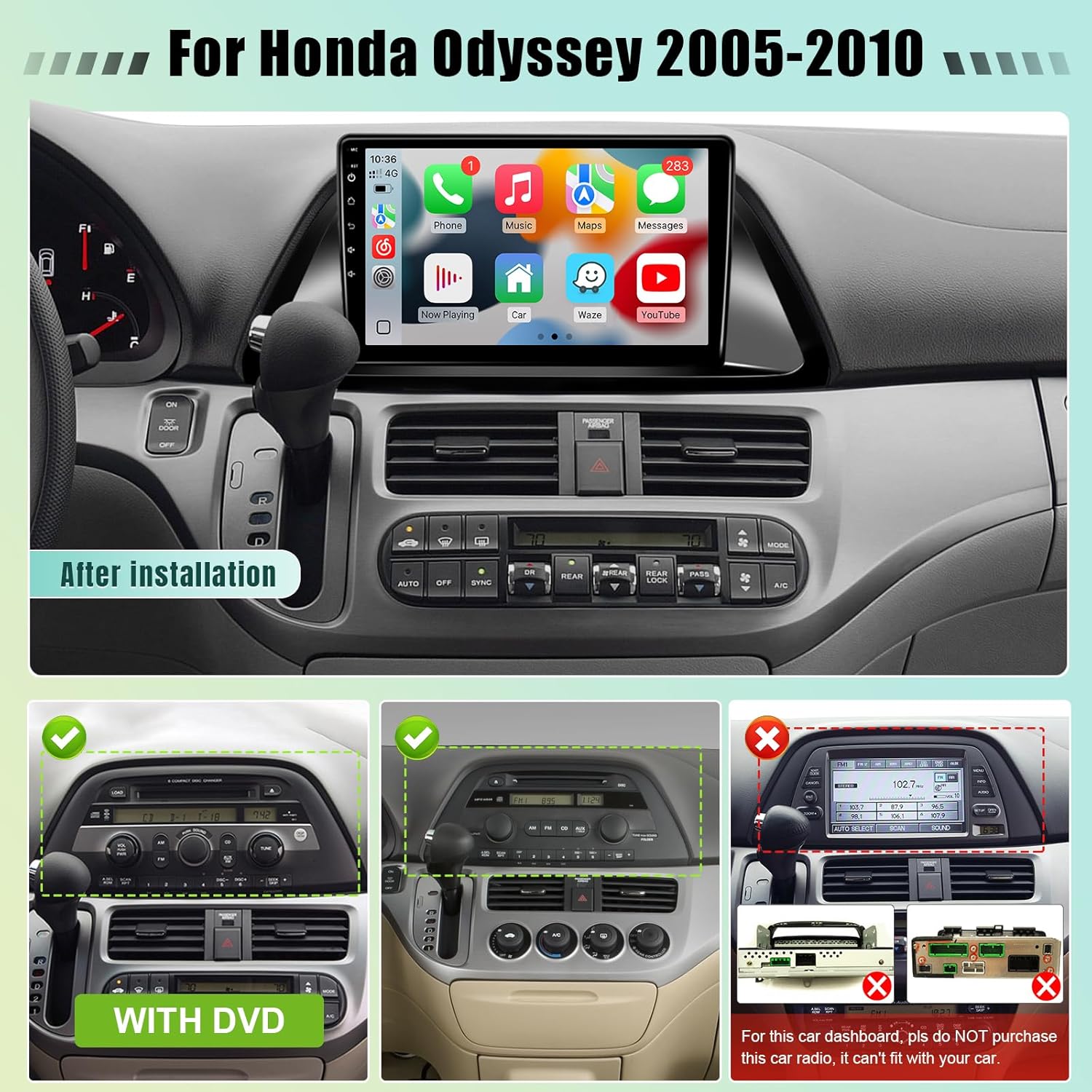
Image: Leadfan 10.1-inch Car Play Radio after installation in a Honda Odyssey dashboard, showing the main interface with various app icons.
Шайкештик жөнүндө эскертүү
This car stereo is compatible with Honda Odyssey models from 2005 to 2010. Маанилүү: If your vehicle is equipped with a premium sound system (e.g., J.B.L or B.O.S.E) or a large factory navigation screen, this unit may not be compatible. Please verify your vehicle's dashboard configuration before proceeding with installation.

Image: A diagram illustrating compatible and incompatible dashboard configurations for the Honda Odyssey (2005-2010) with the Leadfan car stereo. It shows examples of dashboards with and without DVD players, and a specific incompatible dashboard with a large factory screen.
Орнотуу жана орнотуу
The Leadfan Car Play Radio is designed for plug-and-play installation, minimizing complex wiring. However, professional installation is recommended if you are unfamiliar with car audio systems.
Пакеттин мазмуну
Баштоодон мурун, бардык компоненттердин бар экендигин текшериңиз:
- Leadfan 10.1" Car Play Radio Unit
- Камера
- Реверсивдүү камеранын киргизүү кабели
- GPS антеннасы
- Plug and Play Power Harness
- RCA кабели
- Радио комплект
- Колдонуучунун Колдонмосу (бул документ)
- Microphone (external)
- USB кабелдери (x2)

Image: An illustration of the complete package contents, including the main unit, cables, GPS antenna, backup camera, and microphone.
Орнотуу кадамдары (Жалпы көрсөтмө)
- Даярдоо: Электр зымдарынын кыска төшөлүшүнө жол бербөө үчүн унаанын аккумуляторун ажыратыңыз.
- Завод радиосун алып салуу: Заводдун бар болгон радиоприёмниктерин жана трим панелдерин кылдаттык менен алып салыңыз. Конкреттүү нускамалар үчүн унааңыздын тейлөө нускамасынан караңыз.
- Зымдарды туташтыруу: Connect the provided plug-and-play power harness to the vehicle's wiring and the new head unit. Ensure all connections are secure.
- GPS антеннасы: GPS антеннасын ачык жерге орнотуңуз view асмандын, адатта аспаптар тактасында же алдыңкы айнектин астында.
- Арткы камера (милдеттүү эмес):
- Connect the camera's video output to the "Reverse Input" on the head unit using the RCA cable.
- Connect the camera's power cable to the vehicle's reverse light positive (+) and negative (-) wires.
- Connect the reversing trigger cable from the head unit to the vehicle's reverse light positive (+) wire.

Image: A detailed wiring diagram showing how to connect the backup camera, including video and power connections to the head unit and vehicle's reverse lights.
- Микрофон: Чалуунун сапатын жана үн буйруктарын жакшыртуу үчүн тышкы микрофонду туташтырыңыз. Аны так аудио жаздыруу үчүн оптималдуу жайгаштырыңыз.
- USB туташуулары: Connect any desired USB devices or cables.
- Сыноо байланыштары: Before fully reassembling, reconnect the battery and perform a basic power-on test to ensure the unit powers up.
- Коопсуздук бирдиги: Жаңы баш блокту башкаруу панелинин тешигине бекем орнотуңуз.
- Кайра чогултуу: Бардык трим панелдерин кайра орнотуңуз.
Иштөө нускамалары
Күйгүзүү/өчүрүү жана негизги навигация
Press the power button (usually located on the front panel or screen) to turn the unit on or off. The touchscreen interface allows for intuitive navigation through menus and applications. Swipe, tap, and drag gestures are supported.
Зымсыз Apple CarPlay & Android Auto
This unit supports both wireless Apple CarPlay and Android Auto. This allows seamless integration of your smartphone for navigation, music, calls, and messaging.
- Телефонуңуздун Bluetooth жана Wi-Fi иштетилгенин текшериңиз.
- On the car stereo, go to the CarPlay/Android Auto application.
- Телефонуңузду Bluetooth аркылуу жупташтыруу үчүн экрандагы көрсөтмөлөрдү аткарыңыз.
- Жупташтырылгандан кийин, система CarPlay/Android Auto функциялары үчүн автоматтык түрдө Wi-Fi туташуусун орнотот.

Image: The car stereo display showing the Apple CarPlay interface on the left and the Android Auto interface on the right, demonstrating phone integration.
GPS Navigation & Wi-Fi Connection
The unit comes with built-in GPS and supports online/offline navigation. Connect to Wi-Fi via your phone's hotspot or a dedicated Wi-Fi network to access online maps and download apps.
- Онлайн карталар: Connect to Wi-Fi, then use pre-installed navigation apps or download your preferred ones from the app store.
- Оффлайн карталары: Download map data for your region in advance through a navigation app while connected to Wi-Fi.
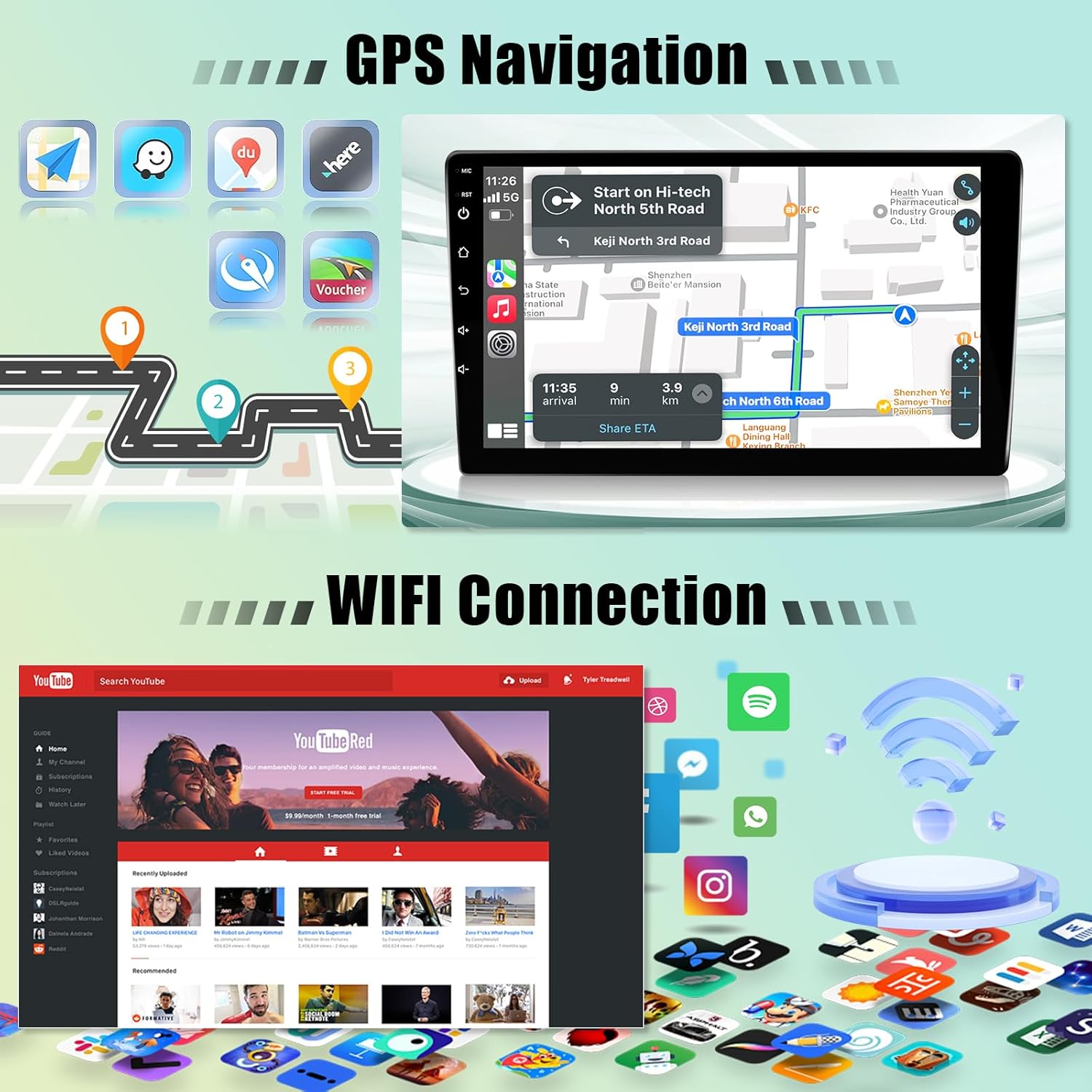
Image: The car stereo screen showing a GPS navigation map on one side and various app icons, including a Wi-Fi symbol, on the other, indicating connectivity and navigation features.
Bluetooth 5.0
Телефонуңузду Bluetooth аркылуу туташтырып, үнсүз чалуу жана аудио агымы.
- Унаа стереосундагы Bluetooth жөндөөлөрүнө өтүңүз.
- Телефонуңузда Bluetooth'ду иштетип, жеткиликтүү түзмөктөрдү издеңиз.
- Select the car stereo's Bluetooth name (e.g., "Leadfan Car Play") from your phone's list and pair.
- Туташкандан кийин, сиз чалууларды жасап/кабыл алып, зымсыз музыка ойной аласыз.

Image: The car stereo displaying Bluetooth features for hands-free calling and music playback, with a separate section illustrating the split-screen functionality.
FM/RDS Radio & EQ Settings
Access the FM radio tuner to listen to local stations. The RDS (Radio Data System) feature displays station information where available. Customize your audio experience with the built-in 10-band equalizer (EQ).
- FM радиосу: Select the "Radio" app, then use the on-screen controls to scan for stations or manually tune.
- EQ Орнотуулары: Navigate to the "Sound" or "EQ" settings to adjust audio frequencies, balance, fader, and select preset sound modes (e.g., Pop, Rock, Jazz).

Image: The car stereo display showing the FM radio tuner interface with frequency display, and a separate screen illustrating the graphic equalizer (EQ) settings for audio customization.
Бөлүнгөн экран функциясы
Бөлүнгөн экран функциясы 10.1 дюймдук дисплейде бир эле учурда эки тиркемени, мисалы, навигация жана музыка ойнотууну иштетүүгө мүмкүндүк берет.
- Колдонгуңуз келген биринчи колдонмону ачыңыз.
- Press and hold the recent apps button (or swipe from the side, depending on UI) to activate split-screen mode.
- Select the second application from the list to display it alongside the first.

Image: The car stereo screen in split-screen mode, showing a navigation map on one side and a video playback application on the other, demonstrating simultaneous app usage.
Рулду башкаруу (SWC)
The unit supports learning steering wheel controls, allowing you to map your vehicle's existing steering wheel buttons to control the stereo functions (e.g., volume, track skip, call answer).
- Go to the "Steering Wheel Control" settings in the system menu.
- Follow the on-screen instructions to program each button by pressing the physical button on your steering wheel and then selecting the corresponding function on the stereo's screen.

Image: The car stereo display showing the reverse camera view at the top, and the steering wheel control learning interface at the bottom, with an illustration of steering wheel buttons.
Арткы камера дисплей
When a compatible rear camera is connected and properly installed, the display will automatically switch to the camera view унаа артка берүүчү ылдамдыкка өткөндө, коопсуз токтотууга жана маневр жасоого жардам берет.
Техникалык тейлөө
- Экранды тазалоо: Сенсордук экранды акырын сүртүү үчүн жумшак, түксүз чүпүрөктү колдонуңуз. өжөр тактар үчүн, бир аз гampчүпүрөккө суу же экранды тазалоочу каражат. Абразивдүү материалдардан же катуу химиялык заттардан алыс болуңуз.
- Программалык камсыздоо жаңыртуулары: Системанын жөндөөлөрү же өндүрүүчүнүн жөндөөлөрү аркылуу жеткиликтүү программалык камсыздоонун жаңыртууларын мезгил-мезгили менен текшерип туруңуз webоптималдуу аткарууну жана жаңы функцияларга жетүүнү камсыз кылуу үчүн сайт.
- Жалпы кам көрүү: Аппаратты экстремалдык температурага, түз күн нуруна узак убакытка же ашыкча нымдуулукка дуушар кылуудан алыс болуңуз.
Проблемаларды чечүү
| Көйгөй | Мүмкүн себеп | Чечим |
|---|---|---|
| Түзмөк күйбөйт. | Электр туташуусу бошоп калган, сактагыч күйүп кеткен, зымдар туура эмес туташкан. | Check power harness connections. Inspect vehicle's fuse box and the unit's inline fuse. Verify wiring according to the installation guide. |
| Үн жок. | Үнү өтө төмөн, үнсүз режим иштетилген, динамиктин зымдарында көйгөй бар, аудио булагы туура эмес. | Үндү катуулатыңыз. Үнсүз режим иштетилгенин текшериңиз. Динамиктердин туташуусун текшериңиз. Туура аудио булагынын тандалганын текшериңиз. |
| CarPlay/Android Auto зымсыз туташпай жатат. | Bluetooth/Wi-Fi off on phone, incorrect pairing, interference. | Ensure phone's Bluetooth and Wi-Fi are on. Re-pair the phone. Try connecting with a USB cable first to establish initial connection. |
| GPS сигналы начар же так эмес. | GPS антеннасынын жайгаштырылышы, айлана-чөйрөнүн кийлигишүүсү. | GPS антеннасынын таза болушун текшериңиз view металл буюмдардын жанына койбоңуз. |
| Арткы камера көрүнбөйт. | Incorrect camera wiring, faulty camera, trigger wire issue. | Verify all camera connections (video, power, trigger). Ensure the vehicle is in reverse. Test camera functionality if possible. |
| System freezes or lags. | Too many apps running, low memory, software issue. | Close unnecessary applications. Restart the unit. Consider a factory reset if persistent (backup data first). Avoid downloading too many apps. |
Техникалык шарттар
| Бренд | Leadfan |
| Модель аты | Car Play Radio for Honda Odyssey 2005-2010 |
| Модель номери | US02-SW300-3 |
| Screen Size | 10.1 дюйм |
| Операция системасы | Android 12 |
| Процессор | 4-өзөктүү |
| RAM | 2 ГБ |
| ROM (ички сактагыч) | 32 ГБ |
| Байланыш технологиясы | Bluetooth (5.0), USB, Wi-Fi |
| Адам-интерфейс киргизүү | Сенсордук экран |
| Карта түрү | North America, Street, Worldwide (supports online/offline) |
| Аудио чыгаруу режими | Stereo (10 adjustable EQ levels) |
| Өзгөчөлүктөр | Wireless Apple CarPlay & Android Auto, Mirrorlink, GPS Navigation, FM/RDS, AHD Backup Camera support, Steering Wheel Control (SWC), Split Screen, Dual USB ports. |
| Элементтин өлчөмдөрү (L x W x Y) | 16.9"L x 4.4"W x 12.2"H |
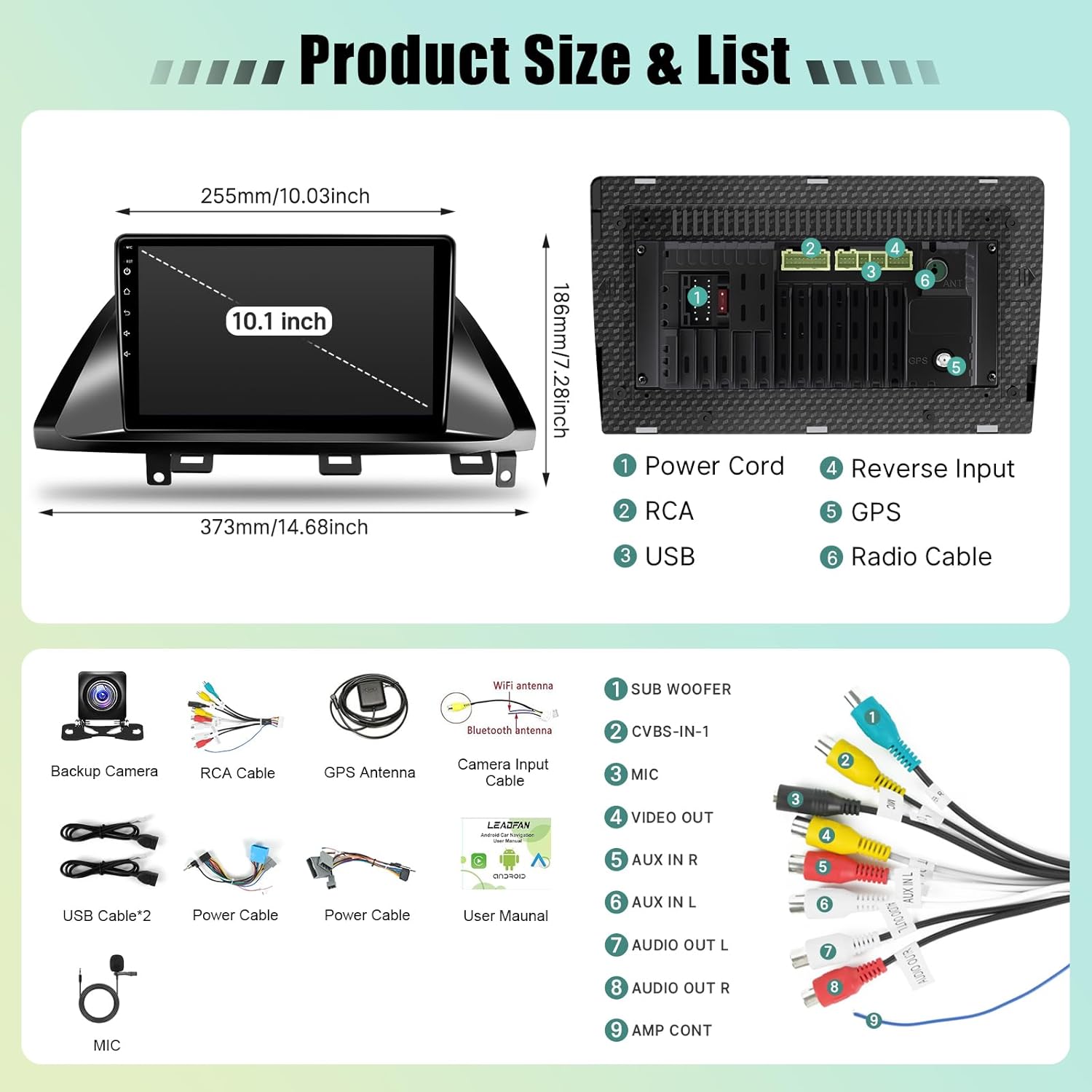
Image: A technical diagram illustrating the physical dimensions of the 10.1-inch car stereo unit and a detailed view of its rear connection ports, including power, RCA, USB, reverse input, GPS, and radio cable connections.
Кепилдик маалымат
This Leadfan Car Play Radio comes with a 1 жылдык кепилдик from the date of purchase. This warranty covers manufacturing defects and malfunctions under normal use. It does not cover damage caused by improper installation, misuse, accidents, or unauthorized modifications. Please retain your proof of purchase for warranty claims.
Кардарларды колдоо
For technical assistance, troubleshooting, or warranty inquiries, please contact Leadfan customer support. Refer to the contact information provided on the product packaging or the official Leadfan website. Online assistance is also available to enhance your shopping experience and address any questions.
Онлайн ресурстар: зыярат кылыңыз Leadfan Store on Amazon кошумча продукт маалымат жана колдоо үчүн.