
Introduction
Thank you for choosing the LIORQUE Wireless Weather Station YGH6208. This device provides accurate indoor and outdoor temperature and humidity readings, weather forecasts, and features a DCF radio-controlled clock with alarm functions. This manual will guide you through the setup, operation, and maintenance of your weather station.
Пакеттин мазмуну
- 1 x LIORQUE Wireless Weather Station (Main Unit)
- 1 х Сырткы сенсор
- 3 x AAA Batteries (for Main Unit)
- 2 x AAA Batteries (for Outdoor Sensor)
- 1 х Колдонуучунун колдонмосу (бул документ)
Продукт бүттүview
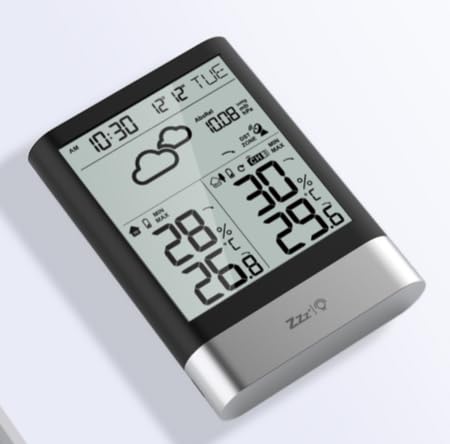
Сүрөт 1: LIORQUE Wireless Weather Station Main Unit. This image shows the front view of the main display unit, highlighting its LCD screen and compact design.
Негизги блоктун өзгөчөлүктөрү:
- 4.3-inch LCD screen with backlight
- Ички температура жана нымдуулук дисплей
- Тышкы температура жана нымдуулук дисплей
- Аба ырайынын сүрөтчөлөрү
- DCF radio-controlled clock with manual setting option
- Double alarm clock with snooze function
- Calendar and day of the week display (7 languages)
- Max/Min temperature and humidity records
- Air pressure display and weather trend
- 12/24 саат убакыт көрсөтүү
Тышкы сенсордун өзгөчөлүктөрү:
- Wireless transmission up to 100m (open area)
- Температура жана нымдуулук өлчөө
- Supports hanging or standing placement
- Data updated every 30 seconds
- Supports up to 3 sensors (one included)
Жайгашуу
1. Батареяны орнотуу
- Тышкы сенсор: Open the battery compartment cover on the back of the outdoor sensor. Insert 2 x AAA batteries, ensuring correct polarity (+/-). Close the cover.
- Негизги блок: Open the battery compartment cover on the back of the main unit. Insert 3 x AAA batteries, ensuring correct polarity (+/-). Close the cover.
- The main unit will power on and display indoor readings.
2. Sensor Pairing
After installing batteries in both units, the main unit will automatically search for the outdoor sensor. The outdoor temperature and humidity should appear on the main unit's display within a few minutes. If the outdoor readings do not appear:
- Ensure both units are within range (up to 100m in open air).
- Кол менен сигнал жөнөтүү үчүн сырткы сенсордун батарея бөлүмүнүн ичиндеги "TX" баскычын басыңыз.
- On the main unit, press and hold the "CHANNEL" button to initiate a manual search for the sensor.
3. Initial Settings (Time, Date, Units)
The weather station will attempt to synchronize with the DCF radio signal for automatic time setting. This may take several hours, especially in areas with weak signals. You can manually set the time and date if needed.
- Убакытты кол менен орнотуу: Press and hold the "MODE" button to enter time setting mode. Use the "UP" and "DOWN" buttons to adjust values and "MODE" to confirm and move to the next setting (e.g., 12/24 hour format, hour, minute, year, month, day, language for day of week).
- Температура бирдиктери: Press the "°C/°F" button to switch between Celsius and Fahrenheit.
- Air Pressure Units: Press the "BARO" button to cycle through air pressure units (e.g., hPa, inHg).
Иштөө нускамалары
Маалыматты көрсөтүү
The 4.3-inch LCD screen displays various information:
- Убакыт жана дата: Учурдагы убакыт, дата жана жуманын күнү.
- Жабык окуулар: Current indoor temperature and humidity.
- Сыртта окуулар: Current outdoor temperature and humidity from the connected sensor.
- Аба ырайы: Болжолдонгон аба ырайынын шарттарын көрсөткөн сүрөтчөлөр (мисалы, күн ачык, булуттуу, жаан-чачындуу).
- Аба басымы: Current atmospheric pressure and trend.
- Арткы жарык: The screen backlight activates with a light touch and returns to normal brightness after 10 seconds to conserve battery.
Ойготкуч саат функциясы
The weather station features a double alarm clock with snooze.
- Ойготкучтарды орнотуу: Press the "ALARM" button to view Alarm 1. Press "ALARM" again to view Alarm 2. Hold "ALARM" to enter alarm setting mode. Use "UP" and "DOWN" to adjust the hour and minute, and "ALARM" to confirm.
- Ойготкучтарды иштетүү/өчүрүү: Ал эми viewing an alarm, press "UP" to toggle it on or off. An alarm icon will appear when active.
- Чырым Function: When an alarm sounds, press any button (except "ALARM OFF") to activate snooze. The alarm will sound again after a set interval. Press "ALARM OFF" to stop the alarm completely.
Максималдуу жана минималдуу жазуулар
The weather station records the maximum and minimum indoor/outdoor temperature and humidity values.
- Press the "MAX/MIN" button once to display maximum recorded values.
- Press "MAX/MIN" again to display minimum recorded values.
- Press "MAX/MIN" a third time to return to current readings.
- To clear records, hold the "MAX/MIN" button while viewжазууларды алуу.
Техникалык тейлөө
- Батареяны алмаштыруу: Replace batteries in both the main unit and outdoor sensor when the low battery indicator appears on the display. Always replace all batteries at the same time.
- Тазалоо: Clean the display and unit surfaces with a soft, damp кездеме. Абразивдүү тазалагычтарды же эриткичтерди колдонбоңуз.
- Сырткы сенсорду жайгаштыруу: For optimal performance and longevity, install the outdoor sensor in a shaded area, protected from direct sunlight and rain. Ensure it is within the 100m wireless range of the main unit.
Проблемаларды чечүү
| Көйгөй | Мүмкүн чечим |
|---|---|
| No outdoor temperature/humidity display. |
|
| Туура эмес убакыт көрсөтүү. |
|
| Дисплей күңүрт же бош. |
|
| Аба ырайынын божомолу так эмес окшойт. |
|
Техникалык шарттар
- Модел: YGH6208
- Бренд: ЛИОРК
- Дисплей түрү: LCD
- Кубат булагы (Негизги блок): 3 x AAA батарейкалар (киргизилген)
- Кубат булагы (тышкы сенсор): 2 x AAA батарейкалар (киргизилген)
- Зымсыз диапазон: 100 м чейин (ачык аянт)
- Температуранын тактыгы: ±0.5 °C
- Сенсор технологиясы: Funk (Wireless)
- Өзгөчөлүктөр: DCF Radio Clock, Alarm, Snooze, Weather Forecast, Max/Min Records, Backlight
- Камтылган компоненттер: Weather Station Main Unit, Outdoor Sensor
Кепилдик жана колдоо
LIORQUE products are designed for reliability and performance. For warranty information or technical support, please refer to the contact details provided with your purchase or visit the official LIORQUE webсайт. Кепилдик дооматтары үчүн сатып алганыңыздын далилин сактап коюңуз.